MLflow is an open-source platform for managing the machine learning lifecycle: it records every training run, stores the model together with its input signature, names and versions it in a registry, and then serves it over REST. This article builds exactly that workflow for a problem close to a Vietnamese e-commerce business, predicting whether a cash-on-delivery (COD) order will be returned, on a single machine with nothing but SQLite and a local folder. Every number in the article is real output from the code in code/s7-50.
It follows Self-hosting LLMs with vLLM and Serving AI models with FastAPI. Those two articles are about running a model fast; this one is about what comes before that, namely knowing which version is running, how it was trained and how to go back to an older one. Environment: Apple M4, 16 GB, Python 3.12, mlflow==3.10.1 (released March 5, 2026), scikit-learn==1.8.0, numpy==2.4.4.
The problem MLOps solves: a model is not a file
A small data team usually starts with a notebook and a model.pkl file sent over chat. A few weeks later come questions nobody can answer: which parameters was this file trained with, on data from which day, and what was the test metric; which version is production using; who changed the version yesterday and when; how do you reproduce a decision a customer is complaining about. These are four different needs:
- Experiment tracking: every run records parameters, metrics, source code and output files.
- Model packaging: the model ships with its environment and its input and output interface, not just weights.
- Versioning and lifecycle: a stable name, increasing version numbers and status labels.
- Deployment: a standard way to load and serve a model that does not depend on how it was trained.
MLflow splits these four parts into Tracking, Models, Model Registry and deployment tools. Its strength is that they are loosely coupled: you can use only Tracking, or only the Model format, and add the rest when you need it.
Architecture: backend store and artifact store
According to the Tracking documentation, a run is one execution of training code and an experiment is a group of runs for the same problem. A run's data lives in two separate places:
| Component | What it stores | In this article | Typical in production |
|---|---|---|---|
| Backend store | Metadata: runs, parameters, metrics, tags, registry tables | SQLite mlflow.db | PostgreSQL or MySQL |
| Artifact store | Large files: models, images, data tables | The mlartifacts/ folder | Object storage (S3 and equivalents) |
| Tracking server | REST API and web interface | Not used (writes straight to SQLite) | One mlflow server process for the whole team |
The self-hosting architecture documentation states that the backend supports postgresql, mysql, sqlite and mssql through SQLAlchemy, and that a database backend gives better performance and reliability than the default file backend. The registry needs a database-style backend, so we use SQLite from the start instead of an mlruns folder. For a team of two or more, run a shared tracking server: the documentation says the server is essential for team development and provides features such as access control.
The problem and the sample data
The data is 4,000 COD orders generated with NumPy and a fixed seed: order value (VND), number of previous orders, the customer's past return rate, order hour, and whether the customer is new or returning. The return rate is about 21%. The data is synthetic on purpose, so it does not touch real customer information and the article runs in a few seconds. The split is 75/25, stratified. The shared configuration in common.py:
MODEL_NAME = "hoan-don-cod"
TRACKING_URI = f"sqlite:///{HERE}/mlflow.db"   # backend store: SQLite
ARTIFACT_ROOT = f"{HERE}/mlartifacts"           # artifact store: local folder
FEATURES = ["gia_tri_don", "so_don_truoc", "ti_le_hoan_cu", "gio_dat", "la_khach_moi"]
A note on data types: integer columns are cast to float64 right at the start, because the signature records the type of each column, and real data can have empty cells that turn an integer column into a float at run time.
Step 1: track experiments with runs
Each configuration is one run. Inside with mlflow.start_run() we record parameters with log_param, metrics with log_metric, arbitrary files with log_dict or log_artifact, and save the model itself with mlflow.sklearn.log_model. We run four configurations: logistic regression with two values of C, and gradient boosting with depth 2 and 4. The core of the loop in step1_track.py:
mlflow.set_tracking_uri(TRACKING_URI)
if mlflow.get_experiment_by_name(EXPERIMENT) is None:
    mlflow.create_experiment(EXPERIMENT, artifact_location=ARTIFACT_ROOT)
mlflow.set_experiment(EXPERIMENT)

with mlflow.start_run(run_name=run_name) as run:
    mlflow.set_tag("nguoi_chay", "nhom-du-lieu")
    mlflow.log_param("model", kind)
    mlflow.log_params(p)
    model.fit(X_tr, y_tr)
    proba = model.predict_proba(X_te)[:, 1]
    mlflow.log_metric("auc", roc_auc_score(y_te, proba))
    mlflow.log_metric("pr_auc", average_precision_score(y_te, proba))
    mlflow.log_dict({"features": FEATURES, "thr": 0.3}, "config/serving.json")
    sig = infer_signature(X_te, model.predict_proba(X_te))
    mlflow.sklearn.log_model(model, name=model, signature=sig,
                             pyfunc_predict_fn="predict_proba",
                             input_example=X_te.head(2))
Three details are worth noting. First, we use PR-AUC next to AUC because the "returned" class is only about a fifth of the data (the reason is covered in Model evaluation for classifiers). Second, pyfunc_predict_fn="predict_proba" makes the generic predict() interface of the loaded model return probabilities instead of hard labels, so the downstream service picks its own threshold. Third, input_example makes MLflow store a sample input and check at logging time that the model runs on it. Running step1_track.py gives the following (four runs; the data is small, so it finishes in a few seconds on a laptop):
train (3000, 5) test (1000, 5) return_rate 0.209
logreg_C0.1  run_id=0a7cfe8d auc=0.7134 pr_auc=0.3967
logreg_C1    run_id=8bf8506f auc=0.7134 pr_auc=0.3968
gbdt_d2      run_id=d358d415 auc=0.7022 pr_auc=0.3799
gbdt_d4      run_id=b7b47694 auc=0.6756 pr_auc=0.3620
The result is a little surprising but realistic: the linear model beats the boosted trees. The data is generated from a logit function and the training set has only 3,000 rows, so the deeper model (max_depth=4) learns noise and AUC drops to 0.6756. The value of Tracking is exactly here: you get four comparable rows instead of remembering "I think the gradient boosting version was better". Opening the UI with mlflow ui --backend-store-uri sqlite:///mlflow.db shows the same table with comparison charts (the web UI is not run in this article).
Also record the data version, the seed and the git commit of the training code as tags: when you reproduce a run, these three matter as much as the hyperparameters. The mlflow.autolog() call records parameters, metrics and the model automatically for scikit-learn, XGBoost and PyTorch; it is handy for exploration, but a formal pipeline should log explicitly.
Step 2: the Model Registry with aliases
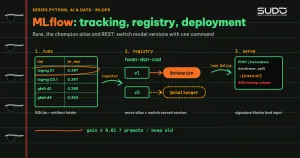
A model logged inside a run is only an artifact. The registry adds three things: a stable name (hoan-don-cod), a version number that grows with each registration, and labels that can move. According to the Model Registry documentation, an alias is a mutable name that points to one version, for example models:/MyModel@champion, while a tag is a key-value pair attached to a model or version, such as a validation status. The Model Registry workflow page also states that since MLflow 2.9.0 Model Stages (Staging, Production) are deprecated and will be removed in a future major release, and that aliases are the replacement. This article therefore uses aliases, not stages.
The script step2_registry.py sorts the runs by PR-AUC, registers the best run as version 1 and assigns the alias champion, registers gbdt_d2 as version 2 with the alias challenger, and then loads the model by alias:
mv1 = mlflow.register_model(f"models:/{logged.model_id}", MODEL_NAME)
client.set_registered_model_alias(MODEL_NAME, "champion", mv1.version)
client.set_model_version_tag(MODEL_NAME, mv1.version, "kiem_tra", "da_duyet")
...
champ = mlflow.pyfunc.load_model(f"models:/{MODEL_NAME}@champion")
champ.predict(X_te.head(3))
Real output:
tags.mlflow.runName params.model  metrics.auc  metrics.pr_auc
          logreg_C1       logreg       0.7134          0.3968
        logreg_C0.1       logreg       0.7134          0.3967
            gbdt_d2         gbdt       0.7022          0.3799
            gbdt_d4         gbdt       0.6756          0.3620

best run: logreg_C1 8bf8506f
registered: hoan-don-cod version 1
registered: hoan-don-cod version 2
version 1: aliases=['champion'] tags={'kiem_tra': 'da_duyet'} run=8bf8506f
version 2: aliases=['challenger'] tags={} run=d358d415

input signature: [('gia_tri_don', 'DataType.double'), ('so_don_truoc', 'DataType.double'), ('ti_le_hoan_cu', 'DataType.double')] ...
champion, probability [not returned, returned] for 3 rows: [[0.871, 0.129], [0.803, 0.197], [0.387, 0.613]]
after pointing champion -> v2: [[0.829, 0.171], [0.815, 0.185], [0.355, 0.645]]
rolled champion back -> 1
Two points to note. One: with MLflow 3 a model is its own entity with a model_id (of the form m-...), so we register from models:/<model_id> obtained through search_logged_models; the older runs:/<run_id>/model form still works, but going by model_id is more explicit. Two: when the alias champion is pointed at version 2, the same line that loads the model returns different probabilities (the first row goes from 0.129 to 0.171) while the serving code does not change by a single character. That is the benefit of aliases: deploying a new version or going back to an old one is a single command that moves a pointer, in the same spirit as the rollback in Deploy, domain change and VPS move pipelines with database rollback.
Step 3: serve the model over REST
The MLflow Model format is a self-describing folder. The MLmodel file lists the flavors (ways to load the model: the native sklearn and the generic python_function), references conda.yaml, python_env.yaml and requirements.txt to rebuild the environment, and holds the signature. The champion's folder in this article (printed by step4_promote.py):
model folder: ['MLmodel', 'conda.yaml', 'input_example.json', 'model.pkl', 'python_env.yaml', 'registered_model_meta', 'requirements.txt', 'serving_input_example.json']An excerpt from the MLmodel file, the signature part, which matters most for operations:
signature:
  inputs: '[{"type": "double", "name": "gia_tri_don", "required": true}, ...
            {"type": "double", "name": "la_khach_moi", "required": true}]'
  outputs: '[{"type": "tensor", "tensor-spec": {"dtype": "float64", "shape": [-1, 2]}}]'
According to the signature documentation, the signature is the model's interface contract and is enforced when loading through PyFunc, when using deployment tools and when serving over REST: required columns must be present, extra columns are dropped, only safe type conversions are allowed (for example int to double), and unsafe conversions (for example string to number) are rejected. We verify exactly that by running a real server. The command that serves by alias:
export MLFLOW_TRACKING_URI="sqlite:///$PWD/mlflow.db"
mlflow models serve -m "models:/hoan-don-cod@champion" -p 5055 --env-manager local
According to the local serving guide, the mlflow models serve command exposes the /ping endpoint (also /health), /version and /invocations. The --env-manager local option uses the current Python environment instead of building a new venv or conda environment; in CI you should drop this option so MLflow builds a clean environment from python_env.yaml, which verifies the claim that the environment travels with the model. The script step3_serve.sh starts the server, sends four requests and shuts it down. Real output:
== GET /ping
HTTP/1.1 200 OK
== GET /version
3.10.1
== POST /invocations (dataframe_split)
{"predictions": [[0.9332335490800622, 0.06676645091993784], [0.3337304891698575, 0.6662695108301425]]}
== POST /invocations missing column la_khach_moi
{"error_code": "INVALID_PARAMETER_VALUE", "message": "Failed to predict data '   gia_tri_don  so_don_truoc  ti_le_hoan_cu  gio_dat\n0     450000.0           5.0           0.02     14.0'. \nError: Failed to enforce schema of data '   gia_tri_don  so_don_truoc  ti_le_hoan_cu  gio_dat\n0     450000.0           5.0           0.02     14.0' with schema '['gia_tri_don': double (required), 'so_don_truoc': double (required), 'ti_le_hoan_cu': double (required), 'gio_dat': double (required), 'la_khach_moi': double (required)]'. Error: Model is missing inputs ['la_khach_moi']."}
HTTP 400
== POST /invocations wrong type (string)
{"error_code": "BAD_REQUEST", "message": "Invalid input. Data is not compatible with model signature. Failed to convert column gia_tri_don to type 'float64'. Error: 'ValueError(\"could not convert string to float: 'rat lon'\")'"}
HTTP 400
Three results deserve a close read. The 450,000 VND order from a customer who has bought 5 times, with a past return rate of 2%, has a 6.7% return probability; the 2.5 million VND order from a new customer placed at 2 a.m., with a past return rate of 30%, has a probability of 66.6%. The two bad requests return HTTP 400 with a message naming the exact missing column (la_khach_moi) or the column of the wrong type (gia_tri_don). That means the input guard comes for free from the signature and you do not have to write manual checks; even so, the returned error message contains the input data itself, so if you put the server behind a public gateway, filter the message so customer data does not leak.
On input formats, /invocations accepts dataframe_split as above, or inputs and instances for tensor data. This server is enough for internal experiments and small services. For heavy load you have two directions. The first is to package it as a container with mlflow models build-docker (the deployment documentation covers both the CLI command and the Python API mlflow.models.build_docker); this step needs Docker and builds an image, so it is not run in this article. The second is to load the model with mlflow.pyfunc.load_model into a separate service such as the FastAPI service with batching and timeouts, so you control the queue, monitoring and authentication yourself.
Step 4: an automatic promotion gate
A registry is only valuable when changing the alias is conditional. Instead of letting a person click a button, we write step4_promote.py: it loads both champion and challenger by alias, scores them on the same test set, and moves champion only if the candidate is better by at least 0.01 PR-AUC. This threshold should come from the run-to-run variation rather than from a nice-looking number; in a real project, measure it with bootstrap or cross-validation as in Machine learning with scikit-learn: Pipeline, cross-validation and tuning.
gain = pr_h - pr_c
if gain >= MIN_GAIN:
    client.set_registered_model_alias(MODEL_NAME, "champion", v_h)
    decision = f"PROMOTE v{v_h}"
else:
    client.set_model_version_tag(MODEL_NAME, v_h, "ket_qua_cong", "khong_dat")
    decision = f"KEEP champion v{v_c}"
champion v1: pr_auc=0.3968 auc=0.7134
challenger v2: pr_auc=0.3799 auc=0.7022
pr_auc difference = -0.0169 (threshold 0.01) -> KEEP champion v1
alias champion currently points to: 1Candidate v2 lost by 0.0169, so it was held back and tagged ket_qua_cong=khong_dat; the alias still points to version 1. Recording a decision not to promote matters as much as recording a promotion, because it gives you a history to answer "why didn't this version go live". In practice you would run this script in a CI pipeline (Jenkins, GitLab) after the training step, similar to how Jenkins acts as the control plane for hundreds of websites, except that what is being deployed is a model.
When you do not need MLflow, and the trade-offs
- One model, one person, never changes: a hashed file and a README are enough; MLflow adds operational parts (a database, a server) you do not need.
- The pickle format: logging scikit-learn uses cloudpickle by default, and loading a pickle can execute arbitrary code, which the MLflow documentation also notes. Only load models from a registry whose write access you control; if you need a safer format, look at the skops option in the MLflow documentation.
- Operating cost: SQLite suits only one user; a team needs PostgreSQL or MySQL, backups of the database and the artifact store, and access control. Backups can share a process with nightly database backup with mysqldump and rclone.
Common errors
- The server reports
'FastAPI' object has no attribute 'route': I hit this whenpippulled FastAPI and Starlette 1.x alongsidemlflow 3.10.1; MLflow's serving code uses the@app.routedecorator. I fixed it by pinning the dependency group (fastapi==0.135.2,starlette==0.52.1,uvicorn==0.43.0,SQLAlchemy==2.0.49,alembic==1.18.4,pydantic<2.13), recorded inrequirements.txt; I did not isolate the packages one by one to find which was the cause. The general rule: pin the whole dependency tree of the serving service. - The error
uvicorn: command not found(exit code 127) when runningmlflow models serve --env-manager localwithout activating the venv: MLflow callsuvicornthrough PATH. Add.venv/binto PATH as instep3_serve.sh.
Checklist
- The backend store is a database (SQLite for experiments, PostgreSQL or MySQL for a team), and the artifact store is shared storage.
- Each run records parameters, metrics, the seed, the data version and the source commit; choose the metric to fit the problem (PR-AUC for imbalanced data).
- The model is logged with a
signatureand aninput_example; data types are agreed on. - Register it in the registry, use aliases (
champion,challenger) and status tags, not stages. - The service loads by
models:/name@alias; switch versions by moving the alias and roll back by moving it again. - There is a promotion gate with a clear threshold, and failed outcomes are recorded too.
Setup: python3.12 -m venv .venv && .venv/bin/pip install -r requirements.txt, then run step1_track.py, step2_registry.py, step3_serve.sh and step4_promote.py in order inside code/s7-50; the step*_output.txt files hold the pasted output. Primary sources: Tracking, Model Registry and aliases, Model Signature.
Next article
Monitoring models in production: data drift, concept drift and alerting. A model that is in the registry and serving does not stay correct forever: real data drifts away from the training data, and the next article shows how to detect that early so you know when to retrain.