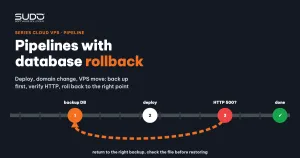
When you run hundreds of websites, the three riskiest operations are usually not incidents but routine requests: deploying a new site, changing the domain of a live site, and moving a site to a different Cloud VPS. Each one touches four places at once (balancer, minion, database, DNS), and a failure halfway through leaves the site half old, half new. This guide shows how to turn those operations into Jenkins pipelines with rollback: back up the database first, run each step behind a state flag, verify HTTP at the end, and undo only what actually changed. It also covers a trap in the post block that makes rollback report "done" while restoring nothing.
1. Why pipelines need rollback
Changing the domain of a Laravel site on Cloud VPS by hand involves all of these steps:
- Dump the database, replace every
https://old.exampleURL withhttps://new.example, and import it back. - Rename the site directory on the minion and update
APP_URLin.env. - Edit the site configuration file on the minion, plus the cron entries and
supervisord.inithat contain the old path. - Create a new configuration file on the balancer and request an SSL certificate for the new domain.
- Clear the Laravel cache, reload PHP-FPM, and check the site.
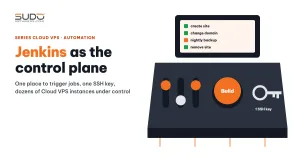
Done by hand, cron is easy to forget. And if step 4 fails (the database already has the new URL but the balancer does not know the new domain yet), the operator has to remember exactly how far they got in order to back out. A pipeline with rollback solves exactly this: the machine remembers instead of the person. How Jenkins drives the whole cluster over SSH is covered in Jenkins as the control plane for hundreds of websites.
| Pipeline | Main work | Rollback on failure |
|---|---|---|
| Deploy a site from a repo | Create the database, clone the code, generate .env, configure nginx on the minion and balancer, request SSL | Remove the nginx configuration, certificate, code, database and user that were just created |
| Change domain | Dump the DB and replace URLs, rename the directory, update .env, cron, supervisor, nginx, SSL | Return everything to the old name and re-import the original dump |
| Move VPS | Move the site to a different minion, balancer or database, then delete the data on the old machine | Remove what was created on the new machine; the old machine is untouched |
| Bulk migration | Copy to the new machine, switch traffic, keep the old machine as is | Copy back the backed-up balancer configuration file |
2. The common skeleton: a state flag for each rollback step
The core principle of rollback is to undo only what has actually changed. If the job fails during parameter validation, rollback must not touch the database; if it fails after the directory was renamed, rollback must rename it back. Use a set of flags initialized to false in the first stage, and turn each flag on only once its step is done:
stage('Validate Parameters') {
    steps { script {
        // ... validate parameters, normalize the domain ...
        env.db_updated             = 'false'
        env.folder_renamed         = 'false'
        env.balancer_nginx_updated = 'false'
        env.post_setup_phase       = 'false'
        env.BK = "/tmp/${env.OLD_DOMAIN}_${env.BUILD_NUMBER}"   // backup file prefix
    } }
}

stage('Backup & Update Database') {
    steps { script {
        sh "ssh deploy@ops \"mysqldump --login-path=${env.DB_HOST} --single-transaction \
            ${env.DB_DATABASE} > ${env.BK}.sql\""
        sh "ssh deploy@ops \"sed 's|https://${env.OLD_DOMAIN}|https://${env.NEW_DOMAIN}|g' \
            ${env.BK}.sql > ${env.BK}_new.sql\""
        env.db_updated = 'true'      // set BEFORE the import: a half-finished import still gets rolled back
        sh "ssh deploy@ops \"mysql --login-path=${env.DB_HOST} ${env.DB_DATABASE} < ${env.BK}_new.sql\""
    } }
}
The original dump is kept separately and the URL-replaced version is a different file, so rolling back the database simply means re-importing the original. For steps that write data, such as an import, set the flag right before the command: if the import fails midway, the database may already be partially written and still needs to be restored. For steps that create something new (a directory, a configuration file), set the flag after the command finishes so that rollback does not delete something that never existed. The backup file name includes the build number so that runs never overwrite each other.
The failure block: undo in reverse order
When a stage throws an error, Jenkins jumps into post { failure { ... } }. There the pipeline reads the flags and undoes the work in the reverse order it was done: balancer first, then minion, then the directory, and finally the database:
failure {
    script {
        if (env.post_setup_phase == 'true') {
            echo "Main phase already finished, skipping rollback."
            return
        }
        if (env.balancer_nginx_updated == 'true') {
            sh "ssh deploy@${params.balancer} \"sudo rm -f /etc/nginx/conf.d/${env.NEW_DOMAIN}.conf \
                && sudo cp ${env.BK}.conf.bak /etc/nginx/conf.d/${env.OLD_DOMAIN}.conf \
                && sudo nginx -t && sudo systemctl reload nginx\" || true"
        }
        if (env.folder_renamed == 'true') {
            sh "ssh deploy@${params.minion} \"cd /var/www && mv '${env.NEW_DOMAIN}' '${env.OLD_DOMAIN}'\" || true"
        }
        // database: see section 4, the backup file must be checked before restoring
    }
}
The post_setup_phase flag marks the "main work is done" boundary. After that boundary (clearing caches, running extra artisan commands), a failure is no longer a reason to roll back: the new domain is already live, and backing out at this point would do more harm than good. Steps past the boundary are wrapped in try/catch and only mark the build UNSTABLE.
3. HTTP verification: the final yardstick
nginx -t passes and systemctl reload reports no error, yet the site can still return 502 because of a wrong socket, wrong directory permissions or a missing variable in .env. That is why the last stage of every pipeline makes a test request to each domain:
stage('Verify Website') {
    steps { script {
        for (domain in env.domains_list.split(',')) {
            def code = sh(script: "curl -s -L -w '%{http_code}' -o /dev/null \
                --connect-timeout 10 --max-time 30 'https://${domain}'", returnStdout: true).trim()
            echo "${code == '200' ? 'OK' : 'WARN'} https://${domain} - HTTP ${code}"
            if (code != '200') { currentBuild.result = 'UNSTABLE' }
        }
    } }
}
For the new-site deployment pipeline, the verification step should not trigger a rollback; it should only mark the build UNSTABLE. A non-200 response at this point usually means DNS has not finished propagating, and an automatic rollback would wipe out a site that is almost working. For a live site you may choose the opposite. Either way, never treat UNSTABLE as success.
4. The trap: post always runs before failure
A very common cleanup pattern, placed at the end of post, after failure:
post {
    failure {
        // ... rollback, needs ${BK}.sql and ${BK}.conf.bak
    }
    always {
        sh "ssh deploy@ops 'rm -f ${env.BK}*.sql' || true"
        sh "ssh deploy@${params.balancer} 'rm -f ${env.BK}.conf.bak' || true"
    }
}
Reading top to bottom, everyone assumes always runs last. Wrong. According to the Jenkins Declarative Pipeline post syntax documentation, the conditions run in a fixed order, not in the order they are written in the file: always, changed, fixed, regression, aborted, failure, success, unstable, unsuccessful, and then cleanup.
This means that when the job fails, always runs first and deletes the original dump along with the backed-up balancer configuration file. Only then does failure run the rollback, which tries to restore from a file that no longer exists. If every rollback command ends with || true so that one broken step does not block the next, the "No such file" error is swallowed and the log reassuringly prints "Rollback completed". The database still carries the new URL, and the balancer has no old configuration file to copy back. This trap is invisible on every successful run and only shows up exactly when you need rollback the most. The fix:
- Move temporary file cleanup into
cleanup, the only condition guaranteed to run after everything else, including afterfailure. - Check that the backup file exists before restoring (
test -s) instead of relying on|| true. If the file is missing, fail loudly with instructions for a manual restore.
post {
    failure {
        script {
            def ok = sh(script: "ssh deploy@ops 'test -s ${env.BK}.sql'", returnStatus: true) == 0
            if (env.db_updated == 'true' && ok) {
                sh "ssh deploy@ops \"mysql --login-path=${env.DB_HOST} ${env.DB_DATABASE} < ${env.BK}.sql\""
            } else if (env.db_updated == 'true') {
                echo "NO BACKUP FOUND - restore the database manually from the nightly backup"
            }
        }
    }
    cleanup {
        sh "ssh deploy@ops 'rm -f ${env.BK}*.sql' || true"
    }
}
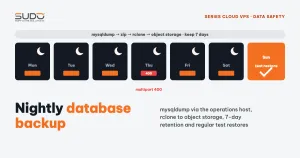
The last safety net is still the nightly database backup with mysqldump and rclone, but restoring from last night's copy means losing a full day of data.
5. VPS moves and migrations: delete the old machine or not
Moving a VPS: clean up the old machine when done
The VPS move pipeline takes pairs of parameters for the current and the new machines, skips stages that are not needed, and stops immediately if the PHP version on the new minion differs from the old one. The order is: copy the code, dump and import the database to the new machine, update DB_HOST, create the configuration on the new balancer or change the minion IP on the old balancer, verify HTTP, and only then run the stage that cleans up the old machine.
Rollback here is simple: every change before the cleanup stage happens on the new machine, so you only need to remove what was created there while the old machine keeps serving traffic. But once the cleanup stage has run, there is no automatic way back. That is why an HTTP failure at the verification step must block the cleanup stage, or cleanup should be split out into a separate manual step.
Migration: keep the old machine for instant rollback
When moving sites in bulk (for example, consolidating every site from one minion onto a new machine), the pipeline uses rsync to copy the code to the target but does not delete it from the source. When switching balancers, it copies the configuration and certificates to the new balancer, then turns the file on the old balancer into a forwarding proxy so the site stays up while the domain owner updates the DNS records:
# old balancer, while waiting for DNS
server {
    listen 443 ssl;
    server_name example.com www.example.com;
    ssl_certificate     /etc/letsencrypt/live/example.com/fullchain.pem;
    ssl_certificate_key /etc/letsencrypt/live/example.com/privkey.pem;

    location / {
        proxy_pass http://10.0.0.12:80;       # new balancer
        proxy_set_header Host $host;
        proxy_set_header X-Forwarded-For $proxy_add_x_forwarded_for;
        proxy_set_header X-Forwarded-Proto $scheme;
    }
}
Before overwriting anything, the pipeline copies the original configuration file to a timestamped .bak; on error, the catch block copies it back and reloads nginx. Cleaning up the old machine is a manual task, done only after monitoring for long enough.
6. Rollback design checklist
- Back up right before the operation; do not rely on the nightly backup.
- Set state flags at the right moment: write steps set the flag before the command, create steps set it after.
- Undo in reverse order, and check the condition before each step runs.
- Know your tool's execution order: clean up temporary files in
cleanup, not inalways. || trueis a double-edged sword: it keeps the rollback going but hides errors; critical steps such as a database restore must report failures clearly.- Place the point of no return as late as possible, or make it a separate manual step.
- Bulk pipelines must be safe to re-run: check "already done?", and summarize the number of sites updated, skipped and failed at the end of the build.
A pipeline does not make risky operations perfectly safe, but when something breaks it breaks in a predictable way, with a rollback path already thought out.
Next article
Laravel Octane and FrankenPHP: running Laravel as an app server. How Octane differs from PHP-FPM, why it is faster, and what changes in coding style a Laravel site has to accept once the application no longer "dies and comes back to life" after every request.