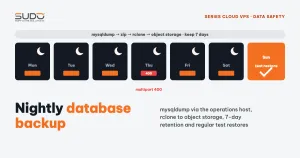
As described in the opening article of this series, MySQL servers on small Cloud VPS instances usually run without binlog and without replicas. In that setup, the safety of all your data rests on exactly one thing: the nightly database backup. This guide walks through a complete backup flow: Jenkins orchestrates, connection details are read from each site's .env, mysqldump runs on the operations host, output is compressed and pushed to S3-compatible object storage with rclone, and old copies are removed according to a retention policy. It also covers common errors and a test restore procedure.
1. Database backup for a cluster without replicas: what is actually required
With one database per site and many schemas per MySQL server, the database backup problem has a few concrete constraints:
- RPO equals the backup interval: with one backup per night, you can lose almost a full day of data if the database server fails just before the backup window. Without binlog, there is no point-in-time recovery.
- Backups must live outside the cluster: a dump that only sits on the disk of the database server or the operations host is lost along with that server, so it has to go to object storage.
- Websites must not slow down: the small MySQL server is still serving users, so dumps run during off-peak hours and sequentially, not dozens of schemas in parallel.
- Back up files too: for a Laravel site, data lives both in the database and in upload directories (
storage/app,public/uploads…).
2. The database backup flow: Jenkins, minion, operations host, object storage
Jenkins (off-peak cron, one job per minion)
   │
   ├─ ssh minion ── ls -d /var/www/*             (list of sites)
   │      └─ read DB_HOST, DB_DATABASE, DB_USERNAME... from each site's .env
   │
   ├─ ssh minion ── compress upload dirs ─▶ scp ─▶ operations host:/backups/...
   │
   ├─ ssh operations host ── mysqldump -h <db> ... | gzip > <domain>.sql.gz
   │                      rclone copy ... ─▶ S3-compatible object storage
   │                      remove temp directory
   │
   └─ final step: delete expired copies on storage
The key point: never SSH directly into the database server. Minions are only used to read .env and compress site directories. Every mysqldump command runs on the operations host and connects to the database server over the private network. The operations host is the only machine with the MySQL client and rclone installed, so the object storage access keys live in exactly one place. This setup goes hand in hand with the model where Jenkins controls every server through a single SSH credential, described in the article on Jenkins as the control plane.
3. Each step of the database backup job
Reading connection details from .env
Every site already has its database details in .env, so the job needs no separate list: a new site automatically gets a database backup, because its directory already sits in the shared site directory.
sites=($(ssh deploy@"$minion" "ls -d /var/www/*"))

for dir in "${sites[@]}"; do
    domain=$(basename "$dir")
    env=$(ssh deploy@"$minion" "cat '$dir/.env'")
    db_host=$(grep -oP '^DB_HOST=\K\S+'     <<< "$env")
    db_name=$(grep -oP '^DB_DATABASE=\K\S+' <<< "$env")
    db_user=$(grep -oP '^DB_USERNAME=\K\S+' <<< "$env")
    # DB_PORT, DB_PASSWORD, DB_CONNECTION are read the same way
done
The job can also branch on DB_CONNECTION: mysql uses mysqldump, while pgsql uses pg_dump with a temporary password file with mode 600 that is deleted right after the dump.
Dumping the database backup with mysqldump, without a password on the command line
cnf=$(mktemp) && chmod 600 "$cnf"
printf '[client]\nhost=%s\nuser=%s\npassword="%s"\n' "$db_host" "$db_user" "$db_pass" > "$cnf"

mysqldump --defaults-extra-file="$cnf" --single-transaction --quick \
    --no-tablespaces --skip-tz-utc "$db_name" \
  | gzip > "$out/${domain}.sql.gz"
rm -f "$cnf"
What the flags mean, according to the MySQL 8.0 mysqldump documentation:
--single-transaction: for InnoDB tables, produces a consistent dump without locking tables. Without it, mysqldump locks tables during the dump and can slow down orders being placed at that very moment.--quick: reads row by row instead of loading the whole table into RAM, which matters on a small operations host.--no-tablespaces: skips the tablespace dump, which requires thePROCESSprivilege that per-site users do not have.--skip-tz-utc: keepsTIMESTAMPvalues in the server time zone instead of forcing UTC, so displayed times do not shift after a reload.
A temporary config file passed via --defaults-extra-file replaces -p<password>, so the password never leaks into the process list or into logs when set -x is enabled.
Pushing the database backup to object storage with rclone
day=$(date +%Y%m%d)
rclone copy "$out/" "<remote>:<bucket>/${minion}/${day}/${domain}/"
rclone lsf "<remote>:<bucket>/${minion}/${day}/${domain}/" | grep -q "${domain}.sql.gz" \
  && rm -rf "$out"
rclone is a file sync tool that works with dozens of storage types, including every S3-compatible service. rclone copy only copies files that are missing at the destination and never deletes anything there, so a configuration mistake cannot wipe out existing backups. The rclone lsf step confirms the file has really reached storage before the temporary copy is removed. The <minion>/<yyyymmdd>/<domain>/ layout means that finding a site's database backup only requires knowing the minion and the date.
Database backup retention: delete by age, not by a list of dates
A common approach is to compute the directory names for a range of old dates (for example, 7 to 19 days ago) and rclone purge each one. This has a gap: any directory older than that range (because the job stopped running for a while) is never cleaned up, and storage usage keeps growing. Delete by file age instead:
# keep the last 7 days for every directory of the minion
rclone delete --min-age 7d "<remote>:<bucket>/${minion}/"
rclone rmdirs --leave-root "<remote>:<bucket>/${minion}/"
If the storage supports lifecycle rules, also set an expiration rule on the storage side as a second layer of protection. Seven days is only an example; choose based on the recovery requirements of each type of site.
4. Common errors when sending a database backup to object storage
Large file uploads rejected with a 400 error
When a file exceeds a size threshold, rclone switches to multipart upload: the file is split into parts, each part is sent as an UploadPart request, and CompleteMultipartUpload is called at the end. Some S3-compatible services handle multipart differently from native S3, and the error usually looks like CreateMultipartUpload ... StatusCode: 400. The symptom: small sites back up fine, while only the sites with large dump files fail. How to fix it:
- Check
provider,--s3-chunk-sizeand--s3-upload-cutoffagainst the rclone S3 configuration page. - Compress with
gzipduring the dump so the file is smaller. - Run it by hand with
-vvto see which request gets the 400.
Temporary directories filling up the disk
Each site passes through two temporary locations: the minion (the compressed site directory) and the operations host (the dump file). If the job stops halfway because scp or rclone fails, the rm command that follows never runs and the temporary files stay behind. After a few failed nights, the small server's disk fills up. Use trap 'rm -rf "$out"' EXIT, add a job that cleans temporary directories periodically, and put the operations host's disk usage under monitoring.
One failing site stops the whole database backup job
The only source of truth is .env. A site whose database password was changed without updating .env makes mysqldump fail with Access denied. With set -e, that error stops the entire job, and the remaining sites get no backup that night. A > file.sql redirect also creates an empty 0-byte file in advance, which looks like a backup exists. Three countermeasures:
- Handle each site separately: on error, record it, notify Slack, then
continue; only return an error code at the end of the job if any site failed. - After the dump, check that the file is not empty and that its last line contains
-- Dump completed(with gzip:zcat ... | tail -1). - Only report success once the file has reached storage.
A server is gone but its job still runs
When a minion is rebuilt or removed from the cluster (see the article on rebuilding with cloud images) and the matching backup job is not removed, the job reports Could not resolve hostname every night. The list of database backup jobs has to follow the list of servers.
5. Restore: a database backup is only worth something if it restores
A green database backup job only proves the commands finished; it does not prove the dump can be reloaded with every table and every row. The following should be a mandatory part of the database backup process:
- Regular test restores: pick a few sites, download the latest copy, load it into a temporary schema on a test MySQL server, and compare the table count and the row counts of a few key tables with the live version.
- Measure restore time so you have a real number when someone asks "how long until the data is back".
- Alert on unusual sizes: a file much smaller than the previous day's is a sign of a broken dump or missing tables.
- Document the restore procedure: which copy to download, where to load it, how to change
.env.
# test restore on a test server
rclone copy "<remote>:<bucket>/app-php82-1/<yyyymmdd>/example.com/" /tmp/restore-test/
mysql --login-path=db-test -e "CREATE DATABASE restore_test CHARACTER SET utf8mb4"
zcat /tmp/restore-test/example.com.sql.gz | mysql --login-path=db-test restore_test
mysql --login-path=db-test restore_test -e "SELECT COUNT(*) FROM users"
6. Database backup checklist
- Dumps use
--single-transaction, with the password passed through a config file with mode 600. - Each site is processed independently; one site's failure does not block the others.
- Verify that the dump is complete and has reached storage before deleting the temporary copy.
- The database backup lives outside the cluster; storage keys exist only on the operations host.
- Old copies are deleted by age, with a lifecycle rule on the storage side.
- Alerts fire when the job fails, when the temporary disk fills up, and when sizes look abnormal.
- Test restores run on a fixed schedule. Until you have tested a restore, you do not have a backup.
Next article
Low-cost self-healing: detecting and restarting dead services. The periodic Jenkins jobs that scan services, supervisor and disks, and why automatic restarts can hide the root cause.