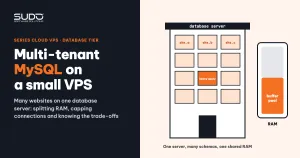
In the database tier of a multi-website setup on Cloud VPS, each server typically runs one MySQL 8.0 instance holding dozens of schemas for dozens of different websites. The server has only a few GB of RAM, no replica, and has to serve a busy e-commerce site and a brochure site that almost nobody visits at the same time. This guide shows how to configure multi-tenant MySQL on a small VPS: splitting RAM for the buffer pool, setting connection limits, the trade-off of disabling binlog, per-database privileges, quick diagnostic queries for a slow server, and an operations checklist.
1. What multi-tenant MySQL is and where the risks are
"Multi-tenant" here simply means that many websites share one mysqld process, each with its own schema and its own user. It is economical: one database server serves dozens of sites, and backups and monitoring are centralized in one place. The risks of multi-tenant MySQL sit right in the word "shared":
- Shared RAM: the buffer pool is a shared cache. A site with large tables and scan-heavy queries pushes other sites' data out of RAM.
- Shared connections:
max_connectionsapplies to the whole server. One site with hanging queries can take every slot from every site. - Shared disk: if one schema balloons and fills the disk, every site stops writing at once.
2. Where multi-tenant MySQL uses RAM
On a multi-tenant MySQL server, the memory of mysqld has two parts:
- The global part, allocated at startup: the InnoDB buffer pool, log buffer, table cache and Performance Schema. Performance Schema sizes itself from
max_connectionsandtable_open_cache, so setting those two values too high also raises the baseline RAM. - The per-connection part:
sort_buffer_size,join_buffer_size, in-memory temporary tables. Each value is small, but multiplied by a few hundred connections and a few heavy queries at once, it adds up.
Note: after a load spike, the RSS of mysqld in top stays high even after the load drops, because the glibc allocator keeps memory around for reuse. High RSS is not necessarily a leak; it reflects the peak the server has been through.
3. Sizing multi-tenant MySQL to the server's RAM
The minimal configuration commonly seen on a multi-tenant MySQL server differs from the defaults by only a few lines:
# /etc/mysql/mysql.conf.d/mysqld.cnf (excerpt)
[mysqld]
datadir                 = /var/lib/mysql
log-error               = /var/log/mysql/error.log
bind-address            = 10.0.0.31        # listen on the private IP only
max_connections         = 300
innodb_buffer_pool_size = 2G               # example for a 4 GB RAM server
skip-log-bin
If you do not set innodb_buffer_pool_size, MySQL uses the 128 MB default, far too small for a multi-tenant MySQL server with dozens of schemas. This is the first parameter to tune.
innodb_buffer_pool_size
The buffer pool is where InnoDB keeps data and index pages in RAM. When the "hot" data fits in the buffer pool, queries read from RAM; when it does not, they have to read from disk. The MySQL InnoDB buffer pool documentation suggests up to 80% of RAM on a server that runs only the database. On a small VPS hosting multi-tenant MySQL, leave more headroom, because the operating system, per-connection memory and dump tools also need room:
| Server RAM | Suggested buffer pool | Notes |
|---|---|---|
| 1–2 GB | 256–768 MB | Lower max_connections to match; a small swap helps |
| 4 GB | about 2 GB | Watch the disk read ratio after the change |
| 8 GB | 4–5 GB | Suits a server consolidating many large schemas |
The table above is a starting point, not a formula. To judge whether the buffer pool is big enough, compare Innodb_buffer_pool_reads (reads that had to go to disk) with Innodb_buffer_pool_read_requests (total logical reads). The smaller the ratio, the better; once it goes above roughly 1%, the server is reading from disk a lot, and growing the buffer pool usually brings the most visible gain.
innodb_dedicated_server sizes things automatically from RAM, but it assumes the whole machine is dedicated to the database, so on a small VPS set the values by hand.
max_connections
The default is 151. The right number depends on the application side: every PHP-FPM worker handling a request may hold a connection. For example, with three minions pointing at the same database server and pm.max_children = 50 on each, the theoretical peak is already 150 connections, before counting queue workers and cron.
But raising max_connections does not let a multi-tenant MySQL server handle more load; it only lets more connections wait. On a 2 GB server, a few hundred connections running heavy queries at once will exhaust RAM before they hit the limit. The connection limit should equal the total number of workers that can actually connect, plus a margin, not a huge number for peace of mind.
skip-log-bin: what you trade for the savings
Since MySQL 8.0, the binary log is enabled by default and kept for 30 days. On a multi-tenant MySQL server with a small disk, the binlog of dozens of sites writing continuously can take a significant share of disk space and I/O. Disabling binlog with skip-log-bin gives you:
- Less write I/O, and a disk that is not filled by binlogs.
- In exchange: no replicas, because replication is built on the binlog.
- In exchange: no point-in-time recovery. You can only go back to the latest dump, which means you may lose almost the entire interval between two backups.
Only accept this trade-off consciously. Sites that need stronger data safety should live on a dedicated server with binlog enabled, outside the multi-tenant MySQL pool.
Slow query log
The slow log is off by default. You can turn it on during an investigation, while the multi-tenant MySQL server is running, without a restart:
SET GLOBAL slow_query_log_file = '/var/log/mysql/slow.log';
SET GLOBAL long_query_time = 1;
SET GLOBAL slow_query_log = ON;

-- after a while, summarize slow queries by total time
-- (run in a shell): mysqldumpslow -s t -t 20 /var/log/mysql/slow.log
long_query_time only applies to connections opened after the change. Settings made with SET GLOBAL are also lost when MySQL restarts: that is both an advantage (you cannot forget to turn it off) and a drawback (you lose the investigation data). Other options are covered in the slow query log documentation.
4. Users, privileges and networking in multi-tenant MySQL
One schema per site, one user per site, privileges only on that schema, and logins allowed only from the minions' private IP range:
CREATE DATABASE site_a CHARACTER SET utf8mb4 COLLATE utf8mb4_unicode_ci;
CREATE USER 'site_a'@'10.0.0.%' IDENTIFIED BY '<randomly generated password>';
GRANT ALL PRIVILEGES ON site_a.* TO 'site_a'@'10.0.0.%';- No application uses the
rootuser. A site whose.envleaks exposes only that site's data. - The
'10.0.0.%'host part restricts logins to the private network, even if the password leaks. - The database server only has a private IP, and
bind-addressis set to that private IP somysqldlistens only on that interface. Never expose port 3306 to the Internet.
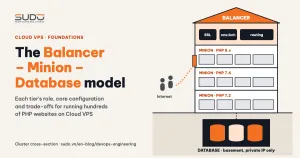
Operators should not SSH into the database server to run commands. As described in the overview of the Cloud VPS model, every query goes through the operations host with mysql --login-path=<server-name>. The server name is its name in internal DNS, so reading the command tells you which server you are working on.
5. Quick checks on a slow multi-tenant MySQL server
-- who is running what, and for how long
SHOW FULL PROCESSLIST;

-- connections: open, running, peak since startup
SHOW GLOBAL STATUS WHERE Variable_name IN
  ('Threads_connected','Threads_running','Max_used_connections',
   'Connection_errors_max_connections','Aborted_clients','Aborted_connects');

-- is the buffer pool big enough
SHOW GLOBAL STATUS LIKE 'Innodb_buffer_pool_read%';

-- which schemas are taking up disk
SELECT table_schema,
       ROUND(SUM(data_length + index_length)/1024/1024/1024, 2) AS gb
FROM information_schema.tables
GROUP BY table_schema ORDER BY gb DESC LIMIT 10;
Read the results in order: high Threads_running while Threads_connected is normal means a heavy query is running; check PROCESSLIST for statements with a large Time value. Many connections in Sleep for a long time are connections the application opened and never closed. Max_used_connections close to max_connections is an early warning before the error actually happens on your multi-tenant MySQL server.
6. Common errors with multi-tenant MySQL
ERROR 1040: Too many connections
The first reflex is usually to raise max_connections. In most cases, the real cause is a slow query: each request waits longer on it, holds its connection longer, and connections pile up until they hit the ceiling. Find that query in PROCESSLIST and the slow log, add an index or fix the code, and the connection count drops on its own. The Connection_errors_max_connections variable tells you whether this error has actually happened since the last startup.
Disk full because of test databases and clones
A very "multi-tenant" way to fill a disk: to test a feature or build a demo, someone copies a whole production database into a new schema and forgets to delete it afterwards. When the disk is full, InnoDB cannot write and write queries from every site on the server hang together. Prevention: name test schemas with an easily recognizable convention, run the per-schema size query above periodically, and set the disk alert threshold well below 100%.
Aborted_clients keeps rising
Aborted_clients counts connections dropped without the client closing them properly, usually because a PHP worker was killed mid-request or a connection slept past wait_timeout. A slow increase is normal; sudden bursts should be cross-checked against the PHP-FPM log. Aborted_connects, on the other hand, counts failed logins, usually due to a wrong password or a host that has not been granted access.
7. Multi-tenant MySQL checklist and trade-offs
- Set
innodb_buffer_pool_sizeaccording to RAM, leaving room for the operating system and connections. max_connectionsequals the total number of workers that actually connect, plus a margin.- One schema and one user per site, host restricted to the private range;
bind-addressis the private IP. - Decide explicitly whether binlog is enabled, and write down the acceptable amount of data loss.
- Know how to turn on the slow log quickly; have alerts on disk usage and
Max_used_connections. - Clean up test schemas and clones periodically.
| Choice | Gain | Cost |
|---|---|---|
| Many schemas on one server | Fewer servers, cheaper, centralized backups | One bad site affects every site on the server |
| Small buffer pool on a low-RAM server | Runs on a VPS with a few GB of RAM | When data outgrows the buffer pool, disk reads increase |
skip-log-bin | Less I/O, no disk filled by binlogs | No replicas, no point-in-time recovery |
| Slow log only enabled when needed | No disk or I/O cost | When an incident happens, there is no data from that moment |
Multi-tenant MySQL runs well on a small VPS as long as you know exactly where you are saving and what you are paying for it.
Next article
PHP 7.4 end of life: living with multiple versions and an upgrade path. What EOL means, why legacy sites still have to run on PHP 7.2 and 7.4, and how to upgrade one site at a time without disrupting the others.