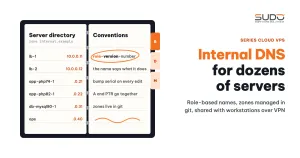
When a cluster has only a few servers, remembering each IP is easy. Once the count reaches a few dozen, spread across balancers, minions, database servers, build servers and monitoring servers, writing IPs into scripts, into .env files or into operators' heads starts causing mistakes. This guide shows how to build internal DNS with BIND to name and manage dozens of Cloud VPS instances: zone structure, naming conventions, pushing DNS to workstations over VPN, the zone editing workflow, and common errors when managing zones by hand.
1. Why you need internal DNS
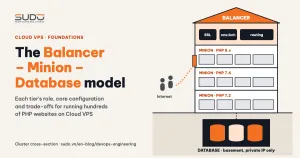
In the three-tier Balancer – Minion – Database model, only the balancer has a public IP. Minions and database servers only have private IPs, and all traffic between tiers goes over the private network. Without names, every place that needs to know "where is this site's database" has to copy a 10.0.0.x address:
- The
upstreamblock in the site configuration file on the balancer. DB_HOSTin each website's.env.- Backup scripts, deploy scripts, and everyone's
~/.ssh/config.
When one IP changes (a server is rebuilt or moved to a new Cloud VPS), you have to fix it in every one of those places. Worse, an IP says nothing about the role: nobody looking at 10.0.0.37 can tell whether it is a balancer or a database. Internal DNS solves both problems: names carry meaning, and when an IP changes you edit a single record.
2. How internal DNS works
Internal DNS is one (or a few) DNS servers that serve only the private network and hold a private zone that is never published to the Internet. In this guide, the internal DNS zone is called internal.example. Three concepts to understand:
- Forward zone: maps names to IPs with
Arecords, and aliases to canonical names withCNAME. - Reverse zone: maps IPs to names with
PTRrecords, used when logs or tools need to display a name instead of an IP. - Master and secondary: the zone is edited on the master. The secondary pulls a copy via zone transfer and keeps serving when the master fails. The secondary knows the zone has changed because the serial number in the SOA record goes up.
When a server looks up db-1.internal.example, its resolver sends the query to the internal DNS server listed in /etc/resolv.conf, gets back the private IP and caches the result for the record's TTL.
3. Repository and zone structure for internal DNS
Manage the internal DNS zones in a git repository from day one, so every change has a history and can be reviewed. Minimal layout:
dns-repo/
├── named.conf.local          # declares the 2 zones
└── zones/
    ├── internal.example      # forward zone: A, CNAME
    └── 10.in-addr.arpa       # reverse zone: PTR
The named.conf.local file on the internal DNS master:
zone "internal.example" {
    type master;
    file "/etc/bind/zones/internal.example";
    notify yes;
    also-notify { 10.0.0.3; };        # notify the secondary as soon as the zone changes
    allow-transfer { 10.0.0.3; };     # only the secondary may pull the zone
};

zone "10.in-addr.arpa" {
    type master;
    file "/etc/bind/zones/10.in-addr.arpa";
    allow-transfer { 10.0.0.3; };
};
The allow-transfer line is mandatory: without it, anyone on the network can download your entire server directory with a single dig AXFR. The top of a sample forward zone:
$TTL    3600
@       IN      SOA     internal.example.    dns1.internal.example. (
                        42           ; serial: bump on every edit
                        3600         ; refresh
                        900          ; retry
                        864000       ; expire
                        300 )        ; negative cache TTL
        IN      NS      dns1.internal.example.
        IN      NS      dns2.internal.example.

dns1                IN  A      10.0.0.2
dns2                IN  A      10.0.0.3
vpn                 IN  CNAME  dns2

; BALANCER -------------------------------------------------
lb-1                IN  A      10.0.0.11
; MINION ---------------------------------------------------
app-php74-1         IN  A      10.0.0.21
app-php82-1         IN  A      10.0.0.22
; DATABASE -------------------------------------------------
db-mysql80-1        IN  A      10.0.0.31
; SERVICES -------------------------------------------------
ops                 IN  A      10.0.0.40
build               IN  CNAME  ops
The serial only needs to be an increasing integer. The example above uses a simple counter; many teams prefer the YYYYMMDDNN format (edit date plus a two-digit sequence number for that day) so you can see at a glance when the zone was last changed. Either works, as long as the serial never goes down.
4. Server naming conventions in internal DNS
The simplest naming scheme is role + sequence number (minion1, db3). It works while the cluster is small, but shows three weaknesses as it grows:
- The name does not tell you the version. Does this server run PHP 7.2 or 7.4? You have to SSH in to find out, even though that is the first question when deploying a site.
- Numbers get "holes". Decommissioned servers leave gaps, and the unspoken rule "minion N pairs with database N" breaks as soon as one database serves several minions.
- Project-based names creep in. Names like
minion<project-name>are easy to remember for the people on that project, but they follow no pattern, so scripts cannot guess them.
The recommended convention has the form role-runtime-number:
| Name pattern | Example | What the name tells you |
|---|---|---|
lb-N | lb-1 | Balancer with a public IP, running nginx and certbot |
app-phpXY-N | app-php74-1 | Minion running PHP 7.4, first server in its group |
db-mysqlXY-N | db-mysql80-1 | MySQL 8.0 database server |
| Service name | ops, vpn, build | A server with a single function |
You cannot rename a running server in one step, because scripts and configuration still reference the old name. The safe way is to add the new name as a CNAME pointing to the old one, move references over to the new name gradually, then flip them: the new name becomes the A record, the old name becomes the alias, and finally you delete the alias once nobody uses it.
5. Internal DNS for workstations over VPN
Operators do not sit inside the private network. Their workstations connect to the cluster over VPN, and to be able to type ssh app-php74-1, those workstations must also be able to query internal DNS. With OpenVPN, the server pushes DNS settings to clients with push:
# /etc/openvpn/server.conf (excerpt)
push "route 10.0.0.0 255.255.0.0"
push "dhcp-option DNS 10.0.0.2"
push "dhcp-option DNS 10.0.0.3"
push "dhcp-option DOMAIN internal.example"
The DOMAIN line lets you type short names: the resolver automatically expands ssh app-php74-1 to app-php74-1.internal.example. Two caveats:
- How clients apply
dhcp-optionvaries by operating system. Windows picks it up directly. On Linux you usually need a script that updates the resolver (for exampleupdate-resolv-conf); without it, the VPN comes up but names do not resolve. - On the Cloud VPS instances themselves,
/etc/resolv.confmust list internal DNS before public DNS, together withsearch internal.example. Otherwisemysql -h db-mysql80-1fails with a host-not-found error.
6. Benefits for operational scripts
Once names are stable in internal DNS, scripts only need server names, not IPs:
# ~/.ssh/config: one block for every server in the zone
Host lb-* app-* db-*
    User deploy
    IdentityFile ~/.ssh/id_ops

# run the same command across the PHP 7.4 minion group
for h in app-php74-1 app-php74-2 app-php74-3; do
    ssh "$h" 'hostname; systemctl is-active nginx'
done

# the website's .env points to the database by name
DB_HOST=db-mysql80-1.internal.example
When .env points to the database by name, rebuilding the database on a new Cloud VPS comes down to changing one A record and waiting for the TTL to expire. Websites keep connecting to the right place without editing each file. Names also appear in script output, so a log line like backup db-mysql80-1: OK is far easier to read than a string of IPs.
7. Zone editing workflow
Every internal DNS change should go through git first, and only then be applied to the master:
# 1. edit the zone, BUMP THE SERIAL in both the forward and reverse zones
# 2. check the syntax before loading
named-checkconf /etc/bind/named.conf
named-checkzone internal.example /etc/bind/zones/internal.example
named-checkzone 10.in-addr.arpa  /etc/bind/zones/10.in-addr.arpa

# 3. reload the zones, no need to restart named
rndc reload internal.example
rndc reload 10.in-addr.arpa

# 4. query both DNS servers directly and compare serials
dig @10.0.0.2 internal.example SOA +short
dig @10.0.0.3 internal.example SOA +short
dig @10.0.0.2 app-php74-1.internal.example +short
dig @10.0.0.2 -x 10.0.0.21 +short
8. Common mistakes when running your own internal DNS
- Forgetting to bump the serial. The master has the new record but the secondary never pulls it, because the serial has not changed. Symptom:
digagainst the two DNS servers returns two different answers. - Editing the forward zone but forgetting the reverse zone (or the other way around). The name resolves but the reverse lookup returns nothing, or vice versa.
- A and PTR out of sync. The
Arecord points to one IP, while thePTRassigns that name to another server's IP. Forward lookups are still correct, so it is hard to spot, but logs that display reverse DNS show the wrong hostname. - Long TTLs. A TTL measured in days makes other servers hold on to the old IP for a long time. For internal infrastructure where IPs change often, use a moderate TTL, and lower the TTL of the specific record you are about to change to a few minutes well before moving the server.
- The secondary is missing from NS. With
notify yes, BIND only sends NOTIFY to servers listed in NS records or declared withalso-notify. Without either, the secondary only updates on itsrefreshcycle. - The server is gone but its name remains. Scripts keep SSHing to an IP that may later be assigned to a different server. Decommissioning a server must include deleting both its
AandPTRrecords.
The recommendations on serials, TTLs and PTR records in RFC 1912 on common DNS configuration errors are still entirely valid.
9. Checklist and trade-offs of running your own internal DNS
Checklist for every internal DNS zone edit:
- Bump the serial in every zone that changed.
- Add or remove the
AandPTRrecords together. - Run
named-checkconfandnamed-checkzonebefore reloading. - Compare serials on the master and secondary, and check forward and reverse
digresults. - Commit the change to git with a short description of why.
| Gain | Cost |
|---|---|
Scripts, configuration and .env use names instead of IPs | One more service to keep alive: if DNS dies, every call by name fails |
| Complete change history in git | Zones are edited by hand, so it is easy to forget the serial or the PTR |
| Entirely inside the private network, no external dependency | Servers or services that do not use the internal resolver cannot address others by name |
For a small operations team, BIND plus git is enough for the long run. What matters most is not the software but the discipline: every new server gets a name in internal DNS before it is used, and every decommissioned server has its name removed.
Next article
The Balancer tier: Nginx reverse proxy, SSL offload and domain routing. The configuration directory layout on the balancer, the mandatory proxy headers, timeouts, gzip, HTTPS, and how to tell a 502 from a 504.