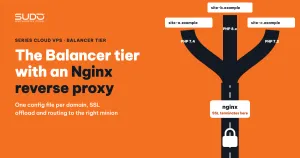
In a multi-website setup on Cloud VPS, every request passes through one door: the balancer tier. These are the only servers with public IPs, and they run an Nginx reverse proxy that decrypts HTTPS, blocks junk requests and forwards the rest to the right minion on the private network. This guide covers how to organize configuration on the balancer: one file per domain, the mandatory proxy headers, timeouts, upload limits, gzip, HTTP-to-HTTPS redirects, how to read 502, 504 and 413 errors, and a checklist before putting a site live.
1. What the Nginx reverse proxy does in the balancer tier
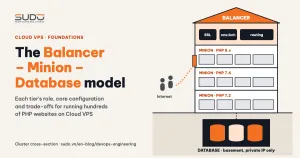
A reverse proxy is a server that sits in front of the application, receives requests on its behalf and forwards them inward. The browser only ever talks to the balancer and never sees the minion. In the Balancer – Minion – Database model, the Nginx reverse proxy on the balancer carries four jobs:
- SSL offload: performs the TLS handshake, holds the certificates and decrypts traffic. The minions behind it only receive plain HTTP over the private network.
- Domain routing: uses
server_nameto decide which domain goes to which minion. - Early blocking: returns 403 for sensitive paths and rate limits requests before they consume PHP workers.
- Compression and normalization: gzip, hiding the nginx version, enforcing HTTPS.
When each domain points to a single minion, the Nginx reverse proxy on the balancer is an entry point and a router, not yet a load balancer spreading traffic across several servers.
2. Nginx reverse proxy directory layout: one file per domain
/etc/nginx/
├── nginx.conf                       # global config: workers, gzip, rate limit zones
├── conf.d/
│   ├── example.com.conf             # upstream + server :80 + server :443
│   ├── site-a.example.conf
│   └── ...
└── snippets/
    └── security-blocking.conf       # shared blocking rules, included in every site
/etc/letsencrypt/live/<domain>/      # certificates issued by certbot
The rule: one domain, one file, and the file name is the domain. Adding a site means creating a file, removing a site means deleting a file, moving a site means editing one line. To find out which domains live on a balancer, just run ls /etc/nginx/conf.d/.
Scripts can address minions by name through internal DNS, but Nginx reverse proxy configuration files should use private IPs: nginx resolves names in upstream only once, when it loads the configuration, so writing IPs keeps the balancer from depending on DNS at startup.
A detail that is often overlooked: nginx.conf only loads conf.d/*.conf. Name backup copies with a suffix like example.com.conf.bak so they are not loaded. If you name one example.com.bak.conf, nginx loads both and complains about a duplicate server_name, or worse, silently uses the old version.
3. Global configuration in nginx.conf
The global configuration determines how much load the whole Nginx reverse proxy can handle and applies to every domain on the balancer. A sample configuration:
worker_processes auto;            # one worker per vCPU
worker_rlimit_nofile 65535;       # each proxied connection uses 2 file descriptors

events {
    worker_connections 4096;
    use epoll;
    multi_accept on;
}

http {
    server_tokens off;            # do not expose the nginx version in headers and error pages
    client_max_body_size 64M;     # default upload limit for every site

    gzip on;
    gzip_comp_level 6;
    gzip_proxied any;
    gzip_types text/css application/javascript application/json image/svg+xml text/xml;

    limit_req_zone $binary_remote_addr zone=dynamic:10m rate=25r/s;
    limit_req_status 429;         # default is 503, easily confused with a system error

    include /etc/nginx/conf.d/*.conf;
}
worker_processes autowithepollis the standard choice on Linux. A single-vCPU Nginx reverse proxy has only one worker, so total concurrent connections are roughlyworker_connections. Each proxied request uses two connections (client and minion), so the real number of users is only about half that.gzip_proxied anylets the Nginx reverse proxy compress responses coming from the minion too. There is no need to add JPEG or PNG togzip_typesbecause they are already compressed.
4. A site configuration file on the Nginx reverse proxy
upstream example_com {
    server 10.0.0.21:80;
}

server {
    listen 80;
    server_name example.com www.example.com;
    return 301 https://$host$request_uri;
}

server {
    listen 443 ssl http2;
    server_name example.com www.example.com;

    ssl_certificate     /etc/letsencrypt/live/example.com/fullchain.pem;
    ssl_certificate_key /etc/letsencrypt/live/example.com/privkey.pem;
    add_header Strict-Transport-Security "max-age=63072000" always;

    access_log /var/log/nginx/example.com.access;
    error_log  /var/log/nginx/example.com.error;

    include snippets/security-blocking.conf;

    location / {
        limit_req zone=dynamic burst=50;

        proxy_pass http://example_com;
        proxy_set_header Host              $host;
        proxy_set_header X-Real-IP         $remote_addr;
        proxy_set_header X-Forwarded-For   $proxy_add_x_forwarded_for;
        proxy_set_header X-Forwarded-Proto $scheme;

        proxy_connect_timeout 10s;
        proxy_read_timeout    300s;
    }
}
Four proxy headers you cannot skip
When acting as an Nginx reverse proxy, nginx creates a new request to the minion rather than passing the original request through unchanged. The following information has to be sent explicitly:
Host: by default nginx sends the upstream name (example_com), not the domain. The minion usesserver_nameto pick the site, so without this line the request lands on the minion's default site.X-Real-IPandX-Forwarded-For: the user's real IP. Without them, the minion and the application only see the balancer's IP, and logs and every IP-based limit downstream are wrong.X-Forwarded-Proto: tells the application that the original request was HTTPS. Laravel needs this header (along with the TrustProxies configuration) to generatehttps://links.
Timeouts: where should the error happen
By default, the Nginx reverse proxy waits up to 60 seconds for the minion to respond (proxy_read_timeout). Admin pages that export reports or import files can take longer, and in that case you can raise it to a few minutes. The rule: the balancer timeout is always larger than the minion timeout (fastcgi_read_timeout) and PHP's execution time limit. Slow requests are cut off at the tier closest to the cause, the error log sits on the minion, and it is easy to trace which script is slow. proxy_connect_timeout is the opposite and should be short: on a private network, failing to connect within a few seconds means the minion has a problem, and waiting longer does not help.
HTTP to HTTPS and HSTS
The listen 80 block does exactly one thing: return 301 to HTTPS. The HSTS header tells the browser to use only HTTPS for this domain for the duration of max-age (two years in the example above). Two caveats:
- Only add
includeSubDomainswhen you are certain every subdomain has HTTPS. Otherwise, an HTTP-only subdomain will not open in a browser that has remembered the HSTS policy. add_headeris only inherited when the child block has noadd_headerof its own. If alocationadds anotheradd_header, the HSTS header from theserverlevel disappears from that location's responses.
5. Basic blocking snippet and rate limiting
A shared snippet, included in every site, blocks at the Nginx reverse proxy the paths that are never legitimate for a Laravel website:
# /etc/nginx/snippets/security-blocking.conf
location ~ /\.(env|git|svn|htaccess) { deny all; }
location ~* \.(sql|bak|swp)$         { deny all; }
location ~* (wp-login\.php|xmlrpc\.php|phpmyadmin) { return 403; }
Regex location blocks take priority over location / in nginx, so a request for /.env gets a 403 right at the balancer and never reaches the minion. A Laravel website has no wp-login.php, so every request for it is a bot probing for vulnerabilities.
Rate limiting uses the ngx_http_limit_req_module. In the example, rate=25r/s is the average rate per IP and burst=50 is the number of requests queued when that rate is exceeded; requests beyond the burst get a 429. The rate limit here counts every request, including CSS, JS and images. A page with a few dozen static assets can hit the threshold if the burst is too small, so test it on your heaviest page before tightening it.
6. Configuration change workflow: always nginx -t first
Every change on the Nginx reverse proxy should end with exactly one command:
nginx -t && systemctl reload nginxDo not use restart on the Nginx reverse proxy when you have only changed configuration. reload makes the master process read the new configuration, start new workers and let the old workers finish their open connections, so users are not cut off. More importantly, if the new file has a syntax error, nginx -t stops immediately and the old configuration keeps running. One balancer serves dozens of domains; a missing semicolon combined with restart takes all of them down at once.
7. Common errors on the Nginx reverse proxy
| Symptom | Log line on the balancer | Common cause |
|---|---|---|
| Immediate 502 Bad Gateway | connect() failed (111: Connection refused) while connecting to upstream | Nginx on the minion is down, the upstream IP is wrong, or the minion is not listening on its private IP |
| 502 after a few seconds | upstream prematurely closed connection | PHP-FPM on the minion died or a worker was killed mid-request |
| 504 Gateway Timeout | upstream timed out (110: Connection timed out) | The minion is overloaded, a query is slow, or the minion is unresponsive |
| 413 Request Entity Too Large | client intended to send too large body | The uploaded file is larger than client_max_body_size |
| Browser reports "too many redirects" | No error, just a chain of 301s | The application does not know the request is HTTPS, so it redirects back |
A quick way to tell them apart on the Nginx reverse proxy: 502 means it cannot talk to the minion, 504 means the minion accepted the request but answered too slowly. For a 502, check systemctl status nginx and PHP-FPM on the minion. For a 504, look for the slow request in the minion's log and the application log.
A 413 has to be fixed in three places, because the smallest limit wins: client_max_body_size on the balancer, client_max_body_size on the minion's nginx, and upload_max_filesize and post_max_size in PHP. Raise it on the Nginx reverse proxy but forget the other two, and the error just moves to another tier instead of going away.
A redirect loop is almost always caused by the application believing the request is HTTP. Check the X-Forwarded-Proto header sent by the Nginx reverse proxy, the application's trusted proxy configuration, and fastcgi_param HTTPS on on the minion. If the domain goes through Cloudflare with SSL mode set to "Flexible", Cloudflare calls the balancer over HTTP, the balancer redirects to HTTPS, and the loop happens at the outermost layer. The correct mode when the balancer already has a certificate is "Full (strict)".
8. Nginx reverse proxy configuration checklist for a new site
- The file is named after the domain in
conf.d/, and no backup copy ends in.conf. - The upstream uses the minion's private IP; the minion only listens on its private IP.
- All four headers are set:
Host,X-Real-IP,X-Forwarded-For,X-Forwarded-Proto. - The port 80 block only does a 301 redirect; HSTS only enables
includeSubDomainswhen you are sure. - The balancer timeout is larger than the minion timeout;
client_max_body_sizematches PHP. - The shared blocking snippet and the rate limit zone are included.
- The domain has its own logs, with logrotate so the disk does not fill up.
- Run
nginx -tbeforereload, then check withcurl -I https://example.com.
Most of the default behaviors that cause confusing errors (the Host header, the 60-second timeout, buffering) are described in the ngx_http_proxy_module documentation. Configuring an Nginx reverse proxy is not complicated; the hard part is keeping dozens of site configuration files on the same template, so whoever is on call can read any file and immediately understand what it does, and rebuild a balancer quickly when something goes wrong.
Next article
The Minion tier: running multiple PHP versions side by side. Installing PHP 7.2, 7.4 and 8.x from the same package source, PHP-FPM sockets per version, site directory conventions, and supervisor for queue workers.