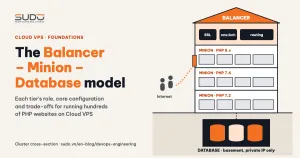
With only a handful of websites, giving each site its own server is the simplest approach. Once you are running hundreds of sites, most of them PHP/Laravel and each needing a different PHP version, that approach becomes both expensive and hard to manage. This guide describes how to organize Cloud VPS instances into a three-tier Balancer – Minion – Database model: the role of each tier, the core configuration, common operational errors, and the trade-offs this model deliberately accepts.
1. When you need a three-tier model on Cloud VPS
The model fits when the problem looks like this:
- Many websites for many customers, mostly Laravel, some plain PHP or Node.js.
- Several generations of code living side by side: some sites only run on PHP 7.2, others have moved to PHP 7.4 or 8.x.
- Every site needs SSL, protection against bots and malicious requests, and a daily database backup.
- The budget is limited, so the fleet is mostly small Cloud VPS instances (a few vCPUs, a few GB of RAM).
The goal is to pack many sites onto a few Cloud VPS instances while still separating the things that should not be shared: the Internet entry point, the PHP version, and the data.
2. Architecture overview: three tiers, three roles
                Internet
                   │  HTTPS :443
                   ▼
   ┌───────────────────────────────────┐
   │ BALANCER (public IP)              │  SSL, blocks bad requests, rate limit,
   │ nginx reverse proxy               │  routes domain → minion
   └───────────────┬───────────────────┘
                   │  HTTP :80 over the private network
                   ▼
   ┌───────────────────────────────────┐
   │ MINION (private IP only)          │  nginx + PHP-FPM per version,
   │ one PHP version per minion group  │  code in /var/www/<domain>,
   └───────────────┬───────────────────┘  supervisor for queue workers
                   │  TCP 3306 over the private network
                   ▼
   ┌───────────────────────────────────┐
   │ DATABASE (private IP only)        │  MySQL, many schemas per server
   └───────────────────────────────────┘
        + operations host (jump host): MySQL client, dump/backup, tooling
The most important rule: across the whole Cloud VPS cluster, only the balancer has a public IP. Minions and database servers only have private IPs, so nothing on the Internet can reach PHP-FPM or port 3306 directly.
Name servers after their role, for example with the pattern <role>-<version>-<number>, such as lb-1, app-php74-1, db-mysql80-1. The name alone tells you what that Cloud VPS does and which version it runs. These names are registered in internal DNS so that configuration files and scripts address servers by name instead of IP. The next article covers this in detail.
3. The Balancer tier: the single entry point
The balancer is a Cloud VPS running nginx as a reverse proxy (the ngx_http_proxy module). Each domain has its own file in /etc/nginx/conf.d/<domain>.conf, so adding, changing or removing a site touches exactly one file. A sample configuration (trimmed):
upstream example_com {
    server 10.0.0.21:80;          # minion currently hosting the site
}

server {
    listen 80;
    server_name example.com www.example.com;
    return 301 https://$host$request_uri;
}

server {
    listen 443 ssl http2;
    server_name example.com www.example.com;

    ssl_certificate     /etc/letsencrypt/live/example.com/fullchain.pem;
    ssl_certificate_key /etc/letsencrypt/live/example.com/privkey.pem;

    include snippets/security-blocking.conf;   # block sensitive paths, bad bots

    location / {
        limit_req zone=dynamic burst=50;

        proxy_pass http://example_com;
        proxy_set_header Host              $host;
        proxy_set_header X-Real-IP         $remote_addr;
        proxy_set_header X-Forwarded-For   $proxy_add_x_forwarded_for;
        proxy_set_header X-Forwarded-Proto $scheme;
        proxy_read_timeout 300;
    }
}
The balancer handles four jobs:
- SSL termination: Let's Encrypt certificates are issued and renewed automatically by certbot on the balancer itself. The minions behind it only need to serve HTTP on the private network.
- Early blocking: a shared snippet returns 403 for paths such as
.env,.git,phpmyadmin,wp-loginand for a list of bad User-Agents. Junk requests stop here and never consume a PHP worker. - Rate limiting:
limit_reqcaps the number of requests per IP so a single aggressive client cannot choke a whole minion. - Routing: which domain goes to which minion. To move a site to another Cloud VPS, you only change the
serverline in the upstream block and runnginx -t && systemctl reload nginx.
A note on naming: in this model, each upstream block usually contains only one minion. The name "balancer" describes its position more than its function: it is the entry point, not a load balancer spreading traffic across several servers. Each site runs on exactly one minion, and if that minion fails, the site goes down. This is a deliberate trade-off to keep the model simple.
4. The Minion tier: where the code runs
Cloud VPS instances in the minion tier are grouped by PHP version: one group hosts legacy sites that need PHP 7.2, another hosts PHP 7.4 sites, another PHP 8.x. This split means:
- You never have to install, patch and monitor several PHP versions on the same Cloud VPS.
- Upgrading PHP for one site just means moving that site to a new minion group, without affecting any other site.
Each minion runs its own nginx, listens only on its private IP, receives requests from the balancer and hands them to PHP-FPM over a unix socket:
server {
    listen 10.0.0.21:80;
    server_name example.com www.example.com;
    root /var/www/example.com/public;
    index index.php;

    location / {
        try_files $uri $uri/ /index.php?$query_string;
    }

    location ~ \.php$ {
        include fastcgi_params;
        fastcgi_pass unix:/run/php/php7.4-fpm.sock;
        fastcgi_param SCRIPT_FILENAME $realpath_root$fastcgi_script_name;
        fastcgi_param HTTPS on;          # SSL already terminated at the balancer
        fastcgi_read_timeout 180;
    }
}
The fastcgi_param HTTPS on line is small but important. Requests reaching the minion are plain HTTP; without this line, Laravel generates http:// links and can end up in an infinite redirect loop.
Directory conventions on a Cloud VPS minion
Agree on a single path for every site, for example /var/www/<domain>/, owned by the user that runs the web server. That directory holds the full Laravel repository, including .env, artisan and public/. When every Cloud VPS follows the same convention, operational scripts (deploy, backup, log reading) only need the domain name.
Queue workers: each site carries its own supervisor config
Laravel needs queue:work running in the background. Instead of editing a shared supervisor file every time a site is added, configure supervisor to also read a supervisord.ini file located inside each site's directory:
# /etc/supervisor/supervisord.conf
[include]
files = /etc/supervisor/conf.d/*.conf /var/www/*/supervisord.ini
# /var/www/example.com/supervisord.ini
[program:example-com-queue]
command=php /var/www/example.com/artisan queue:work --sleep=2 --tries=2 --timeout=300
user=www-data
numprocs=1
autostart=true
autorestart=true
stdout_logfile=/var/www/example.com/storage/logs/queue.logThe worker configuration is deployed together with the code. To remove a site, delete its directory; the worker disappears after the next supervisorctl reread && supervisorctl update.
5. The Database tier: separating data from code
MySQL runs on dedicated Cloud VPS instances, each holding many schemas for many sites. Separating the database from the minions brings three benefits:
- No competition for resources: a PHP-FPM spike cannot push MySQL into OOM, and vice versa.
- Easy minion moves: moving a site to another minion does not touch the data, as long as
DB_HOSTin.envstill points to the right database server. - Centralized backups: dumps run per database server, not minion by minion.
On small Cloud VPS instances, the MySQL configuration usually has to be frugal, and every choice has a cost:
| Choice | Gain | Cost |
|---|---|---|
Binlog disabled (skip-log-bin) | Saves I/O and disk space | No replicas, no point-in-time recovery. Backups are only periodic dumps |
Small innodb_buffer_pool_size on a low-RAM server | Runs on a VPS with a few GB of RAM | When data outgrows the buffer pool, disk reads increase and queries slow down |
| Many schemas on one server | Fewer servers, easier to manage | One site with bad queries can slow down the whole server |
6. The operations host: never SSH straight into the database
Database work (diagnostic queries, dumps, imports) should go through a dedicated operations Cloud VPS (a jump host) with the MySQL client and an object storage upload tool installed. Credentials for each database server are stored with mysql_config_editor, so nobody types a password on the command line and passwords never leak into shell history:
# store the credentials once (obfuscated in ~/.mylogin.cnf)
mysql_config_editor set --login-path=db-1 \
    --host=db-1.internal.example --user=admin --password

# from then on
mysql --login-path=db-1 -e "SHOW DATABASES;"
mysqldump --login-path=db-1 --single-transaction ten_db | gzip > ten_db.sql.gz
7. Common errors and how to fix them
| Symptom | Common cause | Fix |
|---|---|---|
Infinite redirect, generated links use http:// | The minion does not know the original request was HTTPS | Add fastcgi_param HTTPS on and configure TrustProxies in Laravel |
| 502 Bad Gateway at the balancer | The minion Cloud VPS is down, the minion's nginx is not listening on the right IP, or PHP-FPM has died | From the balancer, run curl -H "Host: example.com" http://10.0.0.21/ to isolate the failing tier |
| 504 Gateway Timeout | A PHP request runs longer than proxy_read_timeout or fastcgi_read_timeout | Find the slow query; only raise the timeout when the task genuinely needs it |
| One slow site drags down the whole minion | Scraper bots or heavy queries exhaust the PHP-FPM workers | Rate limit at the balancer, split PHP-FPM pools per site, check the MySQL slow log |
| Queue not running after adding a site | The new supervisord.ini file has not been loaded | supervisorctl reread && supervisorctl update |
8. Pros, cons and a checklist for a three-tier Cloud VPS cluster
| Pros | Cons |
|---|---|
| Simple: only familiar tools (nginx, PHP-FPM, MySQL, supervisor) | Each site runs on exactly one minion, with no automatic failover |
| Cheap: many sites on a few small Cloud VPS instances | Sites on the same minion share its resources |
| Multiple PHP versions coexist without conflicts | Adding sites, changing domains and moving servers by hand is error-prone and needs automation |
| Small attack surface: only the balancer is exposed to the Internet | The balancer is a single point of failure for every site behind it |
| Easy to debug: walk the three tiers and you find the fault | No database replicas, so data safety relies entirely on backups |
Checklist for building a cluster on this model:
- Only the balancer has a public IP; the firewall blocks every minion and database port from the Internet.
- Every Cloud VPS is named after its role and registered in internal DNS.
- One configuration file per domain on the balancer; always run
nginx -tbefore reloading. - Minions are grouped by PHP version, with a consistent site path.
- Databases live on their own Cloud VPS instances, with periodic backups and a tested restore.
- Database work goes through the operations host, with no passwords on the command line.
No model is perfect. This way of organizing Cloud VPS suits a stage where you need many sites, low cost and a small operations team. The following articles go deeper into each tier, including how to respond when the weaknesses above turn into incidents. The whole series is collected in the Sudo engineering blog.
Next article
Internal DNS: naming and managing dozens of servers. Why you should address servers by role-based names instead of memorizing IPs, and how internal DNS helps every operational script downstream.