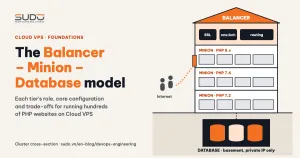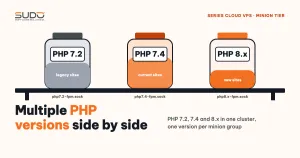
A single Cloud VPS cluster typically holds legacy websites that only run on PHP 7.2, new Laravel sites that need PHP 8.x, and many sites in between on PHP 7.4. Upgrading everything to one version is not realistic, so the minion tier has to run several PHP versions side by side without them stepping on each other. This guide shows how to install and organize a minion that hosts multiple PHP versions: the package source, PHP-FPM sockets per version, the local nginx, site directories, user permissions, supervisor, opcache, common errors and a verification checklist.
1. Why Debian's default PHP packages are not enough
Each Debian release packages exactly one PHP version: Debian 10 ships PHP 7.3, Debian 11 ships PHP 7.4. To get PHP 7.2 or 8.1 on Debian 11, you need another package source. The popular choice is the repository maintained by Ondřej Surý (deb.sury.org), who also maintains the official PHP packages in Debian. This repository provides many PHP versions at once, each as a set of packages with its own prefix (php7.2-*, php7.4-*, php8.1-*), and they install side by side without conflicts.
apt-get install -y apt-transport-https lsb-release ca-certificates wget
wget -O /etc/apt/trusted.gpg.d/php.gpg https://packages.sury.org/php/apt.gpg
echo "deb https://packages.sury.org/php/ $(lsb_release -sc) main" \
    > /etc/apt/sources.list.d/php.list
apt-get update

# install one PHP version with the extensions Laravel needs
V=7.4
apt-get install -y php$V-fpm php$V-cli php$V-mysql php$V-mbstring php$V-xml \
    php$V-curl php$V-zip php$V-gd php$V-bcmath php$V-intl
Once installed, the PHP versions each get their own set of directories and services:
| Component | PHP 7.2 | PHP 7.4 |
|---|---|---|
| FPM configuration | /etc/php/7.2/fpm/ | /etc/php/7.4/fpm/ |
| CLI configuration | /etc/php/7.2/cli/ | /etc/php/7.4/cli/ |
| systemd service | php7.2-fpm | php7.4-fpm |
| Default socket | /run/php/php7.2-fpm.sock | /run/php/php7.4-fpm.sock |
| FPM log | /var/log/php7.2-fpm.log | /var/log/php7.4-fpm.log |
| CLI binary | /usr/bin/php7.2 | /usr/bin/php7.4 |
The bare php command is just a link managed by update-alternatives that points to one of the PHP versions above. This small detail is the root cause of quite a few errors, covered at the end.
2. Splitting minions by PHP version
Being able to install multiple PHP versions on one server does not mean you should run production that way. An easier setup to operate is to split minions into groups, each dedicated to one of the PHP versions you support (for example app-php72-*, app-php74-*, app-php82-*). The reasons:
- Each server only has one PHP-FPM stack to patch, monitor and tune.
- The server name tells you the version, so whoever deploys does not have to guess.
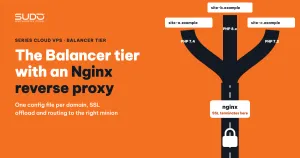
- Upgrading PHP for a site means moving it to a new minion group, then changing one upstream line on the balancer running the Nginx reverse proxy. Other sites on the old server are not affected.
Side-by-side installation is still useful: before moving a site to a new minion group, you can install the target version alongside the existing PHP versions to run that site's composer install and tests right on the server that already has the code.
3. PHP-FPM: a shared pool, running as the same user as nginx
The simplest configuration is for each of the PHP versions to use a single shared pool named www for every site, running as the same user as nginx, which also owns the code (on Debian this is usually www-data):
; /etc/php/7.4/fpm/pool.d/www.conf (excerpt)
[www]
user = www-data
group = www-data
listen = /run/php/php7.4-fpm.sock
listen.owner = www-data
listen.group = www-data
listen.mode = 0660

pm = dynamic
pm.max_children = 40
pm.start_servers = 10
pm.min_spare_servers = 5
pm.max_spare_servers = 20
pm.max_requests = 500
pm.max_children is the maximum number of PHP requests the pool handles concurrently. To estimate it, take the RAM left after the operating system and nginx, and divide by the average RAM per worker (Laravel typically uses a few dozen MB per worker). pm.max_requests makes each worker restart itself after a number of requests, limiting memory leaks from older libraries. The numbers in the example are only a starting point and need to be measured on the real server, separately for each of the PHP versions, since memory use differs between them. Each parameter is explained in the PHP-FPM configuration documentation on php.net.
A shared pool is simple but has a weakness: one slow site can hold every worker and drag down the whole server. If you choose this approach, watch closely for max_children warnings in the FPM log; as the number of sites grows, move to one pool per site.
4. Local nginx and site directories
Each minion runs its own nginx, listening only on its private IP, receiving requests from the balancer and passing them to the socket of the right PHP version:
server {
    listen 10.0.0.21:80;
    server_name example.com www.example.com;
    root /var/www/example.com/public;
    index index.php;
    client_max_body_size 64M;

    location / {
        try_files $uri $uri/ /index.php?$query_string;
    }

    location ~ \.php$ {
        include fastcgi_params;
        fastcgi_pass unix:/run/php/php7.4-fpm.sock;   # the minion's own version
        fastcgi_param SCRIPT_FILENAME $realpath_root$fastcgi_script_name;
        fastcgi_param HTTPS on;
        fastcgi_read_timeout 180;
    }
}
Every site's code should live at a consistent path, for example /var/www/<domain>/, owned by the user that runs the web server. Laravel only needs to write to storage/ and bootstrap/cache/:
cd /var/www/example.com
chown -R www-data:www-data .
find . -type d -exec chmod 755 {} \;
find . -type f -exec chmod 644 {} \;
chmod -R ug+rwX storage bootstrap/cache
Because the path is the same on every minion, deploy, backup and log-reading scripts only need the domain name, regardless of which of the PHP versions the site runs on.
5. Supervisor and cron: always spell out the PHP version
As described in the overview of the Cloud VPS model, supervisor on the minion can also read a supervisord.ini file inside each site's directory:
# /etc/supervisor/supervisord.conf
[include]
files = /etc/supervisor/conf.d/*.conf /var/www/*/supervisord.ini
The thing to remember when a server has more than one PHP version: commands in supervisor and cron must call the full path of the version, never the bare php.
# /var/www/example.com/supervisord.ini
[program:example-com-queue]
command=/usr/bin/php7.4 /var/www/example.com/artisan queue:work --sleep=2 --tries=2 --timeout=300
user=www-data
autostart=true
autorestart=true
stdout_logfile=/var/www/example.com/storage/logs/queue.log

# /etc/cron.d/example-com: Laravel scheduler
* * * * * www-data /usr/bin/php7.4 /var/www/example.com/artisan schedule:run >> /dev/null 2>&1
If someone adds to the PHP versions installed on a server, update-alternatives may switch php to the newest one. The web keeps working because nginx calls the right socket, but queue workers and the scheduler quietly start running on a different version.
6. The CLI and FPM php.ini are two different files
All PHP versions have two php.ini files each: /etc/php/7.4/fpm/php.ini for the web and /etc/php/7.4/cli/php.ini for the command line. Debian's CLI file sets memory_limit = -1 with no execution time limit, which suits long-running artisan commands. The FPM file has limits. As a result:
- Changing
upload_max_filesizein the CLI file changes nothing for the web. - Code that runs fine with
php artisancan still fail withAllowed memory size exhaustedwhen called through the web. php --inionly shows the CLI files. To see what FPM is reading, usephpinfo()or look directly in thefpm/directory.
Once the php7.4-opcache package is installed, opcache is enabled for FPM (the same applies to all PHP versions). With the default opcache.validate_timestamps=1, PHP periodically checks whether files have changed, so new code takes effect after a few seconds. If you disable this check for speed, every deploy must run systemctl reload php7.4-fpm; otherwise the site keeps running the old code cached in memory.
7. A small swap for low-RAM minions
Small minions are prone to short RAM spikes, for example when composer install runs at the same time as live traffic. A small swapfile with low swappiness keeps the OOM killer from striking immediately during these spikes, while under normal conditions the kernel still prefers RAM:
fallocate -l 1G /swapfile && chmod 600 /swapfile
mkswap /swapfile && swapon /swapfile
echo '/swapfile none swap sw 0 0' >> /etc/fstab
sysctl -w vm.swappiness=10
Swap is no substitute for RAM. If swap is always full, that is a sign you need to lower pm.max_children or move some sites elsewhere.
8. Common errors on minions with multiple PHP versions
| Symptom | Log signature | Fix |
|---|---|---|
| 502, the minion's nginx cannot find the socket | connect() to unix:/run/php/php7.2-fpm.sock failed (2: No such file or directory) | The site points to the socket of a version that is not on this server, or FPM for that version is not running |
| 502, the socket exists but access is denied | (13: Permission denied) while connecting to upstream | The pool's listen.owner/listen.group does not match the nginx user |
| 502 on every site on the server | Connection refused or the socket has disappeared | PHP-FPM has died: run systemctl status php7.4-fpm, check the FPM log and dmesg for OOM |
| 500, Laravel cannot write its log | The stream or file ... could not be opened: Permission denied | storage/ is not owned by the web user, usually because a command was run as root |
Blank page after composer install | Composer detected issues in your platform | composer update was run with a newer CLI version than FPM, so composer picked libraries that require a newer PHP. Call /usr/bin/php7.4 /usr/local/bin/composer explicitly |
| Slow responses or 502 under load | server reached pm.max_children setting | The shared pool has run out of workers. Look for slow requests before thinking about raising max_children |
The "Permission denied" error in storage/ is so common that it should become a rule: never run artisan as root on a minion. For any command you need to run by hand, use sudo -u www-data, so newly created cache and log files still belong to the right user.
9. Checklist for minions running multiple PHP versions
- Install PHP from a single, consistent package source, with every extension Laravel needs for each version.
- One main PHP version per minion group, with the version in the server name.
fastcgi_passpoints to the right socket; socket permissions match the nginx user.- Supervisor, cron and composer call the full PHP path, never the bare
php. - Edit
php.iniin the rightfpm/orcli/directory, and reload FPM afterwards. - Never run
artisanas root;storage/andbootstrap/cache/are writable. - Have a small swap, and watch for
max_childrenwarnings in the FPM log.
Running multiple PHP versions side by side lets legacy sites keep living while new sites use a modern version, and upgrading each site becomes a reversible server move. The price is that the number of minion groups grows with the number of PHP versions, and older PHP versions gradually lose security support. That topic is covered in detail in the article on PHP 7.4 end of life, right after the article on the database tier.
Next article
The Database tier: multi-tenant MySQL on small VPS instances. Sizing the buffer pool to RAM, connection limits, the trade-off of disabling binlog, per-database privileges, and how to quickly check a MySQL server that is running slow.