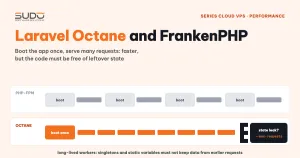
With PHP-FPM, every request to a Laravel site starts from zero: load the autoloader, read the config, register dozens of service providers, and only then reach the code that does the real work. When the request ends, everything is thrown away. On a high-traffic site, this repeated startup takes up a significant share of response time. Laravel Octane changes the game: the application boots once, stays in memory and serves many requests in a row. This guide explains how Laravel Octane works, why we chose FrankenPHP, how to put it behind nginx on Cloud VPS, and the changes it forces on how you write code and how you deploy.
1. What Laravel Octane is and how it differs from PHP-FPM
PHP-FPM follows a "share nothing" model: a worker receives a request, runs the full application lifecycle, returns the result and then wipes its memory. This model is very safe, because an error in one request cannot leak into the next. The price is that the Laravel bootstrap is repeated on every request. OPcache saves you from recompiling PHP files, but the whole initialization still has to execute again.
According to the official Laravel Octane documentation, Octane boots the application once, keeps it in memory and feeds each request into that already-booted application. Octane runs on one of three app servers: FrankenPHP, Swoole or RoadRunner.
| Criterion | PHP-FPM | Laravel Octane |
|---|---|---|
| Application lifecycle | Booted and destroyed per request | Booted once, lives across many requests |
| Communication with nginx | FastCGI over a unix socket | HTTP over an internal TCP port |
| State between requests | None, always clean | Yes, if the code is careless |
Plain PHP exit(), header() | Work normally | Cause errors or kill the worker |
| Deploying new code | Takes effect immediately (or after an FPM reload) | Requires octane:reload or a restart |
| Memory leaks | Gone when the request ends | Accumulate, need --max-requests |
2. Why run Laravel Octane on FrankenPHP
Swoole and RoadRunner are both good options, but FrankenPHP has two advantages for a Cloud VPS infrastructure. First, there is no separate PHP extension to build as with Swoole: FrankenPHP is an app server written in Go with PHP embedded, and Octane downloads the FrankenPHP binary itself when installed with --server=frankenphp. Second, Laravel Octane has officially supported FrankenPHP since late 2023, so there is nothing extra to patch. The site has to run PHP 8.x, as Octane requires.
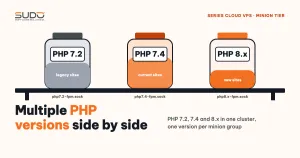
It is best to dedicate a group of minions to Laravel Octane sites, separate from the PHP-FPM minions, so you do not have to mix two runtime models and two ways of budgeting RAM on the same machine.
3. Putting Laravel Octane behind nginx on Cloud VPS
The request flow is the same as in the model described in Cloud VPS architecture: Balancer, Minion and Database tiers for hundreds of PHP sites. The balancer still terminates SSL and forwards HTTP to the minion. The difference is on the minion: instead of fastcgi_pass to a PHP-FPM socket, nginx uses proxy_pass to FrankenPHP listening on 127.0.0.1, with a separate port for each site:
Internet ─HTTPS─▶ balancer (SSL, rate limit)
                    │ HTTP :80
                    ▼
         Octane minion: nginx (10.0.0.24:80)
           ├─ static files: nginx reads directly from public/
           └─ dynamic requests ─▶ 127.0.0.1:8001  FrankenPHP (site-a)
                               ─▶ 127.0.0.1:8002  FrankenPHP (site-b)
The site configuration file on the minion (trimmed):
server {
    listen 10.0.0.24:80;
    server_name site-a.example;
    root /var/www/site-a.example/public/;

    # the minion only speaks HTTP, don't let nginx generate absolute http:// redirects
    absolute_redirect off;

    location / {
        client_max_body_size 128M;
        proxy_http_version 1.1;
        proxy_set_header Host              $host;
        proxy_set_header X-Real-IP         $remote_addr;
        proxy_set_header X-Forwarded-For   $proxy_add_x_forwarded_for;
        proxy_set_header X-Forwarded-Proto https;      # SSL already terminated at the balancer
        proxy_set_header Upgrade           $http_upgrade;
        proxy_set_header Connection        "upgrade";
        proxy_read_timeout 300;
        proxy_pass http://127.0.0.1:8001;
    }

    location ~ \.php$ { deny all; }                  # no .php file may be called directly

    location ~* \.(?:css|js|webp|woff2|png|jpg|jpeg|gif|ico|svg|mp4)$ {
        expires 30d;
        access_log off;
        add_header Cache-Control "public";
    }
}
X-Forwarded-Proto https plays the same role as fastcgi_param HTTPS on on a PHP-FPM site. Laravel only trusts this header when the request comes from a trusted proxy, so TrustProxies needs $proxies = ['127.0.0.1']. Without this step, Laravel Octane generates http:// CSS/JS links and the browser blocks them as mixed content.
Running Laravel Octane under supervisor
Each Laravel Octane site is a long-running process that needs to be monitored and restarted automatically. You can use supervisor just as for queue workers, one program per site:
[program:site-a-octane]
command=/usr/bin/php8.3 artisan octane:start --server=frankenphp
        --host=127.0.0.1 --port=8001 --admin-port=9001
        --workers=1 --max-requests=500
directory=/var/www/site-a.example
user=www-data
autostart=true
autorestart=true
environment=PATH="/usr/local/bin:/usr/bin:/bin",
    CADDY_ADMIN="127.0.0.1:9001",
    PHP_INI_SCAN_DIR="/etc/php/8.3/cli/conf.d:/etc/php-octane/site-a"
Three things to keep in mind in operation:
- Ports must not collide, neither
--portnor--admin-port. FrankenPHP embeds Caddy, and Caddy has its own admin port; if two sites share an admin port, the one that starts second fails. Keep a port registry for each minion (for example, site-a uses 8001 and 9001, site-b uses 8002 and 9002). - FrankenPHP does not read PHP-FPM's php.ini. The most common symptom is large uploads being rejected even though FPM's
upload_max_filesizeis high enough. Create a separate ini file for the site and pointPHP_INI_SCAN_DIRat its directory (keep it outsidevendor/socomposer installdoes not delete it). - Configuration changes must reload the right program:
supervisorctl reread,supervisorctl update, thensupervisorctl restart site-a-octane.
# /etc/php-octane/site-a/custom.ini
post_max_size       = 128M
upload_max_filesize = 128M
memory_limit        = 256M
4. Writing code for Laravel Octane: the app no longer "dies and comes back"
This is the most labor-intensive part. Code that works correctly on PHP-FPM can break on Laravel Octane, because it silently assumes that everything is fresh after each request. The common bugs when moving a Laravel CMS to Octane fall into five groups.
State leaking between requests
Take a theme service that stores a list of CSS/JS files in an array property. On PHP-FPM, the array is created fresh on every request. On Octane, the service is a singleton that lives for the whole life of the worker, so every request appends a few more <link> tags to the old array: after many requests, the HTML page contains the same CSS file repeated many times. The fix: deduplicate when adding, and add a middleware that calls flush() at the start of each request.
Singletons and Facades
The opposite bug: sitemap and menu helpers registered with bind instead of singleton. Between requests, Octane clears the Facade cache, the Facade creates a new empty instance, the data registered at boot disappears, and the sitemap comes back empty. The rule: anything that is loaded with data at boot and must live for the whole worker has to be a singleton; anything that depends on the request (user, locale, shopping cart) must not be kept in a singleton.
Static properties used as a cache
The private static $options optimization meant to "avoid querying again within the same request" is a time bomb on Octane: the static value lives as long as the worker, so an admin changes a setting but the site keeps showing old data until the worker restarts. Drop the static cache and switch to Cache::remember() so that expiry and cache invalidation live in one place.
Plain PHP exit() and header()
On PHP-FPM, exit() only ends the request; on Octane, it ends the entire worker. Likewise, header("Content-Type: text/xml"); echo $xml; has no effect because Octane only reads headers from the Response object, so the RSS page comes out blank. Always return a Laravel Response:
// Before: works on PHP-FPM
header("Content-Type:text/xml");
echo $rss->getRSSContent();

// After: correct on both PHP-FPM and Laravel Octane
return response($rss->getRSSContent(), 200)->header('Content-Type', 'text/xml');

// exit() used to block access becomes
abort(403);
Logic that only runs once at boot
License checks and applying mail settings from the database are often placed in a service provider's booted(). On Octane, booted() only runs when the worker starts, so if an admin changes the mail settings through the UI, the worker keeps using the old ones. Move this logic into a per-request listener, with a mechanism that only reapplies the settings when they have actually changed.
--max-requests: a safety net for memory leaks
A large Laravel Octane application with many third-party packages can hardly avoid small memory leaks entirely. --max-requests tells Octane to restart a worker after a given number of requests, bringing memory back to its starting level. Set it too high and workers bloat; set it too low and you lose part of the benefit of booting once. You can start at a few hundred and then watch the RAM of the frankenphp process to tune it. Low-traffic sites can run with --workers=1 so the minion has room for more Octane sites.
5. Deploying a Laravel Octane site: don't forget to reload
With PHP-FPM, new code runs as soon as git pull finishes (when OPcache checks timestamps). With Laravel Octane, the old code is still sitting in worker memory. The minimum deployment procedure:
cd /var/www/site-a.example
git pull
composer install --no-dev --optimize-autoloader
php artisan optimize:clear
php artisan octane:reload        # reload the workers without dropping in-flight connections
Enabling or disabling a plugin in the CMS falls into the same category: a plugin's service provider is only loaded when the worker starts, so the workers need a reload after that action. Push the reload into a queued job, because calling reload synchronously from a request that is itself running inside a worker will deadlock. As a consequence, an Octane site needs a queue:work process running alongside it.
6. When to use Laravel Octane and when not to
| Good fit | Poor fit |
|---|---|
| Sites with a high volume of dynamic requests and many pages that cannot be cached | Small, low-traffic sites: PHP-FPM with page caching is enough |
| Code your own team controls, where singletons and statics can be audited | Legacy code or old packages full of exit() and global variables |
| Running PHP 8.x and a recent Laravel release | Sites still stuck on PHP 7.x |
| An operations team that can monitor RAM per process | Low-RAM minions already running close to their limit |
Laravel Octane is not a "go faster" switch you flip and forget. It shifts part of the responsibility from the runtime to the developer: PHP-FPM cleans up after you on every request, Octane does not. For the right site, the reward is getting rid of the repeated bootstrap cost; for the wrong site, PHP-FPM remains the lower-risk choice.
Next article
Standardizing Nginx security: security snippets and connection limits. Collecting rules that block sensitive paths, bad bots and excessive requests into a shared configuration, then rolling it out to every balancer at once without taking any site down.