Open the access log on any balancer and you will see the same kinds of requests over and over: /.env, /.git/config, /wp-login.php, /phpmyadmin/, /vendor/phpunit/.... A Laravel site has no WordPress or phpMyAdmin at all, but vulnerability-scanning bots do not care. Without an Nginx security layer in front, every such request that reaches a minion ties up a PHP worker just to return a 404. This guide shows how to standardize Nginx security on the balancer tier with two tools: a shared security snippet that blocks sensitive paths, and per-IP limit_req/limit_conn limits, along with a procedure for rolling them out to dozens of site configuration files without taking any site down.
1. Why Nginx security belongs on the balancer
In the three-tier Cloud VPS model, the balancer is the only entry point with a public IP. Putting the Nginx security layer here has three benefits:
- Cheap: nginx returning 403 for a bad request costs very little CPU, compared with letting PHP-FPM boot Laravel just to return a 404.
- Consistent: one rule applies to every site, regardless of which framework the site uses or whether it blocks
.envon its own. - No changes to application code: the operations team is self-sufficient and does not have to wait for each project's developers.
When blocking rules are scattered across individual site configuration files (copied from a template when the site was created, or hand-written in everyone's own style), each site's level of protection depends on when it was created and by whom. Standardizing Nginx security means bringing every site onto the same rule set.
2. The security snippet: one Nginx security file for every site
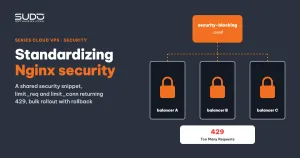
Collect all Nginx security rules into a single file, /etc/nginx/snippets/security-blocking.conf, on each balancer, so that each site configuration file only needs one include line. A sample snippet:
# /etc/nginx/snippets/security-blocking.conf

# 1. Sensitive files: database dumps, scripts, environment variables, git, htaccess
location ~* \.(sql|sh|bash|env|git|htaccess)$ {
    return 403;
}
location ~ /\.(git|svn|env) {
    return 403;
}

# 2. Paths bots commonly probe: WordPress, phpMyAdmin, Adminer
location ~* (wp-admin|wp-login|xmlrpc\.php|phpmyadmin|adminer) {
    return 403;
}

# 3. Laravel debug and monitoring tools, and files that expose configuration
location ~* (vendor/phpunit|_ignition|telescope|horizon|\.json\.bak) {
    return 403;
}
Group 3 matters for Laravel sites: _ignition is the debug error page that once had a remote code execution vulnerability when APP_DEBUG=true, while telescope and horizon are internal dashboards that should never be exposed to the Internet. The Nginx security layer on the balancer is a second line of defense in case a site accidentally has debug enabled in production.
In the site configuration file, the include line goes right before location / {:
server {
    listen 443 ssl http2;
    server_name example.com www.example.com;

    # Load the shared security blocking configuration
    include snippets/security-blocking.conf;

    location / {
        limit_req  zone=dynamic burst=50;
        limit_conn conn_dynamic 100;
        proxy_pass http://10.0.0.21;
        # ...
    }
}
Location order: why the snippet beats location /
According to the nginx location directive documentation, nginx first finds the longest matching prefix location (here, location /), remembers it, and then checks regex locations in the order they appear. The first regex that matches wins. Because /.env matches the snippet's regex, the request gets a 403 even though location / also matches. Two consequences:
- The include can go anywhere in the
serverblock, but placing it beforelocation /makes it obvious to the reader. - If a site declares its own regex location before the include line, that regex beats the snippet. When auditing, read the whole file instead of just checking that the include line exists.
The price: overly broad regexes
A regex like (…|horizon) has no word boundaries, so it matches every URL containing that string: a blog post with the slug /horizon-zero-dawn will get a 403. Blocking wp-admin is right for Laravel sites but breaks a real WordPress site if one lives on the same balancer. String-based Nginx security rules always carry this trade-off. To reduce it, anchor the regex to the start of the path (^/(wp-admin|phpmyadmin)) when you can, and keep a separate snippet for groups of sites on other frameworks. When a site reports an unexpected 403, the first thing to check is whether the URL matches the snippet.
3. Nginx security through per-IP request and connection limits
The Nginx security snippet blocks things that are definitely bad. Requests that look normal but arrive too densely, such as a crawler scraping thousands of product pages per minute, call for rate limiting instead. Nginx has two modules for this: ngx_http_limit_req_module limits the number of requests over time, and ngx_http_limit_conn_module limits the number of concurrent connections. Zones are declared once in the http block:
http {
    # 10 MB of shared memory, enough for about 160,000 IP addresses
    limit_req_zone  $binary_remote_addr zone=dynamic:10m rate=25r/s;
    limit_req_zone  $binary_remote_addr zone=login:10m   rate=6r/s;
    limit_conn_zone $binary_remote_addr zone=conn_dynamic:10m;

    # both return 503 by default, switch to 429 Too Many Requests
    limit_req_status  429;
    limit_conn_status 429;
}
Each site applies them inside location / as shown in section 2. How to read the sample configuration: each IP gets 25 requests per second; above that rate, up to 50 requests are queued (burst=50) and released gradually at 25r/s; anything beyond 50 queued requests gets an immediate 429. At the same time, no IP may hold more than 100 open connections at once. These numbers are a starting point; test them on your heaviest page (lots of CSS, JS and images) before tightening.
429, not 503
By default, limit_req and limit_conn return 503 Service Unavailable. That code misleads both people and machines: seeing 503s rise, the on-call engineer assumes a minion is down; Googlebot reads a 503 as an overloaded server. The right code is 429 Too Many Requests, which clearly says "you are sending too much", and well-behaved clients will slow down on their own. Watch out for typos such as limit_conn_status 505: 505 means "HTTP Version Not Supported" and has nothing to do with connection limits.
Note: which IP is being limited
$binary_remote_addr is the IP of whatever connects directly to the balancer. For a site reached straight from the Internet, that is the user's IP. For a domain behind Cloudflare, it is a Cloudflare IP, and a great many users end up sharing a single 25r/s "quota". This problem is big enough to get its own article, which comes next.
4. Rolling out Nginx security in bulk without taking sites down
Writing the Nginx security snippet is easy. The hard part is getting the include line and the limit_req line into dozens of site configuration files on each balancer, many of them hand-written with inconsistent formatting. Manual edits introduce mistakes, and one wrong sed command breaks every site at once. Split the work into separate Jenkins jobs (see Jenkins as the control plane for hundreds of websites): one job creates or updates the snippet file, one inserts the include into site files, and one inserts limit_req/limit_conn. Every Nginx security job follows the same skeleton: back up, edit, nginx -t, then reload or roll back.
Step 1: back up the whole directory with a timestamp
TS=$(date +%Y%m%d_%H%M%S)
BACKUP=/root/nginx_migration_backup/backup_$TS
mkdir -p "$BACKUP"
cp -v /etc/nginx/conf.d/*.conf "$BACKUP"/
The backup directory must carry a timestamp. With a fixed directory, the second run overwrites the backup with the files already modified by the first run, and the originals are lost for good.
Step 2: edit conditionally, skip files already processed
You can pull each file back to Jenkins and process it in Groovy instead of running sed on the server, which gives precise control over where lines are inserted:
// skip if the include is already there: the job is safe to re-run any number of times
if (content =~ /include\s+['"]?snippets\/security-blocking\.conf['"]?\s*;/) {
    skipped << domainName
    continue
}
// insert only before the first "location / {" line, keeping the indentation
if (trimmed.replace(' ', '') == 'location/{') {
    newLines.add(indent + "include snippets/security-blocking.conf;")
}
Files without a location / { are skipped and listed at the end of the build. The "modified" and "skipped" lists must be read after every run, because a skipped file is a site left outside the shared Nginx security layer.
Step 3: nginx -t before reloading, restore on failure
def test = sh(script: "ssh deploy@${BALANCER} 'sudo nginx -t 2>&1'", returnStdout: true)
if (test.contains("test is successful")) {
    sh "ssh deploy@${BALANCER} 'sudo systemctl reload nginx'"
} else {
    // copy every file back from the backup directory
    sh "ssh deploy@${BALANCER} 'sudo cp ${BACKUP}/*.conf /etc/nginx/conf.d/'"
    error("nginx -t failed")
}
A safer variant: run nginx -t after each file; if a file breaks the syntax, only that file is restored and the job stops, printing the file contents with line numbers. It is slower but points to the exact culprit. The key point: until you reload, nginx keeps running the old configuration from memory, so an error caught by nginx -t has not affected users yet.
Step 4: test behavior, not just syntax
nginx -t only knows that the syntax is valid; it cannot tell whether the Nginx security rules block the right things. After each batch, test with curl on a few representative sites:
$ curl -s -o /dev/null -w '%{http_code}\n' https://example.com/.env
403
$ curl -s -o /dev/null -w '%{http_code}\n' https://example.com/wp-login.php
403
$ curl -s -o /dev/null -w '%{http_code}\n' https://example.com/
200

# test the limits: fire 200 parallel requests, some of them will get 429
$ seq 200 | xargs -P 50 -I{} curl -s -o /dev/null -w '%{http_code}\n' https://example.com/ | sort | uniq -c
5. Nginx security standardization checklist
- A single source of truth: Nginx security rules live in one snippet; site configuration files keep only what is site-specific.
- Timestamped backups: a backup that overwrites itself is no backup at all.
- Bulk jobs must be safe to re-run: check "already there?" before inserting, and list skipped files.
- Separate syntax from behavior:
nginx -tprotects you from outages, curl protects you from "running but wrong". - Status codes are an interface: 429 for limits, 403 for blocking rules.
- The broader the regex, the more false positives: anchor regexes when possible, and have a procedure for handling 403 reports.
Snippets and limits are the foundational Nginx security layer: simple and cheap. They do not replace a WAF or fail2ban, but they drop most junk requests before they ever reach PHP.
Next article
Getting the real client IP behind Cloudflare and a load balancer. Why $remote_addr on the minion is always the balancer's IP, why per-IP rate limiting becomes meaningless when a site sits behind Cloudflare, and how to fix it with nginx's realip module.