Putting a new Laravel website on Cloud VPS by hand is a long chain of steps: create the database, clone the code, edit .env, run composer, write the nginx config file on the minion and then on the balancer, reload, verify. Each step is simple, but together they are very easy to get wrong. This guide shows how to build a first automated deployment pipeline with GitLab CI: a self-hosted GitLab Runner that SSHes into each server and generates nginx configuration from templates, with sample configs, the design risks that come up most often, and a checklist so the pipeline does no harm when it is run by mistake.
1. Why you need automated deployment
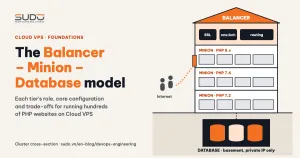
In the Balancer – Minion – Database model, a new site touches at least three servers:
- Database: create the schema, create the user, grant privileges.
- Minion: clone the code into
/var/www/<domain>, create.env,composer install,php artisan migrate, set permissions, add the site's config file for the local nginx. - Balancer: add
/etc/nginx/conf.d/<domain>.confpointing to the minion, configure SSL, reload nginx.
Done by hand, the operator has to remember the right minion IP, the right database name, the same password in two places (MySQL and .env), and must not mistype the domain in three different files. One wrong character and the site returns 502 or a database connection error. The goal of automated deployment is very concrete: enter a few parameters, click run, and every step happens in the same order, identically every time.
2. GitLab CI and GitLab Runner: the foundation of automated deployment
GitLab CI reads the .gitlab-ci.yml file at the root of the repository. This file describes a pipeline made of several stages that run in sequence, each stage holding one or more jobs. The full syntax is in the .gitlab-ci.yml reference. The key concepts:
- variables: input parameters, declared in the file, in the project's CI/CD Variables, or passed when the pipeline is started.
- rules: conditions for a job to run, for example only when the pipeline is triggered from the web UI or through the API.
- tags: a job is only handed to runners with matching tags.
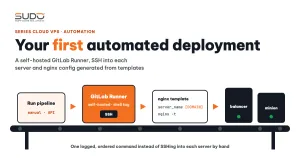
GitLab itself runs no commands. Commands are executed by GitLab Runner, a process installed on your own server that registers with GitLab and keeps polling for new jobs. For a scenario that SSHes into servers, the shell executor is the simplest option: the job runs directly in a shell on the runner host, with no container and no image.
For automated deployment on Cloud VPS, the runner must be self-hosted because minions and databases only have private IPs. GitLab's shared runners live on the public Internet and cannot SSH into them. A runner placed in the same private network can reach every server, while GitLab only stores the pipeline, provides the button to run it and shows the logs.
3. A three-step automated deployment pipeline
The repository holding the automated deployment pipeline contains no website code, only .gitlab-ci.yml and the nginx templates. Each pipeline run is a "deploy command" for one site, with input variables such as:
| Variable | Meaning |
|---|---|
DOMAIN | The site's domain, also the directory name and config file name |
MINION_IP, BALANCER_IP | The minion holding the code and the balancer receiving traffic |
DB_HOST, DB_NAME, DB_USER, DB_PASSWORD | Details of the database to create |
REPO_URL | The site's code repository |
SSL_TYPE | letsencrypt or cloudflare |
SSH_PRIVATE_KEY | A File-type variable in CI/CD Variables, never in the repository |
Step 1: create the database, only if it does not exist
stages: [create_database, pull_code, config_nginx]

create_database:
  stage: create_database
  tags: [shell]
  rules:
    - if: $CI_PIPELINE_SOURCE == "web" || $CI_PIPELINE_SOURCE == "api"
  script:
    - |
      ssh -i "$SSH_PRIVATE_KEY" deploy@"$DB_HOST" "
        mysql --login-path=admin -N -e \"SHOW DATABASES LIKE '$DB_NAME'\" | grep -q . \
          && { echo 'Database already exists, stopping'; exit 1; }
        mysql --login-path=admin -e \"CREATE DATABASE \\\`$DB_NAME\\\`;
          CREATE USER '$DB_USER'@'10.0.0.%' IDENTIFIED BY '$DB_PASSWORD';
          GRANT ALL ON \\\`$DB_NAME\\\`.* TO '$DB_USER'@'10.0.0.%';\""
The two safeguards of automated deployment sit right in the first job: rules only lets the pipeline run when someone clicks "Run pipeline" or a system calls the API, never automatically on a push that edits a template; and the job stops if the database already exists instead of dropping and recreating it. The admin credentials live in mysql_config_editor on the target server and never appear on the command line.
Step 2: pull the code and build .env
pull_code:
  stage: pull_code
  tags: [shell]
  script:
    - |
      ssh -i "$SSH_PRIVATE_KEY" deploy@"$MINION_IP" "
        set -e
        test ! -e /var/www/$DOMAIN || { echo 'Directory already exists, stopping'; exit 1; }
        git clone $REPO_URL /var/www/$DOMAIN
        cd /var/www/$DOMAIN
        cp .env.example .env
        sed -i 's|^APP_DEBUG=.*|APP_DEBUG=false|; s|^DB_HOST=.*|DB_HOST=$DB_HOST|' .env
        composer install --no-dev
        grep -q '^APP_KEY=.\+' .env || php artisan key:generate
        php artisan migrate --force
        chmod -R ug+rwX storage bootstrap/cache"
set -e (or chaining commands with &&) stops the sequence as soon as one command fails, SSH returns a non-zero exit code and the job turns red in GitLab. This is the cheapest "stop on error" mechanism that still works well for shell-based automated deployment. The remaining database settings should be written into .env with a tool that escapes values properly, not with sed (see section 5).
Step 3: generate the nginx config from a template
The most valuable part of automated deployment is the nginx configuration. Instead of writing each site's config file by hand, the repository keeps templates with placeholders such as [DOMAIN] and [MINION_IP]. The template for nginx on the minion (shortened):
server {
    listen [MINION_IP]:80;
    server_name [DOMAIN] www.[DOMAIN];
    root /var/www/[DOMAIN]/public/;
    access_log /var/log/nginx/[DOMAIN].access;
    error_log  /var/log/nginx/[DOMAIN].error error;

    location / {
        try_files $uri $uri/ /index.php?$query_string;
    }
    location ~ \.php$ {
        include fastcgi_params;
        fastcgi_param SCRIPT_FILENAME $realpath_root$fastcgi_script_name;
        fastcgi_param HTTPS on;
        fastcgi_pass unix:/run/php/php8.2-fpm.sock;
        fastcgi_read_timeout 180;
    }
}
The config_nginx job copies the template to the target server, fills in the placeholders, then checks the syntax before reloading. A safe way to install the file: write to a temporary file, keep the old version, reload only after the check passes, and restore the previous state on failure:
CONF=/etc/nginx/conf.d/$DOMAIN.conf
sed "s/\[DOMAIN\]/$DOMAIN/g; s/\[MINION_IP\]/$IP/g" template.conf > "$CONF.new"
[ -e "$CONF" ] && cp "$CONF" "$CONF.bak"
mv "$CONF.new" "$CONF"
if nginx -t; then
    systemctl reload nginx
else
    # never leave a broken file behind in conf.d
    if [ -e "$CONF.bak" ]; then mv "$CONF.bak" "$CONF"; else rm -f "$CONF"; fi
    exit 1
fi
nginx -t before the reload is the single most important line in the whole automated deployment pipeline: if the generated file has a syntax error, the reload never happens and the running sites are unaffected, because nginx only applies a new configuration when it receives the reload signal. The restore step ensures that the next reload, by anyone, does not fail because of a leftover broken file.
4. Two SSL scenarios in automated deployment
For sites that go through the balancer, the automated deployment pipeline should have two templates, selected by the SSL_TYPE variable:
config_nginx_balancer_letsencrypt:
  stage: config_nginx
  variables: { TEMPLATE: "balancer_letsencrypt.conf" }
  rules: [ { if: '$SSL_TYPE == "letsencrypt"' } ]

config_nginx_balancer_cloudflare:
  stage: config_nginx
  variables: { TEMPLATE: "balancer_cloudflare.conf" }
  rules: [ { if: '$SSL_TYPE == "cloudflare"' } ]
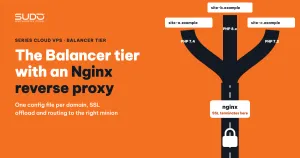
The balancer template is the familiar reverse proxy file from Nginx reverse proxy on the Balancer tier: an upstream block pointing to the minion IP, proxy_pass, and the X-Forwarded-* headers. The Cloudflare template can listen only on port 80 if SSL terminates at Cloudflare, or use an Origin Certificate for Full (strict) mode.
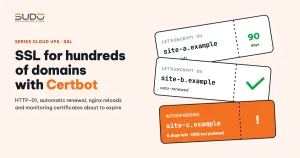
The Let's Encrypt scenario runs into a chicken-and-egg problem: the template already contains the path /etc/letsencrypt/live/[DOMAIN]/fullchain.pem, but the certificate only exists after certbot runs, and certbot needs nginx to already serve port 80. While the certificate does not exist, nginx -t fails. The fix is to split it into two phases, as in SSL for hundreds of domains with Certbot: generate a config with only port 80, run certbot certonly --nginx, and only then add the 443 block.
5. Common design risks in a first automated deployment pipeline
An automated deployment pipeline that runs is not necessarily a safe one. The design flaws below are very common in a first version:
| Point in the pipeline | Risk | The right way |
|---|---|---|
DROP DATABASE IF EXISTS before CREATE | Re-running it for a live site wipes out real data | Stop if the database exists. To start over, dump first |
rm -rf $DOMAIN then clone again | User-uploaded files are lost, and the site is down during the clone | Separate "create site" from "update code"; update into a new release directory and switch a symlink |
php artisan key:generate on every run | Changing APP_KEY kills sessions, and encrypted data can no longer be decrypted | Only generate a key when .env has none |
mysql -u root -p$PASSWORD | The password shows up in the process list and in logs | Use mysql_config_editor or a client file with mode 600 |
StrictHostKeyChecking=no, SSH as root | Spoofed hosts go undetected; a leaked key means root on every server | Pre-populate known_hosts, use a dedicated deploy user with limited privileges |
Substituting variables with sed | A password containing / or & breaks the command or writes a wrong .env | Generate .env with a tool that escapes values, or restrict the password character set |
composer install --ignore-platform-reqs | Installs packages that need a newer PHP than the minion has; errors only appear at runtime | Drop the flag so composer fails early when the wrong minion group is chosen |
6. Checklist for an automated deployment pipeline
Before handing the automated deployment pipeline to the whole team, check the following:
- Runs only on a manual click or an API call, never automatically on push.
- Checks state before acting: if the database, directory or config file already exists, it stops and says so clearly.
- Every step can be re-run: if it fails halfway, the next run can continue without manual cleanup.
- Templates are a contract: fixing a bug in a template fixes it for every site created afterward; a bug in a template is cloned just as widely, so templates need review like code.
- Secrets stay out of the repository: the SSH key lives in a File-type CI/CD Variable (masked, protected), and passwords never go through the command line.
- Always
nginx -tbefore reloading, and restore the old file on failure.
Simple as it is, a three-step automated deployment pipeline changes how the team works: creating a site is no longer a job for the one person who remembers the procedure, but a command with logs, a fixed order and repeatable results. The more complex automated deployment pipelines that come later can all grow out of this skeleton.
Next article
Speeding up websites with Laravel ResponseCache, Redis and Supervisor. Caching full responses for public pages, clearing exactly the right cache when content changes, and keeping queue workers alive with supervisor.