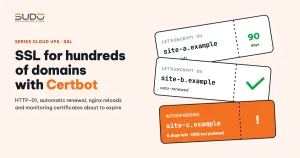
In a multi-site model on Cloud VPS, every site runs over HTTPS and the certificates live on the balancer tier. With hundreds of domains and Let's Encrypt certificates that only last 90 days, renewing by hand is impossible. The right tool is Certbot, the official ACME client developed by the EFF. This guide explains how HTTP-01 works, which Certbot mode to use on a balancer whose configuration files come from a template, how to renew automatically and reload nginx at the right moment, how to monitor certificates that are about to expire, the common errors, and a checklist for adding domains.
1. How Let's Encrypt and HTTP-01 work
Let's Encrypt issues free certificates over the ACME protocol. Before issuing, the CA needs proof that the requester really controls the domain. With the HTTP-01 challenge type, the flow is:
- Certbot on the balancer creates a certificate order for
example.com. - Let's Encrypt returns a random token.
- Certbot makes the URL
http://example.com/.well-known/acme-challenge/<token>return exactly the content the CA expects. - Let's Encrypt servers, from several vantage points on the Internet, resolve the DNS for
example.comand fetch that URL over port 80. - If the content matches, the CA signs the certificate and Certbot stores it in
/etc/letsencrypt/live/example.com/.
Three hard requirements follow: the domain's DNS record must point to the balancer running Certbot, port 80 must be open to the Internet, and requests to /.well-known/acme-challenge/ must not be blocked or redirected elsewhere. When these cannot be met, for example when the server cannot receive connections from the CA, you can use the DNS-01 challenge with a TXT record, covered in a separate article.
2. Choosing a Certbot mode: --nginx, certonly or webroot
| Command | Validation | Edits nginx config files? | Best when |
|---|---|---|---|
certbot --nginx | The nginx plugin injects a temporary location | Yes: adds SSL lines automatically, may add a redirect | Few sites per server, hand-written config |
certbot certonly --nginx | The nginx plugin injects a temporary location | No | Config generated from a template that must stay intact |
certbot certonly --webroot -w <dir> | Writes the token file to a directory | No, but every site needs a ready-made location for the challenge | You do not want Certbot touching nginx at all |
On the balancer, each site's config file should follow a fixed template, as described in the Balancer tier with Nginx reverse proxy. To stop Certbot from editing those files, use certonly --nginx: the nginx plugin handles validation (temporarily injecting the config that serves the token, then removing it), while the certificate paths in the config file are written by the operator or the template.
certbot certonly --nginx \
    -d example.com -d www.example.com \
    --non-interactive --agree-tos -m <ops-email>
The order of steps when adding a new site therefore matters. If the config file already has a listen 443 block pointing to /etc/letsencrypt/live/example.com/fullchain.pem before the certificate exists, nginx -t fails and every later reload fails too. The correct sequence:
- Create a config file with only a
listen 80block for the domain, thennginx -t && systemctl reload nginx. - Run Certbot to issue the certificate.
- Add the
listen 443block and the HTTP-to-HTTPS redirect, test and reload again.
With -m (the operations email), Let's Encrypt can send account-related notices. Do not treat email as your primary expiry alert; your own systems should handle monitoring (see section 4).
3. Automatic renewal with certbot.timer
The Certbot package on Debian ships a systemd timer that runs certbot renew twice a day, with a random delay so that clients do not all hit the CA at the same moment. The renew command only renews certificates with fewer than 30 days left, so running it often costs nothing.
# timer is enabled, and when it runs next
systemctl list-timers | grep certbot

# test the whole renewal flow against staging, nothing is really issued
certbot renew --dry-run

# list of certificates, domains and expiry dates
certbot certificates
Each certificate has a /etc/letsencrypt/renewal/<name>.conf file recording how it was issued (which plugin, which domains). Renewal reuses exactly that method, so a certificate issued with certonly --nginx is also renewed through the nginx plugin.
Deploy hook: reload nginx after renewal
Nginx loads certificates into memory at startup or on reload. Certbot writes the new file to disk, but if nginx is not reloaded it keeps serving the old certificate until it expires. The most reliable fix is a deploy hook, which runs every time a certificate is actually renewed:
# /etc/letsencrypt/renewal-hooks/deploy/reload-nginx.sh
#!/bin/sh
nginx -t && systemctl reload nginx

chmod +x /etc/letsencrypt/renewal-hooks/deploy/reload-nginx.sh
Scripts in the renewal-hooks/deploy/ directory apply to every certificate on the server, so you never declare them per domain. The nginx -t comes first so that one broken config file does not turn a renewal into an nginx outage. Hook options and execution order are covered in the Certbot user guide.
4. Monitoring certificates that are about to expire
The timer and the hook handle most cases, but never trust a single mechanism completely. Add an independent check, seen from the user's side, that runs periodically:
#!/bin/bash
# list domains with Let's Encrypt SSL on the balancer, warn about certificates with under 14 days left
for f in /etc/nginx/conf.d/*.conf; do
    grep -q 'letsencrypt' "$f" || continue
    d=$(basename "$f" .conf)
    end=$(echo | openssl s_client -servername "$d" -connect 127.0.0.1:443 2>/dev/null \
          | openssl x509 -noout -enddate | cut -d= -f2)
    left=$(( ( $(date -d "$end" +%s) - $(date +%s) ) / 86400 ))
    [ "$left" -lt 14 ] && echo "WARNING $d: $left days left ($end)"
done
This script asks nginx itself which certificate it is serving (via openssl s_client with SNI) instead of reading files on disk. That way it also catches the case where the file has been renewed but nginx has not been reloaded. For any domain on the warning list, run certbot renew --cert-name <domain> to see the exact error.
A very common source of false alarms: a domain that is no longer used, or that now points elsewhere, while its config file and certificate are still on the balancer, so Certbot keeps trying to renew and keeps failing. When you remove a site, remove its certificate too with certbot delete --cert-name example.com.
5. Let's Encrypt limits you need to know
Let's Encrypt enforces several rate limits; the exact numbers can change, so always check the official page. Three groups of limits matter most when working with many domains:
- Failed validations: only a few per hour per account and hostname. Re-running Certbot over and over while DNS is still wrong hits this limit very quickly.
- Duplicate certificates: the number of certificates per week for the exact same set of domains is capped at a low level.
- Certificates per registered domain: there is a weekly ceiling per registered domain. This matters when you create large numbers of demo subdomains under one domain.
When testing a new process, use --dry-run or --staging. The staging environment has much more generous limits and does not count against your production quota.
6. Common errors when issuing SSL with Certbot
The domain does not point to the balancer yet
The usual messages are Invalid response from http://example.com/.well-known/acme-challenge/...: 404 or Timeout during connect (likely firewall problem). The CA reached a server other than the balancer running Certbot, or could not connect to port 80. Always check before running:
dig +short example.com A
dig +short www.example.com A
curl -sI http://example.com/.well-known/acme-challenge/test
Both the main domain and www must point correctly, because a single wrong name in -d fails the whole order. If the domain owner has just changed DNS, wait for the old record's TTL to expire before running, instead of retrying repeatedly and hitting the failed validation limit.
The domain is behind the Cloudflare proxy
When a record has the proxy enabled (orange cloud), dig returns Cloudflare's IP rather than the balancer's IP, so do not use that result to conclude DNS is wrong. The validation request passes through Cloudflare before reaching the balancer. Most of the time it still works, but settings such as forced HTTPS, firewall rules or bot protection modes can block or redirect requests to /.well-known/acme-challenge/. The safest approach for the first issuance is to switch the record to DNS only temporarily and turn the proxy back on after the certificate is issued.
Duplicate certificate: example.com-0001
Running Certbot for a domain that already has a certificate but with a different -d list (adding or dropping www) can create a new certificate named example.com-0001. The nginx config still points to the old directory, both certificates keep getting renewed, and the operator has no idea which one is in use. The correct approach:
# expand the existing certificate instead of creating a new one
certbot certonly --nginx --cert-name example.com --expand \
    -d example.com -d www.example.com -d shop.example.com

# delete the duplicate once you are sure no config file still points to it
grep -r 'example.com-0001' /etc/nginx/conf.d/ || certbot delete --cert-name example.com-0001
7. Certbot checklist for adding and removing domains
- DNS for the domain and
wwwpoints to the right balancer (or is temporarily DNS only when using Cloudflare). - Port 80 is open, and
/.well-known/acme-challenge/is neither blocked nor redirected. - The config file has only the port 80 block before issuance; add the 443 block once the certificate exists.
- Issue with
certonly --nginx; expand with--cert-nameplus--expand. certbot.timeris enabled, the deploy hook is executable, andcertbot renew --dry-runsucceeds.- The SNI-based expiry check runs periodically and someone receives its alerts.
- When removing a site,
certbot deletethe matching certificate.
Running Certbot on each balancer keeps things simple: certificates live exactly where they are used, with no syncing between servers. The cost is that certificates are tied to a balancer: moving a site to another balancer means issuing again on the new server once DNS points there, and monitoring has to run on every server. Earlier articles in the series are available in the Sudo engineering blog.
Next article
First automated deployment: GitLab Runner, SSH and nginx templates. From adding sites by hand to a pipeline that creates the database, pulls the code, generates nginx config from a template and issues SSL in a single run.