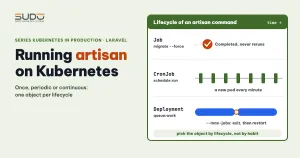
Running artisan on Kubernetes is very different from running it on a VPS: there is no long-lived machine to SSH into, no operating-system crontab, and every process has to belong to an object with a clear lifecycle. The easiest way to pick the right object for artisan on Kubernetes is to classify commands by lifecycle: run once, like migrate; run periodically, like schedule:run; and run continuously, like queue:work. This article walks through each type, points out where initContainer is often misunderstood, and says plainly where we could not reach a conclusion.
If Pods, Deployments and basic manifests are new to you, read your first Kubernetes manifest first. The image used here is the Laravel image audited in auditing a Laravel image for Kubernetes.
Three types of artisan tasks on Kubernetes
| Lifecycle | Example command | Matching object |
|---|---|---|
| Once | migrate --force | Job, restartPolicy: Never |
| Periodic | schedule:run | CronJob, one minute at minimum |
| Continuous | queue:work | Deployment |
For artisan on Kubernetes, all three types share the web image and differ only in the start command. They should read environment variables from the same ConfigMap and Secret as the site (see ConfigMap and Secret for Laravel). Otherwise the worker and the web app can talk to two different databases and nobody notices.
Running migrate: Job, initContainer and postStart
The first time you run artisan on Kubernetes, the first error is usually Base table or view not found: the application connects to the database, but the tables do not exist yet. There are three places to run migrate, and this is where mistakes are easiest to make.
A dedicated Job
For artisan on Kubernetes, a Job is the clearest choice when a command runs only once. Remember --force: in production Laravel asks for confirmation before migrating, and a pod has no terminal, so the command stops at that prompt.
apiVersion: batch/v1
kind: Job
metadata:
  name: migrate-v1
spec:
  backoffLimit: 0
  ttlSecondsAfterFinished: 3600
  template:
    spec:
      restartPolicy: Never
      containers:
        - name: migrate
          image: registry.example.com/site-a:1.0
          workingDir: /var/www/html
          command: ["php", "artisan", "migrate", "--force"]
          envFrom:
            - configMapRef:
                name: site-a-config
            - secretRef:
                name: site-a-secret
The sample manifests assume the code lives in /var/www/html. If your image puts it elsewhere, fix workingDir or WORKDIR, or php artisan will report that it cannot find the file.
A common mistake when copying artisan on Kubernetes manifests is wrong indentation, which leaves envFrom outside the container element. Depending on the kubectl version, the manifest is rejected or the field is ignored, and the container runs with no environment variables at all. Run kubectl apply --dry-run=server first.
While the Job still exists, applying it again will not rerun it, because spec.template cannot be modified. The sample above has ttlSecondsAfterFinished, so once the Job is deleted, applying the same name creates a new Job and runs migrate again. That is why you should name Jobs after the version, or delete the old Job and apply on purpose. With Helm, put the annotation helm.sh/hook: pre-install,pre-upgrade (the first install needs migrations too) and helm.sh/hook-delete-policy: before-hook-creation on the Job.
initContainer
An init container runs in the same Pod as the main container, sequentially, and each one must exit successfully before the next starts. Two misconceptions to avoid: it is not a separate pod, because it shares the network and volumes with the pod; and it does not wait for the database to be ready on its own. If migrate fails because it cannot connect, the pod shows Init:Error and then Init:CrashLoopBackOff.
postStart
The lifecycle.postStart hook runs in parallel with the ENTRYPOINT, and the Kubernetes documentation does not guarantee that it finishes first. It runs again every time the container starts. For migrate this is the worst option: no ordering, no separate log, and it multiplies with the number of pods.
Why an initContainer cannot migrate when MySQL is in the same pod
A common test setup puts both the application and MySQL in one pod and uses an init container to migrate. This always fails: every init container finishes before the regular containers start, and MySQL is one of those. When migrate runs, MySQL has not started yet, so the connection is refused.
The root cause of this artisan on Kubernetes failure is design. Two containers that depend on each other's timing should not share a pod. The database should be its own workload with its own Service, and migrate should run after the database is ready. Native sidecars (an init container with restartPolicy: Always, which requires Kubernetes 1.28 or later and is enabled by default from 1.29) may help, but we have not verified them for this case.
Several replicas running artisan on Kubernetes at once
If you put migrate in the init container of a multi-replica Deployment, every new pod runs migrate, and during a rolling update several pods may run it almost simultaneously. Two pods running at the same time can both see the same unapplied migration, so even a simple migration can conflict (for example a "table already exists" error) and make the init container exit with an error; migrations that modify data are riskier still. Try it yourself on a test cluster. Laravel has migrate --isolated, which takes a lock through the cache, but it needs a shared cache driver; we have not tried this option. Also, during a rolling update the old pods keep running old code against the changed schema, so migrations must be backward compatible with the code version that is running. A safer way to run artisan on Kubernetes is to separate the steps:
kubectl apply -f migrate-job.yaml
kubectl wait --for=condition=complete job/migrate-v2 --timeout=300s
kubectl rollout restart deployment/app
Note: when you run artisan on Kubernetes through a Job and the Job fails, the wait command above keeps waiting until --timeout expires before it reports the failure. You can run kubectl wait --for=condition=failed job/migrate-v2 in parallel, or check kubectl logs job/migrate-v2 when the wait runs too long.
Scheduler: a CronJob running schedule:run every minute
The Laravel scheduler needs php artisan schedule:run to be called every minute, so artisan on Kubernetes needs an object that runs periodically. A CronJob with the schedule * * * * * does exactly that: every minute a pod runs for a few seconds and ends up Completed.
apiVersion: batch/v1
kind: CronJob
metadata:
  name: schedule
spec:
  schedule: "* * * * *"
  concurrencyPolicy: Forbid
  startingDeadlineSeconds: 30
  successfulJobsHistoryLimit: 3
  failedJobsHistoryLimit: 3
  jobTemplate:
    spec:
      backoffLimit: 1
      template:
        spec:
          restartPolicy: Never
          containers:
            - name: schedule
              image: registry.example.com/site-a:1.0
              workingDir: /var/www/html
              command: ["php", "artisan", "schedule:run"]
              resources:
                requests: { cpu: 50m, memory: 128Mi }
                limits: { memory: 256Mi }
concurrencyPolicy: Forbidprevents two runs from overlapping.startingDeadlineSecondslimits catch-up runs after a missed schedule.- The two history limits keep the last few pods around so you can read their logs.
restartPolicy: Neverwith a smallbackoffLimit: withOnFailure, the wholeschedule:runpass is rerun on failure, which can repeat tasks that have side effects (sending mail, writing data).- Do not redirect output to
/dev/null, orkubectl logshas nothing left to read.
The alternative for artisan on Kubernetes scheduling is to run crond and supervisord inside the web container. This adds no objects, but cron multiplies with the number of replicas and shares the memory limit with the web process. We have not measured the two approaches against each other. Pick one and let the scheduler run in exactly one place.
Worker: a Deployment running queue:work continuously
An artisan worker on Kubernetes is a continuous process, so use a Deployment, separate from the web pod so it can scale independently. Set limits so a long-running PHP process does not grow memory without bound.
command: ["php", "artisan", "queue:work", "--queue=default",
"--max-jobs=200", "--timeout=90", "--memory=256"]--max-jobs: the artisan on Kubernetes worker exits after this many jobs and Kubernetes restarts the container. A slowly risingRESTARTScolumn is normal.--memory: measured in MB and checked only after a job finishes. The container'slimits.memoryshould be larger than this value so the worker exits on its own before it is OOMKilled.--timeout: should be smaller thanretry_afterof the queue connection.
For artisan on Kubernetes workers, set terminationGracePeriodSeconds larger than --timeout so the worker can finish its job during a rollout. See also the Laravel Queues documentation.
Pod Pending with Insufficient cpu: the default request equals the limit
When you run artisan on Kubernetes on a small cluster and the total CPU requests are nearly full, a new pod (web or worker) gets stuck Pending with the event Insufficient cpu. One contributing factor is a manifest that declares only limits.cpu and no requests.cpu: according to the Kubernetes documentation, when a limit is set without a request, the request defaults to the limit. A worker that declares only a 500m limit is counted by the scheduler as needing 500m of free room even if it uses a few dozen m; lowering it to 100m, or setting a low request with a high limit, frees room for other pods. To confirm, check the Requests section of kubectl describe pod and the Allocated resources section of kubectl describe node. How to read the real free capacity is covered in Pod Pending with Insufficient cpu.
Queue stops processing while supervisor reports RUNNING: a diagnostic method
This is the part where we could not pin down the cause of a hung artisan on Kubernetes. The situation: the worker runs under supervisord, supervisorctl status reports RUNNING, but the worker log stops at the RUNNING line of one job with no DONE line. Deleting the stuck job makes the worker run again. Installing pcntl and tuning the memory option did not fix it; the final suspicion is the job code, but there is no evidence. What is worth keeping is the diagnostic method:
- Supervisor's RUNNING only tells you the process is alive. Use
psto see the real state and arguments ofqueue:work. - A
RUNNINGline withoutDONEmeans the job has not finished. The job may be making an HTTP call or waiting for a database lock with no timeout (a hypothesis, not confirmed). - Check
php -m | grep pcntl. According to the Laravel documentation, job timeouts need this extension. In the case we drew from,pcntlwas already installed and the worker still hung, so this is a step of elimination, not an established cause. - With the database driver, look at the
reserved_atcolumn of thejobstable and at thefailed_jobstable.
Checklist for artisan on Kubernetes
- Artisan on Kubernetes for production migrations: a dedicated Job or a Helm hook, with
--force, wait for it to finish, then roll out. - Do not use an init container to migrate when the database is in the same pod; migrations must stay backward compatible during rolling updates.
- A CronJob with
concurrencyPolicy, history limits, resources and logs to stdout. - An artisan worker on Kubernetes with
--max-jobs, a--timeoutsmaller thanretry_after, a long enough grace period, andlimits.memorylarger than--memory. - Declare
requestsseparately for every artisan on Kubernetes pod; do not let the request default to the limit. - Every artisan command on Kubernetes runs in the application directory (
WORKDIRorworkingDir).
Reference documentation: CronJob and Init Containers. In short, artisan on Kubernetes works best when every command has exactly one owner and a clear lifecycle.
Next article
413 and 504 errors on Kubernetes: body limits, timeouts and headers across layers. When a large file import fails, you need to know which layer in the proxy chain blocked it.