A typical situation: a Laravel site runs on the cluster, an admin imports an XML file of about 45 MB and gets a 413 error, Request Entity Too Large. You change client_max_body_size in the pod's nginx, change post_max_size in php.ini, rebuild the image, redeploy: the 413 error is still there, even for a 2 MB file. After you get past that error, the import may fail with 504 errors. 413 errors and 504 errors share one root: on Kubernetes a request passes through several proxy layers, and each layer has its own limit. This article shows how to work out which layer is causing the 413 and 504 errors from the logs, and then move the limits into configuration.
If you only run nginx and PHP-FPM on a VPS, read the nginx reverse proxy article for the basic proxy chain. This article adds one more layer, the Ingress, which was introduced in Ingress and NodeBalancer.
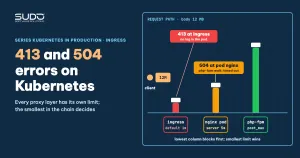
413 and 504 errors: how many layers a request crosses before PHP
For a site that uses ingress-nginx, an upload request crosses four layers, each with a limit on body size, wait time or header size:
- Client, CDN or NodeBalancer at the outermost edge: a CDN (for example Cloudflare) has its own body-size limit and timeout depending on the plan, while a NodeBalancer or front proxy depends on its mode; check the documentation of the service you use.
- ingress-nginx: a standalone nginx that runs outside your pod.
- nginx in the pod: the nginx of the application image, in front of PHP-FPM.
- PHP-FPM and PHP:
post_max_size,upload_max_filesize,max_execution_time.
The layer that is easiest to miss is the second one. The Ingress is not your configuration; it is a different nginx with its own defaults. Changing the nginx in the pod cannot raise the limit of the nginx in front of it, so the 413 error does not change.
413 error: why editing nginx.conf in the pod has no effect
According to the ingress-nginx documentation, the annotation nginx.ingress.kubernetes.io/proxy-body-size defaults to 1m. Any request with a body larger than that is answered by the ingress with a 413 error and is never forwarded to the pod. That is why editing files inside the pod does not change the result. The most telling symptom is that even a file as small as 2 MB fails, far below the value you set in the pod.
How to check the effective value on the ingress:
kubectl get ingress app -o yaml | grep -i body-size
kubectl -n ingress-nginx exec deploy/ingress-nginx-controller -- grep -n client_max_body_size /etc/nginx/nginx.conf
The correct annotation is proxy-body-size. Some guides online mention client-max-body-size as an ingress-nginx annotation, but it is not in the list of standard annotations, so do not rely on it. The default is 1m according to the ingress-nginx documentation, but if the cluster admin changed it through the ConfigMap the effective value differs, so verify with the two commands above.
metadata:
  annotations:
    nginx.ingress.kubernetes.io/proxy-body-size: "128m"
413 error across three limits: a test and the conclusion on overrides
To learn which layer wins when a 413 error occurs, a compact test is to set three different values in three places, then upload files whose sizes fall between them:
| Where it is set | Test value |
|---|---|
Ingress (proxy-body-size) | 10m |
nginx in the pod, http block | 1m |
nginx in the pod, server block | 5m |
- 4.7 MB file: passes. It is larger than the 1m of the
httpblock, so theserverblock overrode it. - 7.4 MB file: blocked by the nginx in the pod, with the log line
client intended to send too large body. - 12 MB file: blocked by the Ingress, and there is no log in the pod at all.
The correct nginx mechanism is that a directive set in a more specific block overrides the enclosing block; it is not a case of "the narrower value wins". Between the Ingress and the pod the two layers are independent, so the effective value is the smallest value in the chain. We have not tested the location level. In theory each request is handled in a single location, so a directive set in location / does not apply to a request that has moved to location ~ \.php$. That is inference; try it yourself on a test cluster.
One more note on the fourth layer: with plain PHP, a body that exceeds post_max_size leaves $_POST and $_FILES empty, with a POST Content-Length ... exceeds the limit warning in the PHP log, so the upload "succeeds" but there is no file. Laravel is different: the ValidatePostSize middleware (in the global middleware by default) compares Content-Length with post_max_size and throws PostTooLargeException, and the application returns a 413 error with a "Payload Too Large" page. So a 413 can still be generated by the application, not only by nginx.
Identifying the layer behind a 413 error from the logs
| Observation | Blocking layer |
|---|---|
| Returns 413, the ingress log has the request line, the nginx log in the pod shows nothing | ingress-nginx |
Returns 413, the nginx log in the pod has client intended to send too large body | nginx in the pod |
Returns 413 ("Payload Too Large" page), the nginx access log in the pod has the request line, the nginx error log has no too large body, the Laravel log has PostTooLargeException | Laravel application (post_max_size) |
Upload finishes but the file is empty, no HTTP error (plain PHP, no ValidatePostSize) | PHP (post_max_size) |
So the first question when you hit 413 errors is whether you see any log line in the pod. No log means the request never reached the pod, and you should not waste time editing the nginx in the pod.
The nginx log trap: separate log files do not show in kubectl logs
Many images declare a separate log per site, for example error_log /var/log/nginx/web.error. This file lives inside the pod, kubectl logs cannot see it, and you can only read it with kubectl exec. When diagnosing a 413 error, a common misunderstanding is to see access.log symlinked to /dev/stdout, conclude that it "cannot be read", and remove the symlink. When nginx is the main process (PID 1) of the container, that very symlink is what sends logs to kubectl logs, so keep it.
access_log /dev/stdout;
error_log  /dev/stderr warn;
The important condition is how the image runs nginx. If nginx runs under supervisord, nginx's /dev/stdout is a pipe to supervisord and not the container's stdout, so logs may still not appear in kubectl logs. In that case point the nginx program's logs in supervisor to /dev/fd/1 and /dev/fd/2:
[program:nginx]
stdout_logfile=/dev/fd/1
stdout_logfile_maxbytes=0
stderr_logfile=/dev/fd/2
stderr_logfile_maxbytes=0
Also check write permissions: an nginx worker running as a non-root user may hit permission denied when opening /dev/stdout. This is one possible reason logs are "unreadable"; confirm it on your own image.
After the 413 error come 504 errors: timeouts at two tiers
Once you get past the 413 error, the import step often runs for a long time and ends in 504 errors (504 Gateway Time-out). Like body limits, 504 errors come from timeouts that sit in two independent places:
- Ingress:
proxy-read-timeout(default 60 seconds), along withproxy-send-timeout. - nginx in the pod waiting for PHP-FPM:
fastcgi_read_timeout(default 60 seconds). - PHP:
max_execution_time, and FPM'srequest_terminate_timeoutif it is set.
A common mistake behind 504 errors on large imports is to raise only the Ingress proxy-read-timeout very high and still not have enough. The pod log then has the line upstream timed out (110: Operation timed out) while reading response header from upstream with the upstream being fastcgi://127.0.0.1:9000. That line says the request got past the ingress and the nginx in the pod is where time ran out. You need to raise both tiers to clear the 504 errors. If the image already sets fastcgi_read_timeout 180 and the import still times out, the value must exceed the real processing time, not just the default. If a CDN sits in front, its timeout may show a code other than nginx's 504 errors (for example Cloudflare returns 524).
Another common mistake is adding proxy_connect_timeout to the nginx in the pod. That directive applies only to proxy_pass, not to fastcgi_pass, so it cannot fix 504 errors coming from PHP-FPM. The right directive for PHP-FPM is fastcgi_read_timeout, together with max_execution_time. If an import succeeds after such a change, that does not prove cause and effect; try it yourself with fastcgi_read_timeout.
location ~ \.php$ {
    # keep the existing fastcgi_params include and SCRIPT_FILENAME lines
    fastcgi_pass 127.0.0.1:9000;
    fastcgi_read_timeout 300;
}
The snippet above is only an excerpt of an existing location block, not a full configuration.
For tasks that run for minutes, such as an import, the most durable cure for 504 errors is to push the work to a queue (see running artisan on Kubernetes) instead of stretching the timeouts of every layer.
Move the limits for 413 and 504 errors into configuration instead of editing the pod
Edits made directly in the pod are lost on the first restart, and the 413 error and 504 errors come back, so every limit should go into declarative configuration. With Helm, put them in values.yaml so the generated Ingress already carries the annotations:
ingress:
  annotations:
    nginx.ingress.kubernetes.io/proxy-body-size: "128m"
    nginx.ingress.kubernetes.io/proxy-read-timeout: "600"
    nginx.ingress.kubernetes.io/proxy-send-timeout: "600"
The nginx and PHP in the pod should come from a ConfigMap or from the image, with values in the same order: Ingress greater than or equal to the pod's nginx, and post_max_size larger than upload_max_filesize. Timeouts follow the same rule for 504 errors: the Ingress value should not be shorter than the pod's. ingress-nginx configuration in general is covered in ingress-nginx and cert-manager.
400 error: oversized header or cookie
Besides 413 errors and 504 errors, the third error in the same family is 400 Bad Request: Request Header Or Cookie Too Large. This is the nginx message when a header exceeds the buffer. The default of large_client_header_buffers is 4 8k. One fix is to raise it in the server block of the pod's nginx, for example large_client_header_buffers 4 32k;. We have not confirmed which layer generates the error in each specific case. If the Ingress causes it, you need to adjust the large-client-header-buffers key in the ingress-nginx ConfigMap. Apply the same method: see which layer has the request line in its log.
Checklist for 413 and 504 errors
- On a 413 error: check the pod log first; if there is no log, fix the Ingress.
- If the pod has a request log but the nginx error log has no
too large bodyline: checkpost_max_sizeand the application log (Laravel returns 413 throughValidatePostSize). - To prevent 413 errors, set
proxy-body-sizeon the Ingress,client_max_body_sizein the pod'sserverblock, and a correspondingly large value in PHP. - On 504 errors: look for the
upstream timed outline, then raise both timeout tiers. - To keep 504 errors from returning, put every value in values or a ConfigMap; do not hand-edit inside the pod.
- Send the site's logs to stdout and stderr; if nginx runs under supervisord, use
/dev/fd/1and/dev/fd/2.
Reference documentation: ingress-nginx annotations and client_max_body_size on nginx.org.
Next article
Kubeconfig for developers per namespace: ServiceAccount, Role and the risks. When developers need to read pod logs themselves, as in this article, how do you grant them access without handing over the whole cluster?