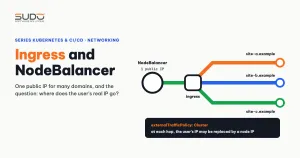
In the previous articles, pods got IPs and a Service grouped many pods behind one stable address. But that address only exists inside the cluster. The browsers of people visiting the website are out on the Internet. This article answers the remaining question before building a cluster for Website AI: which path does a request from the Internet take to reach a pod, what role does the Linode NodeBalancer play, and why is Ingress the sensible way for many domains to share one entry point. The last part covers externalTrafficPolicy, a small setting that decides whether the application can see the user's real IP.
On Cloud VPS this job belongs to the balancer tier, as in the article The Balancer tier: Nginx reverse proxy, SSL offload and domain routing. Kubernetes splits the job into several smaller pieces, and you need to understand each piece to avoid surprise bills.
1. Three Service types and the path from the Internet
The article Pod, Deployment, Service and Namespace introduced the ClusterIP Service type. Kubernetes has two more types directly related to external traffic:
| Service type | Who can reach it | How it works |
|---|---|---|
ClusterIP (default) | Only pods inside the cluster | An internal virtual IP; kube-proxy forwards to the pods matching the selector |
NodePort | Anyone who can reach a node's IP | Opens the same port (default range 30000–32767) on every node, then forwards into the Service |
LoadBalancer | The Internet | Like NodePort, plus an external load balancer created by the cloud provider, pointing at the nodes' NodePort |
These three types are nested: LoadBalancer includes a NodePort, and NodePort includes a ClusterIP. Using NodePort directly for a website does not work well: users would have to type port 3xxxx, node IPs change when nodes are replaced, and nothing checks which nodes are still alive. So for real traffic the answer is almost always LoadBalancer, and on Linode that means a NodeBalancer.
2. NodeBalancer: the LoadBalancer Service on Linode
NodeBalancer is Linode's built-in load balancing service: one public IP that accepts connections and spreads them across several machines behind it, with health checks. On LKE you do not create the NodeBalancer yourself. The Linode Cloud Controller Manager (CCM) runs in the control plane, watches Services of type LoadBalancer and handles the Linode side automatically:
- When it sees a new
type: LoadBalancerService, the CCM calls the Linode API to create a NodeBalancer. - Each port of the Service becomes a configuration on the NodeBalancer. The backends are each node's private IP plus the NodePort.
- The NodeBalancer's public IP is written to the Service's
status.loadBalancerand shows up in theEXTERNAL-IPcolumn. - When nodes are added, removed or replaced, the CCM updates the backend list. When the Service is deleted, the CCM deletes the NodeBalancer too.
apiVersion: v1
kind: Service
metadata:
  name: web
  namespace: site-a-example-com
spec:
  type: LoadBalancer
  selector:
    app: web
  ports:
  - name: http
    port: 80
    targetPort: 80
Right after creation, the EXTERNAL-IP column of kubectl get svc shows <pending>, then changes to the NodeBalancer's IP once the CCM finishes creating it.
NodeBalancer behavior (TCP or HTTP, health checks, Proxy Protocol…) is tuned with annotations prefixed service.beta.kubernetes.io/linode-loadbalancer- on the Service. The full list is in the CCM README and in the Linode NodeBalancer documentation.
Two consequences to keep in mind from the start:
- Each LoadBalancer Service is one NodeBalancer, and each NodeBalancer is billed separately every month. Ten websites, each with its own LoadBalancer Service, means ten NodeBalancers and ten public IPs.
- The IP follows the Service object. Delete the Service, or uninstall a chart that created it, and the NodeBalancer is deleted and the IP goes back to Linode. Every DNS record pointing at the old IP breaks.
3. What Ingress is and what an ingress controller does
The first consequence is the reason Ingress exists. Ingress is a Kubernetes object describing HTTP routing rules: which host and which path go to which Service. The Ingress object itself does not handle any requests. It is only configuration. The part that actually runs is the ingress controller: one (or a few) reverse proxy pods that read every Ingress in the cluster and generate their own configuration from them.
LKE does not ship with an ingress controller. You choose and install one yourself. The most popular are ingress-nginx (a Kubernetes community project that uses nginx internally) and Traefik. For a team already used to nginx on Cloud VPS, ingress-nginx is the natural choice. The official documentation for this object is on the Ingress page on kubernetes.io.
          Internet
             │  :80 / :443
             ▼
   ┌─────────────────────────┐
   │ NodeBalancer (public IP)│   created by the CCM for ONE LoadBalancer Service
   └────────────┬────────────┘
                │  node private IP : NodePort
                ▼
   ┌─────────────────────────┐
   │ ingress controller pod  │   reads every Ingress, picks a target by Host + path
   └──────┬───────────┬──────┘
          │           │   each site's ClusterIP Service
          ▼           ▼
   ┌───────────┐ ┌───────────┐
   │ pod site A│ │ pod site B│   site-a.example, example.com
   └───────────┘ └───────────┘
An Ingress for two domains pointing to two different Services looks like this. Each website still only needs a ClusterIP Service:
apiVersion: networking.k8s.io/v1
kind: Ingress
metadata:
  name: web
  namespace: site-a-example-com
spec:
  ingressClassName: nginx        # which controller handles this Ingress
  rules:
  - host: site-a.example
    http:
      paths:
      - path: /
        pathType: Prefix
        backend:
          service:
            name: web            # site A's ClusterIP Service
            port:
              number: 80
The ingressClassName field points to an IngressClass, which says which controller is responsible. The old kubernetes.io/ingress.class annotation still appears in many guides, but it was replaced by this field in Kubernetes 1.18.
4. One NodeBalancer for many domains through Ingress
Put the two pieces together: only the ingress controller's Service has type: LoadBalancer, so the whole cluster has just one NodeBalancer and one public IP. Every domain points its A record at that IP, and the controller reads the Host header and routes to the right site. Adding a new website just means adding another Ingress.
Architecturally, this is the Cloud VPS balancer tier moved inside the cluster: the NodeBalancer holds the public IP, and the ingress controller does the job of the nginx reverse proxy (routing by domain, terminating TLS, redirecting to HTTPS). The only difference is that configuration is no longer files in /etc/nginx/conf.d/ but Ingress objects sitting next to each site's Deployment.
| Approach | Number of NodeBalancers | Pros | Cons |
|---|---|---|---|
| One LoadBalancer Service per site | Equal to the number of sites | Sites are fully independent at the network layer | Cost grows with the number of sites, one IP per site, TLS must be handled in each pod |
| One ingress controller for all | 1 | Cheap, one IP, TLS and shared rules in one place | The controller becomes a shared gateway: a config error or overload affects every site |
The downside in the second row is nothing new: the Cloud VPS balancer was also a shared point of failure. The difference is that the controller can run several replicas across several nodes.
5. externalTrafficPolicy: Cluster or Local
LoadBalancer and NodePort Services have an externalTrafficPolicy field, which decides how the node receiving traffic handles packets when the target pod is not on that node.
Cluster (default) | Local | |
|---|---|---|
| Node without a target pod | Still accepts traffic and forwards it to another node that has a pod | Does not accept it. The load balancer's health check sees that node as "down" and skips it |
| Source address seen by the pod | SNATed to the forwarding node's IP | Keeps the source address of the packet that reached the node |
| Load distribution | Even across pods, may add a network hop | Only nodes with pods receive traffic, easily unbalanced if pods per node are uneven |
Kubernetes explains this mechanism clearly in the tutorial Using Source IP. With Cluster, kube-proxy has to rewrite the source address so the reply packet returns along the right path. The price is that the pod no longer knows who sent the request.
Why the application behind Ingress only sees internal IPs
On LKE, the user's real IP can be lost at two layers, and many people only know about one:
- The NodeBalancer layer. A NodeBalancer is a proxy: it accepts the user's connection and opens a new connection to the node. In TCP mode, the node sees the NodeBalancer's address, not the user's. To pass the real IP through this layer, the NodeBalancer must enable Proxy Protocol (via a CCM annotation), and the ingress controller must enable reading Proxy Protocol to match.
- The kube-proxy layer. With
externalTrafficPolicy: Cluster, packets reaching a node that has no controller pod are SNATed when forwarded to another node.
The consequence is not just logs full of internal IPs: $request->ip() in Laravel, per-IP rate limiting, blocking bad IPs and geographic statistics are all wrong as a result. Switching externalTrafficPolicy to Local only removes the second layer. The first layer remains unless you set up Proxy Protocol.
Proxy Protocol has its own trap: it must be enabled on both sides at the same time. If one side sends it and the other does not expect it, or the other way around, every request fails. Changing this setting on a running cluster needs a plan, not a hurried one-line edit.
6. Common errors with Ingress and NodeBalancer
EXTERNAL-IPstuck at<pending>: the CCM could not create the NodeBalancer. Runkubectl describe svcto read the events: a wrong annotation value, an exceeded account limit, or an API call error.- Creating an Ingress and nothing happens: the cluster has no ingress controller yet, or
ingressClassNamedoes not match any IngressClass name. The Ingress object is still created successfully; nobody reads it. - 404 from the default backend: the
Hostheader matches no rule, usually becausewwwis missing or DNS points to the wrong place. - Losing the public IP after reinstalling the controller: uninstalling the chart and installing it again deletes the old Service and creates a new one, which brings a new NodeBalancer with a new IP. DNS has to be changed for every domain.
Localwith a single controller replica: only one node receives traffic. If that node is busy or being replaced, every website stalls.
7. Key points before building a cluster
A checklist of the groundwork before creating a cluster, together with the series of articles from What is Kubernetes to PersistentVolume, PVC and StorageClass:
- Websites only need
ClusterIPServices. The gateway to the Internet should be consolidated into a single ingress controller, and only that controller uses aLoadBalancerService. - The NodeBalancer's IP is tied to the Service object. Treat the controller's Service as an asset to protect: do not delete it, and do not uninstall the chart casually.
- Ingress is where per-domain rules live. TLS will also terminate here, so certificates must be issued and renewed automatically inside the cluster, replacing certbot on the balancer.
- To get the user's real IP, you have to account for both layers, the NodeBalancer and kube-proxy, not just change
externalTrafficPolicy.
Next article
Building the first LKE cluster: node pools, kubeconfig and early choices. Creating a cluster for Website AI: choosing a region and node size, getting the kubeconfig, and limiting who holds the keys to the cluster.