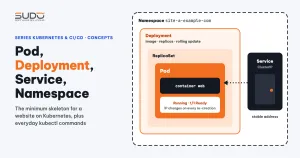
In the What is Kubernetes article, the control plane, nodes and pods were introduced at the concept level. This article moves on to the objects developers will deal with every day once a Website AI site runs on Kubernetes: Namespace to separate sites, Pod and its lifecycle, Deployment and ReplicaSet to keep the right number of replicas running and swap versions without downtime, and Service to give the pods a stable address. At the end are the basic kubectl commands and the errors every beginner will run into. The YAML here is a minimal learning sample that you can apply to a test cluster.
1. Namespace: one namespace per website
A Namespace splits a cluster into separate name spaces. Two objects with the same name can exist in two different namespaces. For Website AI, an effective convention is one namespace per website, named after the domain with dots replaced by hyphens: site-a.example.com becomes site-a-example-com. Namespace names must follow DNS label rules: lowercase letters, digits and hyphens, at most 63 characters.
This convention brings a few clear benefits:
- Everything belonging to one site (Deployment, Service, configuration, secrets) sits in one place.
kubectl get all -n site-a-example-comshows it all. - Permissions per namespace: give developers access to the logs of exactly the sites they are responsible for.
- Remove a site with
kubectl delete namespace: every object inside is deleted with it, except cluster-level resources such as PersistentVolumes. On Cloud VPS, removing a site means deleting the directory, the nginx config, the cron line and the supervisor file across several machines. - Set resource limits (ResourceQuota) per site if needed.
2. The Pod and its lifecycle
A pod goes through the following phases:
| Phase | Meaning |
|---|---|
Pending | Accepted by the API server but not running yet: waiting to be scheduled onto a node or pulling the image |
Running | Bound to a node, at least one container is running |
Succeeded | All containers finished successfully and will not restart (common with Jobs) |
Failed | All containers have finished, at least one with an error |
Unknown | The state cannot be obtained, usually because contact with the node was lost |
Within the Running phase, each container has its own state: Waiting, Running or Terminated. Words like CrashLoopBackOff or ImagePullBackOff that appear in the STATUS column are actually the reason a container is in the Waiting state.
The most important point: a pod does not resurrect itself. Kubelet can restart containers inside a pod, but if the pod is deleted or the node dies, that pod is gone for good. Creating a replacement pod is the job of a controller, most commonly a Deployment.
3. Deployment and ReplicaSet: keeping the right number of replicas
A Deployment says "I want N pods running from this template". The Deployment does not create pods itself; it creates a ReplicaSet, and the ReplicaSet is what ensures exactly N pods exist. The chain is Deployment → ReplicaSet → Pod, and pod names reflect that chain exactly:
site-a-example-com-<pod template hash>-<5 random characters>
└─ Deployment name ┘└──── ReplicaSet ────┘└──── Pod ────┘
A sample Deployment and Service for a Website AI site, using the all-in-one image from the article Dockerizing Laravel:
apiVersion: v1
kind: Namespace
metadata:
  name: site-a-example-com
---
apiVersion: apps/v1
kind: Deployment
metadata:
  name: site-a-example-com
  namespace: site-a-example-com
spec:
  replicas: 1
  selector:
    matchLabels:
      app: site-a-example-com
  strategy:
    type: RollingUpdate
    rollingUpdate:
      maxSurge: 1
      maxUnavailable: 0
  template:
    metadata:
      labels:
        app: site-a-example-com
    spec:
      containers:
        - name: web
          image: <registry>/websiteai:<tag>
          ports:
            - name: http
              containerPort: 80
          readinessProbe:
            httpGet:
              path: /
              port: http
---
apiVersion: v1
kind: Service
metadata:
  name: site-a-example-com
  namespace: site-a-example-com
spec:
  type: ClusterIP
  selector:
    app: site-a-example-com
  ports:
    - name: http
      port: 80
      targetPort: http
Three things to watch: the Deployment's selector.matchLabels must match the labels in the template; the Service's selector picks pods by those same labels; and everything lives in the site's namespace.
4. Rolling update: swapping versions without downtime
Whenever the template section of a Deployment changes (new image tag, new environment variables, new labels), the Deployment creates a new ReplicaSet and gradually moves pods from the old ReplicaSet to the new one. The pace is controlled by two parameters, detailed in the Deployment documentation on kubernetes.io:
maxSurge: how many extra pods beyondreplicasmay run during the switch. Default 25%, rounded up.maxUnavailable: how many ready pods may be missing. Default 25%, rounded down.
For a site with a single replica (replicas: 1), the defaults give maxSurge = 1, maxUnavailable = 0: the new pod is created, and only once it is ready is the old pod shut down. "Ready" depends on the readiness probe. Without a probe, Kubernetes treats a container as ready as soon as it starts, while Laravel may still be booting, and users will hit errors for those few seconds. That is why the sample above already includes a readinessProbe.
Commands that go with rolling updates:
kubectl rollout status deployment/site-a-example-com -n site-a-example-com
kubectl rollout history deployment/site-a-example-com -n site-a-example-com
kubectl rollout undo deployment/site-a-example-com -n site-a-example-com
kubectl rollout restart deployment/site-a-example-com -n site-a-example-com
rollout undo goes back to the previous ReplicaSet, something the SSH pipeline on Cloud VPS never had. By default a Deployment keeps 10 old ReplicaSets (revisionHistoryLimit). rollout restart recreates all pods one after another without changing the image, which is useful when external configuration changes without the Deployment knowing.
5. Service: a stable address in front of the pods
A pod's IP changes every time it is recreated, so a fixed address is needed. A Service of type ClusterIP (the default) gets a virtual IP usable only inside the cluster, plus a DNS name:
site-a-example-com.site-a-example-com.svc.cluster.local
└─ Service name ─┘ └── namespace ───┘
A Service finds pods through its selector, and only adds pods that are Ready to its endpoint list. port is the Service's port, targetPort is the container's port (here referenced by the name http). To check which pods a Service points to:
kubectl get endpoints site-a-example-com -n site-a-example-comAn empty list almost always has one of two causes: the selector does not match the pod labels (one typo is enough), or the pods have not passed the readiness probe. A ClusterIP Service does not receive traffic from the Internet. Bringing outside traffic in is the job of Ingress, the topic of a later article.
6. Everyday kubectl: get, describe, logs, exec
On Cloud VPS, developers SSH into a minion to read logs and run artisan. On Kubernetes, everything goes through kubectl:
| Task | Command |
|---|---|
| List the site's pods | kubectl get pods -n site-a-example-com -o wide |
| Show details and events | kubectl describe pod <pod-name> -n site-a-example-com |
| Read logs (follow) | kubectl logs deploy/site-a-example-com -n site-a-example-com -f |
| Logs from the previous run before the container died | kubectl logs <pod-name> -n site-a-example-com --previous |
| Get a shell in the container | kubectl exec -it deploy/site-a-example-com -n site-a-example-com -- sh |
| Show namespace events | kubectl get events -n site-a-example-com --sort-by=.lastTimestamp |
The output of kubectl get pods has the columns READY (ready containers out of the total), STATUS, RESTARTS (how many times containers were restarted) and AGE. A steadily rising RESTARTS is a sign that a container keeps dying and coming back. kubectl exec is handy for running php artisan, but any file changes made inside the container are lost when the pod is recreated, so do not fix code this way.
One thing that often surprises developers: kubectl delete pod on a pod managed by a Deployment brings up a new pod with a different name a few seconds later. That is not a bug; it is the ReplicaSet doing its job of keeping the replica count.
7. Common errors: CrashLoopBackOff, ImagePullBackOff, Pending
CrashLoopBackOff
The container starts and exits, kubelet restarts it, and it exits again. Each wait is longer, starting at 10 seconds and doubling up to a maximum of 5 minutes. How to investigate: kubectl logs --previous to see the logs from the last crash, kubectl describe pod to see the exit code. With Laravel, common causes are a main process that goes to the background so the container exits immediately, a missing important environment variable, or write permission errors on storage/. Exit code 137 with the reason OOMKilled means the container exceeded its RAM limit.
ImagePullBackOff, ErrImagePull
The node cannot pull the image. Check in this order: is the image name and tag correct, has the private registry been declared in imagePullSecrets, and with Docker Hub, have you hit the anonymous pull limit. The Events section of kubectl describe pod shows the exact error message from the registry.
Pending
The pod is not scheduled onto any node. The FailedScheduling event gives the reason, in the form 0/3 nodes are available: 3 Insufficient memory. Common causes: the total resources requested by pods exceed the free capacity on the nodes, no node matches the node selection conditions (nodeSelector, affinity), or the pod is waiting for a volume that is not ready.
Running but READY 0/1
The container is running but the readiness probe fails, so the Service does not send traffic to it. Look at the Events section to see which code the probe got, then try calling that same path from inside the container.
8. Trade-offs of using Deployment for many sites
The four objects in this article are the minimum skeleton for a Website AI site: one Namespace, one Deployment, one Service, with configuration and storage added later. Compared with how Website AI runs on Cloud VPS, we gain rolling updates that wait for readiness, one-command rollback, and pods that are recreated automatically when a node dies. In exchange, the number of objects to manage multiplies with the number of sites, the YAML is almost identical from site to site, and developers have to learn to debug through kubectl. The repeated YAML problem will call for a config generation tool such as Helm, but first it pays to understand each raw object thoroughly.
Next article
ConfigMap and Secret: Laravel environment variables on Kubernetes. Where each site's .env file goes when one image serves every site, and why a Secret is not encryption.