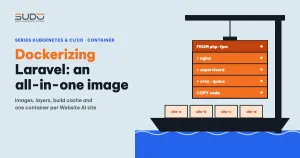
To run Website AI on Kubernetes, the first job is not building a cluster but packaging the application as an image. This guide covers Dockerizing Laravel for a product like the Website AI core: what Docker is, how images and layers work, how to read a Dockerfile written for developer machines, what is still missing to get to a production image, and when to choose one all-in-one image per site.
1. What Docker is: the groundwork before Dockerizing Laravel
In the previous article on Website AI on Cloud VPS, each site was a clone of the code placed on a minion that already had nginx, PHP-FPM and the extensions installed. Docker changes the mindset: you package both the environment and the code into a unit that runs anywhere there is a container runtime.
- Image: a read-only package containing a minimal operating system, PHP, extensions, libraries and possibly the code. An image has a name and a tag, for example
php:8.2-fpm. - Layer: each
RUN,COPYandADDinstruction in a Dockerfile creates a layer holding the changes relative to the layer below. Identical layers are shared between images. - Container: a process running from an image, with an extra temporary writable layer on top. Delete the container and the writable layer goes with it, so files Laravel writes to
storage/orpublic/uploadsinside the container do not persist.
A container has no kernel of its own like a virtual machine. It shares the host's kernel and is isolated with Linux namespaces and cgroups, so it starts in seconds. Understanding these three concepts is enough to start Dockerizing Laravel.
2. The first Dockerfile when Dockerizing Laravel for Website AI
A common starting point is a repo that already has a Docker setup for developer machines: a Dockerfile, a docker-compose.yml and a .docker/ directory with nginx and PHP-FPM configs. The Dockerfile grows as needs come up, for example GD with WebP support added later, and looks like this:
FROM php:8.2-fpm

RUN apt-get update && apt-get install -y \
    libzip-dev \
    libmagickwand-dev \
    libcurl4-gnutls-dev \
    libpng-dev \
    libjpeg-dev \
    libfreetype6-dev \
    && docker-php-ext-install zip curl gd pdo_mysql

RUN pecl install imagick && docker-php-ext-enable imagick

RUN php -r "copy('https://getcomposer.org/installer', 'composer-setup.php');" && \
    php composer-setup.php --install-dir=/usr/local/bin --filename=composer && \
    php -r "unlink('composer-setup.php');"

# Install the GD extension
RUN apt-get update && apt-get install -y \
    libpng-dev \
    libjpeg-dev \
    libfreetype6-dev \
    libzip-dev
RUN docker-php-ext-configure gd --with-freetype --with-jpeg && \
    docker-php-ext-install gd zip
# Install the WebP library
RUN apt-get install -y libwebp-dev && \
    docker-php-ext-configure gd --with-webp=/usr/include/ && \
    docker-php-ext-install gd

CMD ["php-fpm"]
The base image is the official PHP image on Docker Hub, the Debian-based 8.2-fpm variant. The extensions match the require section of the core's composer.json (ext-gd, ext-zip, ext-imagick…). It is a good start, but three things need fixing:
- The image contains no code. There is no
COPYinstruction; the code is mounted from the developer machine at runtime. This is an environment image, not yet an application image. Dockerizing Laravel for production means putting the code into the image. - GD is built three times, each time as a new layer stacked on top, while the old layers remain in the image.
- The apt cache is never cleaned, and the
-devpackages needed only for compiling stay behind too.
3. docker-compose: Dockerizing Laravel for the dev environment
For many teams, the first step in Dockerizing Laravel is really the docker-compose.yml file, which sets up three separate services (trimmed):
services:
  nginx:
    image: nginx:latest
    volumes:
      - ./:/var/home/
      - .docker/nginx/app.conf:/etc/nginx/conf.d/app.conf
  php-fpm:
    image: <registry>/php8:<tag>
    expose:
      - "9000"
    volumes:
      - ./:/var/home:cached
  mysql:
    image: mysql:latest
Nginx forwards PHP requests to the PHP-FPM container with fastcgi_pass php-fpm:9000;, thanks to the internal DNS of the compose network. The configs in .docker/ already follow two good container habits: nginx runs with daemon off; and logs to /dev/stdout, and PHP-FPM sets daemonize = no and error_log = /proc/self/fd/2. A container only lives while its main process keeps running in the foreground, and logs written to stdout can be read with docker logs without going inside the container.
There are also values that only suit developer machines: memory_limit = -1 in php.ini and pm.max_children = 100 in www.conf. In a container with a RAM limit, these two values are a recipe for the kernel killing the process for running out of memory. When Dockerizing Laravel for production, they must be reset to match the resource limits.
4. Build cache and image size when Dockerizing Laravel
Docker builds instructions in order and looks for a cached layer for each one. According to the Dockerfile reference, the cache for RUN is based on the command string, and the cache for COPY on file contents. The most important rule: once a layer is rebuilt, every layer after it is rebuilt too. That leads to three principles for Dockerizing Laravel:
- Put what rarely changes at the top and what changes often at the bottom: PHP extensions first, composer libraries next, code last.
- Combine related commands into one
RUNand clean up inside that same command. Deleting files in a laterRUNdoes not make the image smaller. - Have a
.dockerignore. Without it, once you start usingCOPY . ., the developer machine's.git,node_modulesandvendordirectories and the.envfile end up in the build context.
On size, the usual sources of bloat are -dev packages, the apt cache, repeatedly built extensions, and a vendor that includes dev packages. Inspect each layer with docker history <image>. Multi-stage builds are the next optimization step, not a priority at the start.
5. Dockerizing Laravel for production: the image must carry the code
On Kubernetes there is no developer machine to mount code from. This is where Dockerizing Laravel fixes exactly the pain point from the previous article: the Cloud VPS pipeline ran composer update for each site, while the image runs composer install once against composer.lock and every site shares the result. The skeleton below is a draft to start from, not a finished production file:
FROM php:8.2-fpm

# 1. System packages and extensions: change the least
RUN apt-get update && apt-get install -y --no-install-recommends \
        nginx supervisor \
        libzip-dev libmagickwand-dev libcurl4-gnutls-dev \
        libpng-dev libjpeg-dev libfreetype6-dev libwebp-dev \
    && docker-php-ext-configure gd --with-freetype --with-jpeg --with-webp \
    && docker-php-ext-install zip curl gd pdo_mysql \
    && pecl install imagick && docker-php-ext-enable imagick \
    && rm -rf /var/lib/apt/lists/*

COPY --from=composer:2 /usr/bin/composer /usr/local/bin/composer
WORKDIR /var/www/html

# 2. PHP libraries: rebuilt when the lock file or internal packages change
COPY composer.json composer.lock ./
COPY packages/ packages/
RUN composer install --no-dev --no-scripts --no-autoloader --no-interaction

# 3. Code: changes most often
COPY . .
RUN composer dump-autoload --optimize \
    && chown -R www-data:www-data storage bootstrap/cache

COPY .docker/supervisord.conf /etc/supervisor/conf.d/app.conf
CMD ["supervisord", "-n", "-c", "/etc/supervisor/supervisord.conf"]
If composer.json declares a path repository pointing to ./packages/*, where the project's internal packages live, then packages/ must be copied before composer install. The --no-scripts flag avoids running artisan package:discover at build time, when no environment variables exist yet.
The image must never contain .env: an image used by every site cannot carry any one site's database credentials. Configuration is passed in at runtime as environment variables. Laravel gives real environment variables priority over values in the .env file, so no code changes are needed.
6. All-in-one or separate containers when Dockerizing Laravel
On a minion, a Website AI site needs four processes: nginx, PHP-FPM, the scheduler (cron running schedule:run every minute) and a queue worker managed by supervisor, as in the article Speeding up websites with Laravel ResponseCache, Redis and Supervisor. In containers there are two options:
| Criterion | All-in-one: supervisord runs all four | Split: one container per process |
|---|---|---|
| Components per site | One container | Three to four containers |
Static files in public/ | Nginx reads them directly, same filesystem | Nginx needs a copy of the code or a shared volume |
| When a process dies | supervisord restarts it, Kubernetes never knows | Kubernetes sees it and restarts exactly that container |
| Scaling | Scaling web also scales the worker and scheduler | Scale each part separately, keep one scheduler replica |
| Logs | Four sources mixed into one stdout | One log stream per container |
The standard principle is "one process per container". But when most sites have low traffic, a single replica is enough, and the team still thinks in terms of minions, all-in-one is a sensible first step in Dockerizing Laravel for Website AI. Note down the weak points in the table above so you can revisit them once you have operational data. A sample supervisord file:
[supervisord]
nodaemon=true

[program:php-fpm]
command=php-fpm -F

[program:nginx]
command=nginx -g "daemon off;"

[program:queue]
command=php /var/www/html/artisan queue:work --sleep=2 --tries=2 --timeout=120
user=www-data

[program:scheduler]
command=php /var/www/html/artisan schedule:work
user=www-data
Keep the queue parameters the same as the supervisor config used on the minion so behavior does not change. schedule:work (available since Laravel 8) calls the scheduler every minute, which saves installing cron in the image.
7. Common mistakes when Dockerizing Laravel
The mistakes below are common the first time a team tries Dockerizing Laravel, and most come from habits formed on VPS environments. Review this list every time you start Dockerizing Laravel for a new project:
- The container starts and exits immediately: the main process sends itself to the background (missing
daemon off;or-F). - Write permission errors on
storage/: on a minion, the pipeline usually runschownafter cloning. In an image, the user running PHP-FPM must ownstorageandbootstrap/cachefrom build time. - A volume mount hides the code: mounting onto
/var/www/htmlcovers all the code in the image. Mount only the directories that need to persist. - Logs written to files:
storage/logs/laravel.logdisappears with the container. Send the log channel to stdout. - Secrets baked into the image by accident: without
.dockerignore,COPY . .brings.envalong.
8. Trade-offs and lessons from Dockerizing Laravel
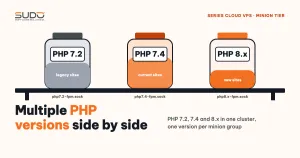
Dockerizing Laravel for Website AI is not hard because of syntax. The hard part is changing habits: code lives in the image, not on the machine; configuration comes from environment variables, not a hand-edited .env; and everything written inside a container is temporary. The all-in-one image is a deliberate compromise to move fast, not the destination. Another benefit: each image carries its own PHP version, so there is no longer any need to split minions by version as in the article on running multiple PHP versions side by side.
Next article
What is Kubernetes: control plane, nodes and pods for PHP developers. Now that we have an image, who runs it across many machines, restarts it when it dies and swaps versions without downtime?