Once the Website AI image existed, the next question in the team was what is Kubernetes, and what can it do that a group of Cloud VPS instances running nginx and PHP-FPM cannot. This article answers "what is Kubernetes" for PHP developers who are used to SSH-ing into a minion, running php artisan and reading nginx logs: the components of the control plane, nodes and pods, how a single deploy flows through them, and whether to choose managed Kubernetes such as LKE or build your own.
1. What is Kubernetes, in short
To answer "what is Kubernetes" in one sentence: it is a container orchestration system that takes a description of the "desired state" and keeps working to make the actual state match it. You do not issue commands like "SSH into machine 3 and run container X". You declare "site A needs one replica running Website AI image version Y, with port 80 open", and Kubernetes picks the machine, runs the container, and runs it again when it dies.
Kubernetes is an open source project started by Google, based on its experience running the internal Borg system, and now governed by the CNCF. There are roughly three minor releases per year, so check which versions are still supported before creating a cluster. The official definition and a diagram of the components are on the Kubernetes Components page on kubernetes.io.
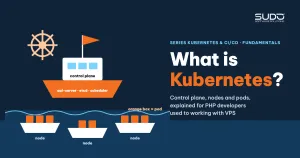
A Kubernetes cluster has two parts: the control plane, which makes decisions, and the nodes, which run the work. Understand these two parts and you have most of the answer to "what is Kubernetes".
2. What is Kubernetes when seen from the three-tier Cloud VPS model
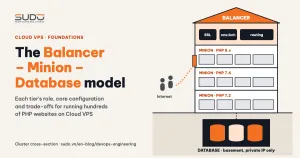
For anyone who has operated the Balancer, Minion and Database model on Cloud VPS, the quickest way to answer "what is Kubernetes" is to put the two side by side:
| On Cloud VPS | In Kubernetes |
|---|---|
| Minion running nginx + PHP-FPM | Node (worker machine) running pods |
Directory /var/www/<domain> | Pod running the site's image, with configuration loaded from outside |
| Operator picks a minion for the site | Scheduler picks a node with enough resources |
supervisor autorestart=true | kubelet restarts the container, a controller recreates the pod |
| Machine name in internal DNS | Service name in the cluster's DNS |
| Balancer with a config file per domain | Service of type LoadBalancer and Ingress (later article) |
| Pipeline SSHs into machines and runs commands | Send a YAML file to the API server |
The biggest difference is in the last row: on Cloud VPS, a change is a sequence of commands run in order, and if it stops halfway the system is left half-done; in Kubernetes, a change is a new description, and the components work out how to get there. Machine names in internal DNS also give way to Service names.
3. The control plane: the brain of the cluster
Most of the answer to "what is Kubernetes" lies in the four control plane components:
- kube-apiserver: the only entry point to the cluster.
kubectl, CI pipelines and the other components all talk through its REST API. The API server authenticates, checks permissions and validates objects before writing them to etcd. It is like an API-only Laravel application with authentication middleware and validation before saving. - etcd: a distributed key-value store holding the entire cluster state: every Deployment, Service, ConfigMap and Secret. etcd uses the Raft consensus algorithm and needs a majority of members alive to accept writes. Lose etcd without a backup and you lose the whole cluster.
- kube-scheduler: for each pod that has no node yet, the scheduler filters eligible nodes (enough CPU and RAM by requested amounts, matching labels, not blocked), scores them and assigns the pod to the best node. Until now we did this by hand when choosing a minion for a new site.
- kube-controller-manager: runs many control loops (controllers). The Deployment controller sees that 2 replicas are needed but only 1 exists, and creates another. The node controller sees a node that has been silent too long, marks it, and lets the pods on it be moved elsewhere.
On cloud platforms there is also the cloud-controller-manager, which bridges to the provider's API. When you declare a Service of type LoadBalancer on LKE, this component creates a Linode NodeBalancer. Knowing these components answers half of the question "what is Kubernetes".
4. Nodes: where pods actually run
The other half of the question "what is Kubernetes" lies in the nodes: the virtual or physical machines that run workloads. Each node has three main components:
- kubelet: the Kubernetes agent on the node. It registers the node with the API server, watches the pods assigned to its node, asks the container runtime to run them, performs health checks (probes) and reports status back. If a container dies, kubelet restarts it according to the pod's restart policy.
- kube-proxy: turns a Service's virtual address into iptables or IPVS rules on the node, so packets sent to the Service reach a running pod.
- Container runtime: the software that actually runs containers, most commonly containerd. Since version 1.24, Kubernetes has removed dockershim, meaning Docker Engine is no longer used as the runtime. Images built with Docker still run normally because they follow the OCI standard. Docker remains the image build tool on developer machines, as in Dockerizing Laravel for Website AI.
In addition, the cluster needs a network plugin (CNI) so pods on different nodes can reach each other, and internal DNS (usually CoreDNS) to resolve Service names.
5. Pods: the smallest unit Kubernetes manages
PHP developers asking "what is Kubernetes" usually think of containers, but the unit Kubernetes schedules is the pod. A pod contains one or a few containers that:
- Share one IP address and network namespace, so they talk to each other via
localhost, just like nginx and PHP-FPM on the same minion. - Can share volumes.
- Are always placed on the same node, and live and die together.
Pods are ephemeral. A pod's IP changes every time it is recreated, and files written inside the container disappear with the pod. That is why nobody calls a pod's IP directly; traffic goes through a Service. It is also why almost nobody creates pods directly: a pod created directly is gone for good once deleted, while a pod managed by a Deployment is recreated automatically. For Website AI, one site will be one (or a few) pods running the all-in-one image, with a Service in front. If you remember just one thing while asking "what is Kubernetes", remember this: pods are temporary.
6. How one deploy flows through the components
The easiest way to answer "what is Kubernetes" in practice is to follow one deploy, from typing the command to the site responding:
kubectl apply -f site-a.yaml
   │
   ▼
kube-apiserver ── authenticate, validate, write the Deployment to etcd
   │
   ▼
Deployment controller ── create a ReplicaSet
ReplicaSet controller ── create a Pod (no node yet)
   │
   ▼
kube-scheduler ── pick a node with enough CPU/RAM, bind the Pod to it
   │
   ▼
kubelet on the node ── ask containerd to pull the image, run the container
   │                   run probes, report Running/Ready status
   ▼
Service ── add the Pod's IP to its endpoint list, start receiving traffic
No component calls another directly. They all watch the API server and react to changes. Because of that, if the node running a pod is shut down, the chain from the controllers downward runs again on its own to create a new pod on another node, with nobody pressing anything. That is the "self-healing" part often mentioned when explaining "what is Kubernetes".
7. Managed (LKE) or self-built?
Once you have answered "what is Kubernetes", the practical question is who operates the control plane. There are two directions:
| Criterion | Managed (LKE) | Self-built (kubeadm, k3s…) |
|---|---|---|
| Control plane, etcd | Run by the provider, you cannot SSH into it | Install it yourself, back up etcd yourself, fix it yourself when it breaks |
| Nodes | Choose a machine plan per node pool, add or remove via the UI or API | Create VPS instances yourself, install the runtime, join them to the cluster |
| Version upgrades | Click upgrade, nodes are replaced one by one | Upgrade one minor version at a time yourself, no skipping |
| Infrastructure integration | A LoadBalancer Service creates a NodeBalancer, a PVC creates Block Storage | Install the matching components yourself |
| Level of control | Lower: control plane parameters cannot be tuned | Full control |
For a small operations team that is still learning, we leaned toward LKE. Costs then come mainly from the nodes (regular Linode machines), NodeBalancers and Block Storage volumes. In exchange, we accept that we cannot touch the control plane. Each Kubernetes minor release is supported for only a little over a year, so regular upgrades are mandatory, whether managed or self-built.
8. What is Kubernetes, and what it is not: common misconceptions
- "Moving to Kubernetes means automatic scaling." No. By default the number of replicas is exactly the number you declare. Autoscaling needs extra configuration and resource metrics.
- "Kubernetes replaces the database." Kubernetes can run MySQL, but backups, restores and disk performance are still your job. Running the database inside or outside the cluster is a separate decision.
- "Writing files in a pod is like writing on a minion." Files written inside a container are lost when the pod is recreated. Uploads and customized themes must live on durable volumes or object storage.
9. Trade-offs of choosing Kubernetes for Website AI
Answering "what is Kubernetes" also means understanding its cost. In exchange for automatic scheduling, self-healing and declarative deploys, the team has to learn many new concepts, accept an extra abstraction layer between code and machines, and debug in a different way. With dozens of Website AI sites sharing one core, as described in the opening article of the series, we believe that price is worth paying. For a few standalone sites that rarely change, Cloud VPS is still simpler and cheaper. In other words, our answer to "what is Kubernetes" is: a tool worth learning for the problem of many similar sites, not the destination for every website.
Next article
Pod, Deployment, Service and Namespace: using Kubernetes in practice. With "what is Kubernetes" answered, the next article moves from concepts to hands-on work: the pod lifecycle, rolling updates, Services and everyday kubectl commands.