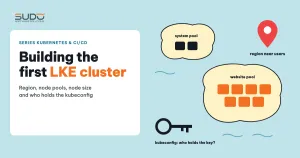
This guide walks through creating a first LKE cluster for a web application such as Website AI: the choices on the LKE cluster creation form, how to split node pools by role, how to size nodes from requests, and how to keep the kubeconfig file safe. After the theory on pods, Services, ConfigMaps, volumes and Ingress, it is time for a real cluster to run trials on.
1. What an LKE cluster consists of
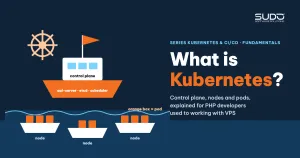
LKE (Linode Kubernetes Engine) is Linode's managed Kubernetes service. As explained in What is Kubernetes: control plane, nodes and pods, a cluster has two halves. With an LKE cluster, responsibility for the two halves is clearly divided:
| Part | Who operates it | What it includes |
|---|---|---|
| Control plane | Linode | API server, etcd, scheduler and controller manager, plus Linode-specific components such as the Cloud Controller Manager (creates NodeBalancers) and the CSI driver (creates Block Storage) |
| Worker nodes | You choose, Linode builds them | Linode machines running kubelet, the container runtime, kube-proxy and the CNI. This is where pods actually run |
| Attached resources | Created by the cluster when needed | NodeBalancers for LoadBalancer Services, Block Storage volumes for PVCs |
You cannot SSH into the control plane, and you do not have to back up etcd or patch the API server; every operation goes through the API and the kubeconfig. The cost of an LKE cluster lies in worker nodes, NodeBalancers and volumes, so every choice below is also a choice about money.
Worker nodes are grouped into node pools: nodes of the same machine type, which you can scale up or down, or add new pools to, at any time without recreating the cluster. Each node carries the label lke.linode.com/pool-id, which tells you which pool it belongs to.
2. Choices when creating an LKE cluster
The LKE cluster creation form in Cloud Manager is very short, but every field has long-term consequences:
- Label: pick a name that says which product the cluster serves, with a numeric suffix left for later clusters, for example
app-prod-01. The role should be obvious from the name, just like machine naming on Cloud VPS. - Region: choose the region closest to your users to reduce latency. For customers in Vietnam, Singapore (
ap-south) is usually a sensible choice. The region cannot be changed after creation: moving regions means building a new cluster and migrating the workloads. - Kubernetes version: LKE usually offers only the latest few minor branches. Choosing a version is also a commitment to regular upgrades, and on LKE an upgrade means nodes are replaced one by one with new nodes, so workloads must tolerate pods being moved.
- HA control plane or not: LKE offers a replicated control plane option at extra cost. Running pods do not die when the control plane is flaky; only deploys, scaling and controllers are affected.
There is one thing you do not have to choose: the CNI. LKE installs Calico as soon as the cluster is created, and Calico's CRDs appear almost at the same moment as the default namespace. Calico handles networking between pods across nodes and supports NetworkPolicy if you later need to fence off traffic.
The official documentation for these options is on the Linode Kubernetes Engine page.
3. Node pools: splitting nodes by role
A small LKE cluster could get by with a single pool, but it is worth splitting pools by role from the start because workload groups behave very differently:
| Pool | What it runs | Characteristics |
|---|---|---|
| System pool | Ingress controller, cert-manager, monitoring | Few pods, stable, but a shared gateway: if it dies, every website dies with it |
| Website pool | Each site's application pods | Pod count grows with customers, load rises and falls with each site's traffic, constant deploys |
Separate pools mean a site whose CPU is eaten by crawler bots does not drag the ingress controller down with it. But the scheduler is still free to place pods on any node with room; if you want system pods to run only in the system pool, you have to declare nodeAffinity on the lke.linode.com/pool-id label (covered in a separate article in the series).
4. Choosing node size for an LKE cluster
LKE cluster nodes are regular Linode machine plans. In the Shared CPU group, three common sizes are g6-standard-1 (1 vCPU, 2 GB RAM), g6-standard-2 (2 vCPU, 4 GB) and g6-standard-4 (4 vCPU, 8 GB). When choosing, consider three things.
Allocatable is smaller than the number on the price list
A 4 GB node does not let pods use the full 4 GB. kubelet reserves a portion for the operating system and itself, and what remains is called allocatable. Within that allocatable portion, each node also has to run LKE's system DaemonSets such as calico-node, kube-proxy and the CSI node driver. See the real numbers with:
kubectl describe node <node-name> | grep -A 6 Allocatable
kubectl describe node <node-name> | grep -A 10 "Allocated resources"
This overhead is roughly fixed per node, so the smaller the node, the larger the share that gets "eaten".
Count pods by requests, not by feel
The scheduler places pods based on requests, not actual usage. Suppose the web container requests 150m CPU and 300Mi RAM. The estimation formula:
max pods by RAM = (allocatable RAM − system DaemonSet requests) / RAM request per pod
max pods by CPU = (allocatable CPU − system DaemonSet requests) / CPU request per pod
→ take the smaller number, then leave headroom for deploys (RollingUpdate creates new pods before deleting old ones)
For PHP websites, RAM usually runs out before CPU, so prefer plans with a high RAM-to-CPU ratio.
A few large nodes or many small nodes
With many small nodes, one node failing takes down only a few pods, but the DaemonSet overhead is multiplied. With a few large nodes, resources are used more efficiently, but each node incident moves many websites at once. With an LKE cluster, changing your mind is cheap: add a pool of a different size, move the workloads over, then delete the old pool.
5. Kubeconfig: the key to the LKE cluster
Once the LKE cluster is ready, Cloud Manager lets you download a kubeconfig file. This YAML file tells kubectl which API server to call and which identity to use. Its structure (values replaced with <...>):
apiVersion: v1
kind: Config
clusters:
- name: lke<id>
  cluster:
    server: https://<api-server-endpoint>:443
    certificate-authority-data: <...>
users:
- name: lke<id>-admin
  user:
    token: <...>          # admin token: whoever has it has full control
contexts:
- name: lke<id>-ctx
  context:
    cluster: lke<id>
    user: lke<id>-admin
    namespace: default
current-context: lke<id>-ctx
The token line is the whole issue: the default kubeconfig of an LKE cluster carries the highest admin privileges, with no second authentication factor. If the file leaks, the LKE cluster leaks. Safe everyday usage:
# one file per cluster, readable only by the owner
chmod 600 ~/.kube/app-prod-01.yaml
export KUBECONFIG=~/.kube/app-prod-01.yaml

kubectl config get-contexts        # make sure you are pointing at the right cluster
kubectl get nodes -o wide          # nodes from every node pool
kubectl get pods -n kube-system    # calico, coredns, csi-linode, kube-proxy...
kubectl get storageclass           # linode-block-storage and linode-block-storage-retain
The habit of typing kubectl config get-contexts before a dangerous command becomes essential as soon as you have a second LKE cluster. Kubernetes explains how multiple kubeconfig files are merged on the page Organizing Cluster Access Using kubeconfig Files.
6. Access control: who gets to hold the key
For an LKE cluster, set a few rules equivalent to managing SSH keys on Cloud VPS:
- The admin kubeconfig stays only with the cluster operators: do not send it over chat, do not commit it to Git, do not paste it into tickets. Check
.gitignoreand.dockerignoreso the file cannot slip into Git or an image. - If it leaks, revoke it immediately. Cloud Manager has a kubeconfig reset action: the old token stops working and everyone has to download the new file.
- Developers and CI systems do not use the admin kubeconfig. The right approach is to create a dedicated ServiceAccount, attach a
RoleandRoleBindingonly in the namespaces needed, then generate a kubeconfig from that ServiceAccount's token. The permission model is described in the Kubernetes RBAC documentation. - A Linode API token is a different key. This token can create and delete clusters, node pools and NodeBalancers. Grant only the scopes actually needed and set an expiry.
A minimal example of a ServiceAccount that can deploy only in one namespace:
kubectl create namespace site-a
kubectl -n site-a create serviceaccount deployer
kubectl -n site-a create rolebinding deployer-edit \
  --clusterrole=edit --serviceaccount=site-a:deployer
kubectl -n site-a create token deployer --duration=24h
7. Common mistakes with a new LKE cluster
- Running a command against the wrong cluster: the
KUBECONFIGvariable in an old terminal tab still points at the test cluster. Name files and contexts clearly and check the context before everyapplyordelete. Unable to connect to the serverafter resetting the kubeconfig: the old token has been revoked. Download the file again and update everywhere the old file is used.- Pods
Pendingeven though nodes look "empty":kubectl topshows the node is idle, but totalrequestshave already reached allocatable. Look at "Allocated resources" instead of actual usage. - Forgetting that nodes can be replaced at any time: a version upgrade or node recycle creates new nodes with new names and new IPs. Do not write any configuration that depends on a specific node name or node IP. A comment line or a
nodeNamepointing to a node of an old test cluster, left behind in a manifest, is a very easy mistake to make.
8. Checklist before putting workloads on the LKE cluster
- The cluster name states its role, the region is close to users, and the Kubernetes version is still supported.
- Node pools are split by role (system, websites), and node size is calculated from allocatable and requests.
- The admin kubeconfig has
600permissions, is not in any repo or image, and you know how to reset it. - CI and developers use ServiceAccounts with narrow, namespace-scoped permissions.
- The Linode API token has clear scopes and an expiry.
- No manifest depends on a node name or node IP.
Creating an LKE cluster takes only a few minutes; the time-consuming part is deciding which workload runs where, how many resources each pod needs, and who is allowed to do what. How traffic enters the cluster was covered in Ingress and NodeBalancer, and how volumes are provisioned in PersistentVolume, PVC and StorageClass.
Next article
Your first Kubernetes manifest: namespace, Deployment and MySQL StatefulSet. We read each YAML file of a Laravel application on Kubernetes, see why MySQL uses a StatefulSet instead of a Deployment, and look at the common mistakes in a first version.