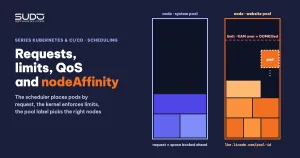
The two blocks that get edited back and forth the most in the manifest of an application newly moved to Kubernetes are resources and affinity. The cause is usually the same: not fully understanding how requests and limits affect which node a pod lands on, how its CPU gets squeezed and when it gets killed. This guide covers that knowledge, how to pick the numbers for a Laravel container, the three QoS classes, and how to assign pods to the right LKE node pool with nodeAffinity.
1. What requests and limits are
Requests and limits are two numbers each container can declare for each resource type (CPU, memory):
- request: the amount of resources the container is guaranteed. The scheduler uses this number to choose a node.
- limit: the ceiling the container must not exceed. Kubelet and the kernel (through cgroups) enforce this number while the container runs.
CPU is measured in cores, so 1500m means 1.5 cores. Memory is usually expressed in Mi/Gi (powers of 2). An example requests and limits block for a Laravel container (numbers are for illustration only):
containers:
- name: web
  image: <registry>/laravel-app:<tag>
  resources:
    requests:
      memory: "450Mi"
      cpu: "150m"
    limits:
      memory: "1800Mi"
      cpu: "1500m"
Read it in the scheduler's language: "find a node with at least 150m CPU and 450Mi RAM free to place this pod; at runtime, let it use up to 1.5 cores and 1800Mi, no more". The two numbers in requests and limits serve two different purposes, so getting either one wrong causes two different kinds of incidents. The full documentation is on the Kubernetes page on resource management for containers.
A detail that is often overlooked: if there is only a limit and no request, Kubernetes uses the limit as the request. A container that declares a 2Gi limit "just to be safe" will be treated by the scheduler as needing the full 2Gi.
2. The scheduler uses requests, not actual usage
Each node has an allocatable figure: total resources minus what is reserved for the operating system and kubelet. When placing a new pod, the scheduler adds up the requests of every pod already on the node, adds the new pod's request, and compares that with allocatable. It does not look at the CPU or RAM actually in use.
The consequences:
- An idle node is still considered "full" if the pods on it declare requests that are too high. The new pod stays
Pendingwith anInsufficient cpuorInsufficient memoryevent. - Conversely, requests declared lower than reality make the scheduler cram too many pods onto one node. When load rises, the pods fight over real resources.
- Of the requests and limits pair, the limit plays no part in scheduling decisions. Total limits on a node exceeding 100% of allocatable is normal, and is called overcommit.
To see how much of a node is "booked", counting both requests and limits:
kubectl describe node <node-name> | grep -A 8 "Allocated resources"For a pod with initContainers, the pod's effective request is the larger of the total requests of the main containers and the largest request among the initContainers. An initContainer running php artisan migrate --force with a high RAM request also helps decide whether the pod fits on a node.
3. Exceeding the limit: CPU gets throttled, memory gets killed
CPU and memory react very differently when a container hits its limit. This is the most important part of choosing requests and limits for a PHP application.
| CPU | Memory | |
|---|---|---|
| Resource type | Compressible: shared out over time | Incompressible: once given, cannot be taken back |
| When the limit is hit | Throttled: the kernel pauses the process until the end of the period (CFS quota, 100ms by default) | OOMKilled: the kernel kills the process, and the container exits with code 137 |
| Symptoms | Requests get slower, timeouts, the pod is still Running | RESTARTS increases, Last State: Terminated, Reason: OOMKilled |
| How to see it | The container_cpu_cfs_throttled_periods_total metric | kubectl describe pod, the pod's events |
With Laravel, a CPU limit that is too low usually shows up as slow pages rather than clear errors, so it is easy to blame the code or the database. A memory limit that is too low is easier to spot because the pod restarts. However, an all-in-one image contains several processes (nginx, PHP-FPM, queue worker), so the killed process may be just one worker and the pod stays alive. Besides the container's requests and limits there is also PHP's memory_limit: if memory_limit times the number of workers exceeds the container limit, the kernel kills the process before PHP can report an error.
4. QoS: the priority class derived from requests and limits
Based on how requests and limits are declared, Kubernetes puts each pod into one of three QoS (Quality of Service) classes. When a node runs out of memory, kubelet evicts pods in this order:
| QoS class | Condition | When the node is short of RAM |
|---|---|---|
| Guaranteed | Every container has request = limit for both CPU and memory | Evicted last |
| Burstable | At least one request or limit, but not meeting the Guaranteed condition | Evicted after BestEffort, starting with the pods that exceed their requests the most |
| BestEffort | No container declares any request or limit | Evicted first |
To see a pod's QoS class:
kubectl get pod -n app <pod-name> -o jsonpath='{.status.qosClass}'The Laravel container in the example above has different requests and limits, so it is Burstable. A MySQL with only a request and no limit is also Burstable. If you want the database best protected when a node runs short of RAM, set the request equal to the limit so the pod becomes Guaranteed. The official guide on configuring Quality of Service for pods has examples for all three classes.
5. Choosing requests and limits for a Laravel container
When choosing requests and limits, remember that a container holding nginx, PHP-FPM, cron and a queue worker needs more resources than intuition suggests. A CPU limit of a few hundred millicores is usually too tight: migrations, cache builds or heavy page renders get throttled. A common approach in the early stage is "low request, generous limit":
- Request reflects the baseline when the site is idle, so the scheduler can fit many pods on a node.
- Limit is generous enough for short peaks, and tight enough that one broken site cannot swallow the whole node.
- Measure, then tune. Take real usage over many days from Grafana (for example the 95th percentile of RAM and CPU), set the request near the baseline and the RAM limit a safe margin above the peak.
Changing one number in requests and limits, applying, checking whether the pod comes up, then changing it again is slow and error-prone. Batch resource changes together, with data to back them up, and put them through the pipeline instead of a manual kubectl apply.
6. Placing pods on the right nodes: nodeSelector, nodeAffinity and the pool label
Requests and limits only answer the question "which node has enough room". To specify which group of nodes a pod runs on, Kubernetes has two mechanisms based on node labels:
- nodeSelector: the simplest, listing label pairs that must match exactly.
- nodeAffinity: more expressive, with the operators
In,NotInandExists, and two levels: required (requiredDuringSchedulingIgnoredDuringExecution) or preferred (preferredDuringSchedulingIgnoredDuringExecution).
A common mistake is pinning by the kubernetes.io/hostname label. Node names on LKE look like lke<cluster-id>-<pool-id>-<random suffix>, and the suffix changes every time a node is replaced: recycling the node pool, upgrading the Kubernetes version, deleting and adding nodes. Pinning by hostname means that every time LKE replaces a node, the pod stays Pending until someone goes in and fixes the manifest.
LKE gives every node the label lke.linode.com/pool-id, whose value is the ID of the node pool containing it. This ID does not change when nodes inside the pool are replaced, so pin by pool:
affinity:
  nodeAffinity:
    requiredDuringSchedulingIgnoredDuringExecution:
      nodeSelectorTerms:
      - matchExpressions:
        - key: lke.linode.com/pool-id
          operator: In
          values:
          - "<pool-id>"     # must be a string, quotes required
If you only need to match one value, nodeSelector is shorter:
nodeSelector:
  lke.linode.com/pool-id: "<pool-id>"
nodeAffinity is more convenient when you later extend to several pools: just add values to values. To see the pool ID of each node:
kubectl get nodes -L lke.linode.com/pool-idDetails on the operators and the required/preferred levels are in the Kubernetes documentation on assigning pods to nodes. Creating node pools is covered in Building the first LKE cluster: node pools, kubeconfig and early choices. Apply the same approach to the monitoring stack from Kubernetes monitoring with kube-prometheus and Grafana: Prometheus, Grafana and the operator's webhook should be pinned to the system pool by pool-id, not by hostname.
7. Common errors with requests and limits and affinity
- Pod
Pendingwith anInsufficient memoryevent: total requests on the nodes have reached allocatable, even though real RAM is still free. Lower the requests to the actual baseline, or add nodes to the pool. - Pod
Pendingwith adidn't match Pod's node affinity/selectorevent: the label matches no node, usually because of a mistyped pool ID or a pool that has been deleted. Check withkubectl get nodes -L lke.linode.com/pool-id. - Label values written as numbers:
values: [12345]is invalid because this field is a list of strings. Always wrap values in quotes. - Unusually slow pages while node CPU is low: suspect a CPU limit that is too tight and a throttled container. Check the throttling metric in Prometheus before optimizing code.
- Pod restarts with reason
OOMKilled: the memory limit is lower than real peak usage. Raise the limit or reduce the number of PHP-FPM workers in the container.
8. Recommendations and trade-offs
- A request is a promise to the scheduler, a limit is a fence at runtime. Set requests and limits according to the role of each number.
- "Low request, generous limit" packs in more pods, but makes every pod Burstable and pushes total limits far above allocatable. When many pods spike at once, the node can run out of real RAM. Acceptable during trials, but measure again once there is real traffic.
- The database also needs realistic requests and limits. MySQL without a limit uses RAM according to its buffer configuration and can encroach on other pods on the same node.
- Pin to something stable. Choose a label that describes the node's role (pool), not one that describes a specific machine.
- Put manifest changes into CI/CD. Every manual edit and apply is another chance to get it wrong.
Next article
First CI/CD with Bitbucket Pipelines, Docker Hub and kubectl. Build the image, push it to a registry and apply the manifests automatically on every code push, instead of running kubectl apply by hand.