A Laravel pod starts normally, but as soon as it writes a log, a cache entry or an uploaded image, a permission denied error appears: Failed to open stream: Permission denied on storage/framework/cache, or Impossible to create the root directory on the uploads directory. What is confusing is that the Dockerfile already contains the line chown -R nginx:nginx storage public. This article explains why that line cannot save a mounted path, the two sources of a wrong owner, a quick way to check, and a table for choosing the right way to set the owner for each volume type.
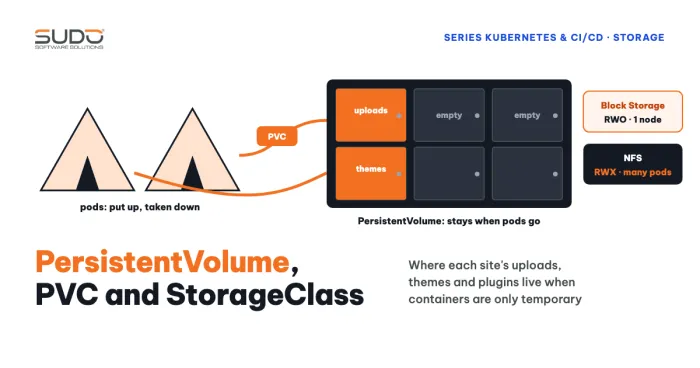
If you are not yet comfortable with PVs, PVCs and StorageClasses, read Volume, PersistentVolume, PVC and StorageClass on Kubernetes first.
Symptoms of a permission denied error
- The PHP-FPM or Laravel log shows a permission denied error such as
file_put_contents(...): Failed to open stream: Permission denied, usually on a path likestorage/framework/cache/data/...orstorage/logs. - An image upload reports that it cannot create the root directory (the same permission denied family), even though the
public/uploadsdirectory appears to exist. - There is no permission denied error when you run the image with
docker runwithout mounting a volume.
Why chown in the Dockerfile cannot prevent permission denied
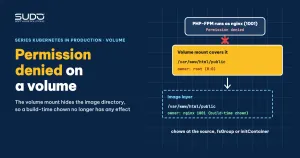
The RUN chown command only changes the owner of files that live in the image layer. When the pod runs, Kubernetes mounts the volume on exactly that path (for example /var/www/html/public), and the volume's content completely hides the directory in the image. The owner you set at build time is still in the image, but nobody sees it anymore. On a newly created volume, the root directory usually belongs to root, or to a UID decided by the NFS server.
Do not conclude that "chown in the Dockerfile has no effect": it is still correct for files that live in the image, and is only useless for paths that a volume hides.
Two sources of permission denied: a wrong owner
A newly created volume
A new block storage PVC is formatted and mounted with its root directory owned by root. With hostPath and NFS, the owner is the owner of the directory on the server. A container running as a regular user (such as nginx) cannot write there and hits permission denied.
Files created by artisan running as root
The second source is subtler. When you run kubectl exec -it pod -- php artisan ..., the command runs as the container's default user, usually root. If that command creates a cache or log file, the file belongs to root, and the PHP-FPM process, which runs as a regular user, cannot overwrite it afterward. Running chown again makes the permission denied go away, until the next artisan run brings it back. The way to avoid this is to run artisan as the application's own user, for example kubectl exec -it deploy/site-a -- su -s /bin/sh nginx -c 'php artisan cache:clear' (or su-exec, runuser, depending on the image).
For a Job, set securityContext.runAsUser, runAsGroup (and fsGroup if needed) to match the application user, because a Job uses the image's default USER, usually root. Using a Job is covered in Running artisan on Kubernetes: migrations as a Job or initContainer, scheduler as a CronJob.
Quickly checking permission denied in a pod
Before fixing anything, confirm who is running and who owns the directory:
kubectl exec deploy/site-a -- sh -c 'ps -o user,pid,comm | grep -E "php-fpm|nginx"; ls -lan storage public'
kubectl logs deploy/site-a | grep -i -E 'permission|denied'
kubectl exec deploy/site-a -- tail -n 50 /var/log/nginx/error.log
kubectl get pod -l app=site-a -o jsonpath='{.items[0].spec.securityContext}{"\n"}{.items[0].spec.containers[*].securityContext}{"\n"}'
kubectl describe pod -l app=site-a | grep -A8 -i 'Mounts'
The first line shows which user the PHP-FPM workers run as. Do not use id to infer this: id in kubectl exec only shows the user of the exec session, usually root, unless the container runs as non-root through securityContext. The last two commands split the work: only kubectl get pod -o jsonpath prints the securityContext (kubectl describe does not), and describe is used only for the Mounts section.
Use ls -ln to see UID/GID as numbers, because permission denied is really a numeric comparison: the user name may match while the numbers differ between the image and the volume server. If the php-fpm worker runs as UID 101 and the directory belongs to 0, you have found the fault. With an nginx plus PHP-FPM image, PHP errors usually land in nginx's error log (for example /var/log/nginx/error.log, depending on configuration) as FastCGI sent in stderr, so look at that file when kubectl logs shows no error.
A permission denied error can be caught early if a health endpoint tries to write to a pod-local directory. The method is in Health endpoint for Laravel on Kubernetes: what to check and which probe to use: change the storage permissions and readiness fails, so the pod receives no traffic.
Comparison of ways to handle permission denied
| Approach | What it does | Notes |
|---|---|---|
| chown in the Dockerfile | Sets the owner in the image layer | Hidden by the volume, useless for the mount path |
postStart | Runs chown after the container starts | The hook runs in parallel with the ENTRYPOINT and is not guaranteed to finish before the application starts; the pod only becomes Ready after the hook ends, so a slow chown lengthens startup. It can only chown if the container runs as root |
| initContainer running as root | Runs chown before the main container starts | Effective and easy to understand, but runs every time the pod starts |
runAsUser, runAsGroup | The container runs as the desired UID/GID | Only helps when the directory already belongs to that UID |
fsGroup | The kubelet changes the group and write permission of the volume | Changes the group and adds group write permission, but does not change the owning user. Depends on the CSI driver and fsGroupPolicy; does not apply to hostPath, and usually not to NFS |
| chown at the source (the NFS server, the pipeline) | Sets the owner before the pod mounts | Needs privileges on the server, see the next article on NFS |
Choose by volume type:
| Volume type | Recommended approach |
|---|---|
| CSI block storage | fsGroup with OnRootMismatch |
hostPath, NFS | Chown at the source, or an initContainer running as root |
| Image running as root | postStart, only for small directories (drawback: longer startup) |
One confirmed case: an image that runs its master process as root, where the upload succeeded once the postStart chown finished. This only works when the container runs as root.
The fsGroup, initContainer and fsGroupChangePolicy options below follow the Kubernetes documentation and are presented as reference configuration for you to try yourself before going to production, not as measured results.
fsGroup for block storage
# goes in spec.template.spec of the Deployment
securityContext:
  runAsUser: 1001
  runAsGroup: 1001
  fsGroup: 1001
  fsGroupChangePolicy: "OnRootMismatch"
With fsGroupChangePolicy: OnRootMismatch, the kubelet changes permissions recursively only when the volume's root directory is not yet correct, avoiding touching every file on later startups. The default value Always walks the whole volume every time. Note that a pod-level non-root runAsUser needs image support (listening on a port above 1024, no root needed for nginx); an nginx plus PHP-FPM image that runs the master as root to bind port 80 may break when run as non-root. Details are in the Kubernetes security context documentation.
An initContainer that runs chown with numeric UIDs
initContainers:
  - name: fix-owner
    image: busybox:1.36
    command: ["sh", "-c", "chown -R 1001:1001 /data"]
    securityContext:
      runAsUser: 0
    volumeMounts:
      - name: data
        mountPath: /data
Use numeric UID/GID, because the user name nginx does not exist in the busybox image. Also remember that the initContainer must finish before the main container starts, so on a large volume, the time for chown -R adds directly to every pod's startup time.
The cost of recursive chown on large directories
The chown -R and chmod -R commands have to touch every file. On a public directory of several GB with a great many small files, each command can run for a long time on any volume type; NFS is usually slower because every metadata operation crosses the network. If you put them (along with cp -rf of the public directory) in postStart, every restart, pod deletion or rolling update has to wait a long time.
The telltale sign: when you delete a pod, the new pod sits in ContainerCreating for a very long time. This is an inference from slow pod initialization when postStart runs recursive commands; each command has not been timed separately. The fix is to remove recursive chown and chmod from the deployment and set the owner correctly once at the source. This article has no before-and-after measurements for removing chown.
To avoid permission denied without paying a startup cost, the rule is to chown only the root directory you need, in a place that runs once (the pipeline that creates the directory, or OnRootMismatch), and keep it out of each pod's startup path.
Do not confuse it with a FailedMount error
Another error also relates to volumes but is a different kind: FailedMount or Unable to find device path is an error attaching the volume to the node, and it happens before the container runs. Permission denied only appears after the mount succeeds, inside the container. Diagnosing attach errors is covered in Pod stuck in ContainerCreating on LKE: Multi-Attach and Unable to find device path. Do not merge the two kinds of error, because the fixes are completely different.
What remains unsettled
- No test has confirmed that
fsGroupor the initContainer actually works in this situation; you need to verify it yourself. - One report says a
postStartchown in an image running as a regular user "fixed the error", even though in principle a regular user cannot chown a root-owned directory. The reason has not been explained, so do not treat it as a standard practice. - NFS-specific mechanics (UID, squash) are covered in the next article.
Permission denied troubleshooting checklist
- When you hit permission denied, use
ps -o user,pid,commto find the php-fpm worker's user andls -lnto find the directory's numeric owner (idonly shows the exec session's user). - CSI block storage: use
fsGroupwithOnRootMismatch, and try it in a test environment. - NFS or
hostPath: set the owner at the source, and do not count onfsGroup. - Do not put recursive chown or chmod on large directories in
postStart. - Run artisan as the application's own user (or a Job with a matching
runAsUser) to avoid creating root-owned files. - Use numeric UID/GID when writing an initContainer.
- Test it yourself: delete the pod, wait for the new one, try an upload and check the log; the permission denied error must be gone.
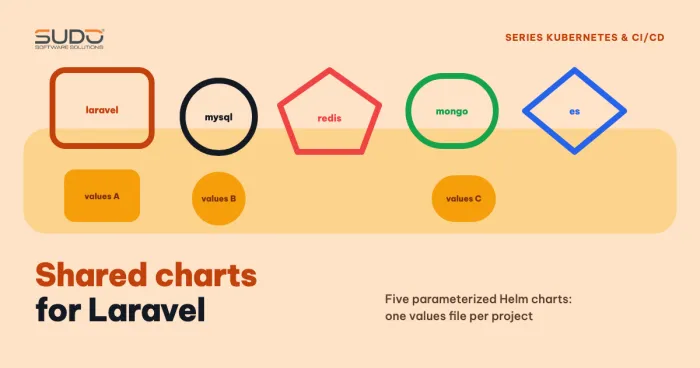
The Helm configuration that sets these values consistently for every site is covered in Shared charts: reusing Helm for Laravel, MySQL and Redis.
Next article
NFS and non-root pods: UID/GID, root_squash and anonuid. The NFS mechanism that decides who owns a directory when the pod does not run as root, and the correct exports configuration.