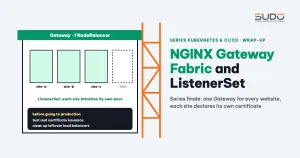
After leaving ingress-nginx, the biggest Gateway API problem on a cluster with many websites is certificates: when many sites write to one Gateway, they overwrite each other. NGINX Gateway Fabric with ListenerSet solves exactly that. This article describes a design with one Gateway and one load balancer for every website on LKE, where each site declares its own hostname and certificate with a ListenerSet and cert-manager 1.21 issues certificates through a shared HTTP listener, along with the common mistakes during rollout. This is the final article of Series 2, so the last part looks back at everything the series has covered.
1. Why NGINX Gateway Fabric and ListenerSet
The previous article, ingress-nginx retirement: a Traefik and Gateway API pilot, then rollback, stopped at the certificateRefs problem: a listener's certificate list is an atomic field, so when many sites write to one Gateway they overwrite each other.
ListenerSet (GEP-1713 in Gateway API) lets a namespace add listeners to an existing Gateway without editing that Gateway. Each site has a ListenerSet in its own namespace, containing the hostname and a TLS Secret from the same namespace. Nobody shares a list anymore, and no ReferenceGrant is needed for the Gateway to read Secrets in other namespaces.
NGINX Gateway Fabric is built on an nginx core, close to the experience of a team that has run Nginx on VPS for years. The versions need to match:
| Component | Version | Reason |
|---|---|---|
| NGINX Gateway Fabric | 2.8 or later | Has ListenerSet, requires Kubernetes 1.32 or later |
| Gateway API CRDs | 1.6.3, standard channel | Needs the listenersets.gateway.networking.k8s.io CRD |
| cert-manager | 1.21 or later | ListenerSet support since 1.20, the http01-parentreffallback annotation since 1.21 |
In cert-manager, ListenerSet is still behind the ListenerSets feature gate and is off by default. You must enable both config.gatewayAPI.enableListenerSet and config.featureGates.ListenerSets at install time, following the guide cert-manager: Annotated Gateway resource.
2. NGINX Gateway Fabric architecture: one Gateway, one load balancer
Internet
  → NodeBalancer (TCP 80 + TCP 443, no TLS termination)
    → Gateway public-gateway (namespace nginx-gateway)
        :80   shared HTTP: redirects and ACME HTTP-01 challenges
        :443  HTTPS placeholder (placeholder.invalid)
      → each site's ListenerSet (site namespace): HTTPS :443, hostname + TLS Secret
        → HTTPRoute → Service → Pod
TLS is terminated at NGINX Gateway Fabric. The infrastructure team owns the Gateway, the ClusterIssuer and the placeholder Secret, created once for the whole cluster. The web chart creates the ListenerSet, HTTPRoute, Deployment and Service in the site's namespace. Adding or removing a site does not touch the Gateway.
apiVersion: gateway.networking.k8s.io/v1
kind: Gateway
metadata:
  name: public-gateway
  namespace: nginx-gateway
spec:
  gatewayClassName: nginx
  infrastructure:
    annotations:
      service.beta.kubernetes.io/linode-loadbalancer-default-protocol: tcp
  allowedListeners:
    namespaces: {from: All}          # ListenerSets in site namespaces can attach
  listeners:
    - name: http
      protocol: HTTP
      port: 80
      allowedRoutes: {namespaces: {from: All}}
    - name: https
      protocol: HTTPS
      port: 443
      hostname: placeholder.invalid  # only so the load balancer opens port 443
      tls:
        mode: Terminate
        certificateRefs: [{kind: Secret, name: placeholder-tls}]
      allowedRoutes: {namespaces: {from: Same}}
The :443 listener with an .invalid hostname is a necessary trick on LKE: the NodeBalancer takes its port list from the listeners declared on the Gateway itself. If the Gateway only has :80, the Service and NodeBalancer only open port 80, and HTTPS cannot get in even though the site's ListenerSet has a 443 listener. The .invalid hostname guarantees the placeholder never matches a real domain when certificates are selected by SNI.
3. Each site on NGINX Gateway Fabric: a ListenerSet, three HTTPRoutes and two policies
apiVersion: gateway.networking.k8s.io/v1
kind: ListenerSet
metadata:
  name: site-a-example
  annotations:
    cert-manager.io/cluster-issuer: letsencrypt-prod
    acme.cert-manager.io/http01-parentreffallback: "true"
spec:
  parentRef: {name: public-gateway, namespace: nginx-gateway, kind: Gateway}
  listeners:
    - name: https
      hostname: "site-a.example"
      protocol: HTTPS
      port: 443
      tls:
        mode: Terminate
        certificateRefs: [{kind: Secret, name: site-a-example-tls}]
    - name: https-www               # only present when wwwRedirect is enabled
      hostname: "www.site-a.example"
      ...
cert-manager reads the annotations on the ListenerSet and creates a Certificate in the same namespace by itself, and NGINX Gateway Fabric loads the Secret once it is ready. The ListenerSet only has HTTPS listeners, so the http01-parentreffallback annotation lets the HTTP-01 challenge go through the Gateway's :80 listener. Without this annotation, the challenge reports NoReadyListeners.
Routing is split into three HTTPRoutes: the main route sends the domain's HTTPS traffic to the Service, the https-redirect route redirects HTTP to HTTPS (only when TLS is enabled), and the www-redirect route sends www to the main domain. Sites without TLS attach their route directly to the Gateway's HTTP listener with no ListenerSet, so they do not hit the 404 caused by a global redirect. The Exact challenge route for /.well-known/acme-challenge/ takes precedence over the PathPrefix / redirect, so certificate renewal still works once the redirect is enabled.
The remaining ingress-nginx annotations are replaced with NGINX Gateway Fabric's own policies attached to the main route: ClientSettingsPolicy limits the body size (for example 128m), and ProxySettingsPolicy sets the connect, read and send timeouts. A practical note: the main route should have only one rule, because multiple rules can make NGINX Gateway Fabric generate duplicate client_max_body_size directives. Compared with the design that used a certificate-collecting script, the chart drops the Certificate, Middleware, ReferenceGrant and sync CronJob templates entirely.
4. Common mistakes when deploying NGINX Gateway Fabric
- Helm only installs the control plane. The NGINX Gateway Fabric data plane (the nginx pod and the
LoadBalancerService) only appears once a Gateway object exists. Each Gateway creates its own load balancer. If you want many sites to share one IP, you must have exactly one Gateway. - By default a listener only accepts routes from the same namespace. An HTTPRoute in another namespace reports
The Route is not allowed by any listeneruntil the listener hasallowedRoutes.namespaces.from: All. - Keeping the IP by patching the old Service still works, provided the Gateway is in the same namespace as the old ingress-nginx Service, because a Service can only select pods in its own namespace. In a different namespace you get 0 endpoints.
- Use Linode annotations to keep the IP.
linode-loadbalancer-preserve: "true"keeps the NodeBalancer when the Service is deleted.linode-loadbalancer-nodebalancer-idattaches a new Service to an existing NodeBalancer and gets back exactly the old IP. - Changing the Service type is not how you remove a load balancer. If you patch the Gateway's Service from
LoadBalancertoClusterIP, NGINX Gateway Fabric immediately sets it back toLoadBalancer, the Cloud Controller Manager provisions a new NodeBalancer, and the old one is left behind and still billed. After every test session, reconcile the list of load balancers on the account against the Services in the cluster. - Uninstalling and reinstalling cert-manager is safe for your data if the CRDs are kept with the
keepresource policy: Certificates and Secrets remain intact, and the new controller keeps managing them without reissuing.
5. Checklist before taking NGINX Gateway Fabric to production
- Test the real certificate issuance flow for a real domain through ListenerSet and cert-manager, and record the results so it can be rerun.
- Plan to run both in parallel. NGINX Gateway Fabric does not process Ingress objects, so the transition period must run ingress-nginx and NGINX Gateway Fabric as two separate controllers, moving hostnames over in batches.
- Have a template for every site type, including sites that only redirect an entire domain.
- Keep secrets out of the chart's default values. Any value that has ever been in values should be treated as leaked: rotate it, then move it to a Secret.
- Keep the Gateway API CRD version in line with the controller's requirements, and remove the CRDs of previously trialed controllers.
- Clean up test infrastructure: test clusters and abandoned load balancers.
6. Looking back at Series 2
The series followed the exact order in which a PHP team moves hundreds of Laravel websites to Kubernetes:
| Stage | Content | Representative article |
|---|---|---|
| Foundation | The first cluster, ingress, cert-manager, environment variables in containers | Building the first LKE cluster: node pools, kubeconfig and early choices |
| CI/CD | Monitoring, requests and limits, the first deploy pipeline | First CI/CD with Bitbucket Pipelines, Docker Hub and kubectl |
| Packaging | Helm charts, the bridge to GitLab CI, shared charts | What is a Helm chart: packaging Laravel websites for repeatable deploys |
| Moving in | Database outside the cluster, NFS, bulk migration, backup | Migrating websites to Kubernetes: a safe bulk migration process |
| Scaling out | Placeholder pods, a second cluster, a new monitoring stack | kube-prometheus-stack: replacing old monitoring and silent misconfiguration |
| Operations and controller change | Jenkins as a form for GitLab CI, Gateway API | Jenkins and GitLab CI: operating Website AI on Kubernetes |
Three things held true throughout the series: whatever works must be repeatable, thanks to shared charts and pipelines; keeping data outside the cluster makes every move lighter; and anything "installed once and left alone", like an ingress controller or a cert-manager that never gets upgraded, sooner or later turns into debt that has to be paid all at once. Schedule upgrades of the cluster's infrastructure components as a recurring task, and do not wait until a project stops shipping patches.
The Cloud VPS side has its own retrospective: Revisiting the Cloud VPS model: weak points and a VPS consolidation plan. All articles from every series are in the Sudo technical blog.
Series wrap-up
Thank you for following these 30 articles on Kubernetes and CI/CD on Linode. The road was not straight: there were good decisions made early, design mistakes we only noticed much later, and pilots we had to tear down. If you are preparing to leave ingress-nginx for NGINX Gateway Fabric, or to move many Laravel websites to Kubernetes, we hope the commands, sample configurations and mistakes in this series save you a few detours.
What remains is operations: incidents, how to investigate them, and the things that need regular maintenance. Continue with the Production Operations series, starting with Incident investigation across layers: from balancer to database and Kubernetes.