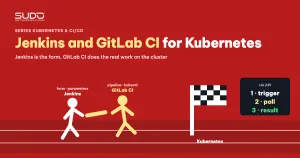
Once the operations pipelines for websites on Kubernetes are running smoothly in GitLab CI, the next question is usually not "which tool should we rewrite them in", but "how do operators run them safely without typing a few dozen variables by hand". This article describes the model combining Jenkins and GitLab CI that we use for Website AI: Jenkins provides the form, GitLab CI does the work. Jenkins does not need kubectl or helm installed and holds no kubeconfig; it only takes parameters, calls the API to run a pipeline, and waits for the result.
1. When to combine Jenkins and GitLab CI
This model suits a team that already has two things:
- Operations logic already lives in GitLab CI. For example, the one-pipeline-per-operation model from One operations pipeline per branch: automation with GitLab CI: create the namespace, run
helm upgrade --install, create the database, commit values to the chart repo. The runners already have an image with kubectl and Helm. - Operators are already used to working through Jenkins. As in Jenkins as the control plane for hundreds of websites, each operation is a job with a form, role-based permissions and result notifications via chat.
Without a form layer, people have to open GitLab's run pipeline page or use a prepared set of API requests, and fill in the domain, database machine, storage path and node pool by hand. One mistyped variable is enough for the pipeline to do the wrong thing. Combining Jenkins and GitLab CI keeps all the logic in GitLab and only replaces the input layer with a form that has dropdowns, default values and input validation. This is also the "trigger via API, then poll the status" pattern used in Bridging Bitbucket and GitLab CI with the API and polling.
2. The Jenkins and GitLab CI model: Jenkins is the form, GitLab does the work
Operator
   │ Build with Parameters (domain, site type, DB machine...)
   ▼
Jenkins  (no kubectl/helm, no kubeconfig)
   │ 1. validate and normalize parameters
   │ 2. POST /api/v4/projects/:id/trigger/pipeline  (ref + variables)
   │ 3. GET  /api/v4/projects/:id/pipelines/:pipeline_id   (poll periodically)
   ▼
GitLab CI  (the pipeline matching the operation)
   │ read kubeconfig from a protected/masked CI variable
   │ create the database, create the storage directory, helm upgrade --install
   │ commit values to the chart repo
   ▼
Kubernetes cluster
The roles of Jenkins and GitLab CI are split as follows:
- Jenkins: the form, input validation, permissions for who can run which operation, notifications, and a history of who ran what.
- GitLab CI: everything that touches the cluster and the database. Infrastructure secrets live only here.
- The contract between Jenkins and GitLab CI: the list of variables each pipeline accepts, their data types and valid values. This contract should be documented like an API.
Operations can be split into a few functional groups: site lifecycle (create, change domain, clone, remove), data (back up, restore, export and import the database, move to another database machine) and application tasks (running artisan commands from presets). Each group has a different wait time: creating a site usually finishes in a few minutes, while backing up a site with many files can take an hour.
3. Trigger and poll between Jenkins and GitLab CI
The two functions below are the entire bridge between Jenkins and GitLab CI. Put them in a Jenkins Shared Library so every job calls the same code, instead of copying them into each job.
// vars/gitlabPipeline.groovy (Shared Library)
def trigger(String ref, Map vars) {
  withCredentials([string(credentialsId: 'gitlab-trigger', variable: 'TRIGGER_TOKEN')]) {
    def form = vars.collect { k, v -> "--form-string 'variables[${k}]=${v}'" }.join(' ')
    def code = sh(returnStdout: true, script: """
      curl -s -o resp.json -w '%{http_code}' -X POST \\
        --form-string "token=\$TRIGGER_TOKEN" --form-string "ref=${ref}" ${form} \\
        "\$GITLAB_API/projects/\$PROJECT_ID/trigger/pipeline"
    """).trim()
    if (code != '201') { error("Trigger failed with HTTP ${code} for ref ${ref}") }
    return readJSON(file: 'resp.json').id
  }
}

def waitFor(def id, int timeoutMinutes, int intervalSec = 15) {
  def deadline = System.currentTimeMillis() + timeoutMinutes * 60000L
  def status = 'created'
  while (System.currentTimeMillis() < deadline) {
    status = fetchStatus(id)   // GET /pipelines/:id, header PRIVATE-TOKEN (read-only token)
    if (status in ['success', 'failed', 'canceled', 'skipped']) break
    sleep(time: intervalSec, unit: 'SECONDS')
  }
  return status
}
A few points to keep in mind when implementing the Jenkins and GitLab CI bridge:
- Use a trigger token to start pipelines. A pipeline trigger token can only run pipelines. Reading the status uses a different, read-only token sent via the
PRIVATE-TOKENheader, as described in the REST API authentication docs. Do not put tokens in the query string, because they easily leak into proxy access logs. - Write the payload to a file or use
--form-string. Building JSON by string concatenation in Groovy breaks easily when a value contains quotes. - A poll interval of 10–30 seconds is enough for operational tasks.
- A separate timeout per job. Base it on the pipeline's real run time, plus some headroom.
4. Input validation on the Jenkins side
The biggest benefit of the form layer is stopping mistakes before they reach the cluster. All checks should finish before Jenkins and GitLab CI exchange anything. A minimal validation skeleton:
def required = ['DOMAIN', 'SITE_TYPE', 'DB_HOST']
required.each { k ->
  if (!params[k]?.trim()) { error("Missing parameter ${k}") }
}
if (!(params.DOMAIN ==~ /^[a-z0-9.-]+\.[a-z]{2,}$/)) {
  error("Invalid domain: ${params.DOMAIN}")
}
def cmd = PRESETS[params.ACTION]
if (!cmd) { error("Preset does not exist: ${params.ACTION}") }
Use fixed choice lists for the database machine and site type so users do not have to type them. Random passwords should be generated by the GitLab pipeline and stored directly in the secret store, not generated in Jenkins.
5. Common mistakes when combining Jenkins and GitLab CI
Jenkins times out while the pipeline is still running
When Jenkins and GitLab CI are combined in polling mode, for long operations such as backups Jenkins may report a failure while GitLab is still compressing and uploading data. "Jenkins reports fail" does not mean "the work failed". The wait function should return the status instead of calling error() itself, so the job can tell a wait timeout apart from a failed pipeline, and print clearly "the pipeline is still running, follow it at this link".
A null variable becomes the word "null"
bash: line 1: null: command not found
command terminated with exit code 127
When a choice on the form does not match any preset, the Groovy variable holds null. After string concatenation it becomes the word null, which is sent to GitLab and actually executed in the pod. Empty checks must happen in Jenkins before triggering.
Parameter names with mismatched case
The form names the parameter DOMAIN, the script reads params.domain. Groovy is case-sensitive, so the script sees an empty value. If the script is pasted directly into the job configuration box, this kind of error only shows up at run time. Keep the pipeline in a reviewed Jenkinsfile, and agree on one naming convention for every parameter.
The real error is in GitLab, Jenkins only sees "failed"
This is the biggest downside of splitting Jenkins and GitLab CI into two systems. A way to ease the pain: when a pipeline fails, Jenkins calls the API to list the pipeline's jobs, finds the failed job and pulls the last few dozen lines of its log into the console. Error messages must also name the right operation: copying a job from another one and forgetting to update the message will mislead whoever reads it.
6. Secrets at the boundary between two systems
The boundary between Jenkins and GitLab CI is where secrets leak most easily. The general rule: infrastructure secrets live only in GitLab, and Jenkins only holds the token used to trigger. Specifically:
- Do not send the kubeconfig as a pipeline variable. Anyone who can view the pipeline's variables gets access to the cluster. Store the kubeconfig once as a protected, masked CI variable in GitLab, tied to a ServiceAccount with only the permissions the pipeline needs.
- Do not print passwords to the console. Jenkins only masks values taken from Credentials, not variables generated inside the script. Write new passwords to the secret store and only print the path to them in the console.
- Split tokens by permission. One token to trigger, one read-only token to poll, and rotate them periodically.
- Limit who can run dangerous jobs. Removing a site or moving to another database machine should be restricted by role and include a confirmation step.
7. Gains and losses of combining Jenkins and GitLab CI
| Gains | Losses |
|---|---|
| No kubectl, Helm or kubeconfig installed on the Jenkins machine | Two systems, two places to read logs |
| Operations logic stays unchanged in GitLab CI | Polling holds a Jenkins executor for the whole wait |
| Jenkins forms, permissions and notifications can be reused | Secrets have to cross the boundary between the two systems |
For a small operations team already used to Jenkins, combining Jenkins and GitLab CI is a sensible intermediate step: it replaces manual typing with a form without rewriting the pipelines. As the number of operations grows, you can consider consolidating into one system, but only once the pipelines are stable.
8. Checklist for the Jenkins and GitLab CI model
- The trigger/poll functions live in a Shared Library; jobs only call them.
- Trigger with a trigger token, poll with a read-only token via a header, no tokens in URLs.
- Every required parameter is checked for emptiness and format before triggering.
- Timeouts are set per operation, and a timeout is distinguished from a failed pipeline.
- On failure, Jenkins pulls the log of the failed GitLab job into the console.
- The kubeconfig lives only in a protected GitLab CI variable, tied to a narrowly scoped ServiceAccount.
- The console never prints passwords or tokens generated during the run.
- The Jenkins pipeline lives in a reviewed
Jenkinsfile.
The other articles in both series are in the Sudo technical blog.
Next article
ingress-nginx retirement: a Traefik and Gateway API pilot, then rollback. When ingress-nginx stopped receiving patches, we trialed Traefik and Gateway API in parallel on a few sites, then pulled back to choose a different direction.