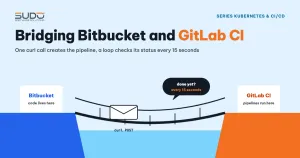
A fairly common situation: the code lives on Bitbucket, where developers work with branches and pull requests, while the pipelines that operate the Kubernetes cluster (creating sites with Helm, working with the NFS machine and the database) run on GitLab CI with self-hosted runners inside a private network. Every time code is pushed to Bitbucket, GitLab CI has to build the image and update the sites. This document describes the simplest bridge model: Bitbucket Pipelines calls the GitLab API to create a pipeline, then polls its status periodically until it finishes. It covers the flow, a sample configuration file, common mistakes, how to force a rollout when the image keeps a fixed tag, the pros and cons, and the alternatives.
1. When you need a bridge to GitLab CI
In the article First CI/CD with Bitbucket Pipelines, Docker Hub and kubectl, everything ran inside Bitbucket: build, push the image, kubectl apply. Once each site becomes a Helm release, as in What is a Helm chart: packaging Laravel websites for repeatable deploys, the operations pipeline usually needs things that Bitbucket's shared runners do not have:
- Self-hosted runners (for example the GitLab Runner used since First automated deployment: GitLab Runner, SSH and nginx templates) sitting in the private network, with a
shellexecutor to SSH into the NFS machine and the database machine. - The kubeconfig, SSH keys and the values repo update process, already configured on the GitLab CI side.
- The operations team managing infrastructure access in a single place.
Moving the code to GitLab disrupts the habits of the whole development team; moving the operations pipeline to Bitbucket loses the internal runners. The least disruptive option is to let Bitbucket do just one thing: tell GitLab that there is a new commit.
2. The flow from push to new pod
Dev push / merge PR ──► Bitbucket (application repo)
                          │ bitbucket-pipelines.yml
                          │ POST /api/v4/projects/<id>/pipeline
                          │   ref=main, BITBUCKET_BRANCH, BITBUCKET_COMMIT_ID
                          ▼
                  GitLab CI (build project, self-hosted runner)
                          │ check out the exact commit, docker build
                          │ docker push <registry>/app:<tag>
                          │ write the commit hash into each site's values, commit the values repo
                          │ helm upgrade on the cluster
                          ▼
                  Cluster: new pods pull the image and run the new code

   Meanwhile, the Bitbucket step periodically calls
   GET /api/v4/projects/<id>/pipelines/<pipeline_id> to get the status
On every deploy, the GitLab CI pipeline creates a small commit in the values repo (changing only the site's commit value). The history of the values repo therefore becomes a deploy log: which site runs which commit, and when it changed.
3. The GitLab CI pipeline creation API
GitLab offers two ways for an external system to start a GitLab CI pipeline:
| Create pipeline | Pipeline trigger | |
|---|---|---|
| Endpoint | POST /projects/:id/pipeline | POST /projects/:id/trigger/pipeline |
| Authentication | Access token (header PRIVATE-TOKEN) with the api scope | Trigger token created specifically for the project, passed via the token parameter |
| Passing variables | JSON array variables: [{key, value}] | variables[KEY]=value |
| Permission scope | Broad: works for any API the token owner has access to | Narrow: can only trigger pipelines of that specific project |
Both return JSON containing the id of the newly created pipeline, which you use to query its status via GET /projects/:id/pipelines/:pipeline_id. The final states are success, failed or canceled; intermediate states are created, pending, running... Details are on the GitLab Pipelines API page and in triggering pipelines through the API.
4. A bitbucket-pipelines.yml file that calls GitLab CI
The template uses a trigger token (narrow scope) and jq to read JSON. The token, project ID and GitLab URL live in repository variables marked as secured, not in the file:
image: atlassian/default-image:4

pipelines:
  branches:
    main:
      - step:
          name: Trigger GitLab CI
          script:
            - apt-get update -qq && apt-get install -y -qq jq
            - |
              RESP=$(curl -sS --fail -X POST \
                -F "token=$GITLAB_TRIGGER_TOKEN" -F "ref=main" \
                -F "variables[BITBUCKET_BRANCH]=$BITBUCKET_BRANCH" \
                -F "variables[BITBUCKET_COMMIT_ID]=$BITBUCKET_COMMIT" \
                "$GITLAB_URL/api/v4/projects/$GITLAB_PROJECT_ID/trigger/pipeline")
              PIPELINE_ID=$(echo "$RESP" | jq -r '.id')
              WEB_URL=$(echo "$RESP" | jq -r '.web_url')
              [ "$PIPELINE_ID" != "null" ] || { echo "Failed to create pipeline"; exit 1; }
              echo "GitLab CI pipeline: $WEB_URL"
              for i in $(seq 1 80); do          # about 20 minutes max
                sleep 15
                STATUS=$(curl -sS --header "PRIVATE-TOKEN: $GITLAB_READ_TOKEN" \
                  "$GITLAB_URL/api/v4/projects/$GITLAB_PROJECT_ID/pipelines/$PIPELINE_ID" | jq -r '.status')
                echo "Status: $STATUS"
                case "$STATUS" in
                  success) exit 0 ;;
                  failed|canceled|skipped) echo "See the error at $WEB_URL"; exit 1 ;;
                esac
              done
              echo "Timed out waiting, see $WEB_URL"; exit 1
A trigger token can only create pipelines; to read the status, use a separate token that only has the read_api scope. The Bitbucket step succeeds only when the GitLab CI pipeline succeeds, so whoever merges the pull request still sees the deploy result right on Bitbucket.
5. Common mistakes when calling GitLab CI from Bitbucket
- A colon in an echo command.
- echo "Current branch: $BITBUCKET_BRANCH"makes YAML treat the whole line as a key/value pair because it contains ":". Drop the colon, wrap the command in single quotes, or use a|block as in the template above. - Mismatched endpoint and token.
/trigger/pipelinerequires a trigger token and does not accept an access token viaPRIVATE-TOKEN;/pipelineis the opposite. A mismatched pair is always rejected. - Wrong variable format. With
/pipeline, putting"BITBUCKET_BRANCH": "..."at the same level asrefmakes GitLab ignore it: the pipeline still runs but never receives the commit it should build. Variables must go in thevariablesarray askey/valuepairs. - Variables inside single quotes.
'{"value":"$BITBUCKET_COMMIT"}'sends the literal string$BITBUCKET_COMMIT. You have to close the single quote, put double quotes around the variable, then reopen:'"$BITBUCKET_COMMIT"'. The fastest way to catch this is toechothe payload right beforecurl. - A multi-line script collapsed into one line. A
whileloop written as several items in YAML may be joined with spaces; a missing;makes the shell misread the whole block. Use a|block to keep the line breaks. - Extracting JSON with grep.
grep -o '"id":[0-9]*'can catch a nestedidby mistake (for example the id of the user who created the pipeline). Usejq. - Printing the token to the log for debugging. Bitbucket masks secured variables in the log, but do not rely on that.
- Polling too often. Asking every few seconds does not make the build finish sooner; about 15–30 seconds is enough.
6. Forcing a rollout when the image tag does not change
If the image is always pushed with a fixed tag, building and pushing alone does not tell Kubernetes that anything changed. The chart can solve this with a label in the pod template whose value comes from values:
template:
  metadata:
    labels:
      {{- include "web.selectorLabels" . | nindent 8 }}
      commit: {{ .Values.commitId | quote }}
The GitLab CI pipeline writes the Bitbucket commit hash into this value for each site and then runs helm upgrade. The pod template changes, the Deployment does a rolling update, and the new pods with imagePullPolicy: Always pull the same tag again and get the new code.
| Gains | Losses |
|---|---|
| No need to change the tag in the values of many sites | You cannot tell which image a pod runs just by looking at the tag |
The commit label shows which commit a site is on | Rolling back to an old commit does not bring back the old image, because the tag was overwritten |
| One build serves every site of the same type | Any pod that restarts has to ask the registry for the image, even when there is no new code |
As the number of sites grows, switch to tagging by commit hash and writing the tag into values; the commit label then becomes purely informational.
7. Pros and cons of an API plus polling bridge
| Pros | Cons |
|---|---|
Simple: one curl command, no extra service | The Bitbucket step sits waiting for the whole GitLab CI run, burning Bitbucket build minutes |
| The deploy status shows up right on Bitbucket | You only see pass or fail; to read the detailed error you still have to open GitLab CI |
| No need to move the code to another platform | With an access token that has the api scope, a leaked token exposes the whole GitLab account |
| GitLab CI keeps full control of the internal runners | Without a timeout, a pipeline stuck in pending holds the step until Bitbucket's limit |
8. Alternatives
- A trigger token instead of an access token, as in the template in section 4: if it leaks, the damage is much smaller. This is the cheapest change and should come first.
- A Bitbucket webhook calling the trigger URL directly. GitLab CI accepts the webhook and puts the payload in the
TRIGGER_PAYLOADvariable. Bitbucket no longer runs a waiting step; in exchange, if you want the status to show up on Bitbucket, the GitLab CI pipeline has to call Bitbucket's build status API itself in its last step. - Mirroring the repo from Bitbucket to GitLab. Pull mirroring (a paid tier feature) lets every mirror update trigger a pipeline automatically, with no bridge.
- Multi-project pipelines, if the code is also on GitLab:
trigger: projectwithstrategy: dependmakes the parent pipeline wait for and receive the child pipeline's status naturally.
9. Checklist for a Bitbucket and GitLab CI bridge
- Print the JSON payload before sending it; errors are more often in quotes and colons than in the API.
- Use the correct endpoint and token type pair; keep the token scope as narrow as possible.
- Give the wait loop a maximum number of attempts, and print the link to the GitLab CI pipeline on failure.
- Read JSON with
jq, not grep. - Know exactly how your image tagging strategy affects rollback.
- Treat a temporary bridge like a real system: it needs an owner, documentation and a replacement plan.
Next article
One operations pipeline per branch: automation with GitLab CI. Each operational task is a branch in the same repo: the flow for creating a site with Helm, and how the pipeline cleans up after itself when a deploy fails.