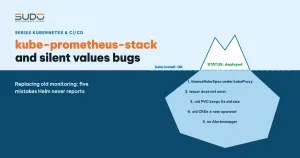
Replacing an old monitoring stack with kube-prometheus-stack usually looks very smooth: the install command reports Install complete, Prometheus comes up, Grafana is reachable, every pod is Running. But "no errors" does not necessarily mean "as intended". This chart has very long values and ships no schema, so a key in the wrong place is simply ignored in silence. This article explains what kube-prometheus-stack contains, how to replace an old stack safely, five common kinds of "silent misconfiguration" and how to catch them before installing on production.
1. What kube-prometheus-stack contains
kube-prometheus-stack is the Prometheus community's Helm chart, bundling everything needed to monitor a cluster:
- Prometheus Operator: a controller that reads CRDs such as
Prometheus,ServiceMonitor,PrometheusRule,Alertmanager,ThanosRulerand builds the corresponding StatefulSets and ConfigMaps. - Prometheus, managed by the operator through the
Prometheusobject. - Alertmanager: receives alerts from Prometheus and sends them out (chat, email...).
- Grafana with ready-made dashboards, kube-state-metrics and node-exporter.
- A default rule set: a few dozen
PrometheusRuleobjects, including both recording rules and alert rules for nodes, the kubelet, the API server and workloads.
The strength of kube-prometheus-stack is that one command gives you the whole set. Its weakness lies there too: the default values.yaml runs to thousands of lines and the chart ships no values.schema.json. Helm therefore cannot check which keys in your values are valid. Mistype a key's name or put it in the wrong place, and Helm just quietly ignores it.
If the cluster is running an old kube-prometheus release as in Kubernetes monitoring with kube-prometheus and Grafana, then after Kubernetes has moved up several versions while the monitoring stack stood still, a replacement becomes necessary.
2. Sample kube-prometheus-stack values for a managed cluster
An example of minimal values for an LKE cluster, with Prometheus and Grafana running on a dedicated node pool:
alertmanager:
  enabled: true
  config:
    route: { receiver: chat }
    receivers:
      - name: chat
        slack_configs: [{ api_url_file: /etc/alertmanager/secrets/chat-webhook/url, channel: "#alerts" }]
grafana:
  persistence: { enabled: true, size: 10Gi }
  affinity: &monitoringPool
    nodeAffinity:
      requiredDuringSchedulingIgnoredDuringExecution:
        nodeSelectorTerms:
          - matchExpressions:
              - { key: lke.linode.com/pool-id, operator: In, values: ["<pool-monitoring>"] }
prometheusOperator:
  affinity: *monitoringPool
kube-state-metrics:
  affinity: *monitoringPool
prometheus:
  ingress:
    enabled: true
    annotations:
      cert-manager.io/cluster-issuer: letsencrypt-prod
  prometheusSpec:
    affinity: *monitoringPool
    retention: 15d
    storageSpec:
      volumeClaimTemplate:
        spec: { resources: { requests: { storage: 30Gi } } }
kubeEtcd: { enabled: false }
kubeControllerManager: { enabled: false }
kubeScheduler: { enabled: false }
The last three lines are necessary on a managed cluster: the control plane is managed by the platform, so Prometheus inside the cluster cannot scrape etcd, the scheduler or the controller manager. Enabling them only produces down targets and false alerts.
3. Replacing the old stack with kube-prometheus-stack: uninstall, then install
There are two ways to replace the old stack: upgrade the old release, or remove it completely and install fresh. Uninstall and reinstall is cleaner, but watch out for PersistentVolumes. If the StorageClass has the Retain reclaim policy, every time you uninstall the release the PVC disappears but the volume stays behind in the Released state, and keeps being billed until someone deletes it by hand. Trying again and again on production leaves one volume behind each time.
- Test the values on a test cluster, or set
grafana.persistence.enabled: falseuntil the values are settled. - After installing, list the abandoned volumes with
kubectl get pv | grep Released, then clean them up deliberately. - Write down the release name. Renaming the release renames every PVC created from it (see section 6).
4. Silent misconfiguration 1: a key in the wrong place in kube-prometheus-stack values
A common example: a thanosRulerSpec block with affinity ends up under kubeProxy. In kube-prometheus-stack, kubeProxy only configures scraping of kube-proxy. The correct path is thanosRuler.thanosRulerSpec, and ThanosRuler is not enabled by default anyway. The chart does not read the wrong path, so the whole block has no effect.
Another variant: the block is at the correct path but applies to a component that is not enabled, for example affinity under prometheusOperator.admissionWebhooks.deployment while deployment.enabled defaults to false. The common result: the operator, Grafana and kube-state-metrics get no affinity and may be scheduled onto the application pool, exactly where the "separate monitoring onto its own pool" design wanted to avoid.
5. Silent misconfiguration 2: the ClusterIssuer does not exist, the Certificate is still Ready
The cert-manager.io/cluster-issuer annotation on the Ingress points to a ClusterIssuer with a mistyped name, for instance confused with the name of the Secret holding the ACME key. According to cert-manager: Securing Ingress Resources, this annotation makes cert-manager create a Certificate for the Ingress automatically. If the TLS Secret it points to already holds a valid certificate issued earlier by the correct issuer, you will see:
$ kubectl describe certificate monitoring-tls -n monitoring
Issuer Ref:  ClusterIssuer/letsencrypt-prd     # mistyped name
Conditions:
  Ready    True  Ready            Certificate is up to date and has not expired
  Issuing  True  IncorrectIssuer  Issuing certificate as Secret was previously issued
                                  by ClusterIssuer.cert-manager.io/letsencrypt-prod
Ready=True only because the old Secret has not expired yet. The Issuing condition, however, is stuck at IncorrectIssuer: when the old certificate expires, nobody will be able to renew it. In the same way, an Ingress that declares a nonexistent TLS Secret still gets HTTPS if it shares a host with another Ingress that has a certificate, because the ingress controller serves certificates by host. Remove that other Ingress and HTTPS disappears without anyone understanding why.
6. Silent misconfiguration 3: the old PVC does not change size
The kube-prometheus-stack values declare storage: 30Gi for Prometheus, but the new release keeps exactly the same name as the old one. The StatefulSet generates exactly the old PVC name, and volumeClaimTemplates only creates a PVC when none exists; it never modifies an existing PVC. Prometheus therefore runs on the old, small volume while anyone reading the values assumes it is 30Gi. Conversely, renaming the release creates a new PVC and abandons the old one. Both cases need checking:
kubectl -n monitoring get pvc -o custom-columns=NAME:.metadata.name,SIZE:.status.capacity.storage,STATUS:.status.phase7. Silent misconfiguration 4: old CRDs, new operator
$ kubectl get crd prometheuses.monitoring.coreos.com \
    -o jsonpath='{.metadata.annotations.operator\.prometheus\.io/version}'
Helm only installs the CRDs in the crds/ directory when the CRD does not exist yet, and never upgrades them. This is intentional behavior, documented in Helm: Custom Resource Definitions, and the kube-prometheus-stack README also states clearly that CRDs must be updated manually. If the printed version is lower than the chart's appVersion, the new operator still runs, but any field the old schema does not know is pruned by the API server when the object is saved, with no error returned. Apply the CRDs of the correct version before installing or upgrading:
helm pull prometheus-community/kube-prometheus-stack --version <version> --untar
kubectl apply --server-side -f kube-prometheus-stack/charts/crds/crds/
The chart also has a crds.upgradeJob.enabled option that applies CRDs through a Helm hook, but the chart's values describe it as an experimental feature, disabled by default.
8. Silent misconfiguration 5: kube-prometheus-stack has rules, nobody receives alerts
Setting alertmanager.enabled: false is a valid configuration. The default rules are still created, alerts still switch to firing, but nothing is sent anywhere. The alerts only sit on the Prometheus Alerts page, waiting for someone to open it by chance. Monitoring is not done until alerts reach a person. Similarly, exposing Prometheus through a NodePort Service to read it from outside opens that port on every node, so it must come with a firewall that only allows the right sources.
9. Catching kube-prometheus-stack mistakes early with helm template
| Mistake | Why nothing reports it | How to catch it |
|---|---|---|
| Key in the wrong place, key for a disabled component | The chart has no schema | helm template, then search the output |
| Issuer does not exist | The Certificate is still Ready thanks to the old Secret | Look at the Issuing condition, not just the READY column |
| PVC has the wrong size | The StatefulSet uses an existing PVC with the same name | Compare kubectl get pvc with the values |
| Old CRDs | Helm deliberately skips existing CRDs | Compare the CRD version label with appVersion |
| No Alertmanager | Valid configuration | Fire a test alert and wait for it to arrive |
helm lint cannot help with the first case because the values are syntactically valid. What helps is rendering the real manifests and checking that what you declared shows up on the right objects:
helm template monitoring prometheus-community/kube-prometheus-stack \
  --version <version> -n monitoring -f values.yaml > rendered.yaml

# the number of affinity blocks in the manifests must equal the number declared in values
grep -c "lke.linode.com/pool-id" rendered.yaml

# which Deployments/StatefulSets have no affinity yet?
grep -E "^kind: (Deployment|StatefulSet)|^  name:|affinity:" rendered.yaml
Prometheus and Alertmanager are built by the operator from CRDs, so for them you need to look in the Prometheus and Alertmanager objects instead of StatefulSets. Spending a few minutes reading the output of helm template before installing is much cheaper than trial installs on production.
10. Checklist after installing kube-prometheus-stack
- "Install complete" only means Kubernetes accepted the manifests. Always read the real state.
- Every monitoring pod runs on the right node pool:
kubectl -n monitoring get pods -o wide. - Every condition of the Certificate, not just the READY column.
- PVC sizes match the values, and no forgotten
Releasedvolumes remain. - The CRD version matches the operator.
- At least one test alert reaches a recipient. As in Low-cost self-healing: detecting and restarting dead services, a system that monitors itself with no one receiving the signals is barely monitored at all.
The other articles in the series are in the Sudo technical blog, including Spinning up a Kubernetes cluster quickly for a microservice project, where kube-prometheus-stack is installed by the same script.
Next article
Jenkins and GitLab CI: operating Website AI on Kubernetes. A model where Jenkins acts as the input form and GitLab CI does the real work with kubectl and Helm, plus the principles for keeping secrets safe at the boundary between the two systems.