The simplest way to attach website data to a pod is to declare an NFS volume directly in the Deployment: one server line, one path line, and you are done. That works, but there is nowhere to put mount options, and there is no object you can list to see which site lives on which NFS machine. This document walks through moving a Helm chart to a model with one static NFS PersistentVolume per site, locked to the right PVC with claimRef: how to choose mountOptions, how to split initialization work between an initContainer and postStart, how to design three probe types, and how to migrate running sites.
1. What a website keeps on NFS
Take a Laravel website whose image contains the code plus an original copy of the public, themes, plugins and lang directories under /var/code. At runtime those four directories are mounted from NFS, because they hold user data: uploaded images, customized themes, installed plugins. If a pod is deleted or moved to another node, the data stays on the NFS machine, and multiple pods of the same site read the same directory.
As the number of sites grows, the data is usually spread across several NFS machines. Each site has its own directory on one machine, with the directory name derived from the domain (dots replaced by hyphens) so it is easy to guess and easy to back up.
2. Inline NFS volumes: simple but incomplete
An inline declaration looks like this:
volumes:
- name: site-a-example-com-volume
  nfs:
    server: 10.0.0.31
    path: /data/site-a-example-com
    readOnly: false
Three limitations show up as the number of sites grows:
- No
mountOptions: an inline NFS volume has no such field, so the protocol version, read and write sizes, and behavior when the server stops responding are all left for the client and server to negotiate. - No object to manage: to find out which site lives on which NFS machine you have to read every Deployment;
kubectl get pvshows nothing. - Storage is tied to the Deployment: changing servers means changing the pod template, and storage details get mixed into the part that runs the application.
Another option is a ReadWriteOnce PVC on Block Storage plus a busybox initContainer that creates the directories and runs chown. That does not suit websites that need many pods on many nodes reading the same directory, so keeping NFS and only changing how it is declared makes more sense.
3. Static NFS PersistentVolumes and claimRef
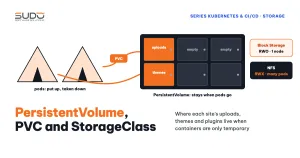
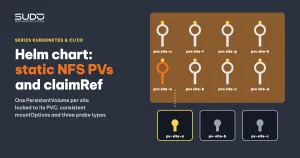
Kubernetes has two ways to provision volumes: dynamic, where a StorageClass creates a PV automatically for a PVC, and static, where an administrator creates the PV in advance and a PVC binds to it (see Volume, PersistentVolume, PVC and StorageClass on Kubernetes). With NFS, the directory already exists on the server, so static is the natural choice. The chart generates one PV per site:
apiVersion: v1
kind: PersistentVolume
metadata:
  name: {{ include "web.fullname" . }}-pv
spec:
  capacity:
    storage: 10Gi
  accessModes:
    - ReadWriteMany
  persistentVolumeReclaimPolicy: Retain
  storageClassName: ""
  nfs:
    path: {{ .Values.volumes.nfsSharedFolder }}/{{ include "web.fullname" . }}
    server: {{ .Values.volumes.nfsIp }}
  mountOptions:
    - vers=4.1
    - rsize=32768
    - wsize=32768
    - hard
    - timeo=600
    - retrans=2
  claimRef:
    namespace: {{ .Release.Namespace }}
    name: {{ include "web.fullname" . }}-pvc
And one PVC in the site's namespace; the Deployment now only references this PVC:
apiVersion: v1
kind: PersistentVolumeClaim
metadata:
  name: {{ include "web.fullname" . }}-pvc
spec:
  accessModes:
    - ReadWriteMany
  storageClassName: ""
  volumeName: {{ include "web.fullname" . }}-pv
  resources:
    requests:
      storage: 10Gi
What claimRef does
A PV is a cluster-scoped resource, while a PVC lives in a namespace. Without claimRef, any PVC with matching requirements could "pick up" another site's PV, and that site would read and write the other site's NFS directory by mistake. claimRef reserves the PV for the name and namespace of the one PVC allowed to bind to it. With hundreds of PVs of the same size and the same access mode, this protection is mandatory. Set storageClassName: "" explicitly on both the PV and the PVC so the cluster's default StorageClass does not step in and create a different dynamic volume; volumeName on the PVC locks the other direction.
Understanding the NFS mountOptions
| Option | Meaning |
|---|---|
vers=4.1 | Pins NFSv4.1 so the client does not fall back to v3 on its own |
rsize=32768, wsize=32768 | Maximum size of each read and write (32 KB) |
hard | If the NFS server stops responding, the client retries forever and the process waits instead of getting an I/O error. This avoids corrupted files, but pods may hang when the NFS machine has a problem |
timeo=600 | Waits 60 seconds (the unit is tenths of a second) before resending a request |
retrans=2 | Number of retransmissions before logging a "server not responding" warning |
The 10Gi capacity only exists so the PV and PVC match; NFS does not enforce this number. The NFS machine's disk is the real limit, so it has to be monitored separately.
One PVC, many subPaths
Each site has a single PVC, mounted several times with different subPath values: public, themes, plugins, lang. Consider not putting storage/framework/sessions and storage/framework/cache on NFS: it cuts down small writes to NFS, at the cost of losing file-based sessions when a pod restarts. Better still, move sessions and cache to Redis.
4. initContainer and postStart: splitting initialization work
A typical bug: postStart copies new code onto NFS in parallel with PHP-FPM starting to accept requests, so the first request may read a file that has not finished copying. Kubernetes does not guarantee that the postStart hook finishes before the container's entrypoint (see the container lifecycle hooks documentation). The rule: anything the application must have before it runs goes into the initContainer.
initContainers:
  - name: init-site
    command: ['sh', '-c', "cp -rf /var/code/plugins ./ &&
      php artisan migrate --force &&
      php artisan db:seed --force &&
      php artisan optimize:clear"]
containers:
  - lifecycle:
      postStart:
        exec:
          command: ['sh', '-c', 'cp -rf /var/code/public/assets ./public/;
            php artisan optimize:clear;
            sed -i "s|https://domain|$APP_URL|g" public/robots.txt;']
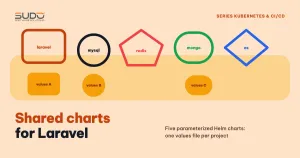
The initContainer chains commands with &&: if the migration fails, the pod does not start, which is exactly the intent. postStart chains them with ;, because a failing hook gets the container killed and restarted; one failed asset copy is not worth killing the whole pod. The chown step is not in the pod: the directory's owner is changed directly on the NFS machine when the site is created, as in Shared charts: reusing Helm for Laravel, MySQL and Redis.
5. Three probe types
The application should have three separate health endpoints. The settings below are reasonable examples for a Laravel website (for detailed configuration, see the Kubernetes probe configuration guide):
| Probe | What the endpoint checks | Example settings | What happens on failure |
|---|---|---|---|
| startup | /startup: database and cache connections | initial delay 10s, every 5s, timeout 3s, threshold 10 | If it has not passed after about 60 seconds, the kubelet restarts the container. While it waits, the other two probes do not run yet |
| readiness | /readiness: database and cache, returns 503 on error | initial delay 5s, every 15s, timeout 6s, threshold 5 | The pod is removed from the Service and gets no traffic, but is not restarted |
| liveness | /liveness: just returns 200, does not touch the database | initial delay 10s, every 10s, timeout 3s, threshold 3 | The kubelet restarts the container |
The key design point is in liveness: it does not check the database. If the database is slow, readiness pulls the pod out of the Service and waits for the database to recover. If liveness also checked the database, the kubelet would restart pods en masse exactly when the database is struggling, turning a small incident into a big one. Liveness answers only one question: "are PHP-FPM and nginx inside the container still alive?". Pin pods to a node pool with the lke.linode.com/pool-id label in values, as in Requests and limits, QoS and nodeAffinity: placing pods on the right nodes.
6. Moving running sites to static NFS PVs
Migrate one site as a trial first, then migrate in batches during off-peak hours. The process for each site:
- Check that values have the correct
nfsIpandnfsSharedFolderfor the current directory. The new PV must point at the old directory, otherwise the site will come up with an empty directory. - Run
helm upgradewith the new chart. Helm creates the PV and PVC, then the Deployment switches from the inline volume to the PVC and does a rolling update. - Check
kubectl get pv,pvc: the PV must beBoundto the correct PVC in the site's namespace. - Open the website and try uploading an image to make sure write permissions on NFS are still correct.
Three things to remember when operating static PVs:
- The source part of a PV (the NFS server and path) cannot be changed after creation. Moving a site to another NFS machine means deleting the old PV and creating a new one.
- A PV is cluster-scoped: deleting the site's namespace does not delete the PV, so the site removal process must delete the PV explicitly.
- Add checksum annotations for the ConfigMap and Secret to the pod template; without them, you have to run
kubectl rollout restartafter changing environment variables.
7. Trade-offs of static NFS PVs
| Gains | Losses |
|---|---|
| Consistent NFS mount options for every site | Two more objects (PV, PVC) to manage per site |
kubectl get pv immediately shows which site lives on which NFS machine | The PV source is immutable, so changing NFS machines means recreating the PV |
claimRef stops a site from binding another site's directory by mistake | Cluster-scoped PVs do not disappear along with the namespace |
| Clearly separated probes: slow means pull traffic, dead means restart | Readiness and startup depend on the database, so a slow database makes it hard for new sites to come up |
NFS is still a shared dependency for every site, and the hard option means that when the NFS machine hangs, pods wait with it. Static PVs do not remove that risk, but they make it visible in kubectl get pv instead of scattering it across hundreds of Deployments. The reasons for moving the database out of the cluster are in MySQL in Kubernetes or outside the cluster: why we moved the database to a VPS.
Next article
Migrating websites to Kubernetes: a safe bulk migration process. The process for moving websites from VPS to the cluster, switching DNS, verifying, and the fallback path when something goes wrong.