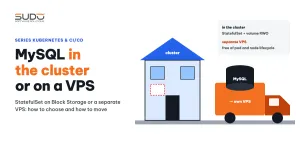
The fastest way to get a database for websites on a cluster is to run MySQL right inside it: a StatefulSet, data on Block Storage, websites connecting through internal DNS. But after running it for a while, many teams realize this stateful part carries more risk than the rest of the cluster. This document analyzes running MySQL in Kubernetes: a typical configuration, the pain points in day-to-day operation, the criteria for deciding whether to keep it in the cluster or move it to a separate VPS, how to switch the database creation pipeline, and how to keep connections from Kubernetes nodes to the VPS secure.
1. What MySQL in Kubernetes looks like
The article Your first Kubernetes manifest: namespace, Deployment and MySQL StatefulSet already set up a minimal MySQL StatefulSet. When it is standardized to be shared by many sites, MySQL in Kubernetes usually lives in its own database namespace:
apiVersion: apps/v1
kind: StatefulSet
metadata:
  name: mysql
  namespace: database
spec:
  serviceName: mysql                 # headless Service, clusterIP: None
  replicas: 1
  template:
    spec:
      containers:
      - name: mysql
        image: mysql:8.4             # LTS line
        resources:
          requests: { memory: "1500Mi", cpu: "700m" }
        env:
        - name: MYSQL_ROOT_PASSWORD
          valueFrom: { secretKeyRef: { name: mysql-secret, key: MYSQL_ROOT_PASSWORD } }
        volumeMounts:
        - { name: data, mountPath: /var/lib/mysql }
      affinity:                        # pin to the node pool reserved for databases
        nodeAffinity: { ... lke.linode.com/pool-id In ["<pool-db>"] }
  volumeClaimTemplates:
  - metadata: { name: data }
    spec:
      accessModes: [ "ReadWriteOnce" ]
      storageClassName: linode-block-storage-retain
      resources: { requests: { storage: 30Gi } }
Websites in the same cluster reach the database through internal DNS: mysql.database.svc.cluster.local. This is the biggest strength of MySQL in Kubernetes: no IP needed, no port opened to the outside.
2. StatefulSet and Block Storage: the foundation of MySQL in Kubernetes
For MySQL in Kubernetes, a StatefulSet differs from a Deployment in three ways: pods have fixed names (mysql-0), each has its own DNS name through a headless Service, and each pod has its own PVC generated from volumeClaimTemplates. When a pod is deleted or moved to another node, the new pod gets the same old name and reattaches the same old PVC (see the StatefulSet documentation).
The PVC here is Linode Block Storage in ReadWriteOnce mode: at any moment, the volume can only be attached to one node. For the MySQL pod to run on another node, the volume has to be detached from the old node and attached to the new one. The Retain reclaim policy keeps the volume even when the PVC is deleted: safe for the data, but the old volume keeps being billed if nobody cleans it up (see Volume, PersistentVolume, PVC and StorageClass on Kubernetes).
3. Pain points of running MySQL in Kubernetes
One replica, one volume, one node
The simple form of MySQL in Kubernetes is replicas: 1. If the node hosting the pod has a problem, or LKE replaces nodes during a Kubernetes version upgrade, the pod has to wait for the volume to detach and attach to the new node before MySQL can start again. During that window, every website using that database gets connection errors. A StatefulSet does not give you replication by itself: if you want replicas, you have to build them yourself or use an operator.
Resources and default configuration
If the chart only sets requests and has no custom my.cnf file, MySQL in Kubernetes runs with the image's default parameters: the buffer pool, max_connections and slow log are not tuned to the real workload. On a VPS, the team is used to tuning with one configuration file; in a container, every tweak means adding a ConfigMap, mounting it into the pod and restarting the pod. Using an innovation image (such as 8.2 or 8.3) also means a shorter lifecycle than the 8.4 LTS line.
Operations must go through kubectl
Every familiar DBA task has to be wrapped in kubectl exec: creating a database for a new site, dumping for backup, killing a stuck query. The site creation pipeline, the backup pipeline and the script that handles long-running queries all have to carry the root password into the container. One more layer of indirection is one more place that can fail, and the password shows up in more places.
Volumes are assets you manage yourself
The data of MySQL in Kubernetes lives on a PVC, and changing the size in volumeClaimTemplates is not applied to PVCs that already exist, because this StatefulSet field cannot be changed after creation. To grow the disk, you have to edit the PVC directly (the StorageClass must allow allowVolumeExpansion). Over time it is very easy to end up with hand-made PVCs outside the template, scattered across many namespaces, each one a manual operation on data.
A LoadBalancer Service for MySQL
Setting service.type: LoadBalancer for MySQL on LKE creates a NodeBalancer with a public IP, which exposes port 3306 to the Internet. MySQL in Kubernetes should always use a ClusterIP or headless Service. Anyone who needs access from outside should use kubectl port-forward or go through a VPN.
4. MySQL in Kubernetes or a separate VPS: selection criteria
| Criterion | MySQL in Kubernetes (StatefulSet + Block Storage) | Separate MySQL VPS |
|---|---|---|
| Connectivity | Cluster internal DNS, no open ports | Over the private network, you must restrict connection sources yourself |
| When a node is replaced | The pod moves node and waits for the volume to detach and attach | Unaffected by the Kubernetes node lifecycle |
| Resources | Shares nodes with website pods, bounded by requests/limits | RAM and disk dedicated to MySQL |
| Tuning | ConfigMap + pod restart | Edit my.cnf and restart the service like any other VPS |
| Backup, killing queries | Through kubectl exec | SSH and familiar tools |
| Team experience | Need to learn an operator for HA | Usually already there from the Cloud VPS days |
The last criterion often weighs the most. If the team already runs MySQL on VPS instances for hundreds of websites (as in The Database tier: multi-tenant MySQL on small VPS instances), moving the database out of the cluster lets the cluster run only stateless workloads, while the stateful part goes back to where the team already knows how to handle incidents. Conversely, if you need automatic replication and the team is ready to learn an operator, keeping MySQL in Kubernetes is a reasonable direction.
5. Moving the database creation pipeline to the VPS
The change to the site creation pipeline is smaller than you might expect, because the hard part of MySQL in Kubernetes is operations, not the database creation command. Previously the job ran kubectl exec into the MySQL pod; now DATABASE_HOST is the private IP of the VPS and the job talks to it directly:
# before: DATABASE_HOST="mysql.database.svc.cluster.local"
#         kubectl exec -i mysql-0 -n database -- mysql ... < create_db.sql
ssh -i "$SSH_PRIVATE_KEY" deploy@$DATABASE_HOST "mysql --defaults-extra-file=/root/.my-admin.cnf" <<SQL
CREATE DATABASE \`$DATABASE_NAME\`;
CREATE USER '$DATABASE_USERNAME'@'10.0.%' IDENTIFIED BY '$DATABASE_PASSWORD';
GRANT ALL ON \`$DATABASE_NAME\`.* TO '$DATABASE_USERNAME'@'10.0.%';
SQL
The rollback step for a failed site creation changes accordingly: DROP DATABASE and DROP USER run through the same path. Roll out this change during low traffic and keep a way to revert to the old pipeline version. For databases currently running on MySQL in Kubernetes, the migration process is:
mysqldump --single-transactionfrom the pod, then import into the VPS.- Change
dbHostin the site's values and runhelm upgrade. - Changing a ConfigMap does not restart pods by itself: run
kubectl rollout restartso the website picks up the new host. - Check the site, and keep the old PVC for a while before deleting it.
6. Securing connections from Kubernetes nodes to the MySQL VPS
Dropping MySQL in Kubernetes means port 3306 has to be opened to the Kubernetes nodes. This is the part that needs the most care.
- Restrict connection sources: only let the nodes' private IP range reach port 3306, using the VPS firewall or Cloud Firewall. LKE nodes can change IP when they are replaced, so a rule based on the private range is more stable than one per IP. Never open 3306 to the Internet.
- Do not grant to
'%': the site user should be'user'@'10.0.%'(your private range) instead of'user'@'%', and withoutWITH GRANT OPTION. - Consider
skip_name_resolve: by default, for every new client, MySQL does a reverse DNS lookup from IP to name and then a forward lookup to verify it. The nodes' private IPs usually have no PTR record, so every new connection costs an extra DNS lookup and may produce "could not be resolved" warnings in the error log. The host cache reduces this but does not eliminate it (see the MySQL 8.4 host cache documentation). Withskip_name_resolveenabled, every grant must be written by IP or IP range. - No passwords on the command line:
mysql -u root -p"..."over SSH exposes the password in the process list. Use an option file with600permissions ormysql_config_editoron the target machine, as in the sample in section 5.
7. Recommendations
MySQL in Kubernetes is not wrong. The single-replica form on RWO Block Storage gives you the convenience of internal DNS, but you carry the node lifecycle, the default configuration and every operation through kubectl exec. Without an operator and HA experience inside the cluster, letting the cluster run websites while the database lives on a VPS is the safer choice. The MySQL chart in Shared charts: reusing Helm for Laravel, MySQL and Redis is still useful for small projects or test environments that need a bundled database.
- Keeping MySQL in Kubernetes: use the LTS line, a
my.cnfthrough a ConfigMap, a dedicated node pool, a ClusterIP Service, and regular backups out of the cluster. - Moving to a VPS: a firewall based on the private range, grants by range, no passwords on the command line, and a pipeline rollback plan.
Next article
Helm charts with static NFS PersistentVolumes, claimRef and three probe types. Replacing the NFS volume declared directly in the Deployment with a static PV/PVC, and how the three probe types help websites start up safely.