A Website AI site on Linode's LKE cluster returns 503 on and off. There is no long outage, just pages that occasionally fail to open and then work again a moment later. kubectl shows that the site's only pod is OOMKilled over and over with a 700Mi memory limit. The quick fix is a single line in values.yaml. But the question behind it is bigger: in a container running nginx, PHP-FPM, cron and a queue worker together, who holds the memory "budget", PHP or Kubernetes? This guide covers how to diagnose it, how to calculate the container limit from the PHP configuration, and how to keep one OOMKilled event from becoming a 503.
The article Image upload errors 419 and 502 on Kubernetes covers the case where PHP's memory_limit stops things first and the user sees a 502. This article is the opposite direction: the container limit stops things first, the whole pod is killed, and the user sees a 503.
Symptoms
- The site returns 503 intermittently, each episode short and then gone on its own.
- The site has only one pod (
replicaCount: 1). - The pod's
RESTARTScolumn climbs steadily, several times a day.
Investigation process
Step 1: where the 503 comes from
In the chain NodeBalancer → ingress-nginx → Service → pod, a 503 has a fairly specific meaning: ingress-nginx received the request, but the Service has no ready endpoint left. For a single-pod site, that happens every time the only container restarts. So the first question is whether the pod restarts, and why.
kubectl -n site-b-example get pod
NAME                       READY   STATUS    RESTARTS
site-b-example-<hash>      1/1     Running   ...

kubectl -n site-b-example describe pod site-b-example-<hash>
    Last State:     Terminated
      Reason:       OOMKilled
      Exit Code:    137
    Limits:
      cpu:     1
      memory:  700Mi

kubectl -n site-b-example get endpoints   # empty while the pod restarts
Exit code 137 is 128 + 9: the main process received SIGKILL from the kernel because the container's cgroup exceeded memory.max. PHP has no chance to report anything.
Step 2: how long a 503 each OOMKilled event causes
The 503 window is not just the moment the container dies. A new container usually has to:
- Pull the image again, if
imagePullPolicy: Always. - Finish the
postStarthook (copy code,optimize:clear, publish assets…). - Pass the
startupProbe, for example starting after 15 seconds and checking every 10 seconds. - Pass the
readinessProbe, and only then be added back to the Service endpoints.
So every OOMKilled event costs the site at least several dozen seconds. Kubernetes is doing its job correctly. The problem is that the site has no second pod to carry the load in the meantime.
Step 3: where that limit came from
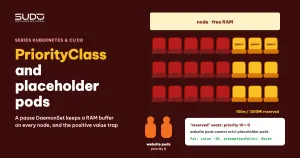
Usually the limit is not chosen for the site specifically. It is a shared value set for the whole fleet, for example after a round of packing more pods onto each node (see PriorityClass and placeholder pods: reserving capacity in a cluster). A shared number can be right for most sites but wrong for a site with heavier load or features.
# count the limit values used in the config repo
grep -rh "memory:" --include=values.yaml . | sort | uniq -c | sort -rn
Step 4: the memory math that leads to OOMKilled
The Website AI container is all-in-one, inherited from the days of running on a VPS. Inside it are:
| Process | Own limit | Notes |
|---|---|---|
| nginx | none | small, stable |
| PHP-FPM, several workers | memory_limit per worker (for example 128M) | the number of workers grows with concurrent requests |
Queue worker queue:work --memory=500 | memory_limit from php.ini; the --memory flag is only checked after a job finishes | long-lived, runs under supervisord |
schedule:run via crond, every minute | memory_limit from php.ini | a new CLI process every minute |
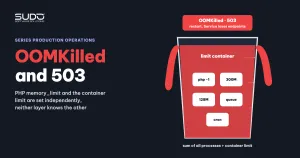
memory_limit is a limit per process, while resources.limits.memory is a limit for the total. All it takes is a few FPM workers handling heavy pages at the same time, for example five workers reaching 128M for 640 MiB, plus nginx, the queue worker and one schedule:run, to exceed 700Mi. At that point no process has exceeded its own limit, yet the whole container is still OOMKilled.
PHP's limit can also have holes. Many CMSs have a helper that actively raises or removes memory_limit for heavy operations:
// shared CMS helper (shortened)
public function maximumExecutionTimeAndMemoryLimit(): self
{
    $this->iniSet('max_execution_time', -1);
    $this->iniSet('memory_limit', -1);     // removes PHP's limit entirely
    return $this;
}
// usually called when: regenerating thumbnails, cropping images, exporting orders, importing/exporting data
# find every place where the code changes memory_limit itself
grep -rnE "ini_set\('memory_limit'|iniSet\('memory_limit'" app/ packages/ platform/ 2>/dev/nullOn these code paths, PHP no longer stops itself. The only safety net left is the container limit, and when that net triggers, the result is an OOMKilled pod, not just a failed heavy request.
The limits of diagnosis
Memory spikes usually last a few seconds, shorter than Prometheus's 15–30 second sampling interval, so the graphs rarely show which process grew. If you need to know the exact culprit (an FPM worker, the queue worker, cron or an admin action that removes memory_limit), record the RSS of each process periodically inside the container, or split the processes into separate containers so each one has its own metrics.
Root causes
- Direct: the total memory of the processes in the container exceeds the limit, and the kernel kills the container (OOMKilled, exit 137).
- Why it becomes a 503: the site has only one replica. Every time the container restarts, the Service has no endpoint, and ingress-nginx returns 503 until the pod passes its probes again.
- Why the limit does not match the application: the container limit is set uniformly for every site, while the application's real memory limits live elsewhere (
memory_limit, the number of FPM workers, the queue worker's--memory), and some code paths remove that limit on their own. The two layers are set independently, and neither knows about the other.
Remediation
Short term: raise the limit for the site
resources:
  limits:
    cpu: 1
    memory: 1536Mi     # previously 700Mi
  requests:
    cpu: 100m
    memory: 250Mi      # unchanged
The request stays the same, so the scheduler places the pod as before. Only the memory ceiling is raised to reduce the number of OOMKilled events. After deploying, watch RESTARTS for at least a few days to confirm the new number is enough.
Long term: make the two limit layers talk to each other
- Calculate the limit from the PHP configuration instead of using one shared number. A suggested formula:
pm.max_children × memory_limit+ the baseline of the queue worker, cron and nginx + 15–20% headroom. If the number is too large, lowerpm.max_childrenrather than keeping the limit low. - Do not let code remove
memory_limitin web requests. Heavy work such as regenerating thumbnails or exporting orders should run in the queue with a clear limit. - Lower the queue worker's
--memorybelow its share of the budget, or move the queue and cron into their own container or Deployment so a bloated job does not drag the web down with it. - Run two replicas for important sites, so one OOMKilled event does not become a 503. The trade-off is more requests on the node, and file-based sessions inside the container must first move to Redis or the database.
- Alert on the number of OOMKilled events from kube-state-metrics, instead of waiting for users to report a 503:
increase(kube_pod_container_status_restarts_total[1h]) > 2
  and on (namespace, pod, container)
kube_pod_container_status_last_terminated_reason{reason="OOMKilled"} == 1
Checklist when a site returns intermittent 503s
kubectl get pod: isRESTARTSgoing up?kubectl describe pod: is theLast StateOOMKilled(container limit exceeded) orError/Completed(usually killed by the liveness probe)?- If OOMKilled: compare
resources.limits.memorywithmemory_limit× the number of FPM workers, plus the queue worker and cron. Search the code forini_set('memory_limit', ...). - If it is a 502 instead of a 503: most likely PHP's
memory_limitstopped things first. Read the PHP-FPM error log inside the container. - Do not rely on a sparsely sampled memory graph to rule out OOMKilled.
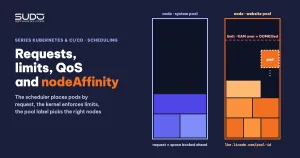
Background on requests, limits, QoS and why exceeding a memory limit gets a container killed rather than throttled like CPU is in Requests and limits, QoS and nodeAffinity: placing pods on the right nodes. For requests set too high or too low compared with real usage, see Kubernetes right-sizing: setting CPU and RAM requests from real usage. Original documentation: Kubernetes' Resource Management for Pods and Containers and the description of memory_limit in PHP.
Lessons learned
- OOMKilled is a failure of the whole container, not of one request. In an all-in-one pod, when one process grows, everything else dies with it.
- PHP's limits and Kubernetes' limits must be calculated together. Each layer can be right on its own and still be wrong when added up.
- One replica means every OOMKilled event is a 503. Raising the limit reduces how often OOMKilled happens; only adding replicas reduces how often users see an error.
- A fleet-wide number needs to be reviewed when the application changes. A value that is right for packing nodes is not necessarily right for each site's needs.
Next article
Cascading supervisor restarts: one command that interrupted every Octane site. Back to Cloud VPS: one Octane site runs out of RAM, and every other site on the same minion goes down with it.