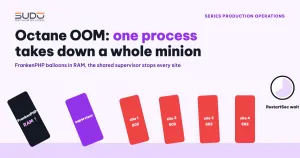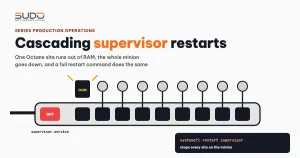
An e-commerce website running Laravel Octane on a minion returns 502 because the kernel killed the site's FrankenPHP process after it ran out of RAM. One site running out of RAM is nothing unusual. What stands out is that within the next minute or two, every site on the minion was interrupted, even though only one site actually used too much memory. The amplifier is supervisor, or more precisely the way the whole minion shares a single supervisor service. There is an even more uncomfortable detail: the operations pipelines that run systemctl restart supervisor cause exactly the same effect, with a single command. This guide describes the cascading restart mechanism, the handling process, and how to write operational commands with the right scope.
Symptoms
- Site A returns 502. The nginx error log on the minion:
connect() failed (111: Connection refused) while connecting to upstream, server: site-a.example, request: "POST /admin/products/804 HTTP/1.0", upstream: "http://127.0.0.1:8005/admin/products/804" - Port 8005 is site A's Octane port on
127.0.0.1.Connection refusedmeans no process is listening anymore. - Site B, which also runs Octane on the same minion and uses little RAM, shows
Connection refusedat exactly the same time.
Investigation process
Step 1: who killed the Octane process
journalctl -k | grep -iE "oom-kill|out of memory"
oom-kill: task_memcg=/system.slice/supervisor.service, task=frankenphp, pid=..., uid=...
Out of memory: Killed process ... (frankenphp) total-vm:...kB anon-rss:...kB
The kernel OOM killer killed site A's FrankenPHP when the process held about 1 GB of real RAM. The most important line is task_memcg=/system.slice/supervisor.service: the process lives in the cgroup of the supervisor service, together with every other process that supervisor manages.
Step 2: why an Octane site keeps growing
Check the process age (ps -o pid,etime,rss,cmd -C frankenphp). A --workers=1 process that has lived for almost a day without ever being recycled is the first sign. Reading the site's code, a common pattern is a listener that runs whenever an admin saves data:
public function handle(): void
{
    Artisan::call('cache:clear');
    Artisan::call('route:clear');
    Artisan::call('config:clear');
    Artisan::call('view:clear');
}
These four commands make sense with PHP-FPM, where each request is a process that dies right afterwards. In Octane, the application lives on inside the process. Each time the config, route and view caches are cleared, the application is forced to reload from scratch inside the running process, and the extra memory allocated is not given back. The more products the admin saves, the more the process grows. This is exactly the kind of risk that Laravel Octane and FrankenPHP: running Laravel as an app server warned about: code written for the PHP-FPM model running inside a long-lived process.
Step 3: why site B died too
Each site declares its Octane process and queue worker in its own supervisord.ini file, but they all run under a single supervisor daemon. That daemon is a systemd unit: supervisor.service, with Restart=on-failure and RestartSec=50s from the Debian package. When the kernel OOM killer kills any process in the unit's cgroup, systemd's default OOMPolicy=stop treats the whole unit as failed:
$ systemctl status supervisor
   Active: activating (auto-restart) (Result: oom-kill)
systemd stops the entire unit, meaning the supervisor daemon and all of its child processes, waits for RestartSec, then starts it again. Every Octane site on the minion shuts down at the same time and only comes back when supervisor comes back. A local failure in site A has become an incident for the whole minion. That is a cascading restart. This mechanism is analyzed in detail in Octane OOM: when one process takes down a whole minion.
Step 4: the fix itself can also cause a 502
The mitigation for site A, after backing up supervisord.ini:
[program:site-a-worker-octane]
command=... octane:start --server=frankenphp --workers=1 --max-requests=150   ; previously 500
stopasgroup=true
killasgroup=true
supervisorctl reread && supervisorctl updateA common trap: an old frankenphp process (PPID=1, orphaned by the previous OOM) is not stopped and still holds the admin port. The new worker reports that the port is taken, falls into BACKOFF and then FATAL, and site A returns 502 for a few more minutes. How to handle it:
ss -ltnp | grep -E ':8005|:2019'           # who is holding the port?
ps -o pid,ppid,etime,cmd -C frankenphp     # PPID=1 means an orphaned process
kill -KILL <orphan-pid>                    # TERM is usually not enough
supervisorctl start site-a-worker-octane
curl -sI http://127.0.0.1:8005/ | head -1
The stopasgroup/killasgroup flags are added precisely so that next time supervisor stops the whole process group and leaves no children behind.
Step 5: find every place that restarts all of supervisor
Apart from OOM, what else restarts the whole supervisor service? Review the operations pipelines: deploy, domain change, moving a site to another VPS (including the rollback step), backup and site removal. The command patterns to look for:
grep -rnE 'systemctl restart supervisor|service supervisor restart|restart supervisord' ./pipelines/Each match is a place where deploying a PHP-FPM site with a queue worker also shuts down every Octane site on the same machine. Another dangerous pattern is an escalating fallback:
supervisorctl restart site-a-worker site-a-worker-octane || systemctl restart supervisorA single mistyped program name makes the first command fail, and the pipeline silently restarts the whole minion. If a deploy pipeline runs right when supervisor is restarting itself after an OOM, it may also report ERROR: Octane server is not running and muddy the investigation further.
Root causes
- The failure domain is too wide: every site on the minion shares one supervisor daemon and one cgroup. systemd's OOM policy and
Restart=on-failureturn the death of one process into stopping and restarting the whole group. - Operational commands have the same scope:
systemctl restart supervisorin a pipeline also stops every program supervisor manages, on the schedule of whoever runs the pipeline instead of the OOM killer's. - A memory leak at the application layer:
Artisan::call(...:clear)inside requests makes the Octane process grow steadily until it is killed.
Remediation
As soon as the incident happens
- The offending site: lower
--max-requestsso Octane recycles its process more often; addstopasgroup=trueandkillasgroup=true. - Clean up orphaned processes holding the port with
kill -KILL, then start only that site's program again. - Apply changes with
supervisorctl reread && supervisorctl update, which only touches programs whose configuration changed. Do not usesystemctl restart supervisor.
Fix the pipelines: commands that target exactly one site
# load the new config, restart only the programs of this exact site
supervisorctl reread
supervisorctl update
supervisorctl restart site-a-worker site-a-worker-octane || { echo "restart of site-a failed"; exit 1; }

# remove a site: delete the file then update, supervisor stops programs no longer declared
rm -f /var/www/site-a.example/supervisord.ini
supervisorctl reread && supervisorctl update
If a command targeting one site fails, the pipeline must stop and report the error, not escalate its scope on its own.
Fix the application and the architecture
- Fix the listener: only
Cache::flush()the data that needs clearing, or push cache clearing to the queue. Also review other sites that use the same package with a similar listener. - Move Octane processes out of the shared supervisor daemon: one systemd unit per site with its own
MemoryMaxand lifecycle, leaving supervisor to manage only the queue workers.
Prevention checklist
- Scan pipelines before merging with the
grepcommand from step 5. Any non-empty result must be explained. - Track how often the supervisor service restarts:
journalctl -u supervisorshowingResult: oom-killorStartedoutside deploy windows is a signal worth alerting on. - A memory watchdog for each Octane process: recycle the worker when RSS crosses a threshold, before the kernel has to step in.
- Be careful with self-healing jobs: a job that periodically scans supervisor will restart
FATALprograms. When the port is held by an orphaned process, restarting solves nothing; check the port withss -ltnpfirst. The self-healing job mechanism is covered in Low-cost self-healing: detecting and restarting dead services. - Review code that runs on Octane: forbid
Artisan::callwith*:clearcommands inside requests.
Lessons learned
- Ask about the scope of every command, not just its effect.
systemctl restart supervisor"loads the new config" for one site, and shuts down every other site as a side effect. - A shared management process is a shared point of failure. supervisor is convenient because each site carries its own config file, but the cgroup and the lifecycle are still shared.
- A hot fix can cause an incident too. An orphaned process holding a port can extend a 502 by several minutes. The
killasgroupflag and a port check should be in place before you need them. - Treating the symptom on one site does not remove the risk for the whole machine. Another Octane site growing large means the cascading restart happens again, until the failure domain is split.
Documentation: running and controlling supervisord (reread, update, restart) and systemd.service (Restart=, OOMPolicy=).
Next article
Consolidating MySQL for Website AI: moving databases to a new host safely. Retiring a MySQL machine from the Kubernetes cluster, and why a site that has "already moved" may still be writing to the old database.