When a MySQL machine serving a Kubernetes cluster becomes too small for the amount of data it carries, the sensible plan is consolidating MySQL: retire that machine and move the websites using it to the remaining ones. The pipeline may report success for almost everything, but that does not mean the sites are using the new database. A very common mistake: a site that has "already moved" still reads and writes to the old database, and a single pod restart is enough to send the site back to the old copy, losing all data written in between. This guide describes the process of consolidating MySQL for Website AI on Linode's LKE cluster, two Helm chart weaknesses that consolidation tends to expose, and a checklist for moving databases safely next time.
When consolidating MySQL makes sense
After moving the databases out of the cluster (see MySQL in Kubernetes or outside the cluster: why we moved the database to a VPS), Website AI sites use a few MySQL VPS instances on the same private network as the cluster. Over time the machines drift apart. Signs that consolidating MySQL is worth considering:
- One machine has noticeably less CPU and RAM but holds the most data, its buffer pool is nearly full and swap keeps growing.
- Many schemas are no longer used by any site (orphans), taking up disk and making backups slower.
- The buffer pool hit ratio is still high: this is planned cleanup, not firefighting a performance problem.
Plan it by listing every schema on the machine to be retired, marking which schemas belong to a live site and which are orphans, then distributing the sites across the target machines to balance size and load, rather than piling everything onto one machine.
SELECT table_schema, ROUND(SUM(data_length + index_length)/1024/1024) AS mb
FROM information_schema.tables GROUP BY table_schema ORDER BY mb DESC;
A typical pipeline for consolidating MySQL
Consolidating MySQL is usually automated with a pipeline (how Jenkins and GitLab CI fit together is covered in Jenkins and GitLab CI: operating Website AI on Kubernetes). Each site goes through these steps:
# pipeline that changes the database host, per site
[1] read DB_HOST, DB_DATABASE, DB_USERNAME, DB_PASSWORD from the running pod's env
[2] mysqldump on the old host, transfer the file through an intermediate machine
[3] keep the database/user name, generate a new password, create the database/user on the new host
[4] import the dump into the new host
[5] update dbHost, dbPassword in values.yaml with yq, helm upgrade
[6] check_website: curl https://<domain> until it returns 200
[7] push values.yaml to the config repo (push_with_retry)
[8] DROP DATABASE and DROP USER on the old host
This pipeline design for consolidating MySQL has three weak points, analyzed below.
Symptom: the old machine does not get lighter
The config repo shows that almost every site now points to the new host. But the measurements on the old machine have not changed: all the schemas are still there, the data size is about the same, and swap is still growing. After a round of consolidating MySQL, a machine that just "lost" most of its sites cannot be busier than before. This is the signal to stop and check.
Investigation after consolidating MySQL
Step 1: look at the sites where consolidating MySQL failed
The site most likely to stop halfway is one whose domain has expired: dig returns neither an A record nor NS records, so check_website never receives a 200. The result is a half-finished state:
- The ConfigMap in the cluster already has the new
DB_HOST, becausehelm upgraderuns beforecheck_website. values.yamlin Git still has the old host, because the push step runs later.- The database exists in both places, and the copy on the new host is a snapshot taken at migration time.
- The pod still uses the old host, so the site keeps running normally.
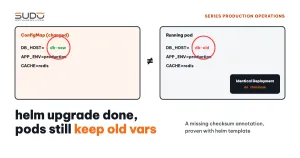
The last point is the clue: the pod did not change hosts even though the ConfigMap did. So what about the "successful" sites?
Step 2: after consolidating MySQL, compare the ConfigMap with the real env in the pod
kubectl -n site-a-example get configmap site-a-example-configmap \
  -o jsonpath='{.data.DB_HOST}'
10.0.1.11                      # db-1, new host

kubectl -n site-a-example exec deploy/site-a-example -- printenv DB_HOST
10.0.1.13                      # db-old, old host

kubectl -n site-a-example get pod -o wide   # AGE column: the pod has never restarted
Step 3: why helm upgrade did not create a new pod
The chart loads configuration with envFrom:
envFrom:
  - configMapRef:
      name: {{ include "web-ai.fullname" . }}-configmap
  - secretRef:
      name: {{ include "web-ai.fullname" . }}-secret
Environment variables are only read when the container starts. Kubernetes only creates a new pod when the Deployment's pod template changes. Changing dbHost only updates the ConfigMap, and the pod template stays exactly the same: there is no checksum/config annotation. So there is no rollout. This class of bug is analyzed in depth in helm upgrade does not change environment variables: the missing checksum annotation.
The pipeline did not catch it because check_website only asks "does the site return 200?". A site using the old database returns 200 just fine.
Step 4: the risk of dropping the old database when consolidating MySQL
By design, the last step drops the database on the old host. If this step runs while the pod still points to the old host, the site loses its database instantly. Only while the original copy is intact can we resynchronize without losing data. That is why the old database must never be dropped in the same pipeline that performs the move.
Root causes
- The config changed, the pod did not. The chart uses
envFrombut has no checksum annotation. The pipeline for consolidating MySQL assumed thathelm upgradewas enough for the pod to pick up the new host. - Checking the wrong thing. HTTP 200 proves the site is alive, not that it is using the right database.
- Unsafe step order.
helm upgraderuns beforecheck_website, the Git push runs after it, and dropping the old database runs right after that. If a step in the middle fails, the cluster and Git drift apart.
Remediation
Repairing a round of consolidating MySQL that has already run
- Resynchronize the data. The copy on the new host is a snapshot from migration time, while the site has kept writing to the old host ever since. For each site, export again from the old host and import over the target host before restarting. If the site has heavy write traffic, enable maintenance mode during this step.
- Rollout restart each Deployment, then go through every namespace again: the pod is
1/1 Runningandprintenv DB_HOSTshows the target host. - Fix the pipeline by adding a restart step right after
helm upgrade:- kubectl rollout restart deployment/${RELEASE_NAME} -n $NAMESPACE_WEB - kubectl rollout status deployment/${RELEASE_NAME} -n $NAMESPACE_WEB --timeout=180s - test "$(kubectl -n $NAMESPACE_WEB exec deploy/${RELEASE_NAME} -- printenv DB_HOST)" = "$NEW_DB_HOST"
A second bug revealed by the restart: Access denied
On a few sites, the new pod reads the correct new host but MySQL reports Access denied: the password in the Secret does not match the user's password on the new host. If an init container runs php artisan migrate --force, it keeps failing and the pod falls into CrashLoopBackOff.
The usual cause: the user creation command uses CREATE USER IF NOT EXISTS. If a user with the same name already exists on the target host (from an earlier move, or a shared name), MySQL keeps the old password, while values and the Secret receive the new one. The fix does not touch Kubernetes at all; just align the MySQL password with the Secret:
ALTER USER '<user>'@'%' IDENTIFIED BY '<password-currently-in-Secret>';A pod in CrashLoopBackOff may keep reporting errors for a few more minutes, not because of a new error but because the backoff stretches the time between attempts. To speed things up, delete the pod so the Deployment recreates it.
Finishing the job of consolidating MySQL: measure again and retire the old machine deliberately
- Measure the old machine again after restarting the pods: connections, swap and QPS must drop clearly.
- Check that no connections to the moved schemas remain:
SELECT db, COUNT(*) FROM information_schema.processlist GROUP BY db; - Keep the original copies for a few days, then drop the schemas and the orphan schemas, with a record of what was done.
- Measure the target machines again (peak RAM over 7 days, swap, datadir size) to make sure they still have headroom below the alert thresholds.
- Shut down the old machine deliberately and remove it from monitoring, cron and internal DNS at the same time. A database machine that stops on its own without any alert is a sign that the alerting is incomplete.
Checklist for the next time you are consolidating MySQL or changing a database host
- Add
checksum/configandchecksum/secretto the Deployment template, so every ConfigMap or Secret change through Helm triggers a rollout automatically. The firsthelm upgradeafter adding them restarts every site, so run it in batches. - The pipeline restarts the Deployment and waits for
rollout statusafter every host change. - The final check in the pipeline is that
printenv DB_HOSTin the new pod equals the target host, not just an HTTP 200. - Check that the domain resolves before exporting, so sites with expired domains are excluded from the start instead of stopping halfway.
- Use
ALTER USER, or check whether the user exists, instead ofCREATE USER IF NOT EXISTS. - Do not drop the old database in the same pipeline; keep the original copies for a few days.
Lessons learned
- "The config has changed" is not the same as "the application uses the new config". With
envFrom, only a new pod reads the environment variables again. - A check must answer the question the change actually asks. If you change the database, check the database, not the home page.
- Measuring the old machine is the cheapest way to catch errors when consolidating MySQL. A machine that just lost most of its sites while its swap keeps growing is reason enough to stop.
- Consolidating MySQL is not finished when the pipeline turns green. It is finished when the old machine has been measured again, the orphan schemas are cleaned up, and the machine has been shut down deliberately, with a record.
References: Helm's tip on automatically rolling Deployments when a ConfigMap changes and the ALTER USER syntax in MySQL 8.4. The push_with_retry mechanism is covered in Conflicts when many pipelines push at once: push_with_retry and GitOps lessons.
Next article
Cron jobs hitting a removed server and a bloated MySQL error.log. What was left behind around the database machines after consolidating MySQL: tasks running against a hostname that no longer exists, and a log file growing because of reverse DNS.