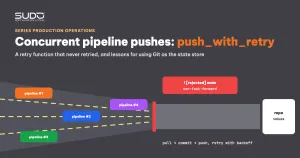
In a GitOps setup, the pipeline that creates a website on Kubernetes usually ends with one step: commit the new site's values file to the Helm repo, then git push. When several pipelines run at once, that push can be rejected because another pipeline pushed just before it. The common answer is a Bash function, push_with_retry, that tries again. This article walks through a typical case: a push_with_retry function that looks correct but can never actually retry because of two overlapping bugs, and a failure in that last step is enough for the rollback job to delete the site it just created. After that come the rewritten function, prevention measures and lessons for using Git as the state store for many concurrent writers.
Context: one Helm repo, many writers
As described in One operations pipeline per branch: automation with GitLab CI, each site has its own values directory in the Helm repo. After helm install succeeds, the site-creation pipeline commits that directory. Many other writers also commit to the main branch: the site-deletion pipeline, the pipeline that moves files to object storage, and the build pipeline (triggered from Bitbucket, as in Bridging Bitbucket and GitLab CI with the API and polling), which commits a new image tag on every code change.
With many automated commits per day, sometimes only seconds apart, one writer getting rejected on push is not an exception; it is guaranteed to happen. push_with_retry exists to handle exactly this situation.
Symptoms
When two pipelines clone the repo at the same time, the one that pushes second gets Git's standard message: ! [rejected] main -> main (fetch first), with the hint Updates were rejected because the remote contains work that you do not have locally. push_with_retry should have handled that. In practice, the deploy job still went red at exactly the push step.
The danger lies in the order of steps. Pushing values is the last step of the deploy job, after the database has been created, helm install has finished and the site already returns HTTP 200. The next job is a cleanup job running with when: on_failure: it deletes the namespace and runs DROP DATABASE. With that configuration, a single rejected push is enough for the pipeline to tear down a perfectly healthy site.
Investigation
Step 1: reread the old push_with_retry
A very common version of push_with_retry (echo lines trimmed):
function push_with_retry() {
  local max_attempts=10
  local attempt=0
  local success=false
  while [ $attempt -lt $max_attempts ]; do
    if git push origin "$BRANCH"; then
      success=true
      break
    else
      echo "Push failed. Merging origin/$BRANCH..."
      git merge "origin/$BRANCH" || exit 1
      sleep 3
    fi
    ((attempt++))
  done
  [ "$success" = true ] && echo "Push successful!" || echo "Failed to push."
}
Step 2: the first hypothesis, a content conflict (wrong)
The word "conflict" makes people think of two pipelines editing the same file. That hypothesis does not hold up: the site-creation pipeline only adds the new domain's directory and never touches other sites' directories. If push_with_retry really fetched the latest state from the remote, the merge would always be clean. The problem had to be in the retry function itself.
Step 3: git merge on a stale reference
origin/main is a local reference that is only updated by git fetch or git pull. The loop contains neither, so git merge origin/main merges exactly the state that existed at the start of the job, returning Already up to date with exit code 0. The log prints "Merge successful", but the next push is rejected just like before. The ten attempts of push_with_retry are really ten pushes of the same state. Remote-tracking branches are described in the git fetch documentation.
Step 4: the counter kills the job on the first iteration
The second bug is quieter. GitLab Runner runs bash scripts with set -eo pipefail, meaning the job stops as soon as a command returns a non-zero code. The expression ((attempt++)) returns the value before the increment; with attempt=0 that value is 0, so the command exits with code 1 and set -e treats it as a failure. Result: the first push is rejected, the loop reaches ((attempt++)), and the job dies on the spot. In other words, the old push_with_retry never got to a second attempt.
The counter was verified in isolation with a test pipeline containing only the loop, without touching Git. The attempt=$attempt+1 form is wrong in a different way, because bash concatenates strings instead of adding numbers:
$ bash -c 'set -e; attempt=0; attempt=$attempt+1; echo "attempt=$attempt"; [ $attempt -lt 3 ]'
attempt=0+1
bash: line 0: [: 0+1: integer expression expected

$ bash -c 'set -e; attempt=0; attempt=$((attempt+1)); echo "attempt=$attempt"'
attempt=1
A detail worth remembering: run the same loop with ((attempt++)) on the default bash 3.2 of macOS and it may complete all its iterations without stopping. Testing CI scripts on a personal machine can give results completely different from the runner. The behavior of set -e is documented in The Set Builtin in the bash manual.
Step 5: reproduce with two parallel pipelines
The most reliable verification is to run two test site-creation pipelines at the same time with two test domains, repeated a few times after each fix. If the repo history shows pairs of commits only seconds apart and both pipelines are green, push_with_retry is doing its job.
Root cause
- Many writers on one Git branch with no queuing mechanism.
- push_with_retry never fetches the new state from the remote:
git mergeon a stale reference is a no-op. - The
((attempt++))counter underset -estops the job at the first failure. - Rollback does not distinguish failure severity: a failure in the step that saves values is handled the same as a
helm installfailure, which leads to deleting a running site.
Fix: rewriting push_with_retry
A good push_with_retry follows the "undo the commit, fetch the new state, commit again" pattern, adds only the exact path, backs off between attempts and fails clearly when it runs out of attempts:
function push_with_retry() {
  local path="$1" msg="$2" max_attempts=5 attempt=0
  while [ "$attempt" -lt "$max_attempts" ]; do
    git pull --ff-only origin "$BRANCH"        # changes are not committed yet, so the pull is always clean
    git add -- "$path"
    git commit -m "$msg"
    if git push origin "$BRANCH"; then
      echo "Push succeeded"; return 0
    fi
    git reset --mixed HEAD~1                    # drop the commit just made, keep the files
    attempt=$((attempt+1))
    sleep $((attempt * 2 + RANDOM % 3))         # increasing backoff with jitter
  done
  echo "Gave up after $max_attempts attempts, values not pushed to the repo" >&2
  return 1
}

push_with_retry "sites/$DOMAIN" "update values $DOMAIN"
Because the local commit is undone before each attempt, git pull --ff-only is always a fast-forward, the repo history stays linear and no merge commits are created. The jittered pause keeps two competing pipelines from retrying at exactly the same moment. Every pipeline that writes to the repo, including the site-deletion pipeline, should share the same function.
Prevention
- Queue instead of competing: put the step that calls push_with_retry in a GitLab CI resource_group so only one job writes to the repo at a time; keep push_with_retry as a second line of defense.
- Failures must be visible: when attempts run out, return an error, but in a separate job that does not trigger a site rollback, with a notification so the on-call engineer can push the values by hand. A green job whose values never reached the repo is more dangerous than a red one.
- Separate rollback by severity: only remove the site when the site itself is broken (
helm install, HTTP check), not when only the state-saving step failed. - Add the exact path instead of
git add *, so temporary files in the working directory are never committed by mistake. - Test CI scripts on a real runner, with the same image and the same
set -e. - Test both branches of every retry function: the immediate-success branch and the rejected branch.
Lessons
GitOps is only trustworthy when Git is the single source of truth, and that requires discipline in how things are written to Git. A Helm repo is both the configuration store and the log of every pipeline, so it carries all the problems of a database with many concurrent writers: contention, retries, and inconsistent state when a write fails. push_with_retry solves the contention part. The rest is queuing, reporting failures in the right place, and never letting a secondary step decide the fate of a running site.
A smaller but more time-consuming lesson: a single ((attempt++)) line can disable an entire retry mechanism without leaving a clear trace in the log. The general investigation method is in Incident investigation across layers: from balancer to database and Kubernetes; other articles are in the Sudo technical blog.
Next article
helm upgrade does not change environment variables: the missing checksum annotation. Why you can change a variable in values, see helm upgrade report success and the ConfigMap carry the new value, while the pod may still run with the old one.