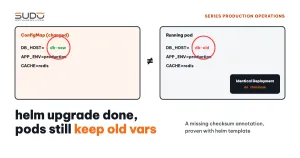
A very common configuration change on Kubernetes: changing dbHost in the values of a batch of sites, for example when moving the database from an in-cluster MySQL StatefulSet to a dedicated MySQL VPS. With Helm, this looks like one line of YAML and one helm upgrade command. But if the chart is missing a checksum annotation on the pod template, helm upgrade only updates the ConfigMap, while the running pods keep the old environment variables. No error, no warning, the site still returns HTTP 200; it is simply talking to the old database. This article explains why, how to verify it with helm template, how to check each pod, and how to add a checksum annotation to the chart.
Symptoms: there are no symptoms
That is exactly what makes a missing checksum annotation dangerous. After the values change, every signal is green: helm upgrade returns has been upgraded, the revision goes up, kubectl get configmap shows the new DB_HOST, and the pods are still Running. The old database is still up, so the application reports no connection errors. If a pod keeps the old host, every new order or post written after the dump lands in the old database, and this only surfaces when the old database is shut down: by then the data has split in two.
The clue usually lies in a habit: configuration-change pipelines all end with kubectl rollout restart, and internal docs carry the note "remember to restart after changing the host" (as in MySQL in Kubernetes or outside the cluster: why we moved the database to a VPS). The questions to ask: why does every configuration change need a manual restart, does the chart have a checksum annotation or not, and which sites were actually restarted?
Investigation
Step 1: read the Deployment template and look for a checksum annotation
The application gets its configuration through envFrom, in both the initContainer and the main container. The pod template only has user-supplied annotations (empty by default) and a label tied to the code deployment:
  template:
    metadata:
      {{- with .Values.podAnnotations }}      # default values: podAnnotations: {}
      annotations:
        {{- toYaml . | nindent 8 }}
      {{- end }}
      labels:
        commit: {{ .Values.commitId }}
    spec:
      containers:
        - envFrom:
            - configMapRef:
                name: {{ include "app.fullname" . }}-config   # DB_HOST lives here
            - secretRef:
                name: {{ include "app.fullname" . }}-secret   # DB_PASSWORD, APP_KEY...
The Deployment controller only creates new pods when spec.template changes. Environment variables from a ConfigMap are read exactly once, when the container starts; the Kubernetes ConfigMap documentation states clearly that environment variables are not updated automatically. Without a checksum annotation, changing the ConfigMap does not change the template.
Step 2: verify with helm template
Render the chart twice with the same values, differing only in dbHost, then compare each object:
$ helm template site-a ./chart -f values-old.yaml > old.yaml
$ helm template site-a ./chart -f values-new.yaml > new.yaml
$ diff old.yaml new.yaml
42c42
<   DB_HOST: mysql.database.svc.cluster.local
---
>   DB_HOST: 10.0.1.20
Certificate, Ingress, Service, Secret and the Deployment are identical; only the ConfigMap differs. Helm applies exactly that difference, Kubernetes sees an unchanged Deployment, and no pod is recreated. This is behavior by design, not a bug in Helm or Kubernetes; the missing checksum annotation is the gap in the chart.
Step 3: which sites were restarted, and why
The Git history of the values repo usually answers this. If a code deployment happened after the commit that changed the database, the commit label in the pod template changed with it, the pods were recreated and happened to pick up the new DB_HOST. Sites with no deployment afterwards are still running with the old configuration; only a manual rollout restart makes their pods read the new configuration.
In other words, whether a site uses the right database depends on whether someone pushed code to it. An operations system should not rely on that kind of coincidence.
Step 4: how to check each pod
The value in the ConfigMap proves nothing yet. What needs comparing is the environment variable inside the running container, and the pod's start time relative to the helm upgrade:
NS=site-a
kubectl get configmap -n $NS app-config -o jsonpath='{.data.DB_HOST}'; echo
kubectl exec -n $NS deploy/app -- printenv DB_HOST
kubectl get pod -n $NS -o custom-columns=NAME:.metadata.name,START:.status.startTime
helm history $NS -n $NS | tail -2
If the two DB_HOST values differ, or the pod started before the last Helm revision, that pod is running with the old configuration. With many sites, wrap these commands in a loop over every namespace and print the sites that are out of sync.
Root cause
- The chart has no checksum annotation for the ConfigMap and Secret, so any change confined to those two objects never triggers a rollout.
- The only rollout trigger is the
commitlabel, tied to code deployments rather than configuration changes. This label filled the checksum annotation gap by accident. - Post-deploy checks only ask for HTTP 200, and a site talking to the old database still returns 200.
Fix
Temporary: rollout restart with verification
After every ConfigMap or Secret change, run kubectl rollout restart, wait for the rollout to finish and check the value inside the pod, instead of just calling restart and moving on:
kubectl rollout restart deployment/app -n $NS
kubectl rollout status  deployment/app -n $NS --timeout=300s
kubectl exec -n $NS deploy/app -- printenv DB_HOST
A note on TLS certificates: TLS Secrets are read by the ingress controller, not by the application pods. ingress-nginx watches Secrets and reloads new certificates on its own, so a rollout restart after changing a certificate is unnecessary. Also avoid editing Secrets with kubectl apply outside Helm, because the values in the repo will no longer match the cluster and the next helm upgrade may overwrite them back.
Long-term: add a checksum annotation to the chart
The standard approach is in Helm's Chart Development Tips and Tricks: hash the content of the ConfigMap and Secret templates and put the result in an annotation on the pod template. When the content changes, the hash changes, the template changes, and the Deployment rolls out on its own:
  template:
    metadata:
      annotations:
        checksum/config: {{ include (print $.Template.BasePath "/configmap.yaml") . | sha256sum }}
        checksum/secret: {{ include (print $.Template.BasePath "/secret.yaml") . | sha256sum }}
        {{- with .Values.podAnnotations }}
        {{- toYaml . | nindent 8 }}
        {{- end }}
Rerun the comparison from step 2 with the chart that now has a checksum annotation, and the Deployment is no longer identical:
$ diff old.yaml new.yaml
42c42
<   DB_HOST: mysql.database.svc.cluster.local
---
>   DB_HOST: 10.0.1.20
121c121
<         checksum/config: c320c9a1efdc…
---
>         checksum/config: 6f2d48708723…
Three things to keep in mind when applying a checksum annotation:
- The first
helm upgradeafter adding the annotation restarts every site that uses the chart, so run it in batches, outside peak hours. - A checksum annotation only catches changes that go through Helm. Anyone editing a ConfigMap with
kubectl editorkubectl applystill has to restart by hand. - A restart is not always harmless. If the pod has an initContainer running
php artisan migrateor a code-copy step, every configuration change means a full startup. You need a readiness probe and more than one replica to avoid downtime.
Prevention: the checksum annotation as a mandatory standard
- Every chart must have a checksum annotation for each ConfigMap and Secret that pods consume through
envFromorenv. Add it to the chart review checklist. - Configuration-change pipelines check the value inside the pod (
printenv), not just HTTP 200. - When moving a database: block writes to, or shut down, the old database after the move, so any pod still pointing at it fails immediately instead of silently writing there.
- Do not edit Helm-managed objects with
kubectl apply; changes go through values andhelm upgrade. - Add a
helm template+diffstep to reviews to see in advance which objects will change.
Lessons
Helm does exactly what it is asked to do: render templates and apply the differences. The gap is that the chart never told the Deployment that the ConfigMap is part of it, and the checksum annotation is how you say that. A label tied to code deployments can hide this gap for a long time, because every site gets redeployed often, until the first time configuration changes without code changing. The broader lesson: a check that only asks "is the site alive" will miss every failure of the "the site is alive, but alive in the wrong way" kind.
ConfigMap, Secret and the ways to load configuration are covered in ConfigMap and Secret: Laravel environment variables on Kubernetes; chart structure is covered in Shared charts: reusing Helm for Laravel, MySQL and Redis.
Next article
OpenSSL version mismatch breaks git and ssh in a CI image. When a package installed at job runtime pulls in a newer library, git and ssh themselves can stop working inside the CI image.