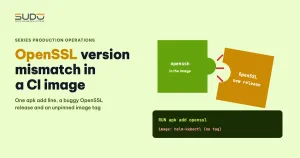
A CI pipeline goes weeks without a single changed line, then suddenly fails at the step that uses git over SSH with the message OpenSSL version mismatch. Whoever picks it up usually starts trying things: pinning versions, reinstalling git, switching to HTTPS, forcing an OpenSSL build from a different Alpine branch. Most of it is wasted effort, because the cause lies outside the repo: a new, buggy OpenSSL release in the package repository meets a CI image with no pinned tag and an apk add line that runs every time the job starts. This article walks through that typical case, the investigation that reveals the pattern, and the changes that stop the pipeline from depending on an external package repository.
Symptoms
The deploy job of the site-creation pipeline runs in a community image containing helm and kubectl, declared without a tag, so it always pulls latest. The order of steps: create the database, helm install, wait for HTTP 200, then encrypt the ConfigMap and Secret before committing values to the Helm repo. The encryption step starts with two lines:
deploy:
  image: helm-kubectl            # no tag = latest
  script:
    - apk add openssl
    - git clone git@git.example.com:team/config-tools.git tools
    - ...
The git command over SSH that runs right after the apk add line reports:
OpenSSL version mismatch. Built against 30500020, you have 30500030
fatal: Could not read from remote repository.
This is the message OpenSSH prints when the OpenSSL library version at runtime does not match the version ssh was built against. Because this step comes after helm install, the failed job triggers the rollback job, which removes the site that was just created, the same chain reaction described in Conflicts when many pipelines push at once: push_with_retry and GitOps lessons.
Investigation
Step 1: stop guessing, line the runs up side by side
The usual reflex is to keep editing and rerunning. A more effective approach is to build a table: for each run, record the relevant part of the script and the result. If nobody recorded it in time, Git history can still reconstruct it: every pipeline commit has a timestamp, and every successful site creation leaves a values commit. Comparing the two sequences, the pattern in a case like this usually shows up very quickly: every successful run happened when the script had no line installing OpenSSL.
Step 2: rule out the wrong suspects
- Pinning the old OpenSSL version (
apk add openssl=<old version>): the Alpine stable repository only keeps the latest version of each package, so the old one can no longer be installed once the new one has replaced it. - Pulling the package from another Alpine branch: the package is not in the repository the image uses;
--allow-untrustedonly skips the signature check, it does not make the package appear, and mixing libraries across branches is even more dangerous. ldconfigandLD_LIBRARY_PATH: they cannot change the fact that there is only one libcrypto3 on the system.- Switching git to HTTPS: it sidesteps SSH, but git over HTTPS still uses the same OpenSSL library, and it means putting a token into the URL.
Step 3: look outside the repo, at the image and the OpenSSL package
When the code has not changed but the job breaks, the right question is "what is new outside". There are two sources to check:
# which Alpine the current image was built on, and which OpenSSL it ships
docker run --rm helm-kubectl sh -c 'cat /etc/alpine-release; apk info -v | grep -E "openssl|libcrypto|openssh"'

# which library version you end up with after installing the extra package
docker run --rm helm-kubectl sh -c 'apk add -q openssl; apk info -v | grep libcrypto; ssh -V'
Next comes the package history of the matching Alpine branch (the aports page, the package changelog). In this typical case, OpenSSL had just been bumped to a new release with a bug in its version number macro, which made openssh's version comparison fail. Alpine recorded exactly this bug with OpenSSL 3.5.3: "OpenSSL 3.5.3 introduced a regression that caused openssh version check to fail", and shipped a fix shortly afterwards.
Root cause
The chain of events is as follows. The CI image was built with ssh and git linked against the older libcrypto3. Every time the job runs, apk add openssl installs the latest OpenSSL package from the repository, pulling libcrypto3 up to the new version. The new version reports the wrong version number, ssh compares it with its build-time version, sees a mismatch and refuses to run. Without installing OpenSSL, the library stays as it is and ssh works normally. Three conditions together caused the incident:
- The CI image has no pinned tag, so its contents depend on the day the runner pulls it.
- System packages are installed at job runtime, mixing fresh packages from the repository with libraries already baked into the image.
- A real upstream OpenSSL bug, fixed quickly but still enough to turn the pipeline red until the fix was available.
The first two conditions are in the operations team's hands. The third is not, and it will recur in other forms.
Fix
Temporary
The shortest fix is to drop the line that installs OpenSSL at job runtime if the image already has the tools you need (it usually does: the openssl command ships with many Alpine images). Verify that the encryption step still produces the right file. When rolling the pipeline file back to its previous state, use git revert on exactly the commits that tried to fix it, and read the diff before pushing, so that unrelated changes do not come along.
Long-term
- Pin the CI image to a specific tag, or better, a digest, and only upgrade after a test run. The syntax is in the GitLab CI image keyword reference.
- Build your own CI image with helm, kubectl, git, ssh and OpenSSL preinstalled, and do not run
apk addin the job. Upgrade packages when building the image, with tests, rather than while creating a site for a customer. - If you must install at runtime: run
apk upgradeto upgrade the whole system consistently, instead of installing a single package on top of old libraries. Howapkworks is described in Alpine Package Keeper. - Run the encryption and commit step before
helm install, or split it into a separate job, so that a tooling failure does not trigger the removal of a running site.
A minimal CI image Dockerfile along these lines:
FROM alpine:3.22
ARG HELM_VERSION=v3.19.0
ARG KUBECTL_VERSION=v1.33.0
RUN apk add --no-cache bash curl git openssh-client openssl ca-certificates \
 && curl -fsSL https://get.helm.sh/helm-${HELM_VERSION}-linux-amd64.tar.gz | tar xz -C /tmp \
 && mv /tmp/linux-amd64/helm /usr/local/bin/ \
 && curl -fsSLo /usr/local/bin/kubectl https://dl.k8s.io/release/${KUBECTL_VERSION}/bin/linux/amd64/kubectl \
 && chmod +x /usr/local/bin/kubectl \
 && ssh -V && git --version && helm version --short
The last line is a self-check: if ssh and OpenSSL are out of sync at build time, the image is never produced, instead of breaking in a customer's pipeline.
Prevention
- When a CI job breaks without any code change, the first question is "what is new in the image and the external packages", before editing the script.
- Every trial fix is a variable: change one thing, run, record the result, following the method in Incident investigation across layers: from balancer to database and Kubernetes.
- A "roll back" commit must be a
git revertof specific commits, with the diff read first. - While debugging, do not
echovariables that hold tokens, and do not embed a token in a URL and then rungit remote -v. Secret variables in GitLab must be marked as masked. If a token is accidentally printed to a job log, treat it as leaked: revoke it, create a new one, then delete that job log. - Schedule regular CI image rebuilds, with a test run, so that security patches arrive without surprises.
Lessons
A pipeline with no changed lines can still break, because it quietly depends on two things that drift over time: the latest tag of a community image and the contents of the package repository on that particular day. A short-lived upstream OpenSSL bug was enough to turn the site-creation pipeline red. The second lesson comes from the fixing process itself: reinstalling the same group of packages over and over leads nowhere, while lining the runs up side by side reveals the pattern "the line that installs OpenSSL means failure" within minutes. How the pipelines are organized is covered in One operations pipeline per branch: automation with GitLab CI; other articles are in the Sudo technical blog.
Next article
Kubeconfig committed to git by mistake: cleaning secrets and rotating properly. Deleting the file from the repo is not the end of it: the Git history, the clones and the key itself are all still there.