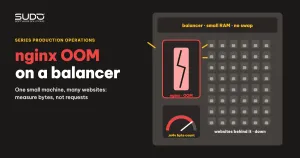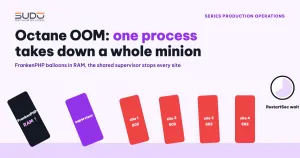
On a minion running several Laravel Octane websites, every site returns 502 Bad Gateway for almost a minute and then comes back on its own. Only one site actually ran out of memory; the others showed nothing unusual but died with it anyway. This is a typical Octane OOM case when many Octane sites share one supervisor. This document describes how to investigate it (including a common trap when reading graphs), the kernel and systemd mechanism that turns one site's Octane OOM into an incident for the whole minion, and how to separate failure domains so that next time only one site is affected.
Background on Octane, FrankenPHP and how to put it behind nginx is in Laravel Octane and FrankenPHP: running Laravel as an app server.
Symptoms of Octane OOM on a shared minion
- Every Octane site on the same minion returns 502 at the same time, including sites with no traffic.
- The outage lasts about a minute, after which everything recovers without anyone intervening.
- The minion's RAM graph shows no peak hitting the ceiling. Right after the incident, the RAM line actually drops sharply.
- Shortly before, one site received a sudden traffic surge, for example from an advertising campaign.
Investigation process
Step 1: do not draw conclusions from the graph
The first question is "did the machine run out of RAM?". Looking at the graph, the answer seems to be no. That is the trap. Prometheus samples RAM every few tens of seconds, while a process's memory balloon lasts only a moment before it is killed. As soon as the process is killed, the memory is returned, so the graph only has time to record a drop. With Octane OOM, the graph is only useful for trends: was the machine already close to the edge beforehand (heavy swap usage, very little Free left), not for drawing conclusions.
Step 2: the kernel log is the source of truth for Octane OOM
Read the kernel and systemd logs around the time of the incident. Note that journalctl takes timestamps in the machine's time zone, usually UTC:
# kernel log around the incident
journalctl -k --since "YYYY-MM-DD HH:MM" --until "YYYY-MM-DD HH:MM" | grep -i "out of memory"

# state of the supervisor unit over the same period
journalctl -u supervisor --since "YYYY-MM-DD HH:MM" --until "YYYY-MM-DD HH:MM"

# typical output (shortened)
Out of memory: Killed process 4479 (frankenphp) total-vm:...kB, anon-rss:...kB
supervisor.service: Failed with result 'oom-kill'.
The Killed process line tells you exactly which process was killed and its RSS at that moment. In the typical case, one site's frankenphp process takes more than half of the machine's RAM. The first conclusion: this is not "the machine is short on RAM in general", but a single process that ballooned.
Step 3: why one site balloons into Octane OOM
Count that site's access log per minute to see the traffic:
# requests per minute over an hour around the incident
awk '{print substr($4, 2, 17)}' /var/log/nginx/site-a.example.access \
  | sort | uniq -c | sort -k2
A site running Octane with --workers=1 --max-requests=500 (parameters described in the Laravel Octane documentation) means one worker serves a full 500 requests before it is recycled. When traffic reaches tens of requests per second, that lifecycle shrinks to a few seconds, yet the process can still grow past 1 GB if the code retains data between requests (static variables, accumulating singletons, in-memory caches). If you have not yet pinpointed the code holding the memory, record the growth and the traffic, and do not guess.
Step 4: why the other sites die too
This is the most important question, because it turns one Octane OOM into an incident for the whole minion. When the sites are declared as programs in the same supervisor, and supervisor runs under a single systemd unit, all Octane processes live in the same cgroup:
system.slice/supervisor.service          ← one unit, one cgroup
 ├─ supervisord
 ├─ site-a-octane   (frankenphp, RSS ballooning)  ← killed by the OOM killer
 ├─ site-b-octane   (frankenphp)                  ← dies with it
 ├─ site-c-octane   (frankenphp)                  ← dies with it
 └─ site-d-octane   (frankenphp)                  ← dies with it
When the kernel kills a process inside a unit, systemd applies that unit's OOMPolicy=. According to the systemd.service documentation, the default is stop: the unit is stopped entirely, taking every remaining process in the cgroup with it. That is the Failed with result 'oom-kill' line. Debian's packaged supervisor.service unit has Restart=on-failure and RestartSec=50s, so systemd waits exactly 50 seconds before starting supervisor again. The length of the outage is decided by this default configuration, not by how long the failing site takes to recover.
# quick check of the unit's policy
systemctl show supervisor -p OOMPolicy -p Restart -p RestartUSec -p KillMode
Root cause: Octane OOM is only the spark
- The spark: a traffic surge to one site, on a long-running process that accumulates memory across many requests.
- No memory bulkheads: no site has its own RAM limit, so Octane OOM happens at the whole-machine level. The process is allowed to eat until RAM and swap run out, and only then does the kernel step in.
- A shared failure domain: many sites share one systemd unit. With
OOMPolicy=stop, a failure of one child process becomes a failure of the whole unit, andRestartSecdecides the length of the outage.
The third layer is what turns one site's incident into an incident for the whole minion. If you only optimize the code of the offending site, the next Octane OOM on another site will still take every site down. A low-RAM minion already running close to its limit is a case where Octane should not be used unless you can monitor per-process RAM.
Fix
Right after an Octane OOM incident
For the services themselves, usually nothing needs to be done: supervisor is restarted automatically. What you need to do right after an Octane OOM is confirm the cause from the kernel log, rather than restarting more services and muddling the logs. While waiting for the architecture change:
- Lower
--max-requestsfor the high-traffic site so its worker is recycled more often. - When a big campaign is announced in advance, watch the RSS of the
frankenphpprocesses directly on the machine (ps -o pid,rss,cmd -C frankenphp), not only through graphs.
Long-term: one systemd unit per Octane site
So that the next Octane OOM affects only one site, move the HTTP part of each Octane site into its own systemd unit, with its own cgroup and memory limit. Supervisor keeps only the queue workers. A sample unit:
# /etc/systemd/system/octane-site-a.service
[Service]
User=www-data
WorkingDirectory=/var/www/site-a.example
ExecStartPre=/bin/sh -c 'fuser -k -9 8001/tcp 2>/dev/null || true'
ExecStart=/usr/bin/php8.4 artisan octane:start --server=frankenphp \
    --host=127.0.0.1 --port=8001 --admin-port=9001 \
    --workers=1 --max-requests=100
Restart=always
RestartSec=1s
KillMode=control-group
MemoryHigh=450M
MemoryMax=600M| Criterion | Shared supervisor | One unit per site |
|---|---|---|
| Blast radius when one site hits Octane OOM | Every Octane site on the minion | Only that site |
| Self-recovery time | The package's RestartSec (50 seconds) | A few seconds (RestartSec=1s) |
| RAM limit | None; eats until the machine runs dry | MemoryHigh starts reclaiming, MemoryMax kills inside the site's cgroup |
| Queue workers | Share supervisor with web | Stay in supervisor, separated from web |
Three things to verify before applying this Octane OOM countermeasure:
- Total MemoryMax larger than machine RAM: per-site limits stop one site from ballooning, but several sites ballooning together can still push the whole machine into a global OOM. Add up the totals and compare them with real RAM.
- systemd's restart limit: with
RestartSec=1s, a site that keeps failing can hit the defaultStartLimitBurstthreshold and systemd will stop restarting it. Decide explicitly how you want this to behave. - A clean cutover: the Octane program must be removed from supervisor before enabling the unit, otherwise both will fight over the same port.
Common mistakes
- Concluding "RAM did not run out" because the graph shows no peak. The balloon is too short for sampling to catch.
- Restarting the whole supervisor when deploying one site. Every deploy then causes an outage for every site, exactly like an Octane OOM.
- Setting
MemoryMaxwithoutMemoryHigh. The process is killed abruptly instead of having memory reclaimed gradually.
Octane OOM prevention checklist
- Alert on OOM events in the kernel log, not only on average RAM thresholds.
- Every long-running process (Octane, queue workers) must have its own memory limit, at the cgroup level or through the application's own parameters.
- Do not put many sites in one systemd unit if one failing site is allowed to stop the whole unit. Check
OOMPolicy,RestartandRestartSecon every unit that carries several sites. - Deploying an Octane site should only touch that site's program (
supervisorctl restart <program>). - The operations team should be told in advance about large advertising campaigns so they can watch the right minion.
- Record every Octane OOM in the incident log with the site name, RSS at kill time and the surrounding traffic, so you can see which sites repeat.
Lessons
- Graphs tell you about trends; the kernel log tells you about events. For Octane OOM or any OOM, always start with
journalctl -k. - Configuration decides how long an incident lasts. Nobody chose a software package's defaults for your system; read them and set them yourself.
- Bulkheads matter more than optimization. Optimizing code reduces the chance of a repeat on one site. Only separating failure domains stops Octane OOM from spreading to other sites.
- Blameless postmortems. An advertising campaign is a normal thing for a customer to run. The infrastructure must withstand it, or at least let only that site take the hit.
Next article
no live upstreams: reading the Nginx error.log when upstreams are marked down. How to tell upstream timed out, connection refused and no live upstreams apart, and what happens when an entire upstream group is marked down.