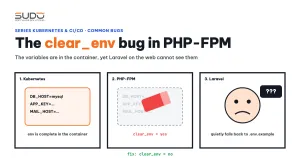
The ConfigMap and Secret are fully loaded into the container, kubectl exec ... env prints every variable correctly, and yet Laravel running on the web still cannot read them. This is a very common error when moving a Laravel image to Kubernetes, and the culprit is usually clear_env, a PHP-FPM parameter that by default wipes the environment before running PHP code. This guide explains how clear_env works, how to tell it apart from other configuration errors, how to fix it, the security cost, and a few other traps when running an all-in-one Laravel image on Kubernetes.
1. Symptom: the variables are in the container but Laravel cannot see them
Suppose you use an all-in-one image like the one in Dockerizing Laravel: one all-in-one image for Website AI: one container running supervisord, which starts nginx and PHP-FPM. The Deployment loads variables with envFrom from a ConfigMap and Secret, exactly as in ConfigMap and Secret: Laravel environment variables on Kubernetes. Everything looks right:
- The pod comes up, meaning the initContainer finished
php artisan migrate --force: thephpcommand connected to MySQL using the values from the ConfigMap and Secret. - Running
envinside the container showsDB_HOST,DB_DATABASEandAPP_URL. - But for requests from a browser, Laravel behaves as if those variables did not exist.
The key point: "same image, same variables, correct when run with the php command, wrong when run through the web". CLI and web take two different paths, and only the web path goes through PHP-FPM.
2. What clear_env is
According to the FPM configuration documentation on php.net, clear_env decides whether to clear the environment of FPM workers before adding the variables declared with env[...] in the pool configuration. The default value is yes. The www.conf file of many distributions says so in its comments, while the line that turns it off is commented out:
; Clear environment in FPM workers
; Prevents arbitrary environment variables from reaching FPM worker processes
; by clearing the environment in workers before env vars specified in this
; pool configuration are added.
; Setting to "no" will make all environment variables available to PHP code
; via getenv(), $_ENV and $_SERVER.
; Default Value: yes
;clear_env = no
Following the path of an environment variable through the container shows why CLI is right and web is wrong:
kubelet ── envFrom (ConfigMap, Secret) ──► container main process: supervisord
                                              │  (child processes inherit env)
               ┌──────────────────────────────┼─────────────────────────────┐
               ▼                              ▼                             ▼
         nginx                        php-fpm (master)               queue:work
                                              │                       HAS all variables
                                              │ clear_env = yes
                                              ▼
                                    php-fpm worker: env WIPED
                                    ← every web request runs here

kubectl exec / initContainer ──► php artisan ...      HAS all variables (no FPM)
This design has a reason: on a shared server, the parent process environment may contain all sorts of unrelated things that should not leak into each site's PHP code. The official PHP image on Docker Hub already sets clear_env = no, because in a container, environment variables are the configuration channel. But images built from Alpine or Debian with PHP installed through the package manager (apk, apt) keep the distribution's default of yes.
Why Laravel does not report an error but quietly uses other values
If Laravel saw no variables at all, it would break immediately and be easy to spot. The harder case is when the Dockerfile has this line:
RUN cp .env.example .envLaravel reads the .env file with the phpdotenv library in non-overwriting mode: variables already in the environment are kept, and .env only fills the gaps. For CLI, the environment has all the real variables, so .env has almost no effect. For FPM workers, the environment has been wiped by clear_env, so the entire configuration comes from the .env.example baked into the image: APP_ENV=local, DB_HOST=127.0.0.1, the development APP_URL. The application does not report "missing variable"; it simply connects to the wrong place and generates links to the wrong domain. This is the most time-consuming kind of bug: everything looks "almost right".
3. Investigating clear_env layer by layer
Compare each layer, from the outside in, until you find the layer that loses the variables:
# Layer 1: does the container have the variables?
kubectl exec -n app deploy/app -- env | grep -E '^(APP_URL|DB_HOST)='

# Layer 2: can PHP running as CLI see them?
kubectl exec -n app deploy/app -- php -r 'var_dump(getenv("DB_HOST"));'

# Layer 3: which configuration is PHP-FPM really using?
kubectl exec -n app deploy/app -- php-fpm -tt 2>&1 | grep -E 'clear_env|include'
# the binary name depends on the distribution: php-fpm, php-fpm82, php-fpm8.2...
Layer 4 is the view from the web side: a temporary route that returns getenv('DB_HOST'), or the Environment section of phpinfo(). If layers 1 and 2 have values and layer 4 is empty, it is almost certainly clear_env. Delete routes like this as soon as the investigation is over: they print exactly what must never be exposed.
A cheaper way to spot it: change APP_DEBUG in the ConfigMap, restart the pod, then trigger an error on the web. If the error page does not change accordingly, the environment variables are not reaching PHP-FPM.
4. The fix: clear_env = no
The fix is a single line in the pool file, plus removing the .env file from the image:
# .docker/www.conf
-;clear_env = no
+clear_env = no

# Dockerfile
-RUN cp .env.example .env
Rebuild the image, redeploy, and the web starts seeing the correct variables from the ConfigMap and Secret. Removing .env from the image is just as important as the clear_env line: if a variable really is missing, Laravel fails visibly instead of silently taking the sample value. Note that ConfigMap changes do not flow into running containers automatically; you have to recreate the pods (for example kubectl rollout restart deploy/app -n app) for the new variables to take effect.
Make sure your configuration file is actually loaded
A related bug: the Dockerfile copies www.conf to /etc/php-fpm.d/www.conf, but the distribution's PHP-FPM only reads another directory, for example include=/etc/php82/php-fpm.d/*.conf on Alpine. The file is in the wrong place, there is no error message, FPM keeps running with the package's default www.conf, and none of your edits (including clear_env) have any effect. After copying configuration into an image, always check the effective configuration with php-fpm -tt (for nginx, nginx -T), rather than trusting that the COPY instruction succeeded.
5. Security considerations when setting clear_env = no
Turning off clear_env means every container variable, including DB_PASSWORD, APP_KEY and object storage keys, is available in getenv(), $_ENV and $_SERVER for every request. The consequences:
- A forgotten
phpinfo()somewhere will print every secret. - Error pages with
APP_DEBUGenabled can display environment variables. If you have to turn debug on to investigate, turn it off again as soon as you are done; live websites always run withAPP_DEBUG=false. - A vulnerability that allows reading variables or running arbitrary code in PHP immediately exposes every secret of the site.
The options and their trade-offs:
| Approach | Pros | Cons |
|---|---|---|
clear_env = no | Simple, adding new variables does not require changing the image | Every container variable is exposed to PHP code |
Keep clear_env = yes, declare each variable env[DB_HOST] = $DB_HOST in the pool | Only listed variables reach PHP | Long list, adding a variable requires an image rebuild, forgetting one line brings the bug back |
Run php artisan config:cache when the container starts | FPM workers read the cache file, no env needed | Calls to env() outside the config/ directory return null; must run at the right moment, on the right filesystem |
In a container that runs only one application, the environment is built specifically for that application, so clear_env = no is an acceptable choice. What needs tightening is secrets in the wrong place: passwords in a ConfigMap, Secret files committed to Git.
6. Other traps when Dockerizing Laravel for Kubernetes
config:cacheat image build time. Duringdocker buildthere are no ConfigMaps or Secrets yet. Runningphp artisan config:cache(oroptimize) in the Dockerfile freezes the default values intobootstrap/cache/config.php, and Laravel ignores environment variables from then on. The Laravel documentation spells out this consequence in the Configuration Caching section.config:cachein an initContainer. Sounds reasonable but is useless: the initContainer has its own filesystem, and the cache file it creates does not carry over to the main container unless both share a volume.- A
.envfile in the image, as in section 2. It hides missing variables and can easily carry real keys if.env.examplecontains values that are not just samples. - Logs not going to stdout. Send nginx access and error logs to
/dev/stdoutand/dev/stderr, otherwisekubectl logsonly shows supervisord's log. - Inconsistent users. nginx, PHP-FPM and directory ownership must use the same user (for example all
nginxinstead of halfnobodyand halfnginx), and the source code must bechowned to match so write access tostorageis consistent. - CPU architecture. Use
FROM --platform=linux/amd64(or a multi-architecture build) so an image built on an ARM machine still runs on amd64 nodes.
7. Checklist when environment variables "disappear"
- Does the container have the variable (
env)? - Can PHP CLI see it (
php -r 'var_dump(getenv(...))')? - Is your pool file really loaded (
php-fpm -tt)? What is clear_env set to? - Is there a
.envorbootstrap/cache/config.phpfile baked into the image? - Have the pods been recreated after editing the ConfigMap?
- Have the debug routes been deleted and
APP_DEBUGturned off after the investigation?
The clear_env bug is hard to find because it sits where three things meet: how Kubernetes passes variables, how PHP-FPM spawns workers and how Laravel reads .env. Each one behaves correctly according to its own documentation. The method is the main lesson: when a value "disappears", check every layer it has to pass through, and never let a default value hide missing configuration. How Laravel uses FPM pools on Cloud VPS is covered in The Minion tier: running multiple PHP versions side by side, and the HTTPS path into the cluster in ingress-nginx and cert-manager: automatic HTTPS on Kubernetes.
Next article
Kubernetes monitoring with kube-prometheus and Grafana. The websites are running; now we need to see the cluster: Prometheus Operator, node-exporter, kube-state-metrics, Grafana, and protecting them with basic auth through Ingress.