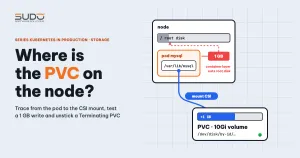
When you run MySQL on Kubernetes, the first question many people ask is: where does the PVC data live, and does it eat into the root disk of the node? This guide shows how to find a PVC on a Kubernetes node by tracing from the pod down to the CSI mount point, how to measure disk usage with a controlled 1 GB write test, and how to unstick a PVC that hangs in the Terminating state. The examples use Linode LKE, but the method applies to other CSI drivers.
If you are not sure why we moved our websites onto a cluster, read Website AI on VPS: why we started planning a move to Kubernetes first. On the MySQL side, The Database tier: multi-tenant MySQL on small VPS instances explains how we organized data before moving it into the cluster. This article goes straight to diagnostics on the Kubernetes node.
Where PVC data really lives on a Kubernetes node
A PersistentVolumeClaim is only an allocation request. With a block storage CSI driver, each PVC on a Kubernetes node maps to its own volume at the provider. The volume is attached to the virtual machine of the node that runs the pod, kubelet formats it if it is empty, and then mounts it into the pod's directory. So PVC data on a Kubernetes node sits on a separate block device, not on the root disk /.
This differs from emptyDir or the container's writable layer: both of those write to the node's own disk. Misunderstanding where a PVC lives on a Kubernetes node leads to two opposite mistakes: either worrying needlessly about the root disk, or forgetting to set limits for writes that happen outside the volume.
Tracing the chain: pod, Kubernetes node, PVC and PV
To find the data of a PVC, start at the pod and work downward. The four commands below give you the Kubernetes node, the PV name, the volume ID at the provider and the pod UID. The UID is used to build the kubelet path in a later step.
kubectl get pods -o wide        # NODE column: which node the pod runs on
kubectl get pvc                 # VOLUME column: the PV name of the PVC
kubectl get pv <pv-name> -o jsonpath='{.spec.csi.volumeHandle}{"\n"}'
kubectl get pod <pod> -o jsonpath='{.metadata.uid}{"\n"}'
These are infrastructure identifiers, so do not paste them into public documents.
Finding the CSI mount point of a PVC on the Kubernetes node
The fastest way to inspect a PVC on a Kubernetes node without logging in to the node is to run df inside the pod, at the mounted directory.
kubectl exec <pod> -- df -h /var/lib/mysql
# Filesystem  Size  Used Avail Use% Mounted on
# /dev/sdc    9.8G  ...                /var/lib/mysql
A 10Gi (GiB) volume usually shows about 9.8G in the Size column because ext4 reserves part of it for metadata (inode tables, journal). That is normal, not data loss. Reserved blocks (5% by default) do not shrink Size; they only reduce Avail for regular users.
To see the real mount point of the PVC on the Kubernetes node, use kubectl debug node instead of logging in as root over SSH. This command creates a temporary pod with the node's filesystem mounted at /host. The kubectl debug node documentation describes it in full.
kubectl debug node/<node-name> -it --image=busybox
chroot /host
df -h | grep kubernetes.io~csi
ls -l /dev/disk/by-id/ | grep -i volume
The Mounted on column looks like /var/lib/kubelet/pods/<pod-uid>/volumes/kubernetes.io~csi/<pv-name>/mount. The device is a symlink in /dev/disk/by-id whose name contains the word Volume and the volume ID. Kubelet also mounts the volume once more in a staging directory (globalmount); that path depends on the kubelet version and the driver, so confirm it with findmnt on a test cluster. These steps are read-only, but you should still try them on a test cluster first.
If chroot /host reports a permission error, add --profile=sysadmin to the kubectl debug command (kubectl 1.30 or later; use it only on a test cluster because the pod gets very broad privileges). The debug pod is not deleted automatically and lives in the current namespace, so clean it up when you are done:
kubectl get pods | grep node-debugger
kubectl delete pod <node-debugger-...>
Reading PVC contents on the Kubernetes node: lost+found, subPath and owner
List the PVC mount directory on the Kubernetes node with ls -ln (numeric IDs instead of names). You will see three familiar things:
lost+found, mode 700, owned by root: created bymkfs.ext4at the root of the volume.- A subdirectory if the manifest uses
subPath. - MySQL data files owned by uid 999 and gid 999. The user and group names shown on the node are whatever maps to uid/gid 999 in the node's
/etc/passwdand/etc/group, which may differ from themysqlname inside the container.
A common manifest mistake is writing hostPath under volumeMounts to select a subdirectory. That is not a valid field of volumeMounts, and kubectl will warn about an unknown field or reject it. The correct field is subPath:
volumeMounts:
  - name: mysql-data
    mountPath: /var/lib/mysql
    subPath: mysql          # correct: subPath, not hostPath
volumes:
  - name: mysql-data
    persistentVolumeClaim:
      claimName: pvc-mysql
Using subPath also keeps MySQL from refusing to start because it finds lost+found inside the data directory.
The 1 GB write test: measuring a PVC on the Kubernetes node correctly
The mechanism is this: writing to a directory that has no volume mounted grows the node's root disk; writing to the PVC mount grows the PVC's disk and leaves the root disk unchanged. To verify it yourself, use a test pod with a PVC attached (in the example below, the test pod mounts the PVC at /data), not a database pod that is serving real traffic.
# on the node: record the numbers before writing (in bytes)
df -B1 / /var/lib/kubelet/pods/<pod-uid>/volumes/kubernetes.io~csi/<pv-name>/mount

# case 1: a directory with no mount (container writable layer)
kubectl exec <pod> -- dd if=/dev/zero of=/tmp/test.bin bs=1M count=1000 conv=fsync
# measure again on the node, then delete the file and measure once more
kubectl exec <pod> -- rm /tmp/test.bin

# case 2: a directory with the PVC mounted
kubectl exec <pod> -- dd if=/dev/zero of=/data/test.bin bs=1M count=1000 conv=fsync
# measure again on the node, then delete the file to free the test PVC
kubectl exec <pod> -- rm /data/test.bin
A few points make the numbers meaningful:
- Check that
/tmpis not tmpfs (df /tmp); tmpfs consumes RAM, not disk. conv=fsyncforces the data to be written out beforeddexits, sodfreflects it right away.- Pick one unit.
count=1000withbs=1Mis 1000 MiB, or 1,048,576,000 bytes, which is not the same as 1000 MB. - The root disk always has other writers (logs, image layers), so swings of tens to hundreds of MB are normal. Only an increase of about 1 GB is trustworthy; repeat the measurement.
Also note that writes to the container's writable layer count toward the Kubernetes node's ephemeral-storage. Writing too much can cause DiskPressure and make kubelet evict pods. Set limits.ephemeral-storage for containers that may write outside the volume.
Four sources of error when measuring PVC usage
A common mistake in self-made measurements is that the conclusion is right but the accompanying df table does not support it, or the root disk even grows in a run where it should not. Four sources of error come up often:
- The test file from the first run was not deleted before the second, so the two measurements overlap.
df -hrounds to 0.1G, which hides small differences.- Downloading the test file over the network with
curldrags in cache and logs, which pollute the numbers. - Mixing up 1000 MB and 1000 MiB, or measuring at two moments when the node is busy with something else.
The fix is to measure each run with dd and df -B1, delete the file between runs and record the difference in bytes.
PVC stuck Terminating: find pods still using it before you patch
After kubectl delete pvc, a PVC can hang in the Terminating state. The cause depends on the case. What follows is the standard Kubernetes mechanism; the most common hypothesis is that a pod still uses the PVC.
Kubernetes attaches the kubernetes.io/pvc-protection finalizer to every PVC. It is removed only when no pod uses the PVC any more. See storage object in use protection in the official documentation. So check whether any pod still mounts the PVC:
kubectl describe pvc <pvc-name> | grep -E "Finalizers|Used By"
kubectl get pods -n <namespace> -o json | jq -r '.items[]
  | select(.spec.volumes[]?.persistentVolumeClaim.claimName=="<pvc-name>")
  | .metadata.namespace + "/" + .metadata.name'
If a pod still uses the PVC on the Kubernetes node, scale the Deployment or StatefulSet down to 0 replicas. The PVC will disappear on its own. Only when no pod remains and the PVC is still stuck should you use the last resort:
kubectl patch pvc <pvc-name> -p '{"metadata":{"finalizers":null}}' --type=mergePatching the finalizer while a pod is still running is risky: the PVC object disappears but the volume may still be attached to the node, and the next attach is likely to fail.
StorageClass Retain: Released PVs and disks that are still billed
With a StorageClass that sets reclaimPolicy: Retain, deleting the PVC does not delete the volume, even when no pod uses the PVC on the Kubernetes node any more. The PV moves to Released, and the volume at the provider remains and keeps being billed. The suggested cleanup procedure follows the reclaiming section of the PV documentation:
- Back up any data you need to keep, outside the cluster.
- Run
kubectl get pvto see the PV in the Released state, and compare itsvolumeHandlewith the volume at the provider. kubectl delete pv <pv-name>: with Retain, this removes only the PV object.- Delete the volume on the provider side, after you are sure the backup is complete.
Step 3 is the one people forget. The delete command on the provider side must follow the provider's documentation, and you should try it on an unimportant volume first.
Checklist
- To find PVC data on a Kubernetes node, get the node, PV name,
volumeHandleand pod UID from the pod. - To inspect a PVC on a Kubernetes node, run
dfinside the pod first; go onto the node withkubectl debug nodeonly when you need to. - Use
ls -lnto read owners as numeric uids. - Measure PVC usage on the Kubernetes node with
ddanddf -B1, deleting the test file between runs. - Set an
ephemeral-storagelimit for containers that write outside the volume. - For a PVC stuck Terminating on a Kubernetes node, check
Used Byfirst; patching the finalizer is the last resort. - Retain: after deleting a PVC, clean up the Released PV before you delete the volume at the provider.
Next article
Pod Pending with Insufficient cpu: calculating real free capacity from kubectl describe node. Now that storage is covered, the next article shows how to calculate free CPU on a Kubernetes node by hand, so you can see why a pod stays Pending even when the CPU chart looks idle.