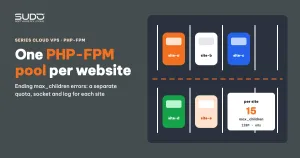
Moving the sites on a minion from the shared www PHP-FPM pool to one pool per site is the right step to end max_children errors. The reasons and the method are in One PHP-FPM pool per website: ending max_children errors. This document covers the part that is easy to overlook: after a PHP-FPM migration, three bugs commonly surface, involving the log path, the upload limit and the time zone. What they have in common: php-fpm -t, nginx -t and even the HTTP health check all report green. None of them takes a site down, but all three make the site behave wrongly in silence, and they tend to show up one after another over the first few days.
Context: a scripted PHP-FPM migration
Splitting pools is usually automated: for each site on the minion, a script generates a new pool file from a list of directives, switches nginx's fastcgi_pass to the site's own socket, checks the syntax, reloads PHP-FPM and then requests the home page. This approach is fast and repeatable, but the quality of the new pool depends entirely on the list of directives the script author thought of.
Symptoms after the PHP-FPM migration
- PHP error logs in the wrong place. The new pool writes PHP errors to the same error log file nginx uses for the site. Two log sources are mixed in one file, and whether PHP can write at all depends on the permissions of the
/var/log/nginx/directory, which belongs toroot:adm. - Uploads failing silently. Files larger than 2 MB will not upload, even though nginx on both the balancer and the minion allows much larger bodies. No 413, no 5xx.
- Wrong time and scripts cut off early. The site runs on UTC, 7 hours off from Vietnam time. A heavy script that used to complete within 60 seconds may now report a timeout at the 30-second mark.
Investigating bugs after a PHP-FPM migration
Why the health check misses bugs after a PHP-FPM migration
A typical health check requests each site's home page through the minion IP with a Host header, and treats any 5xx code or timeout as a failure. It catches problems with the pool's run-as user or the socket owner well, because the home page then returns 502. The three bugs after a PHP-FPM migration are different: the home page still returns 200. Logging to the wrong place does not change the status code. The upload limit only matters when someone uploads. The time zone only shows when someone reads the time on a page. A health check only answers "is the site alive?", not "does the site behave as before?".
Compare values, not files
The right question after a PHP-FPM migration is: which directives differ between the new pool and the old one? The commands below list every php_value and php_admin_value line of the two files side by side:
POOLD=/etc/php/7.4/fpm/pool.d
grep -hE '^\s*php_(admin_)?(value|flag)' $POOLD/www.conf | sort > /tmp/www.txt
grep -hE '^\s*php_(admin_)?(value|flag)' $POOLD/site-a-example.conf | sort > /tmp/site-a.txt
diff /tmp/www.txt /tmp/site-a.txt
A typical result: www.conf has php_admin_value[date.timezone] = Asia/Ho_Chi_Minh and php_admin_value[max_execution_time] = 60, while the new pool has neither. The new pool also declares no upload_max_filesize or post_max_size.
Each pool is a world of its own
According to the PHP-FPM configuration documentation, each [pool] block is independent: any directive a pool does not declare comes from php.ini, not from another pool. In a PHP-FPM migration, which splits sites out of www.conf, every value that was set specifically in www.conf falls back to the php.ini default:
| Directive | In www.conf | New pool without the declaration | Consequence |
|---|---|---|---|
date.timezone | Asia/Ho_Chi_Minh | PHP uses UTC | 7 hours off |
max_execution_time | 60 | Default 30 | Heavy scripts are stopped sooner |
upload_max_filesize / post_max_size | Site-specific values | Default 2M / 8M | Uploads larger than 2 MB fail |
Two details make the impact hard to predict. First, Laravel sites set their own time zone from config('app.timezone') at boot, so the time offset mainly affects plain PHP sites and code that relies on PHP's default time zone. Second, according to the PHP documentation on max_execution_time, on Linux this time does not include time spent waiting on database queries, network calls or system calls. A script that is slow because it waits on I/O may never hit the 30-second limit, while a CPU-heavy script will.
The log path: a flaw in the design itself
The log path bug does not come from php.ini, but from the choice to write PHP errors to /var/log/nginx/<domain>.error. PHP-FPM processes run as the pool's user, while nginx's log directory belongs to root:adm. Whether that user can write depends on each file's permissions, and those permissions can change when the file is rotated. On top of that, reading one file that mixes nginx and PHP logs slows down an investigation exactly when it needs to be fast.
Root cause
- New pools were generated from a hard-coded list, without explicitly inheriting from
www.conf. Every site-specific value inwww.confthat was not on the list got dropped during the PHP-FPM migration. - The health check only tested "alive or dead" on the home page. Behavior changes (uploads, time, logs) do not change the status code, so they slipped through every check.
- There was no step comparing the effective configuration before and after the split, so the bugs only surfaced when users ran into them.
Fix
A complete template pool for the PHP-FPM migration
New pools should be generated with all of the lines below. Note that post_max_size must be greater than or equal to upload_max_filesize, according to the php.ini directive documentation. Set them the other way around and files sized between the two values still will not upload:
request_terminate_timeout = 60s
php_admin_value[memory_limit]        = 256M
php_admin_value[upload_max_filesize] = 64M
php_admin_value[post_max_size]       = 72M
php_admin_value[error_log]           = /var/log/php/site-a.example.error
php_admin_value[max_execution_time]  = 60
php_admin_value[date.timezone]       = Asia/Ho_Chi_Minh
Backfilling pools from an earlier PHP-FPM migration
For pools split before the fix existed, add only the missing lines, without overwriting values a site has tuned on its own:
POOL=/etc/php/7.4/fpm/pool.d/site-a-example.conf
grep -qE '^[;[:space:]]*php_admin_value\[date\.timezone\]' "$POOL" \
  || echo 'php_admin_value[date.timezone] = Asia/Ho_Chi_Minh' >> "$POOL"
grep -qE '^[;[:space:]]*php_admin_value\[max_execution_time\]' "$POOL" \
  || echo 'php_admin_value[max_execution_time] = 60' >> "$POOL"

# a dedicated log directory, owned by the user that runs PHP-FPM
mkdir -p /var/log/php && chown www-data:www-data /var/log/php && chmod 755 /var/log/php

# which pools still lack an upload limit?
grep -L 'upload_max_filesize' /etc/php/*/fpm/pool.d/*.conf | grep -v www.conf

php-fpm7.4 -t && systemctl reload php7.4-fpm
At the same time, fix the procedure for creating new sites under the per-site pool model, so sites created later do not repeat these three bugs.
Improving the PHP-FPM migration procedure
- Inherit instead of enumerating. In a PHP-FPM migration, first copy every
php_valueandphp_admin_valueline fromwww.confinto the new pool, then override the values that need to change. A hard-coded list will always miss things the script author did not know existed. - Align the timeout chain. There are usually three layers:
max_execution_timeandrequest_terminate_timeoutin PHP-FPM,fastcgi_read_timeoutin the minion's nginx, and the balancer's timeout. The innermost layer decides; the outer layers should only be slightly longer. - Functional health checks. Besides the home page, call a check endpoint that returns
date_default_timezone_get()and the pool's mainini_get()limits, and compare them with the expected values.
<?php // health-ini.php, only callable from the internal network
header('Content-Type: application/json');
echo json_encode([
  'tz'     => date_default_timezone_get(),
  'upload' => ini_get('upload_max_filesize'),
  'post'   => ini_get('post_max_size'),
  'met'    => ini_get('max_execution_time'),
]);
Checklist for the next PHP-FPM migration
- Before the PHP-FPM migration: list every directive that differs from the default in the minion's
www.confandphp.ini. - After the split: rerun the comparison for each pool; the result must be empty or contain only intentional differences.
- Try one large file upload and one print of the current time on a sample site on each minion.
- Keep PHP logs and nginx logs in two separate directories, each owned by the user that writes it.
- Do the PHP-FPM migration one minion at a time and record the split date in the change log, so when a bug report comes in you immediately know which sites just changed configuration.
- After the split, watch the logs for
reached pm.max_childrento confirm the main goal of the migration has been met.
Lessons
- Changing the configuration structure changes the defaults. A PHP-FPM migration is a textbook example: splitting out a configuration block does not just move it, it also changes where it takes values from when something is missing.
- "Green" only means you checked what you thought of. An HTTP health check catches alive-or-dead failures, not behavior failures.
- A fix must be backfilled. A fix in the script only helps pools created afterward. The backfill step for old pools is what actually closes the bug on sites that went through the PHP-FPM migration earlier.
- Bugs surfacing one after another point to a process gap, not to several unrelated incidents. Here, that gap was the missing before-and-after comparison.
Next article
Kubernetes right-sizing: setting CPU and RAM requests from real usage. Moving on to the Website AI Kubernetes cluster: when total requests are many times higher than real usage, and every report produces a different set of numbers.