When many Laravel sites on the same minion share a single PHP-FPM pool named www, the setup is very simple but has a fatal weakness: one slow site can grab every worker, and all the other sites on the machine return 502 even though they did nothing wrong. The most familiar symptom is the log line server reached pm.max_children setting repeating over and over. This guide shows how to move to a model where each website gets its own PHP-FPM pool: why the shared pool fails, how to configure a pool with pm = ondemand, how to budget RAM so the machine does not run out, how to roll it out on a live minion with a rollback path, and the most common mistakes.
1. Overview: one shared PHP-FPM pool, one site dies, the whole machine suffers
PHP-FPM's default configuration is a single www.conf file. If every site uses fastcgi_pass to that pool, the maximum number of workers for the entire machine is decided by exactly one number: pm.max_children of the www pool.
Shared pool [www], max_children = 20
┌──────────────────────────────────────────────────┐
│ site-a ████████████ | site-b █ | site-c █ | ...  │
│ site-a calls a hung external API, holds 18/20    │
│ → site-b, site-c... queue up, time out, 502      │
└──────────────────────────────────────────────────┘
What ties up workers is usually not heavy traffic. Turn on the slowlog in the PHP-FPM pool and you will often see workers dumped while sitting in curl_multi_select(): for example, a middleware that calls object storage synchronously inside the request. The network gets a little slow, the worker gets stuck waiting, and one such site is enough to take down the whole minion.
; enable the slowlog to see which function a worker is stuck in
slowlog                 = /var/log/php/www.slow
request_slowlog_timeout = 10s
Worse, the log only says "PHP-FPM pool www is full"; it does not say which site caused it. The usual firefighting is a cron job that restarts PHP-FPM periodically, or a script that automatically restarts dead services as in Low-cost self-healing: detecting and restarting dead services. Both only treat the symptom, and every restart cuts off in-flight requests for every site.
2. The mechanism: one PHP-FPM pool and one quota per site
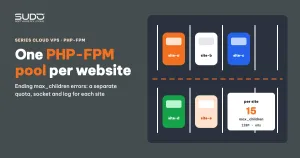
PHP-FPM can run many pools under the same master process. According to the PHP-FPM configuration documentation on php.net, each pool is an independent [name] block with its own socket, worker limits, user and php_admin_value settings. Giving each site its own PHP-FPM pool means:
- A separate quota: if site A uses up every worker in its PHP-FPM pool, only site A slows down.
- A separate socket: each site's nginx talks to that site's PHP-FPM pool.
- Separate logs:
max_childrenorexecution timed outlines clearly name the pool, which means the site. - Separate limits:
memory_limitand timeouts set per site.
Sample PHP-FPM pool configuration
; /etc/php/7.4/fpm/pool.d/site-a-example.conf
[site-a-example]
user  = nginx
group = nginx

listen       = /run/php/php7.4-fpm-site-a-example.sock
listen.owner = www-data          ; the user the nginx process runs as
listen.group = www-data
listen.mode  = 0660

pm                      = ondemand
pm.max_children         = 15
pm.process_idle_timeout = 10s
pm.max_requests         = 500

request_terminate_timeout = 60s

php_admin_value[memory_limit]        = 128M
php_admin_value[upload_max_filesize] = 128M
php_admin_value[post_max_size]       = 64M
php_admin_value[max_execution_time]  = 60
php_admin_value[date.timezone]       = Asia/Ho_Chi_Minh
php_admin_value[error_log]           = /var/log/php/site-a.example.error
In the minion's nginx, you only need to change one line in the location ~ \.php$ block:
-    fastcgi_pass 127.0.0.1:9000;
+    fastcgi_pass unix:/run/php/php7.4-fpm-site-a-example.sock;
What the choices in this sample PHP-FPM pool mean:
pm = ondemand: the pool keeps no workers when there are no requests, spawns workers only when requests arrive, and kills workers that stay idle for more than 10 seconds. This is the key to running many PHP-FPM pools on a machine with little RAM.pm.max_children = 15is a reasonable starting point for an ordinary site; large sites can go higher. It is the ceiling for that site alone, not the number of workers always running.request_terminate_timeout = 60s: requests running longer than 60 seconds are killed by PHP-FPM. A worker stuck on a hung API call is freed after one minute.memory_limit = 128Mviaphp_admin_value: the site's code cannot raise it withini_set(), so one faulty request cannot eat all of the machine's RAM.
Two kinds of user you must not mix up
A PHP-FPM pool file has two pairs of user settings with completely different meanings. user/group is the user that runs the PHP processes, which determines read/write access to Laravel's storage/ and bootstrap/cache. listen.owner/listen.group is the owner of the socket file, which must match the user nginx runs as so that nginx can connect. The two can differ, for example the code belongs to the nginx user while nginx runs as www-data. Get the first pair wrong and Laravel cannot write its logs. Get the second pair wrong and nginx returns 502 for every site that has been split out. That is why the pool-splitting script should not hard-code these values: take user from the www.conf that is currently working, and take listen.owner from the user line in /etc/nginx/nginx.conf.
Splitting pools only isolates resources. To isolate file permissions as well (so one site cannot read another site's .env), each PHP-FPM pool should run as its own Linux user, along with changing ownership of the site directory and updating the deployment script.
A new PHP-FPM pool does not inherit www.conf
Each pool block is independent: any directive not declared in the new pool falls back to the value in php.ini, not the one in www.conf. If www.conf used to set its own date.timezone and max_execution_time, the new pool has to declare them again; otherwise the site will run on the operating system's time zone and the default 30-second limit.
3. Budgeting RAM: a large total max_children that is still safe
Suppose a minion has 30 sites, each with max_children = 15: the total ceiling is 450 workers, whereas the shared pool had only 20. Where does the RAM come from? The answer: max_children is a ceiling, while the real number of workers depends on how many requests are being processed at the same time. With ondemand, most sites have zero workers at any given moment.
To decide the number of PHP-FPM pools and the ceiling for each, you can estimate in three steps:
# 1. RAM for PHP = machine RAM - operating system - nginx - headroom
RAM_PHP = RAM_VPS - 500MB - 100MB - 200MB

# 2. Average RAM per worker (initial estimate, measure it again)
#    PHP 7.2 ~40MB, PHP 7.4 ~50MB, PHP 8.2 ~70MB

# 3. Maximum number of concurrent workers the machine can handle
MAX_CONCURRENT = RAM_PHP / RAM_PER_WORKER

# Example: a 2GB minion running PHP 8.2
RAM_PHP        = 2048 - 500 - 100 - 200 = 1248MB
MAX_CONCURRENT = 1248 / 70 ≈ 17 workers
Measure RAM per worker on your own machine, because it depends on the code and packages:
# average RSS of running PHP-FPM workers (MB)
ps -o rss= -C php-fpm8.2 | awk '{s+=$1; n++} END {printf "%d workers, avg %.0f MB\n", n, s/n/1024}'
Then check whether the estimated total of concurrent workers at peak hours, not the total of max_children, stays below MAX_CONCURRENT. Large sites that regularly use many workers should get a higher ceiling of their own; small sites keep a low one. When every site spikes at once, each PHP-FPM pool hits its own ceiling, and only the site that exceeds its ceiling slows down. That is exactly the goal: contain the damage within a single site.
| pm mode | Workers when idle | Best for |
|---|---|---|
static | Always keeps all N workers | One large site that owns the whole machine |
dynamic | Keeps min_spare_servers workers | Sites with steady traffic that need an immediate response |
ondemand | 0 | Many sites on one machine, most with low or moderate traffic |
The price of ondemand is that the first request after an idle period has to wait for PHP-FPM to fork a new worker. With OPcache, that delay is small compared with Laravel's bootstrap time.
4. Rolling out PHP-FPM pools on a live minion
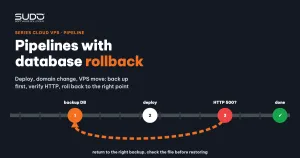
Splitting PHP-FPM pools for many sites on a machine that is serving customers is a risky operation, so write it as a pipeline that follows the same backup, edit, verify, rollback skeleton as in Deploy, domain change and VPS move pipelines with database rollback:
- Back up all of the minion's
pool.d/*.confand/etc/nginx/conf.d/into a timestamped directory. - For each site: if it has no dedicated pool yet, create a new pool and update
fastcgi_pass; if it already has one, update the settings or skip it. Keep thewwwpool for sites that have not been split out. - Run
php-fpm -tandnginx -t, then restart PHP-FPM and reload nginx. - A real HTTP health check:
curl -H 'Host: <domain>' http://<minion IP>/for each site just processed, retrying a few times a few seconds apart so the workers have time to start. - If even one site returns a 5xx or times out, treat the whole batch on that minion as failed: delete the new pools, copy the pools and nginx configuration back from the backup, and restart.
Step 4 is the most important: a socket permission error does not make php-fpm -t, nginx -t or systemctl is-active report anything. Everything is "green" while the site returns 502, and only a real HTTP request catches it.
It is worth having a reverse operation that merges one site back into the shared PHP-FPM pool, deliberately not allowed to run across the whole minion to avoid accidental bulk merges. This operation must tell whether www.conf listens on a unix socket or on TCP, because the fastcgi_pass syntax differs (unix:/run/php/...sock versus 127.0.0.1:9000).
5. Common mistakes and how to fix them
- 502 right after splitting, with nginx logging
Permission deniedon the.sockfile:listen.ownerdoes not match nginx's user. - Laravel reports it cannot write to
storage/logs: the pool'suserdiffers from the owner of the site directory. - Wrong time, long requests cut off at 30 seconds: the new PHP-FPM pool is missing the
date.timezoneandmax_execution_timethat used to be declared inwww.conf. - Heavy swapping after splitting: the ceilings of a few large sites are too high relative to
MAX_CONCURRENT. Lower the ceilings or move the large sites to another machine.
6. Monitoring after splitting the PHP-FPM pool
- The number of
reached pm.max_childrenevents per PHP-FPM pool, to know which site needs a higher ceiling. - The number of
execution timed outevents per pool, to find sites with hanging requests. - The minion's RAM and swap at peak hours, to validate the
MAX_CONCURRENTcalculation.
# count max_children errors per pool in the PHP-FPM log
grep 'reached pm.max_children' /var/log/php8.2-fpm.log | grep -o '\[pool [^]]*\]' | sort | uniq -c
7. Checklist
- Shared resources need bulkheads. A shared PHP-FPM pool saves resources on paper, but turns one site's bug into an incident for the whole machine.
- Periodic restarts are not a solution.
request_terminate_timeoutfrees stuck workers at the right time, in the right pool. - A ceiling is not usage. The total of
max_childrenonly means something together with thepmmode and the actual number of concurrent requests. - Verify over HTTP, not via service status. A PHP-FPM pool that is "active" may still be unable to serve a single request.
Next article
Installing commercial SSL: wildcard and OV certificates. When Let's Encrypt certificates do not meet an enterprise customer's requirements: assembling the chain in the right order, and checking and tracking the expiry of purchased certificates on the balancer.