Most websites on the Cloud VPS model use Let's Encrypt certificates that are issued and renewed automatically. But some customers still need commercial SSL: a business that wants the certificate to show its company name (OV), or one that has already bought a wildcard certificate covering all of its subdomains. This guide describes how to install commercial SSL on an nginx balancer: choosing the certificate type, creating the CSR and private key, assembling the chain, placing the files, configuring nginx, verifying, rolling back, and the most common mistakes.
1. How does commercial SSL differ from Let's Encrypt?
In terms of encryption, it does not: with the same key type, the TLS connection is equally strong. What sets commercial SSL apart is the level of identity validation, how certificates are issued and how they are renewed:
| Type | What the CA validates | When to use it |
|---|---|---|
| DV (Domain Validation) | Only control of the domain (an HTTP file, a DNS record or email) | Most websites. Let's Encrypt only issues this type |
| OV (Organization Validation) | An extra legal-entity check: the company name and address are written into the Subject field | Businesses that need the certificate to show the company name |
| EV (Extended Validation) | A stricter legal-entity validation process than OV | Banking, finance. Modern browsers no longer show a green address bar |
Wildcard (*.example.com) | DV or OV, covering every first-level subdomain | Sites with many subdomains that change often |
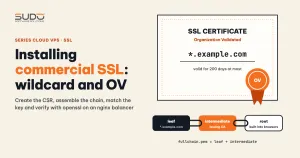
Two common commercial SSL setups: an OV certificate whose SAN contains example.com and *.example.com, or a wildcard DV certificate whose SAN contains *.site-a.example and site-a.example. Note: the wildcard *.example.com does not automatically cover the apex domain example.com. Check that the SAN includes both.
Something many people have not noticed yet: under the validity reduction schedule of the CA/Browser Forum, from 2026 public certificates are valid for at most 200 days, and that limit keeps shrinking in the following years. Even if you buy commercial SSL by the year, you still have to get the certificate reissued and reinstall it at least twice a year, so the procedure needs to be lean enough to repeat.
2. Creating the CSR and private key for commercial SSL: do it yourself
A CSR (Certificate Signing Request) contains the public key and the domain details, and is sent to the CA for signing. The private key is never sent anywhere, so the safest approach is to generate the pair yourself:
# RSA 2048 bit, no passphrase (nginx must read the key on reload)
openssl req -new -newkey rsa:2048 -nodes \
    -keyout example.com.key \
    -out example.com.csr \
    -subj "/C=VN/L=Hanoi/O=Company Name/CN=example.com" \
    -addext "subjectAltName=DNS:example.com,DNS:*.example.com"

chmod 600 example.com.key

# review the CSR contents before sending it to the CA
openssl req -in example.com.csr -noout -text | grep -E "Subject:|DNS:"
In practice it is not always that clean. Sometimes the reseller generates the CSR and private key and sends them in a single text file together with the certificate; sometimes the customer sends the certificate, the key and a PFX file with a password file. You can still install them, but the private key has already passed through email and several intermediate machines. Recommendation: ask the customer to let the operations team create the CSR and send only the CSR to the reseller. If the key has been sent over an insecure channel, treat it as compromised: create a new CSR and ask the CA to reissue.
If you receive a PFX/PKCS#12 file, you can split it with openssl pkcs12:
openssl pkcs12 -in cert.pfx -clcerts -nokeys -out domain.crt
openssl pkcs12 -in cert.pfx -cacerts -nokeys -out intermediate.pem
openssl pkcs12 -in cert.pfx -nocerts -nodes -out privkey.pem
3. Assembling the commercial SSL chain: leaf first, intermediate after
The CA usually sends three things: the domain certificate (leaf), one or more intermediate certificates, and the root certificate. Browsers ship with the root but do not always have the intermediate, so the server must send the intermediate during the TLS handshake. For nginx, the leaf and intermediate are concatenated into one file, with the leaf first:
# 1. check that the chain is valid before concatenating
openssl verify -CAfile root.pem -untrusted intermediate.pem domain.crt
# domain.crt: OK

# 2. concatenate: leaf first, intermediate after, root NOT needed
cat domain.crt intermediate.pem > fullchain.pem

# 3. count the certificates in the combined file
grep -c "BEGIN CERTIFICATE" fullchain.pem
# 2
Do not put the root in fullchain.pem; adding it only makes the handshake heavier. The nginx guide to configuring HTTPS servers explains the chain and this ordering clearly.
Matching the private key to the certificate
Before anything goes to the server, always verify that the key and the certificate are a pair. For RSA keys, compare the modulus of each:
openssl x509 -noout -modulus -in domain.crt | openssl md5
openssl rsa  -noout -modulus -in privkey.pem | openssl md5
# the two MD5 lines must be identical

# a method that works for both RSA and ECDSA: compare the public keys
diff <(openssl x509 -in domain.crt -noout -pubkey) \
     <(openssl pkey -in privkey.pem -pubout) && echo "MATCH"
Only when the commercial SSL certificate passes both checks do you touch the balancer.
4. Placing the commercial SSL certificate on the balancer
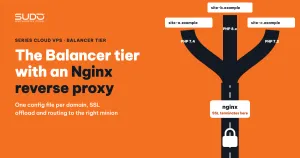
SSL terminates at the balancer tier (see The Balancer tier: Nginx reverse proxy, SSL offload and domain routing), so the certificate only needs to live on the balancer that serves the domain. Stick to three principles:
- A dedicated directory,
/etc/nginx/ssl-custom/<domain>/, separate from/etc/letsencrypt/so Certbot does not overwrite it. - Do not delete the old Let's Encrypt certificate; keep it as a way back, so rollback is just restoring two configuration lines.
- Back up the site configuration file before editing it.
# on the balancer that serves the domain
cp /etc/nginx/conf.d/example.com.conf \
   /etc/nginx/conf.d/example.com.conf.bak_$(date +%Y%m%d%H%M%S)

mkdir -p /etc/nginx/ssl-custom/example.com
# (copy fullchain.pem and privkey.pem up with scp)
chmod 600 /etc/nginx/ssl-custom/example.com/privkey.pem
chown root:root /etc/nginx/ssl-custom/example.com/*
The .bak_* suffix does not match the include conf.d/*.conf pattern, so nginx will not accidentally load the backup. The backup contains the private key, so never commit it to a repository.
nginx configuration
In the site configuration file, change exactly two lines to point to the commercial SSL certificate:
server {
    listen 443 ssl http2;
    server_name example.com www.example.com;

-   ssl_certificate     /etc/letsencrypt/live/example.com/fullchain.pem;
-   ssl_certificate_key /etc/letsencrypt/live/example.com/privkey.pem;
+   ssl_certificate     /etc/nginx/ssl-custom/example.com/fullchain.pem;
+   ssl_certificate_key /etc/nginx/ssl-custom/example.com/privkey.pem;
    ...
}
nginx -t && systemctl reload nginxAlways run nginx -t first and use reload, not restart. If nginx -t reports an error, stop there; the other sites keep running on the old configuration. The directives are described in the nginx ngx_http_ssl module documentation.
5. Verifying after installing commercial SSL
The browser on your own machine is not enough to conclude that commercial SSL is installed correctly, because it may have cached the intermediate from an earlier visit. Check with openssl s_client from an outside machine:
# issuer, subject and validity dates of the certificate the server returns
echo | openssl s_client -connect example.com:443 -servername example.com 2>/dev/null \
  | openssl x509 -noout -issuer -subject -dates

# the full chain the server sends: you must see 0 (leaf) and 1 (intermediate)
echo | openssl s_client -connect example.com:443 -servername example.com -showcerts 2>/dev/null \
  | grep -E "^ *[0-9] s:|^ *i:"

# verification result: expect "Verify return code: 0 (ok)"
echo | openssl s_client -connect example.com:443 -servername example.com 2>/dev/null \
  | grep "Verify return code"
The -servername parameter is mandatory: without SNI, nginx returns the default server's certificate, and you end up checking another site's certificate by mistake. For an OV certificate, the subject line must include the organization name. For a wildcard, the subject is CN=*.site-a.example.
6. Common mistakes when installing commercial SSL
| Symptom | Cause | Fix |
|---|---|---|
Chrome is fine, but older Android, curl or webhooks report unable to get local issuer certificate | Missing intermediate: only domain.crt was set in ssl_certificate | Concatenate domain.crt + intermediate.pem into fullchain.pem and recheck with -showcerts |
nginx -t reports key values mismatch | Key does not match the cert: the key from a different CSR was used | Compare the modulus as in section 3. If the key is lost, create a new CSR and request a reissue |
nginx -t reports the same key values mismatch even though the key is right | Wrong chain order: the intermediate comes before the leaf in fullchain.pem, and nginx compares the key with the first certificate | Re-concatenate in the order leaf → intermediate |
The www host or the apex domain reports a name mismatch | The SAN is missing that name, for example a wildcard without the apex domain | Read the SAN with openssl x509 -noout -ext subjectAltName before installing |
PEM_read_bio, no start line | The file has stray characters from copying out of an email, or Windows line endings | Convert to standard PEM and check with openssl x509 -in domain.crt -noout -text |
| The certificate expires and nobody is alerted | The renewal script only scans sites that use letsencrypt paths | Track commercial SSL expiry separately and schedule reinstallation before it expires |
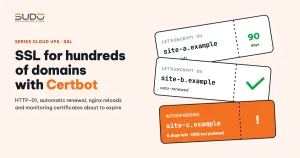
The last mistake deserves more detail. An automatic renewal script like the one in SSL for hundreds of domains with Certbot usually scans configuration files containing 443 and a letsencrypt path. Once a site switches to ssl-custom, it drops off the scan list. Certbot keeps renewing the old Let's Encrypt certificate, which is harmless because nginx no longer uses it, but the expiry of the commercial SSL certificate has to be tracked some other way, for example with a script that reads the expiry date of every file in ssl-custom:
# warn about certificates with less than 30 days left (2592000 seconds)
for c in /etc/nginx/ssl-custom/*/fullchain.pem; do
  openssl x509 -in "$c" -noout -checkend 2592000 >/dev/null \
    || echo "EXPIRING SOON: $c $(openssl x509 -in "$c" -noout -enddate)"
done
7. Rollback and cleanup after switching to commercial SSL
# back to Let's Encrypt in a few seconds
cp /etc/nginx/conf.d/example.com.conf.bak_<timestamp> /etc/nginx/conf.d/example.com.conf
nginx -t && systemctl reload nginx
Because the old certificate was never deleted, the site returns to its previous state right after the reload. Once the new certificate is running smoothly, delete the .bak_* file and keep the old Let's Encrypt certificate as a fallback.
8. Commercial SSL installation checklist
- Check with
opensslfirst, touch the server later. A missing chain, a mismatched key and missing SAN names in commercial SSL can all be caught before uploading. - Separate directories, keep a way back.
ssl-custom/<domain>/plus an untouched Let's Encrypt certificate: each swap only changes two lines. - The private key is what needs the most protection. Create your own CSR,
chmod 600, never send the key by email, never commit it to a repository. - Paying does not mean forgetting. With maximum validity getting shorter and shorter, commercial SSL also needs an expiry schedule and alerts like any other certificate.
Next article
Shipping Nginx access logs to Loki with Fluent Bit. Bringing the balancers' access logs into one place to search them, build dashboards and find the IPs causing load with a few queries.