Some incidents leave operators puzzled: the balancer returns 502/504 in waves, traffic is close to zero, and yet the PHP-FPM pool is always full of busy workers. That is a PHP-FPM hang caused by waiting, not by overload. This article describes a typical case on Cloud VPS and the process of tracking down the cause in the right order: from ps to strace, /proc, ss, the Laravel log, and the place where slowlog should have been from the very beginning.
Symptoms
- The balancer returns 502/504 in waves for one site, unrelated to peak hours. Each wave is a PHP-FPM hang on the minions running that site.
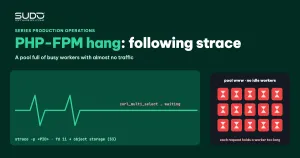
- The pool is always 100% busy with no idle workers, while traffic at the time of checking is close to zero.
- The PHP-FPM log repeats the warning:
WARNING: [pool www] server reached pm.max_children setting (15) - Minion CPU is not high. This is the first sign that the PHP-FPM hang comes from waiting rather than computing.
Investigating the PHP-FPM hang in the right order
Rule out the wrong hypothesis
A common hypothesis: "the request has ended but the worker is still held, maybe by a background thread". That is the wrong direction: each PHP-FPM worker processes requests one at a time in a single process, and there is no background thread holding a worker after a request finishes. If a worker is still busy, the request is still running; the client has simply given up. The right question for a PHP-FPM hang is: what is the worker doing?
Large ETIME, small TIME: the signature of a PHP-FPM hang caused by waiting
ps -eo pid,etime,time,pcpu,stat,cmd | grep 'php-fpm: pool www' | grep -v grepETIME is the wall-clock time since the process started, TIME is the CPU time it has used. A worker alive for tens of minutes that has burned only a few dozen seconds of CPU spends most of its time waiting. A PHP-FPM hang of this kind is usually waiting on one of three things: the database, a file, or the network.
strace: which file descriptor the worker is waiting on
Attach strace to a long-running worker:
strace -p <PID>

recvfrom(11, ..., 1, MSG_PEEK, NULL, NULL) = -1 EAGAIN (Resource temporarily unavailable)
sendto(11, "\27\3\3\3 \f^\242..."..., 805, MSG_NOSIGNAL, NULL, 0) = 805
poll([{fd=11, events=POLLIN}], 1, 1000) = 1 ([{fd=11, revents=POLLIN}])
recvfrom(11, "\27\3\3\2\244", 5, 0, NULL, NULL) = 5
recvfrom(11, "n\332\301\303..."..., 676, 0, NULL, NULL) = 676
The first three bytes \27\3\3 (0x17 0x03 0x03) are the header of a TLS application data record: the worker is talking HTTPS. The repeating pattern of sending a few hundred bytes, waiting in poll, receiving a few hundred bytes and sending again is the shape of many small, sequential HTTP requests over a single keep-alive connection.
/proc and ss: where the file descriptor goes
ls -l /proc/<PID>/fd/11
# ... -> 'socket:[...]'

ss -apn | grep "pid=<PID>,"
# tcp ESTAB ... 10.0.0.102:35806  <storage-IP>:8443  users:(("php-fpm",pid=...,fd=11))

# how many workers hold a connection to the same destination
ss -apn | grep ':8443' | grep php-fpm | wc -l
If the destination is the S3-compatible object storage where the site keeps its images, and most workers hold a socket to that same address, then nearly the whole PHP-FPM pool is hung on a single external service.
Finding who opens the connection: the application log is often faster than grepping code
grep -rn "8443" in the site directory usually finds nothing, because the port comes from the S3 client's endpoint configuration. The Laravel log answers instead, if the application logs errors with stack traces:
production.ERROR: Error in checkOrCreateInBucket
  {"error":"Error executing \"ListObjectsV2\" on \"https://<storage-endpoint>:8443/...\";
   AWS HTTP error: cURL error 6: Could not resolve host: <storage-endpoint> ..."}
#20 .../Middleware/ImageDomainMiddleware.php(132): checkOrCreateInBucket(...)
In this case, the culprit is a middleware that rewrites image domains, attached to the web group, which calls the ListObjectsV2 API to check whether each image already exists in the bucket. The package configuration shows that the check runs synchronously inside the request:
// config/image-domain.php
'queue_bucket_check' => false, // true pushes the image check/creation onto the queue
Why max_execution_time does not cut the request off
The trace often contains this line:
setitimer(ITIMER_PROF, {..., it_value={tv_sec=60, tv_usec=0}}, NULL) = 0ITIMER_PROF is how PHP implements max_execution_time on Linux, and this timer measures CPU time, not wall-clock time. The PHP set_time_limit documentation states clearly that time spent waiting on streams, database queries or system calls is not counted. A request waiting on the network for tens of minutes has still not "hit" the 60-second limit. That is why the PHP-FPM hang lasts so long without PHP killing the request itself.
Reading the code: why one image turns into many network calls
For each image URL, the check function calls exists() for the original image, the webp version and the resized version; if any is missing, it downloads the image and uploads it. An example estimate: a page with 100 images × 5 calls × 2 seconds is about 1,000 seconds for one request. There are two common trigger paths:
- AJAX returning JSON: the middleware walks the whole JSON and checks every string that looks like an image URL. A response with many image URLs means many S3 calls inside the same worker.
- Fallback script: the middleware injects a script into the page; for every broken image, the browser calls an endpoint to fetch a replacement, and that endpoint checks S3 again. A page with a few dozen broken images means a few dozen parallel requests, enough to fill a small pool.
Slowlog: the missing piece
For a PHP-FPM hang, strace tells you which socket the worker is waiting on, but not which PHP line is waiting. If the application does not log errors, the fastest way to see the line of code is slowlog: when a request runs past a threshold, FPM writes that request's PHP backtrace to a file. Enable it on every pool in advance:
; pool www
request_slowlog_timeout = 5s
slowlog = /var/log/php-fpm/www-slow.log
request_terminate_timeout = 60s
According to the PHP-FPM configuration documentation, request_terminate_timeout is measured in wall-clock time, so it can cut off requests waiting on the network that max_execution_time ignores.
Root cause
Four factors added up to the PHP-FPM hang:
- The middleware calls object storage synchronously during the request lifecycle, several times per image, without caching the
exists()result. - The S3 client has no timeout. When the storage side is slow or DNS fails, the worker waits until each call ends on its own.
- A small shared pool (for example
pm.max_children = 15): that many slow requests are enough to exhaust it. max_execution_timedoes not count network wait time, and there is no wall-clock limit at the FPM level.
Fixing the PHP-FPM hang
Temporary
Restarting PHP-FPM brings the site back for a few minutes, but the PHP-FPM hang returns as soon as an image-heavy page is requested. Do not raise pm.max_children: more workers mean more parallel connections to a storage service that is already slow, which makes it even slower.
Move the image check to the queue and verify
cd /var/www/example.com
# 1. config/image-domain.php: 'queue_bucket_check' => true
php artisan config:clear                 # 2
supervisorctl status                     # 3. queue worker must be RUNNING
systemctl restart php8.2-fpm             # 4. free the stuck workers

# verify
ss -apn | grep ':8443' | grep php-fpm | wc -l
curl -o /dev/null -s -w "time=%{time_total}s code=%{http_code}\n" https://example.com/
Do this on every minion running the site. A common mistake: editing the configuration file by hand on the server, then the next deploy overwrites it with the old value, and the PHP-FPM hang comes back exactly as before. Important values must live in the repo or in a controlled .env.
Long-term
- Cache
exists()results in Redis, so each image is only checked once over a long period. - Set
connect_timeoutto about 3 seconds andtimeoutto about 5 seconds on the S3 client. - Remove synchronous calls from the middleware entirely; all image checks and creation go through the queue.
Preventing a PHP-FPM hang
A quick reference for recognizing a PHP-FPM hang:
| Sign | Meaning | Command |
|---|---|---|
| Pool full but traffic low | Slow requests, not a traffic flood | grep max_children /var/log/php*-fpm.log |
| Large ETIME, small TIME | Worker waiting on I/O | ps -eo pid,etime,time,cmd |
| Many connections to one external IP | External service called inside the request | ss -apn | grep php-fpm |
poll repeating on one fd | A chain of sequential network calls | strace -p <PID> |
| Need the line of code | PHP backtrace of the slow request | request_slowlog_timeout |
Add to the code review checklist: every outbound HTTP call inside a request must have a short timeout, and no package may make network calls in global middleware. Periodic PHP-FPM restarts, like the mechanism in Low-cost self-healing: detecting and restarting dead services, only mask this kind of failure: the pool is clean for a few hours, then the PHP-FPM hang returns. How to read balancer logs when an incident spreads is covered in nginx OOM on a balancer: when one small machine carries many websites.
Lessons
- A full pool does not mean high load. When you suspect a PHP-FPM hang, compare ETIME with TIME before thinking about adding workers.
- strace answers "what is it waiting on", slowlog answers "which line of code". You need both; enable slowlog before an incident happens.
- max_execution_time does not protect against network waits. Wall-clock limits must be set in FPM and in every HTTP client.
- Manual edits on the server do not last. Configuration must go through the repo and the deploy process.
- Recount the raw numbers before writing the report. Quick estimates from a trace are often off; the conclusion may not change, but its credibility does.
Next article
High TTFB for Googlebot: splitting every hop and an internal scraper suspect. When Google's bot sees a site as slower than real users do, and the reason may lie inside your own infrastructure.