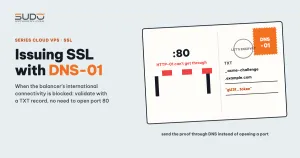
Sometimes the familiar certbot command on a balancer suddenly reports Connection Timeout for every domain. The cause is neither certbot nor nginx: international connectivity for the IP range that hosts the server has been blocked, so Let's Encrypt cannot reach in, and sometimes the server cannot reach out either. The way out is the DNS-01 validation method. This guide explains why HTTP-01 fails, how DNS-01 works, the step-by-step issuance procedure, how to renew automatically, and the most common mistakes.
1. A typical scenario: the server's international connectivity is blocked
Normally, certificates are issued right on the balancer with certbot's nginx plugin, as in SSL for hundreds of domains with Certbot:
certbot certonly --nginx -d example.com -d www.example.comWhen international traffic is blocked, that command hangs and then reports a timeout for every new domain. Check each direction separately:
- Outbound: the balancer cannot open a connection to Let's Encrypt's ACME API (
acme-v02.api.letsencrypt.org:443), so certbot cannot create a certificate order. Test withcurl -sv https://acme-v02.api.letsencrypt.org/directory. - Inbound: the data center blocks access from foreign IPs to ports 80/443. Even if an order is created, Let's Encrypt's validation servers cannot reach in, and the error is Timeout during connect (likely firewall problem).
Turning on the Cloudflare proxy does not help either: Cloudflare's edge connects back to the balancer from foreign IPs, which are also blocked, and visitors get 521/522 errors. You need a way to prove domain ownership without touching the server.
2. Why HTTP-01 fails when international connectivity is blocked
HTTP-01 is certbot's default validation type. Its flow looks like this:
certbot (on the balancer)                Let's Encrypt (abroad)
   │ 1. create order, get token ───────────►  ACME API
   │ 2. place the token file at
   │    /.well-known/acme-challenge/<token>
   │ 3. report "ready"           ───────────►  ACME API
   │                                         │ 4. validation servers in many places around the world
   │ ◄───────────────────────────────────────┘    GET http://example.com/.well-known/acme-challenge/<token>
   │ 5. content matches → certificate signed
Steps 1 and 3 need outbound access, and step 4 needs inbound access to port 80 from abroad. Let's Encrypt validates from several different network vantage points to prevent spoofing, so opening the port for a single range of validation IPs does not work. Block either direction and HTTP-01 is broken.
3. What DNS-01 is and how it works
With DNS-01, Let's Encrypt never calls the web server. Instead, it asks you to prove control of the domain's DNS with a TXT record named _acme-challenge.<domain>. The value is the SHA-256 hash (base64url) of the token and the ACME account key fingerprint, as defined in RFC 8555. Let's Encrypt queries the authoritative nameserver and, if the value matches, signs the certificate.
workstation (with international access)   authoritative DNS (Cloudflare)      Let's Encrypt
   │ 1. create DNS-01 order ──────────────────────────────────────────────►  ACME API
   │ 2. add TXT _acme-challenge.example.com ──► record stored
   │ 3. report "ready"      ──────────────────────────────────────────────►  ACME API
   │                                              ◄── 4. query TXT ──────────┘
   │ 5. download the certificate, copy it to the balancer over the internal network / VPN
The web server does not appear anywhere in this flow: however the balancer is blocked, issuance still works. However, DNS-01 only solves the inbound direction. The ACME client still has to reach the Let's Encrypt API, so if outbound traffic is blocked too, run the client on a machine with normal international access (a workstation or an operations machine) and then push the certificate to the balancer.
| Criterion | HTTP-01 | DNS-01 |
|---|---|---|
| Let's Encrypt must reach the server's port 80 | Yes | No |
Can issue a wildcard *.example.com | No | Yes |
| Requires permission to edit DNS | No | Yes (by hand or via API) |
| Where the client runs | On the web server itself | Any machine that can reach the ACME API |
The official comparison of validation types is on the Let's Encrypt Challenge Types page.
4. Step-by-step DNS-01 certificate issuance
The example below assumes the domain's DNS is managed at Cloudflare and uses acme.sh on a workstation, because it is just a shell script with no Python libraries to pull in. Note: acme.sh's default CA is ZeroSSL, so you must specify --server letsencrypt explicitly.
Step 1: create a DNS-01 order in manual mode
git clone --depth 1 https://github.com/acmesh-official/acme.sh.git ~/acme_src

~/acme_src/acme.sh --issue --server letsencrypt \
  -d example.com -d www.example.com \
  --dns --yes-I-know-dns-manual-mode-enough-go-ahead-please
acme.sh prints the two records to add, one for each name in the certificate:
Domain: '_acme-challenge.example.com'      TXT value: '<first string>'
Domain: '_acme-challenge.www.example.com'  TXT value: '<second string>'
Step 2: add the TXT records on Cloudflare and check them at the authoritative nameserver
In the DNS dashboard, add two TXT records named _acme-challenge and _acme-challenge.www, with TTL set to Auto. Then query the zone's nameserver directly, bypassing public resolvers:
NS=$(dig +short NS example.com | head -1)
dig @"$NS" TXT _acme-challenge.example.com +short
dig @"$NS" TXT _acme-challenge.www.example.com +short
Step 3: request validation and receive the certificate
~/acme_src/acme.sh --renew --server letsencrypt \
  -d example.com -d www.example.com \
  --yes-I-know-dns-manual-mode-enough-go-ahead-please
On success, acme.sh reports Cert success, and the certificate set lives in ~/.acme.sh/example.com_ecc/ (acme.sh generates ECDSA keys by default), including fullchain.cer and example.com.key.
Step 4: copy it to the balancer and point nginx at it
Certificates issued outside certbot are kept separately in /etc/nginx/ssl-custom/<domain>/, so they do not get mixed up with /etc/letsencrypt/, which certbot manages:
D=/etc/nginx/ssl-custom/example.com
ssh root@balancer "mkdir -p $D"
scp ~/.acme.sh/example.com_ecc/fullchain.cer   root@balancer:$D/fullchain.pem
scp ~/.acme.sh/example.com_ecc/example.com.key root@balancer:$D/privkey.pem
ssh root@balancer "chmod 600 $D/privkey.pem"

# in the site's 443 block: point ssl_certificate and ssl_certificate_key at $D
ssh root@balancer "nginx -t && systemctl reload nginx"

echo | openssl s_client -connect 10.0.0.12:443 -servername example.com 2>/dev/null \
  | openssl x509 -noout -subject -issuer -dates
Expected result: a Let's Encrypt issuer and a 90-day validity. Use reload, not restart, so you do not drop connections for other sites.
5. Using certbot for DNS-01: manual mode and DNS plugins
If you are used to certbot, use --manual --preferred-challenges dns to do it by hand, or a DNS plugin to automate it:
# Cloudflare plugin (python3-certbot-dns-cloudflare package): adds and removes TXT automatically
certbot certonly --dns-cloudflare \
  --dns-cloudflare-credentials /root/.secrets/cloudflare.ini \
  -d example.com -d www.example.com
The trap: running certbot on the very balancer whose outbound traffic is blocked still times out, because it cannot reach the ACME API. Where the ACME client runs matters as much as the validation type. Plugin parameters are detailed in the certbot user guide.
6. Wildcards require DNS-01
Let's Encrypt only issues wildcard certificates through DNS-01, because there is no URL that represents "every subdomain" for HTTP-01 to check. A certificate covering both the apex and the wildcard needs two TXT values under the same name, _acme-challenge.example.com:
~/acme_src/acme.sh --issue --server letsencrypt \
  -d example.com -d '*.example.com' \
  --dns --yes-I-know-dns-manual-mode-enough-go-ahead-please
Two TXT records with the same name are valid; do not delete one to add the other. For sites that need OV or an already purchased certificate, use a paid certificate as described in Installing commercial SSL: wildcard and OV certificates.
7. Renewing DNS-01 certificates automatically
Manual DNS-01 is fine for firefighting, but 90 days later you have to do it all again. There are two options:
- Repeat steps 1–4 by hand with the new TXT values.
- Use a DNS API: acme.sh's
dns_cfhook adds the TXT record, waits for validation, fetches the certificate and then removes the TXT record. The token should only grantZone.DNS:Editon the exact zone needed, be stored in a file with mode 600, and never be committed to git.
# Read the token from its own file, never type it on the command line
export CF_Token="$(cat ~/.secrets/cf-dns-edit.token)"
~/acme_src/acme.sh --issue --server letsencrypt --dns dns_cf -d example.com -d www.example.com

# Deploy step: copy the certificate and reload nginx after every renewal
~/acme_src/acme.sh --install-cert -d example.com --ecc \
  --fullchain-file /tmp/example.com/fullchain.pem --key-file /tmp/example.com/privkey.pem \
  --reloadcmd "scp /tmp/example.com/*.pem root@balancer:/etc/nginx/ssl-custom/example.com/ && ssh root@balancer 'nginx -t && systemctl reload nginx'"
The clone from step 1 does not run on a schedule. For automatic renewal, install it with ./acme.sh --install on a machine that is always on and has international access, so it creates a daily cron job, rather than on a personal machine.
An easily forgotten point: the periodic renewal pipeline (see Jenkins as the control plane for hundreds of websites) usually only scans configurations that point to /etc/letsencrypt/. Certificates in ssl-custom need their own monitoring, at a minimum:
for f in /etc/nginx/ssl-custom/*/fullchain.pem; do
  openssl x509 -in "$f" -noout -checkend 1296000 >/dev/null || echo "Expiring soon (< 15 days): $f"
done
8. Common DNS-01 mistakes and how to fix them
- TTL and propagation: the record has been added but DNS-01 still reports "Incorrect TXT record". This usually means you checked too early or a nameserver is slow to update. Check on every authoritative nameserver; public resolvers may still be caching a "no such record" answer.
- Doubled record name: the DNS dashboard appends the zone name automatically, so typing the full name produces
_acme-challenge.example.com.example.com. Type only the_acme-challengepart. - The domain's DNS is not under your control: you cannot ask the customer to add a TXT record every 90 days. The clean solution is CNAME delegation: the customer creates, once, the record
_acme-challenge.example.com CNAME _acme-challenge.acme.example.netpointing to a zone managed by the operations team. acme.sh uses--challenge-alias acme.example.netto write the TXT record into the target zone. - A CAA record blocks Let's Encrypt: if the domain has a CAA record that only allows a different CA, the DNS-01 order is rejected even though the TXT record is correct. Check with
dig CAA example.com +short. - A name missing from the certificate: issuing for the apex but forgetting
wwwmakes the browser report a name error. Check both names after reloading.
9. Trade-offs of using DNS-01
DNS-01 lets you issue certificates even when the balancer is cut off from international networks, without touching the firewall or the Cloudflare proxy. In exchange:
- You now have a kind of certificate that lives outside certbot, with its own location and renewal schedule. If nobody monitors it, it will expire without anyone noticing.
- The DNS API token can edit the domain's records, so guard it as carefully as the root password.
- Once connectivity is restored, HTTP-01 is still the least work for ordinary domains. Keep DNS-01 for wildcards, for domains Let's Encrypt cannot reach, and as a fallback.
A procedure that only works when the network is "normal" deserves a plan B. Try DNS-01 on a test domain before you actually need it.
Next article
Rate limiting by User-Agent: taming crawler bots. Sorting good bots from bad bots right on the balancer, limiting by User-Agent family instead of by IP, and how to avoid accidentally blocking Googlebot.