A store wants to know how many bottles, cans and cartons are left on a shelf, and where they sit. The image classifier from the previous article only answers "which class is this image?", but inventory counting needs an answer for every object: what it is and which box it occupies. That is object detection, and YOLO (You Only Look Once) is the model family most widely used for it because of its speed. This article trains a YOLO model on a custom dataset, measures it with mAP, and compares two ways to initialize it: fine-tuning from COCO weights and training from scratch, with 200 images and with only 20.
It continues Image classification with CNNs and transfer learning in PyTorch, using the same idea of reusing learned knowledge, and relies on the precision and recall concepts from Model evaluation for classifiers: precision, recall, ROC and imbalanced data. Every number below is real output from an Apple Silicon machine (Metal GPU, mps backend) with ultralytics 8.0.230, released in December 2023.
How object detection differs from image classification
Classification gives one label per image, while YOLO returns many boxes. Object detection produces a list per image, and each item holds a bounding box, a class label and a confidence score. The number of objects in an image is not known in advance, so the model must both locate and classify. Before YOLO, systems such as R-CNN ran in two stages: propose regions, then classify each region. They were accurate but slow.
The original paper You Only Look Once: Unified, Real-Time Object Detection by Redmon et al. (2015) reframed the task as regression: a single network looks at the whole image once and directly predicts bounding boxes and class probabilities. The first YOLO ran at 45 frames per second and the small Fast YOLO at 155 frames per second, in exchange for less precise localization than the two-stage systems of that time. The "look once" idea is still the core of every later YOLO version.
YOLOv8: architecture and model sizes
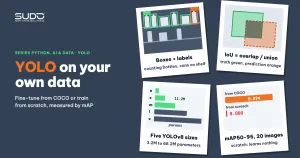
We use Ultralytics YOLOv8, released on January 10, 2023. According to the YOLOv8 documentation, the prediction head is anchor-free: the model predicts the box center and size directly instead of adjusting predefined template boxes, which removes a group of hyperparameters you would otherwise tune per dataset. YOLO comes in five sizes, from n (nano) to x:
| Size | Parameters (millions) | FLOPs (billions, 640 px image) |
|---|---|---|
| YOLOv8n | 3.2 | 8.7 |
| YOLOv8s | 11.2 | 28.6 |
| YOLOv8m | 25.9 | 78.9 |
| YOLOv8l | 43.7 | 165.1 |
| YOLOv8x | 68.2 | 257.8 |
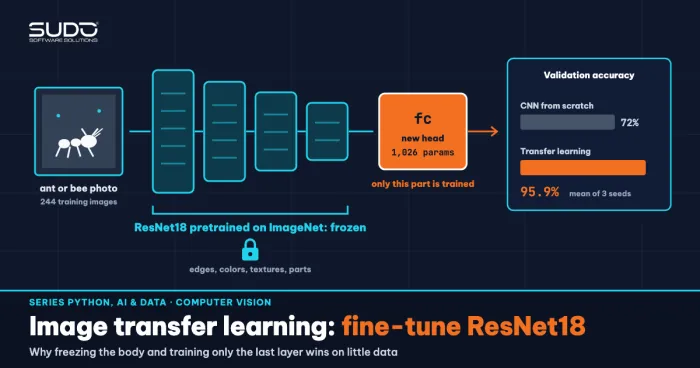
The table comes from the official documentation. This article uses size n: it is the smallest, fits a shared 16 GB of RAM, and is enough for a three-class problem. With 320 px images and 3 classes, the model has 3,011,433 parameters, exactly as the training log reports. The yolov8n.pt weights come from YOLO trained on the COCO dataset (80 classes, mAP50-95 of 37.3 according to the documentation), so they are the starting point for transfer learning, just like ResNet18 on ImageNet in the previous article.
The YOLO data format and the dataset in this article
According to the detection dataset guide, every image has a .txt file with the same name, and each line describes one object: class x_center y_center width height, with coordinates normalized to 0–1 (divided by image width/height) and classes numbered from 0. When training YOLO, Ultralytics finds the labels for an image by replacing the last /images/ in its path with /labels/. The directory layout and the data.yaml file for this article:
dataset/
  images/train/0000.jpg ...    labels/train/0000.txt ...
  images/val/0000.jpg ...      labels/val/0000.txt ...
  data.yaml                    # path, train, val, names: {0: hop, 1: chai, 2: lon}
To make the YOLO experiment reproducible and free of image copyright issues, we generate synthetic data: 320x320 images with varied backgrounds, noise and a slight blur, on which PIL draws 2–5 objects of three classes (carton, bottle, can; the identifiers in the code are hop, chai and lon). Labels are computed directly from the drawing coordinates (make_dataset.py). There are 200 training images (704 objects: 232 cartons, 240 bottles, 232 cans) and 50 validation images (181 objects: 58 cartons, 59 bottles, 64 cans). One caveat up front: hand-drawn images are far easier than real shelf photos, so the absolute numbers below do not predict accuracy on real images. The value of the experiment is the relative comparison between training approaches, and the workflow is identical when you swap in real labeled images.
The original COCO model does not know your "bottle"
Before training, try the original YOLO to see why custom data is needed (zero_shot.py):
COCO classes: 80 | examples: ['bottle', 'cup', 'vase']
image val/0000.jpg: [('cell phone', 0.77), ('cell phone', 0.62), ('cell phone', 0.56)]
The image contains one bottle and three cans, yet the original YOLO reports three "cell phones". COCO has a bottle class but no "carton" or "can" as we define them, and these drawings look nothing like natural photos. That is why you fine-tune YOLO on custom data: you change the label set and adapt the model to the image domain you actually care about.
Training YOLO on custom data takes a few lines
According to the train mode documentation, device="mps" runs on the Apple GPU, pretrained=True is the default, and initializing from a .yaml file instead of a .pt file gives a randomly initialized model. The YOLO training code for this article (train.py, abridged):
from ultralytics import YOLO

model = YOLO("yolov8n.pt")        # or "yolov8n.yaml": train from scratch
model.train(data="dataset/data.yaml", epochs=30, imgsz=320, batch=16,
            device="mps", workers=0, seed=0, project="runs", name=pre200)
The log reports Transferred 319/355 items from pretrained weights: 319 of 355 tensors were loaded from COCO, and the rest belong to the classification head, whose size differs because we have 3 classes instead of 80. YOLO through Ultralytics picks the optimizer itself (AdamW here, lr 0.001429) and applies data augmentation automatically (mosaic, flips, color changes). The article runs eight trainings: two initializations (COCO / random) x two dataset sizes (200 / 20 images) x two seeds, all for 30 epochs at 320 px. A technical note: version 8.0.230 calls torch.load with the old behavior, so newer PyTorch versions need weights_only relaxed (file safe_load.py). Do this only for official checkpoints or ones you trained yourself, because a .pt file is a pickle and can run arbitrary code if it comes from an untrusted source.
Measuring YOLO with IoU, precision, recall and mAP
A prediction counts as correct when it has the same class and its box overlaps the ground-truth box enough. Overlap is measured with IoU (Intersection over Union): the intersection area divided by the union area, where 1.0 is a perfect match. According to the performance metrics guide, mAP50 is the Average Precision averaged over classes at an IoU threshold of 0.5 (the box only has to be "roughly right"), while mAP50-95 averages over thresholds from 0.5 to 0.95 and therefore penalizes misaligned boxes heavily. Precision is the share of predictions that are correct, and recall is the share of real objects that were found. To see IoU as real numbers, iou_demo.py converts the normalized labels to pixels and compares them with the fine-tuned model's predictions on image val/0007.jpg:
image val/0007.jpg: 5 ground-truth labels, 5 predictions
  truth hop   (106,6,191,72) -> predicted hop   conf=0.99 IoU=0.978
  truth chai  (169,161,207,264) -> predicted chai  conf=0.96 IoU=0.970
  truth chai  (111,88,156,187) -> predicted chai  conf=0.98 IoU=0.973
  truth hop   (21,5,80,75) -> predicted hop   conf=0.98 IoU=0.954
  truth hop   (238,88,294,162) -> predicted hop   conf=0.99 IoU=0.949
All five boxes have an IoU above 0.94, so they pass every mAP50-95 threshold from 0.50 to 0.90, and four of them also pass the 0.95 threshold. When every box looks like this, mAP50 sits at the 0.995 ceiling for many different models, and only mAP50-95 can tell which YOLO model localizes better.
Results: fine-tuning from COCO vs training from scratch
The evaluate.py script runs model.val() on the 50 validation images. The table below shows mAP50-95 for two seeds (seed 0 / seed 1), plus mAP50 and recall for seed 0:
| Training approach | mAP50-95 (seed 0 / 1) | mAP50 (seed 0) | Recall (seed 0) |
|---|---|---|---|
| From COCO, 200 images | 0.984 / 0.991 | 0.995 | 1.000 |
| From scratch, 200 images | 0.904 / 0.901 | 0.995 | 0.971 |
| From COCO, 20 images | 0.894 / 0.869 | 0.983 | 0.665 |
| From scratch, 20 images | 0.000 / 0.000 | 0.000 | 0.000 |
Real output of the first row (eval_output.txt):
[pre200] mAP50=0.995 mAP50-95=0.984 precision=0.999 recall=1.000
   class hop   AP50=0.995 AP50-95=0.991
   class chai  AP50=0.995 AP50-95=0.984
   class lon   AP50=0.995 AP50-95=0.978
There are four points worth reading about YOLO here. First, with 200 images both approaches reach an mAP50 near 0.995, meaning they detect the objects correctly; the difference is box accuracy: the fine-tuned model's mAP50-95 is about 0.08–0.09 higher, consistently across both seeds. Second, the model trained from scratch only starts to show meaningful mAP after 10 epochs (0.198), while the COCO model already has 0.813 at epoch 3 and 0.929 at epoch 10 (seed 0), according to results.csv from the seed 0 run.
Third, with 20 images the model trained from scratch detects nothing at all (mAP of 0 for both seeds, with a box loss still at 3.88 in the last epoch versus 0.41 for the COCO model), while the COCO model still reaches an mAP50 of 0.983 and 0.916.
Fourth, and easy to overlook: the 20-image model's recall is only 0.665. Its precision of 0.992 is high, but it misses a third of the objects. Counting predicted boxes over the 50 validation images (181 real objects) by confidence threshold with conf_check.py shows why:
[pre200] conf>=0.05: 182 | conf>=0.25: 181 | conf>=0.5: 181 | conf>=0.8: 181 | ground truth 181
[pre20] conf>=0.05: 128 | conf>=0.25: 65 | conf>=0.5: 35 | conf>=0.8: 11 | ground truth 181
[pre20_s1] conf>=0.05: 129 | conf>=0.25: 68 | conf>=0.5: 42 | conf>=0.8: 24 | ground truth 181
The YOLO trained on 200 images is confident: almost every object is found even at a threshold of 0.8. The YOLO trained on 20 images is "unsure": at the default threshold of 0.25 it outputs only 65–68 boxes for 181 objects, and even at a low threshold of 0.05 it stays under 130. So adding data helps not only because the boxes get tighter but also because the model dares to commit to an answer.
Training 30 epochs on 200 images with the COCO model took 0.038 hours (about 2.3 minutes) in the seed 1 log, so quick retries on a laptop are feasible. Training times for the from-scratch runs vary (0.057 hours for seed 0, 0.275 hours for seed 1) because the machine was running many other tasks in parallel, so do not use them to compare speed.
Inference and reading the predictions
After training YOLO, the best weights are in runs/<name>/weights/best.pt. Predicting one image:
m = YOLO("runs/pre200/weights/best.pt")
res = m.predict("dataset/images/val/0000.jpg", imgsz=320, conf=0.25, device="mps")[0]
for b in res.boxes:
    x1, y1, x2, y2 = [round(v) for v in b.xyxy[0].tolist()]
    print(m.names[int(b.cls)], float(b.conf), (x1, y1, x2, y2))
image val/0000.jpg: predicted 4 objects | ground truth 4
chai conf=0.98 box=(233,192,277,302)
lon conf=0.97 box=(54,64,95,136)
lon conf=0.96 box=(97,189,137,263)
lon conf=0.93 box=(169,116,217,178)Compared with the ground truth (one bottle, three cans), all four are the right class. xyxy gives pixel coordinates of the top-left and bottom-right corners; xywhn gives the normalized form that matches the label format. The conf threshold is a business dial: inventory counting favors recall, so lower the threshold, while automated alerts favor precision, so raise it. Choose the threshold on your own validation set instead of keeping the default.
When not to use YOLO, and licensing
- You only need to know which class an image belongs to: you do not need YOLO. Use classification as in the previous article, which is much cheaper and simpler to label (one label per image, no boxes to draw).
- You need pixel-accurate boundaries (measuring area, cutting out backgrounds): segmentation fits better than bounding boxes.
- Very small or heavily occluded objects: you need much higher image resolution (we use 320) and data that covers those cases.
- Licensing: according to the Ultralytics repository, the library is released under AGPL-3.0, with a separate enterprise license for commercial use. For a closed-source product, read the terms carefully and ask your legal team before shipping it in a customer's system.
Common mistakes when training YOLO
- Labels in the wrong format: using pixels instead of normalized coordinates, or giving the top-left corner instead of the center. The model still runs but learns nothing. Draw the boxes back onto a few images and check them by eye.
- Wrong label path: if the directory does not have parallel
/images/and/labels/folders, Ultralytics reports that no labels were found and treats the images as background. - Evaluating on the training set or on a validation set with near-duplicate images: mAP is inflated. Split by scene or by capture day, and do not randomly split consecutive frames from the same video.
- Trusting a saturated mAP50: in the experiment above, mAP50 (seed 0) is 0.995 for both the fine-tuned YOLO and the from-scratch YOLO with 200 images; only mAP50-95 separates them.
- Selecting the best model on the same validation set you report: Ultralytics saves
best.ptby validation results, so the number on that set is slightly optimistic. A real project needs a separate test set as well. - Training from scratch with little data: the 0.000 result above is the evidence. Start YOLO from pretrained weights.
- Using synthetic data and expecting real-image performance: it is useful for testing the workflow, but it cannot replace real photos taken under the actual deployment conditions (lighting, angles, obstructions).
Checklist for training YOLO on custom data
- Labels: one
.txtper image, normalizedclass xc yc w h, classes starting at 0; verify by eye on a random sample. - Initialize YOLO from
yolov8n.pt(or a larger size if resources allow); train from scratch only when you have thousands of images. - Report mAP50-95, precision and per-class recall, not just mAP50; record the number of validation images and objects.
- Run at least 2 seeds; with 181 objects, a few misaligned boxes change the second decimal place.
- Pick the
confthreshold by business goal (recall or precision) on separate data. - Record the
ultralyticsand PyTorch versions (seerequirements.txt) and the AGPL-3.0 license in the project documentation.
All the YOLO code for this article is in code/s7-24: make_dataset.py, train.py, evaluate.py, zero_shot.py, iou_demo.py, conf_check.py, safe_load.py, plus the *_output.txt files and requirements.txt. Run run_all.sh for seed 0 and prefix the train.py command with SEED=1 for seed 1; Ultralytics downloads yolov8n.pt on the first run. The numbers are real output, but on synthetic data and 50 validation images, so use them only for relative comparison.
Next article
Vietnamese text classification: word segmentation, TF-IDF and linear models. After two computer vision articles, the next one moves to language: turning Vietnamese text into vectors, segmenting words correctly and building a strong baseline classifier before reaching for a large model.