Many order and payment systems still run on Spring Boot 2.7 with Java 8 or 11, because "if it works, don't touch it." Standing still has a price: security patches stop, new libraries drop support for the old version, and the gap to the current release widens every quarter. Spring Boot 3 is the biggest jump in the Spring line in years: a Java 17 baseline, every javax.* package renamed to jakarta.*, Spring Framework 6, and a new observability layer built on Micrometer Observation. This article walks through a real upgrade: what has to change, which tools catch the problems, and how to get both metrics and traces from the same piece of code. Every result comes from an application that actually ran on JDK 21 and Spring Boot 3.4.4.
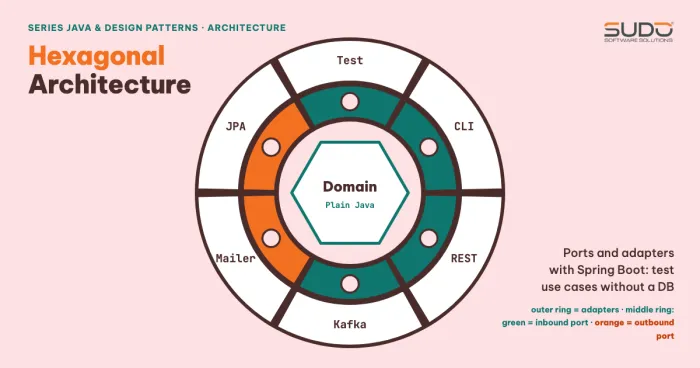
This article follows Hexagonal Architecture with Spring Boot: ports and adapters: a clean architecture means a framework upgrade only touches the adapter layer. The data access side is covered in Repository pattern and Unit of Work with JPA, where Hibernate 6 causes the most changes.
Why move to Spring Boot 3, and which version to target
Each Spring Boot line (for example 3.4) receives open-source support for only about 13 months. According to the lifecycle summary on endoflife.date, the 2.7 line reached the end of OSS support on June 30, 2023 (commercial support only after that), 3.0 on December 31, 2023, 3.1 on June 30, 2024, and 3.2 on December 31, 2024. At the time of writing (April 2025), the 3.3 line is supported until June 30, 2025 and the 3.4 line until December 31, 2025. A practical rule for picking a Spring Boot 3 version: aim for the newest line, and once you are on Spring Boot 3, take a minor upgrade every 6 months instead of saving them all up for one big jump.
| Component | Spring Boot 2.7 | Spring Boot 3.4.4 (run in this article) |
|---|---|---|
| Minimum Java | 8 | 17 (ran on 21; the docs list compatibility up to Java 24) |
| Spring Framework | 5.3 | 6.2.5 |
| Java EE packages | javax.* (Servlet 4, JPA 2.2) | jakarta.* (Servlet 6.0, JPA 3.1) |
| Embedded Tomcat | 9.0 | 10.1.39 |
| Hibernate | 5.6 | 6.6.11.Final |
| Micrometer | 1.9 (metrics) | Observation 1.14.5, Tracing 1.4.4 |
The 3.4.4 column is the real list of jars inside boot3-demo-1.0.jar (from unzip -l). The 2.7 column follows the Spring Boot 2.7 dependency-versions table. The behavior changes in the later sections are based on the Spring Boot 3.0 Migration Guide. The system requirements for the 3.4 line (Java 17 or later, Maven 3.6.3, Tomcat 10.1.25 or later) are in the System Requirements documentation.
Upgrade order for Spring Boot 3: step by step, not in one jump
The Migration Guide recommends upgrading to the latest 2.7.x first, because that release already marks most APIs removed in Spring Boot 3 as @Deprecated. This is the process we use when moving a project to Spring Boot 3:
- Freeze features: the upgrade branch contains only upgrade-related changes, so whatever breaks has a known cause.
- Move to the latest 2.7.x on the Java version you already use, fix every deprecation warning, and run the full test suite.
- Raise Java to 17 (or 21) while still on Spring Boot 2.7; Spring Boot 2.7 runs fine on Java 17, so any failure at this step comes from the JDK (modules, reflection), not from Spring.
- Switch
javaxtojakartaand raise the parent to 3.x. - Run
spring-boot-properties-migratorto find renamed properties. - Handle behavior changes (trailing slash, Hibernate 6, Actuator, Spring Security 6) with integration tests.
- Enable observability last, once the application is stable.
For large projects, OpenRewrite has UpgradeSpringBoot_3_x recipes that automatically rename javax.persistence imports, rename properties in application.properties, and raise java.version in pom.xml. This article does not run OpenRewrite (its guide requires configuring a separate recipe repository), so the sections below do the work by hand to show each change clearly. Even with a tool, you still have to read the git diff and run the tests.
Spring Boot 3 and Jakarta EE: the package rename is not cosmetic
When Java EE moved to the Eclipse Foundation, the right to use the javax name did not move with it, so from Jakarta EE 9 every package became jakarta.*. Spring Boot 3 requires Jakarta EE 10 (Servlet 6.0, JPA 3.1), which means javax.persistence, javax.validation, and javax.servlet all have to change. To see the real errors, we kept the sample application as is (a JPA entity with @NotBlank, a controller with @Valid), changed the imports back to javax, and compiled with the migrate-demo.sh script:
$ mvn -q compile   # code still imports javax.*
src/main/java/demo/sb3/OrderController.java:[3,24] package javax.validation does not exist
src/main/java/demo/sb3/OrderController.java:[4,36] package javax.validation.constraints does not exist
src/main/java/demo/sb3/OrderController.java:[5,36] package javax.validation.constraints does not exist
src/main/java/demo/sb3/OrderEntity.java:[3,25] package javax.persistence does not exist
... (9 errors)

$ sed -i "s/javax\./jakarta./" ...; mvn -q compile
exit=0
The compiler reports 9 missing-package errors on the import lines (plus 9 cannot find symbol errors where the annotations are used, so the excerpt filters only the does not exist lines). After replacing javax.persistence and javax.validation with jakarta.*, mvn -q compile exits with code 0. The easy-to-miss parts are outside your own code:
- Third-party libraries that still depend on
javax.*(old Swagger/springfox versions, some reporting libraries, old drivers) will not work; move to a release with ajakartasuffix or replace the library. Runmvn dependency:treeand search forjavax. - Do not rename every
javax:javax.sql,javax.crypto, andjavax.netbelong to the JDK and must stay. A project-widesedreplacement will break them. - XML configuration files and
persistence.xmlthat contain old class names or namespaces also need to change.
Renamed properties in Spring Boot 3: let a tool find them
Spring Boot 3 removes or renames many configuration keys, and Spring Boot 3 still starts successfully if old keys remain; their values are simply ignored. Instead of cross-checking a table by hand, temporarily add spring-boot-properties-migrator (runtime scope) and start the application. We deliberately added four Spring Boot 2.x style properties to the configuration file and got this report:
$ add spring-boot-properties-migrator + 4 old properties, run the app
Property source 'Config resource 'class path resource [application.properties]' via location 'optional:classpath:/'':
	Key: management.metrics.export.prometheus.enabled
		Replacement: management.prometheus.metrics.export.enabled
	Key: spring.redis.host
		Replacement: spring.data.redis.host
Property source 'Config resource 'class path resource [application.properties]' via location 'optional:classpath:/'':
	Key: server.max-http-header-size
		Reason: Replacement key 'server.max-http-request-header-size' uses an incompatible target type
	Key: spring.jpa.hibernate.use-new-id-generator-mappings
		Reason: Hibernate no longer supports disabling the use of new ID generator mappings.
Two properties were mapped automatically to their new names (management.prometheus.metrics.export.enabled, spring.data.redis.host); the other two need your own decision. For example, server.max-http-header-size becomes server.max-http-request-header-size, but the target type differs, so the tool does not convert it. Remember to remove the migrator when you are done: it analyzes the configuration at startup and does not belong in a production build.
Silent behavior changes in Spring Boot 3
Compile errors are easy to deal with; the dangerous failures are the ones where the code still compiles but the behavior changes. The following three changes cause the most incidents when an application moves to Spring Boot 3.
Trailing slash no longer matches
Starting with Spring Framework 6, /orders/1/ no longer matches the route /orders/{id}. The Migration Guide lists this default as false. The result on the sample application:
$ curl -s -o /dev/null -w "/orders/1  -> %{http_code}\n" localhost:8085/orders/1
/orders/1  -> 200
$ curl -s -o /dev/null -w "/orders/1/ -> %{http_code}\n" localhost:8085/orders/1/
/orders/1/ -> 404
With Spring Boot 3, if a client, a cron job, or a load balancer health check calls a URL with a trailing /, you will get a wave of 404s right after deployment. The best fix is to change the client; a temporary workaround is to declare an extra route or configure PathMatchConfigurer to allow a trailing /, then plan to remove it.
Errors returned as ProblemDetail
Spring Framework 6 supports RFC 7807 (ProblemDetail); with spring.mvc.problemdetails.enabled=true, errors generated by the framework use the application/problem+json content type. Here are both modes on the same endpoint:
$ curl -si -X POST localhost:8085/orders -d '{"customer":"","amountVnd":0}' ...
HTTP/1.1 400
Content-Type: application/problem+json

{"type":"about:blank","title":"Bad Request","status":400,"detail":"Invalid request content.","instance":"/orders"}

$ curl -si localhost:8085/orders/999
HTTP/1.1 404
Content-Type: application/problem+json

{"type":"about:blank","title":"Not Found","status":404,"detail":"No order 999","instance":"/orders/999"}

$ java -jar target/boot3-demo-1.0.jar --spring.mvc.problemdetails.enabled=false
$ curl -si localhost:8085/orders/999
HTTP/1.1 404
Content-Type: application/json
{"timestamp":"...","status":404,"error":"Not Found","path":"/orders/999"}
Enabling ProblemDetail in Spring Boot 3 changes the shape of the error body (it adds type, title, detail, and instance, and drops timestamp, error, and path). If a mobile app or frontend reads the error or path field, this breaks the API contract, so agree on it with the consumers before turning it on. Also note in the example above: the validation error returns detail: "Invalid request content." without listing the invalid fields; if you want a field list, write your own @RestControllerAdvice.
Hibernate 6, Actuator, and Security
- Hibernate 6 changes how SQL is generated, the default id generation strategy (for example, an unspecified
@GeneratedValueuses a per-entity sequence), and makes some HQL rules stricter. Test repositories against real data and read the generated DDL carefully; theuse-new-id-generator-mappingsproperty has been removed, as the report above shows. - Actuator:
httptraceis renamedhttpexchanges;/envand/configpropssanitize all values by default; onlyhealthis exposed over JMX. - Spring Security 6 applies to every dispatch type and removes
WebSecurityConfigurerAdapter; you must switch to aSecurityFilterChainbean. Upgrade to Spring Security 5.8 first (while still on Boot 2.7) to see the warnings.
Observability in Spring Boot 3: declare once, get both metrics and traces
In Spring Boot 2.x, metrics used Micrometer, traces used Spring Cloud Sleuth, and logs used MDC: three separate systems. Spring Boot 3 unifies them with the Micrometer Observation API. According to the Micrometer documentation, your code only reports lifecycle events (start, stop, error) for an Observation, and the registered ObservationHandler instances decide whether to create a timer, a span, or a log line. Sleuth is replaced by Micrometer Tracing. According to the Spring Framework documentation, without an ObservationRegistry every observation is a no-op, so there is no cost until you turn it on.
The minimal setup to enable observability in Spring Boot 3 has four parts: spring-boot-starter-actuator (metrics), micrometer-tracing-bridge-brave (the trace bridge; you can swap in the OpenTelemetry bridge), spring-boot-starter-aop (for @Observed), and two lines of configuration. The ObservedAspect bean is required for @Observed to take effect, according to Spring's observability introduction:
package demo.sb3;

import io.micrometer.observation.ObservationRegistry;
import io.micrometer.observation.aop.ObservedAspect;
import org.springframework.boot.SpringApplication;
import org.springframework.boot.autoconfigure.SpringBootApplication;
import org.springframework.context.annotation.Bean;

@SpringBootApplication
public class Application {
    public static void main(String[] args) { SpringApplication.run(Application.class, args); }

    // Required for @Observed to take effect (per the Micrometer/Spring Boot docs)
    @Bean
    ObservedAspect observedAspect(ObservationRegistry registry) { return new ObservedAspect(registry); }
}
Put @Observed on the business methods. The channel tag has a small, fixed set of values, so it is low cardinality and goes into the metric:
    OrderService(OrderRepository repo) { this.repo = repo; }

    @Observed(name = "order.create", contextualName = "create-order",
              lowCardinalityKeyValues = {"channel", "web"})
    public OrderEntity create(OrderEntity e) {
        OrderEntity saved = repo.save(e);
        log.info("Saved order {} for customer {}", saved.getId(), saved.getCustomer());
        return saved;
    }

    @Observed(name = "order.find")
    public OrderEntity find(long id) {
        return repo.findById(id).orElseThrow(() ->
            new ResponseStatusException(HttpStatus.NOT_FOUND, "No order " + id));
    }
}
The related configuration (the full file is at code/s6-25/src/main/resources/application.properties):
management.endpoints.web.exposure.include=health,metrics
management.tracing.sampling.probability=1.0
spring.mvc.problemdetails.enabled=true
Send two create-order requests: the first carries a traceparent header following the W3C Trace Context standard (simulating a calling service), and the second does not. The real results, excerpted from the application log and Actuator:
$ curl -X POST /orders  -H "traceparent: 00-4bf92f3577b34da6a3ce929d0e0e4736-00f067aa0ba902b7-01"
{"id":1,"customer":"Tran Thi B","amountVnd":99000}
$ curl /orders (no traceparent)
{"id":2,"customer":"Le Van C","amountVnd":1000}

$ application log
INFO 71438 --- [orders] [nio-8085-exec-2] [4bf92f3577b34da6a3ce929d0e0e4736-ba65d6544110ad60] demo.sb3.OrderService                    : Saved order 1 for customer Tran Thi B
INFO 71438 --- [orders] [nio-8085-exec-4] [6af1d9ab8bc9ecf52dfa6619852fcf6c-56a75f617e14897c] demo.sb3.OrderService                    : Saved order 2 for customer Le Van C

$ curl /actuator/metrics/order.create   # (shortened: COUNT, TOTAL_TIME, MAX and the tag names)
order.create {'COUNT': 2.0, 'TOTAL_TIME': 0.0299, 'MAX': 0.0286}
['method', 'channel', 'error', 'class']
$ curl /actuator/health
{"status":"UP"}
Three things are worth noticing. First, the OrderService log lines already carry the trace id and span id in square brackets, with no separate logging.pattern.level configuration. Second, the trace id for order 1 is 4bf92f3577b34da6a3ce929d0e0e4736, exactly the value in the incoming traceparent header, so the trace context is propagated across services; order 2 had no header, so Spring generated a new trace id. Third, the order.create metric has COUNT 2.0 and the tags method, channel, error, and class: one annotation produces both a timer and a span. This tag list comes from the unfiltered call; when you add ?tag=channel:web, Actuator drops channel from availableTags because that tag is already filtered, while COUNT is still 2.0.
When you need to ship traces out, add the matching reporter (Zipkin or OTLP) and Boot configures it automatically; this article stops at the application side. How to collect metrics into Prometheus and Grafana is covered in Kubernetes monitoring with kube-prometheus and Grafana, and centralized logs are in Logging on Kubernetes: from promtail and fluentd to Loki; the trace id in the log is the key for jumping from a log line to a trace.
Cardinality: the trap that overloads Prometheus
Micrometer distinguishes low cardinality tags (a finite set of values, such as method, status, channel) from high cardinality tags (unbounded, such as a user id or a full URL). Low cardinality tags go into both metrics and traces; high cardinality tags belong only in traces. If you put customerId into lowCardinalityKeyValues, every customer creates its own time series and Prometheus memory grows with the number of customers. One more note: Spring MVC uses the route template (/orders/{id}) as the uri tag, exactly like the uri list Actuator reported for us (/orders/{id}, not /orders/1), while the full http.url is high cardinality.
One more detail: an exception handled by @ExceptionHandler or ProblemDetail is not recorded in the HTTP observation automatically; for the error tag to be accurate, the Spring Framework documentation tells you to call ServerHttpObservationFilter.findObservationContext(request) and then setError.
When not to upgrade to Spring Boot 3 (or when you do not need to)
- A dependency has no Jakarta release: an internal or third-party library that is no longer maintained and still uses
javax. Replace it first, or split it into a separate process. - The application is about to be retired: if the system will be replaced within 6 months, the upgrade costs more than the risk; in that case, write down the shutdown date and block access from the internet.
- No automated tests yet: upgrading now is a gamble. Write a few integration tests for the main flows first (placing an order, payment, login), then change versions.
- An old Java EE application server (a WAR running on a Servlet 4 container): you need a container that supports Servlet 6, or you must move to an embedded jar.
Common mistakes when upgrading to Spring Boot 3
- Forgetting
ObservedAspect:@Observedraises no error but produces no metric either. Check/actuator/metricsto see whether the observation name appears. - Missing
spring-boot-starter-aop: the aspect is never created, with the same result as above. - Putting a high cardinality tag at the low level: it makes the number of time series explode.
- Fixing
javaxwithsedacross the whole project: it breaksjavax.cryptoandjavax.sql. - Enabling ProblemDetail without telling clients: the error body changes shape.
- Leaving
spring-boot-properties-migratorin the release build. - Old Mockito/JUnit tests: JUnit 4 is no longer supported by the default test starter; you need to move to JUnit 5.
Spring Boot 3 upgrade checklist
- Before moving to Spring Boot 3, you are on the latest 2.7.x, with no deprecation warnings and green tests.
- JDK 17 or 21 on the build machine, in CI, and in the runtime container.
mvn dependency:treeshows no library pulling injavax.persistence,javax.servlet, orjavax.validation.- On Spring Boot 3, you have run the properties migrator, handled each key, and then removed the migrator.
- You have checked trailing slash, the error format, and the SQL and DDL generated by Hibernate 6.
/actuator/healthstill returnsUP(for readiness probe configuration see Health endpoint for Laravel on Kubernetes: what to check and which probe to use; the same principle applies to Spring).- The Spring Boot 3 application has business metrics annotated with
@Observedusing low cardinality tags, and the logs carry a trace id. - You have a plan to take minor upgrades following the 6-month support schedule.
In short, upgrading to Spring Boot 3 is not hard because of any single change, but because the changes pile up at once. Follow the order (2.7.x, Java 17, Jakarta, properties, behavior, observability), let tools detect what they can, and use integration tests for the rest.
Next article
Once the application runs on the new baseline and can be observed, the next question is whether the data model still fits when reads vastly outnumber writes. Continue with CQRS and Event Sourcing in Java: when they are worth it.