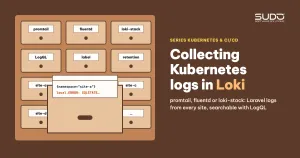
As the number of sites on the cluster grows, the question "what just went wrong with this site" starts to eat time: you have to find the right namespace and the right pod, run kubectl logs, and if the pod has been recreated, the old logs are gone with it. This document walks through building centralized logging for the cluster with Loki: comparing promtail and fluentd, why we chose Loki, how promtail runs as a DaemonSet, how to make Laravel log to stdout, LogQL basics, lessons learned when upgrading with Helm, and the limitations of the default configuration.
1. Where logs live on Kubernetes
Containers write logs to stdout and stderr. The container runtime on each node stores those lines in files under /var/log/pods/<namespace>_<pod>_<uid>/<container>/, and the kubelet rotates the files when they fill up. The kubectl logs command just reads these files back. As a result:
- When a pod is deleted or recreated (on every deploy, every eviction from a node), the old logs disappear.
- There is no way to search across many sites and many pods at once.
- Logs written to a file inside the container, for example
storage/logs/laravel.log, are invisible tokubectl logs.
The common approach described in the Kubernetes logging architecture documentation is to run an agent on each node that reads those log files and ships them to a central store.
2. Choosing an agent: promtail or fluentd
Two agents are commonly considered for shipping logs to Loki:
| fluentd | promtail | |
|---|---|---|
| Scope | General-purpose agent that can ship to many destinations | Agent built specifically to go with Loki |
| Installation | The image needs extra plugins for Loki and Kubernetes metadata | Included in the chart, attaches pod metadata automatically |
| Configuration | Its own syntax mixed with Ruby; you build the namespace and pod labels yourself and guess log_level with regexes | Prometheus-style YAML, with kubernetes_sd_configs built in |
| Common trap | Copies records to fluentd's own stdout and then reads its own logs back; you have to add a @type null rule | Needs the node's log folders mounted correctly |
For a small cluster that only ships logs to Loki, promtail is much leaner. Note that Grafana is gradually replacing promtail with Alloy (see section 8).
3. Why we chose Loki
- It only indexes labels. Loki does not full-text index every log line the way Elasticsearch does. It groups logs by label set (namespace, pod, container...) into streams and compresses the content into chunks. Searching content means scanning the chunks of the streams selected by label. Storage and RAM costs are much lower; in exchange, full-text queries over long time ranges are slower.
- Same family as Grafana. If you already have Grafana, as in Kubernetes monitoring with kube-prometheus and Grafana, adding Loki is just adding a datasource, and you see metrics and logs on the same screen.
- LogQL looks like PromQL. Anyone used to querying Prometheus will pick up LogQL quickly.
- One chart handles both sides. The
loki-stackchart installs Loki, installs promtail as a DaemonSet, and creates a datasource ConfigMap labeledgrafana_datasource: "1". The Grafana in kube-prometheus-stack has a sidecar that reads ConfigMaps carrying this label, so you do not have to declare the datasource by hand.
The detailed architecture is in the Grafana Loki documentation.
# after adding Grafana's official Helm repo under the name "grafana"
helm upgrade --install loki grafana/loki-stack -n monitoring \
  --version <version> -f values-loki.yaml
4. Promtail runs as a DaemonSet
Promtail is Loki's log collection agent. The chart deploys it as a DaemonSet, exactly one pod per node. That pod mounts the node's log folders read-only:
volumes:
- name: pods
  hostPath: { path: /var/log/pods }              # logs of every container
- name: containers
  hostPath: { path: /var/lib/docker/containers }
- name: run
  hostPath: { path: /run/promtail }              # positions.yaml: how far it has read
Promtail asks the Kubernetes API for the list of pods on the node, then labels each stream according to the chart's default configuration:
| Label | Taken from | Example |
|---|---|---|
namespace | the pod's namespace | site-a-example-com |
app | the pod's app.kubernetes.io/name or app label | web, the same for every site installed from the same chart |
job | namespace/app | site-a-example-com/web |
pod, container | pod name, container name | the pod name changes after every deploy |
node_name | the node running the pod | node name |
The cri stage strips the prefix (timestamp, stdout/stderr) that containerd adds to every line and keeps only the original content.
5. Laravel has to log to stdout
This is often more time-consuming than installing Loki itself. By default, LOG_CHANNEL=daily or stack makes Laravel write logs to files in storage/logs inside the container, where promtail cannot read them. Recommended steps:
- Add a
stdoutchannel (MonologStreamHandlerwriting tophp://stdout) toconfig/logging.php. The built-instderrchannel is often set to theerrorlevel; if you pick that channel you only get error logs. - Set
LOG_CHANNEL=stdoutin the ConfigMap to receive all levels. - Use
JsonFormatterwith stack traces for the stdout channel, so each record is one line of JSON. - Raise Loki's
limits_config.max_line_size(for example 256000 bytes) and enable truncation of overly long lines, because Laravel stack traces can be very long. - Set
LOG_LEVELtoinfoorwarningfor production; withdebug, log volume grows with the number of sites.
// config/logging.php (excerpt)
'stdout' => [
    'driver' => 'monolog',
    'handler' => Monolog\Handler\StreamHandler::class,
    'with' => ['stream' => 'php://stdout'],
    'formatter' => Monolog\Formatter\JsonFormatter::class,
    'level' => env('LOG_LEVEL', 'info'),
],
The all-in-one image runs nginx, PHP-FPM, cron and the queue worker in a single container, so stdout is a mix of all of their logs. The JSON format makes it possible to separate application logs from the rest with LogQL's json parser.
6. LogQL basics
A LogQL query consists of a stream selector in curly braces, followed by filters:
# all logs of one site
{namespace="site-a-example-com"}

# lines containing ERROR on every site
{app="web"} |= "ERROR"

# parse Laravel JSON, filter by log level
{namespace="site-a-example-com"} | json | level_name="ERROR"

# drop nginx access logs, keep only lines mentioning an exception
{app="web"} != "GET /" |~ "(?i)exception"

# error lines per site over 5 minutes, for charting
sum by (namespace) (count_over_time({app="web"} |= "ERROR" [5m]))

# top 10 sites by log volume
topk(10, sum by (namespace) (rate({app="web"}[5m])))
The golden rule: filter by label first (fast, uses the index), filter by content second (scans chunks). A query that starts with {app="web"} over a long time range has to scan the logs of every site. The full syntax is on the Loki LogQL page.
7. Lessons from upgrading Loki with Helm
- A header leaking into the values file.
helm get values lokiprints aUSER-SUPPLIED VALUES:header line; using that output verbatim as the-ffile creates a strange keyUSER-SUPPLIED VALUES: null. Usehelm get values loki -o yamlto get clean YAML. - Read the docs for the right chart. Keys like
read.extraVolumesbelong to the newergrafana/lokichart; the Loki subchart insideloki-stackis the older generation and has noreadblock. If you declare a key that does not exist, Helm silently ignores it. - Upgrading with a single value wipes the old values. Whether you pass it with
--setor with a one-line-ffile, without--reuse-values,helm upgradetakes the chart's default values and applies the new value on top. Every earlier customization (image, ruler,max_line_size) stops taking effect, whilehelm listmay still show the old APP VERSION. Keep the full values in Git and upgrade with that file; verify withhelm get values --revision N. - The
podlabel creates new streams after every deploy. With only a few pods per site this is not a concern yet. But never put URL paths, IPs or user IDs into labels: that is the fastest way to bloat Loki's index.
8. Limitations of the default configuration and how to fix them
- No persistent volume. The default values set
persistence.enabled: false, so data lives in anemptyDir: when the Loki pod restarts, old logs are lost. Enable persistence with a Retain StorageClass, or better, store chunks in object storage. - No retention. Data keeps growing on the node's disk. Enable the compactor with
retention_enabled: trueand set a suitableretention_period. - One replica, no authentication. Loki runs 1 replica with
auth_enabled: false: only access it inside the cluster through aClusterIPService, never expose it externally. - Promtail declares no requests and limits. The promtail pod becomes BestEffort and is the first to be evicted when the node runs short of RAM, as analyzed in Requests and limits, QoS and nodeAffinity: placing pods on the right nodes. Give it a small request.
In the long run: the loki-stack chart stopped at the Loki 2.x line, while Loki 3.x is already out. Grafana has also introduced Grafana Alloy, an agent that collects logs, metrics and traces, as a replacement for promtail. For a new setup, consider the grafana/loki chart with object storage, explicit retention and Alloy as the agent.
9. Logging checklist with Loki
- The application logs to stdout, in JSON format, at a sensible log level.
- Labels have few values; filter by label first, then by content.
- The values of every Helm release live in Git; never upgrade with a single stray value.
- Loki has persistent storage and retention; promtail has requests.
- Read the chart's default values carefully before treating Loki as your log store.
Next article
Provisioning infrastructure with the Linode API: cluster, NFS and MySQL via pipeline. Create the LKE cluster, the NFS machine and the MySQL machine through the API right inside GitLab CI, instead of clicking through the web console.