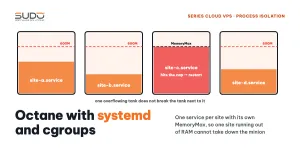
Laravel Octane keeps the application resident in RAM, so a site with a memory leak keeps growing until the kernel has to step in. If every Octane site on a minion runs under supervisor, each time this happens it is not just that one site that dies: every other Octane site on the machine returns 502 too. This guide explains why running Octane under supervisor causes these "cascading deaths", how to move each site into its own systemd service with a memory limit enforced by cgroups, how to migrate safely, and one limitation you need to understand clearly: MemoryMax contains the damage, but it does not cure the cause of running out of RAM.
1. Overview: many Octane sites on one minion
Laravel Octane and FrankenPHP: running Laravel as an app server explained how Octane differs from PHP-FPM. With PHP-FPM, memory is returned when each request finishes. With Octane on FrankenPHP, the framework boots once and then lives on inside the process. That is why it is fast, but every memory leak accumulates in that process.
The most obvious way to deploy it is to declare every site's octane:start in supervisor configuration files, just like queue workers, and let a single supervisor daemon manage them. That works fine until the first OOM.
2. Why one site running out of RAM takes down every Octane site
A typical scenario: an ad campaign sends a flood of requests to one site, that site's FrankenPHP process grows past 1 GB of RAM, and the kernel triggers the OOM killer, which kills it. Right after that, every Octane site on the machine returns 502 for almost a minute. The kernel log shows the mechanism clearly:
oom-kill: ... global_oom, task_memcg=/system.slice/supervisor.service, task=frankenphp
Out of memory: Killed process ... (frankenphp) total-vm:2824304kB, anon-rss:1043720kB
systemd[1]: supervisor.service: A process of this unit has been killed by the OOM killer.
systemd[1]: supervisor.service: Failed with result 'oom-kill'.
All of supervisor's child processes live in the same cgroup: supervisor.service. In systemd the default is OOMPolicy=stop: when the kernel kills any process in a unit, systemd considers the whole unit failed and stops all of it. Debian's supervisor unit also has Restart=on-failure with RestartSec=50s. The result: every Octane site, including those that use little RAM, goes down together and waits almost a minute to come back. Running systemctl restart supervisor by hand during a deployment has exactly the same blast radius.
A secondary bug often comes along with it: after the OOM, an orphaned frankenphp process (PPID=1) still holds the site's admin port. The newly started worker reports that the port is taken, falls into FATAL, and the site keeps returning 502 until the old process is killed with kill -KILL.
3. The mechanism: systemd and cgroups, a separate box for each site
On Debian 12, systemd 252 runs with cgroup v2. Each systemd service has its own cgroup, and systemd can set resource limits per cgroup. The idea is very simple: move the HTTP layer of each Octane site into an octane-<domain>.service unit. Supervisor is left with only the queue workers.
Before                                    After
supervisor.service (1 cgroup)             octane-site-a.service  MemoryMax=600M
 ├─ site-a octane  ← OOM                   octane-site-b.service  MemoryMax=600M
 ├─ site-b octane  ← dies too              octane-site-c.service  MemoryMax=600M
 ├─ site-c octane  ← dies too              ...
 └─ queue workers  ← die too               supervisor.service: queue:work only
Two cgroup v2 memory properties are used, as described in the systemd.resource-control documentation:
MemoryHigh=450M: the soft limit. Above it, the kernel reclaims the cgroup's memory and throttles the process, but does not kill it.MemoryMax=600M: the hard limit. Above it, the OOM killer runs inside that cgroup and only kills that service's processes.
These numbers are examples for a medium-sized site. Measure each site's MemoryCurrent at peak hours, then set MemoryHigh a little above that.
4. A sample systemd unit file for one Octane site
# /etc/systemd/system/octane-example.com.service
[Unit]
Description=Laravel Octane FrankenPHP - example.com
After=network.target

[Service]
Type=simple
User=nginx
WorkingDirectory=/var/www/example.com

ExecStartPre=/bin/sh -c 'fuser -k -9 8001/tcp 9001/tcp 2>/dev/null || true'

ExecStart=/usr/bin/php8.4 artisan octane:start \
    --server=frankenphp \
    --host=127.0.0.1 \
    --port=8001 \
    --admin-port=9001 \
    --workers=1 \
    --max-requests=100

Restart=always
RestartSec=1s
KillMode=control-group
TimeoutStopSec=3s

StandardOutput=append:/var/www/example.com/octane.log
StandardError=append:/var/www/example.com/octane.log

MemoryHigh=450M
MemoryMax=600M

Environment=PATH=/usr/local/bin:/usr/local/sbin:/usr/bin:/bin
Environment=CADDY_ADMIN=127.0.0.1:9001
Environment=PHP_INI_SCAN_DIR="/etc/php/8.4/cli/conf.d:/var/www/example.com/php-ini"

[Install]
WantedBy=multi-user.target
What each important line means:
ExecStartPrewithfuser -k: before starting, kill every process holding the site's web port and Caddy admin port, which deals with orphaned processes once and for all.KillMode=control-group: when the service stops, systemd kills every process in the cgroup, including the FrankenPHP child process spawned byartisan. This is already the default, but state it explicitly so nobody accidentally changes it toprocess.Restart=always,RestartSec=1s: whatever the reason it died, it restarts after one second instead of 50 seconds as with the supervisor unit.--max-requests=100: Octane replaces the worker after every 100 requests, so small leaks have no time to accumulate. This parameter is described in the Laravel Octane documentation.CADDY_ADMINand--admin-port: each FrankenPHP instance needs its own admin port. If two sites use the default port 2019, the second one will not start.PHP_INI_SCAN_DIR: Octane runs on the PHP CLI, so it does not read the FPM configuration. Each site has its own ini directory formemory_limitandupload_max_filesize.
nginx on the minion does not change: it still uses proxy_pass http://127.0.0.1:8001. New code is loaded with php artisan octane:reload, without restarting the service.
5. Migrating from supervisor to systemd with rollback
Try it on a test minion, migrate one or two sites by hand, and only then package it as a pipeline as in Jenkins as the control plane for hundreds of websites. The pipeline takes the minion, domain, memory_high, memory_max, max_requests and workers as parameters, and runs six steps for one domain:
- Read the current web port and admin port from the site's supervisor configuration and keep them, so nginx does not need to change.
- Generate the
/etc/systemd/system/octane-<domain>.servicefile from the template above. - Stop the Octane process in supervisor first, so the two do not fight over the port.
- Remove the
octane:startblock from the supervisor configuration, keepqueue:work, then runsupervisorctl reread && supervisorctl update. systemctl daemon-reload && systemctl enable --now octane-<domain>.service.- Health check: the service must be
activeandcurl http://127.0.0.1:<port>/must not return 5xx, retried a few times. If it fails, remove the unit, restore the supervisor configuration from the backup and re-enable Octane under supervisor.
6. The limitation: MemoryMax does not protect against a global OOM
After the split, a typical OOM looks like this:
kernel: nginx invoked oom-killer
kernel: oom-kill: constraint=CONSTRAINT_NONE ... global_oom, task_memcg=/system.slice/octane-site-b.service, task=frankenphp
kernel: Out of memory: Killed process ... (frankenphp) ... anon-rss:59968kB
systemd[1]: octane-site-b.service: Failed with result 'oom-kill'.
systemd[1]: octane-site-b.service: Scheduled restart job, restart counter is at 2.
systemd[1]: Started octane-site-b.service - Laravel Octane FrankenPHP - site-b.
The good part: exactly one unit is stopped and it comes back after a few seconds. The other Octane sites and all the queue workers are unaffected.
What you need to understand is in two words: global_oom and CONSTRAINT_NONE. This is not a case of one site exceeding its own MemoryMax; it is the whole machine running out of RAM, and the kernel has to pick a victim across the entire system. The kernel picks by oom_score, so the process that gets killed may use only a few tens of MB: the victim is not necessarily the culprit.
The reason is easy to see once you add things up. For example, a 4 GB machine running eight units, each with MemoryMax=600M: the total limit is 4.8 GB, before counting PHP-FPM, queue workers and nginx. Each individual limit is reasonable, but when their sum exceeds the real RAM, they cannot protect the machine from running out of memory.
7. Common mistakes when running Octane with systemd
- Running under both supervisor and systemd: if a site has a systemd unit and still has
autostart=truein supervisor, the two fight over the port, crash-loop every second, and CPU spikes. After migrating, always checksupervisorctl status | grep octane. - Misreading the type of OOM: in
journalctl -k | grep oom-kill,constraint=CONSTRAINT_MEMCGmeans the service hit its ownMemoryMax;CONSTRAINT_NONEtogether withglobal_oommeans the whole machine ran out of RAM. The two cases call for different fixes. - Hitting the restart limit: by default systemd only allows 5 starts within 10 seconds. A site that fails right at startup (a wrong
.env, a missing package) will hit the limit and stay in thefailedstate. Fix the error, then runsystemctl reset-failed. fuser -kkilling the wrong thing: this command kills everything holding the port. If two sites were accidentally assigned the same port, starting one will kill the other. The port allocation table must be unique on each minion.- Code that is not Octane-safe: storing per-request data in
staticproperties, callingexit()ordie(), or runningArtisan::call('config:clear')inside a request (each call reloads the whole application inside a process that lives all day). cgroups cannot fix these bugs.
8. Checklist: systemd limits the blast radius, it does not cure the cause
Moving Octane to systemd is the right thing to do: recovery time drops from almost a minute to a few seconds, and one failing site no longer drags the others down with it. But it is a firewall against spreading fire, not a fire extinguisher. After the split:
- Work out the minion's memory budget: the total
MemoryMaxof all units, plus PHP-FPM and queue workers, must stay below the real RAM. Small sites get smaller limits. - Track each unit's
MemoryCurrentandNRestarts(systemctl show octane-<domain> -p MemoryCurrent -p NRestarts) to see which site really eats RAM, instead of looking only at the victim in the kernel log. - Fix the code of leaking sites: remove cache-clearing
Artisan::callfrom requests, and clean up singletons andstaticproperties. - Apply the same approach to every Octane site, leaving none behind under supervisor.
This is the same thinking as in One PHP-FPM pool per website: ending max_children errors: isolate so that one failing site does not take down the whole machine. To keep any site from failing in the first place, you still have to fix the code and the way resources are allocated.
Next article
Revisiting the Cloud VPS model: weak points and a VPS consolidation plan. The series finale: what the Balancer – Minion – Database model does well, the single points of failure to watch for, and how to plan consolidating Cloud VPS instances.