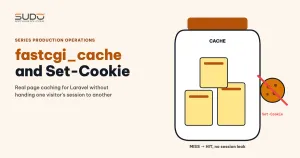
A very common misconfiguration on minions that run many sites: the config file declares fastcgi_cache_key and fastcgi_cache_valid, but has no fastcgi_cache_path and no fastcgi_cache directive. Page caching looks enabled, but the hit rate is 0%. When you turn on fastcgi_cache for real on a Laravel site, the hardest part is not enabling the cache. It is the Set-Cookie header: it prevents the cache from ever hitting, and if you handle it wrong, the cache hands one visitor's session to another. This guide shows how to enable fastcgi_cache for a public content site, how to handle Set-Cookie, how to verify the result, and which side effects to expect.
Background on TTFB and how to measure each hop separately is in High TTFB for Googlebot: splitting every hop and an internal scraper suspect.
Symptoms
- A Laravel site with public content, running on its own PHP-FPM pool. TTFB through the real domain is much higher than the time PHP spends on the minion.
- The site config has the full "shape" of a cache but lacks the two lines that matter, plus a few dangerous ones:
location ~ \.php$ {
    fastcgi_pass unix:/run/php/php8.2-fpm-site-a-example.sock;
    fastcgi_pass_header Set-Cookie;                       # dangerous once caching is on
    fastcgi_pass_header Cookie;
    fastcgi_ignore_headers Cache-Control Expires Set-Cookie;
    fastcgi_cache_key ...;
    fastcgi_cache_valid 200 301 302 30s;
    fastcgi_cache_use_stale updating error timeout invalid_header http_500;
    # no fastcgi_cache_path, no "fastcgi_cache <zone>" → nothing is cached
}- After enabling fastcgi_cache from a hastily edited draft: every request is a
MISS.
Investigation
The "ghost" fastcgi_cache: why a config that looks right does nothing
fastcgi_cache_key, fastcgi_cache_valid and fastcgi_cache_use_stale are only parameters. According to the nginx fastcgi module documentation, caching only works when there is a memory zone declared with fastcgi_cache_path and a fastcgi_cache <zone> directive in the location. Without those two lines nginx reports no error, nginx -t still passes, and every request still runs PHP. A quick check on a minion:
cd /etc/nginx/conf.d
grep -l "fastcgi_cache_valid" *.conf | wc -l      # sites that "seem" to cache
grep -lE "fastcgi_cache\s+\w+;" *.conf | wc -l    # sites that really enable fastcgi_cache
Why fastcgi_cache is enabled but always MISS
Call the minion directly with a Host header and look at the response headers:
curl -sI -H 'Host: site-a.example' http://10.0.0.44/ | grep -iE 'set-cookie|cache-control'
Cache-Control: no-cache, private
Set-Cookie: XSRF-TOKEN=...
Set-Cookie: sitea_session=...
Laravel's web middleware group (StartSession, VerifyCsrfToken) attaches a session cookie and XSRF-TOKEN to every response, even for a first-time visitor. This is default behavior, not a bug. nginx, by default, does not cache responses that carry Set-Cookie or Cache-Control: private, no-cache. When these two safe defaults meet, fastcgi_cache can never store a single page. To cache, you have to deliberately ignore those headers with fastcgi_ignore_headers, and from that point on, safety is your responsibility.
Two common mistakes in the draft
- Wrong cookie name. The bypass condition matched
laravel_session. But Laravel derives the session cookie name fromAPP_NAME(seeconfig/session.php), so a site with its own name uses a cookie likesitea_session. With the wrong regex, the session-based bypass never matches. - Removing
fastcgi_ignore_headers Cache-Control Expires Set-Cookieby mistake along withfastcgi_pass_header, so nginx seesCache-Control: no-cache, privateand refuses to store the response. This is exactly why every request was a MISS.
Two ways to handle Set-Cookie when enabling fastcgi_cache
Once nginx is told to ignore Set-Cookie, the cached copy stores that header too. There are two approaches:
| Option 1: bypass by URL and cookie, keep Set-Cookie | Option 2: hide Set-Cookie on cached pages | |
|---|---|---|
| Mechanism | Do not cache POST, /admin, requests with a query string, or requests that already carry a session cookie or XSRF-TOKEN | Add fastcgi_hide_header Set-Cookie to the cached location |
| Who gets cached pages | Visitors without cookies: Googlebot, bots that do not keep cookies, first-time visitors | Same as option 1 |
| Risk | The cached copy carries the first visitor's Set-Cookie. While it is cached, other cookieless visitors who hit it receive the same session ID | fastcgi_hide_header is a static per-location directive. Put it in the same location as /admin and nobody can log in |
| Complexity | Low | You must split out a separate location for /admin. After try_files, the request is matched against the location list again from the top, and a wrong match breaks login without any error |
Option 1 is acceptable only after verifying three conditions: public pages have no session-dependent content (no view uses @csrf or a POST form), the session of an anonymous visitor is empty, and /admin is always bypassed. With the default session guard, Laravel also regenerates the session ID when a user logs in. This choice is only valid for pure content sites. Sites with a shopping cart or customer accounts must use option 2 or cache at the application layer.
Sample fastcgi_cache configuration
fastcgi_cache_path /var/cache/nginx/site-a levels=1:2 keys_zone=sitea_cache:20m
                   max_size=200m inactive=10m;

location ~ \.php$ {
    # ... fastcgi_pass, fastcgi_param as before
    set $skip_cache 0;
    if ($request_method = POST)                       { set $skip_cache 1; }
    if ($request_uri ~* "^/admin")                    { set $skip_cache 1; }
    if ($http_cookie ~* "(sitea_session|XSRF-TOKEN)") { set $skip_cache 1; }
    if ($query_string != "")                          { set $skip_cache 1; }

    fastcgi_ignore_headers Cache-Control Expires Set-Cookie;
    fastcgi_cache        sitea_cache;
    fastcgi_cache_bypass $skip_cache;
    fastcgi_no_cache     $skip_cache;
    fastcgi_cache_valid  200 301 302 30s;
    fastcgi_cache_use_stale updating error timeout invalid_header http_500;
    add_header X-Cache-Status $upstream_cache_status always;
}
Mandatory checks before calling fastcgi_cache done:
U=https://site-a.example/
curl -sI $U | grep -i x-cache-status                          # MISS
curl -sI $U | grep -i x-cache-status                          # HIT (within 30 seconds)
curl -sI -H 'Cookie: sitea_session=x' $U | grep -i x-cache    # BYPASS
curl -s -o /dev/null -w '%{http_code}\n' ${U}admin/login      # 200

# session leak check: two different cookie jars must not receive the same session ID
curl -s -c a.txt -o /dev/null $U; curl -s -c b.txt -o /dev/null $U
grep sitea_session a.txt b.txt
Alongside this, you can enable Laravel's config:cache and route:cache after confirming that nothing calls env() outside the config directory. A typical result: TTFB drops by about half, and what remains is mostly network and TLS. A HIT served from the minion takes under a millisecond.
Common errors and side effects
Random Permission denied errors in the temp file directory
The error log shows scattered [crit] ... Permission denied lines. A common cause: a subdirectory of /var/lib/nginx/fastcgi/ is still owned by an old user (for example www-data) after the user running nginx was changed. Only responses that must be buffered to disk and land in that exact subdirectory fail, so the errors look random. Fix it with chown -R to match the other subdirectories. No restart is needed.
A faster site gets rate limited more
After enabling the cache, Search Console may report a higher crawl failure rate. The reason: the site is faster, Google crawls harder, and it hits a limit_req threshold that was set back when the site was slow, receiving 429. Whitelisting Googlebot IP ranges is costly to maintain. A simpler approach is to raise the threshold to match real traffic, for example rate=300r/m burst=100 for regular pages. Note: nginx keeps the memory of a limit_req_zone across reloads when its name and size do not change, so the old counters remain. When you change the parameters, rename the zone (for example, add a _v2 suffix).
Google's numbers are not your numbers
If the measuring machine sits on the same network and in the same city as the balancer, every measurement has almost no real network latency. Measuring from several regions shows that the TCP handshake alone from Europe or the US takes hundreds of milliseconds, and HTTPS needs several round trips. No fastcgi_cache configuration can fix geographic distance. Going lower requires a CDN layer close to where Google crawls from.
Checklist for enabling fastcgi_cache
- Every site with fastcgi_cache enabled must have
add_header X-Cache-Status $upstream_cache_status always, and the hit rate must be checked after enabling it. - Review every config file:
fastcgi_cache_validwithoutfastcgi_cache <zone>is a ghost config. Remove it or enable caching for real. - Remove
fastcgi_pass_header Set-Cookiefrom the config template. - Take the session cookie name from
config/session.phpand the realAPP_NAMEof each site. Do not guess. - Check for session leaks by calling the same URL with two different cookie jars.
- When you change
limit_req_zoneparameters, rename the zone. - Measure TTFB from outside the datacenter network, from several regions.
Lessons learned
- A config that "looks right" is more dangerous than a missing one. When something is missing, people go looking for it. When it looks right, nobody suspects it.
- fastcgi_cache does not understand sessions. It returns the stored bytes as they are, headers included. Every safety decision must live in the bypass conditions.
- An accepted risk must have its reason written down. Option 1 is safe for pure content sites, not safe in general.
- Optimizing one layer can expose limits in another. A faster site attracts more crawling, and the old rate limit becomes the new bottleneck.
Next article
Session leak through cache: two vulnerabilities caught in time. When this approach was applied to an e-commerce site with a shopping cart, the pre-cache check uncovered two vulnerabilities that could mix up sessions and expose customers' order details.