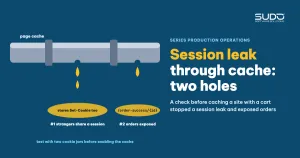
A fastcgi_cache configuration that works well on a pure content site is very easy to copy to another site. On an e-commerce site with a shopping cart, that same configuration can create two vulnerabilities: one causes a session leak between visitors who do not know each other, and the other can serve an order confirmation page, with one customer's name, phone number and address, to the next visitor. This guide describes how both vulnerabilities were found during a check before enabling the cache, why a configuration that was safe on the first site causes a session leak on the next one, and what to do instead.
How Set-Cookie makes nginx refuse to cache, and the two ways to handle it, are covered in fastcgi_cache and Set-Cookie: lowering TTFB without leaking sessions. This article picks up from there.
Context: one playbook, many kinds of sites
The playbook for content sites: add nodelay to the rate limit, enable config:cache and route:cache, then enable fastcgi_cache using "option 1": bypass for POST, /admin, query strings and requests that already carry a session cookie, and let nginx ignore the Set-Cookie header. Option 1 is acceptable on a content site because public pages do not depend on the session, so there is nothing to leak.
An e-commerce site is completely different: the guest cart, wishlist and product comparison all live in the session. Before copying the playbook, you need a dedicated session leak check.
Warning signs
- Every GET request to a public page, including category pages when not logged in, receives two
Set-Cookieheaders:XSRF-TOKENand the session cookie. - The shared layout embeds
csrf_token()in the HTML. - The route list has many GET pages, without a query string, that carry data specific to each customer.
The check process
Step 1: go around the protection layer in front
If the domain sits behind an anti-bot layer with a challenge (CAPTCHA, JS challenge), requests from a script receive the challenge page and never reach the balancer. Every measurement and every session leak test must therefore call the minion's internal IP directly with a Host header.
Step 2: test for a session leak with two cookie jars
If the caching plan only adds fastcgi_ignore_headers ... Set-Cookie without fastcgi_hide_header Set-Cookie, the Set-Cookie header with a real session ID and XSRF token is stored together with the HTML. The test uses two cookie jars to simulate two unrelated visitors calling the same URL, in a test environment:
curl -s -c /tmp/jar1.txt -D - -o /dev/null -H "Host: site-c.example" http://10.0.0.216/promotions/
curl -s -c /tmp/jar2.txt -D - -o /dev/null -H "Host: site-c.example" http://10.0.0.216/promotions/
diff /tmp/jar1.txt /tmp/jar2.txt   # identical session id → the cache is leaking sessions
How the session leak would play out with real visitors if option 1 were enabled on a site with a cart:
- The first visitor has no cookie, the request goes to PHP, Laravel creates a new session and returns
Set-Cookie. nginx stores both the page and the header. - While the cached copy is still valid, a second and third visitor without cookies receive that same cached copy, which means they receive the same session ID.
- From the next request on, all three have a cookie, so they bypass the cache and go straight to PHP, and Laravel treats them as one person: a shared cart, a shared wishlist and a shared CSRF token.
This kind of session leak needs no attacker. It happens naturally on any site whose public pages read and write the session. It is session fixation as OWASP describes it, except that the one "planting" the session is your own cache.
Step 3: find GET pages that can turn a session leak into a data leak
The playbook's $skip_cache condition is a denylist. Reviewing the routes of the e-commerce module (php artisan route:list --method=GET) usually shows that the following pages still qualify for caching:
| Path | Content | Consequence if cached |
|---|---|---|
/cart, /checkout | Cart, checkout | The next visitor sees the previous visitor's cart |
/order-success/{orderID} | Order confirmation: name, phone number, address, purchased products | Personal data exposed to anyone opening the same URL |
/wishlist-product, /compare-product | The customer's personal lists | Lists mixed up between customers |
All it takes is a bot probing order URLs by ID, or a customer reopening the confirmation link from another device without a cookie, for the session leak to become a personal data leak. On a site with a checkout flow, a denylist always risks missing something. You have to switch to an allowlist: cache only the specific public content URL patterns that are known to be safe.
Step 4: check whether the application already has its own cache
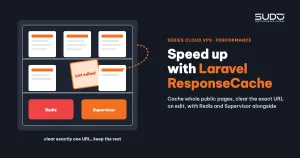
Many Laravel sites already enable full-page caching at the application layer (for example Spatie ResponseCache stored in Redis), as in Speeding up websites with Laravel ResponseCache, Redis and Supervisor. An application-layer cache does not leak sessions at the points just described:
- It does not cache for logged-in users.
CsrfTokenReplacerreplaces the CSRF token in the cached HTML with the token of the current viewer's session. nginx returns the stored bytes as they are, so it cannot do this.- The session, CSRF and cookie encryption middleware run before the cached response is returned, so each visitor still receives their own cookie.
The cost is that every request still has to boot the framework. The idea of "removing the session from public routes so nginx can cache safely" is usually not feasible either, because the cart, wishlist, language and currency all read and write the session right on category and product pages.
Root causes
- The playbook was copied from a content site to an e-commerce site without the condition that made it safe: public pages do not depend on the session.
- Denylist thinking for a security decision. Every new route in the checkout module is a place where something can slip through.
- An nginx-layer cache does not understand sessions. Once it is told to ignore
Set-Cookie, it serves that header unchanged to other people, and a session leak is the inevitable result.
Fixes
Do the safe steps, with no session leak risk, first
On a site with a cart, do not enable the nginx cache right away. First do the steps that do not touch sessions or cookies:
- Change every
env()call outside the config directory toconfig(), fix duplicate route names, then enableconfig:cache. This step alone usually lowers TTFB noticeably. - Look for views that prefill login details from
env()(often left over from development) and remove them, so credentials can never end up in the page source. - If the application loads routes by User-Agent (separate desktop and mobile sets),
route:cacherunning from the CLI only sees one set. Cache the two sets into two separate files and pick the file by User-Agent when the application boots. - Hook application cache invalidation into model save events (posts, reviews, categories), and only then increase the cache lifetime.
If you still need caching at the nginx layer
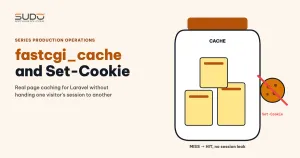
The minimum condition to avoid a session leak is an allowlist, plus hiding Set-Cookie with fastcgi_hide_header on exactly the cached part. Because fastcgi_hide_header is a static per-location directive, the cached part must have its own location and call index.php directly, not through try_files (after try_files, the request is processed again and falls back to the shared PHP location):
location ~ ^/(promotions|products|news)(/|$) {
    include fastcgi_params;
    fastcgi_param SCRIPT_FILENAME $document_root/index.php;
    fastcgi_pass unix:/run/php/php8.2-fpm-site-c-example.sock;

    set $skip_cache 0;
    if ($request_method != GET)                       { set $skip_cache 1; }
    if ($http_cookie ~* "(sitec_session|XSRF-TOKEN)") { set $skip_cache 1; }
    if ($query_string != "")                          { set $skip_cache 1; }

    fastcgi_ignore_headers Cache-Control Expires Set-Cookie;
    fastcgi_hide_header    Set-Cookie;
    fastcgi_cache          sitec_cache;
    fastcgi_cache_bypass   $skip_cache;
    fastcgi_no_cache       $skip_cache;
    add_header X-Cache-Status $upstream_cache_status always;
}
# every other path: shared PHP location, no caching
Note: pages cached this way carry no cookie, so every AJAX POST button on the page (add to cart, add to wishlist) will fail with a 419 error because the session is missing. Apply it only to pages that truly have no session-dependent actions. If you cannot separate them, an application-layer cache is the right choice.
A common mistake when writing an allowlist with if: placing a line like if ($request_method = GET) { set $skip_cache 0; } after the URL patterns, which reopens caching for every GET. The correct order is: no caching by default, open it for safe patterns, then close it again for every risky condition.
Review the session leak risk on sites already cached the old way
If some sites were already running fastcgi_cache with option 1 before the risk was recognized, review them right away with two questions: do the public pages read or write the session, and is there any GET page with personal data? If the answer is "yes", turn off the nginx cache for that site until it moves to an allowlist.
Session leak prevention checklist before enabling page caching
- List every GET route and mark which pages carry data specific to the viewer. If there is a cart, orders or accounts, treat the site as at risk of a session leak by default.
- Look in the layout for components that read the session:
csrf_token(), cart item count, login state, language, currency. - Check whether the application already has an application-layer cache. If it does, optimize that instead of stacking an nginx cache on top.
- Use an allowlist, not a denylist.
- After enabling it, run the session leak test with two cookie jars, and open an order confirmation page without a cookie. It must return
BYPASSor no cache header at all.
Lessons learned
- The safety of a configuration lies in its assumptions. Option 1 is safe on a content site because an anonymous visitor's session is always empty. Moved to a site with a cart, that assumption is false and the same configuration becomes a session leak bug.
- Checking before enabling is cheaper than investigating after an incident. One session of reading routes and two curl commands are enough to prevent a session leak and a customer data leak.
- Safe steps first, risky steps later.
config:cacheand route caching deliver most of the improvement without touching the session. - Every session leak risk found must become a concrete task, with an owner and a deadline.
Next article
Phantom 100% CPU from the hypervisor: when top does not tell the truth. When many Cloud VPS instances report 100% CPU at the same moment while no process is eating CPU, and how to prove that the hypervisor was holding the virtual machine.