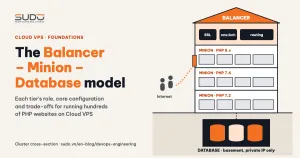
Before a website goes live on its real domain, it usually has a demo version where the site owner reviews the design, QA runs tests, and performance is measured. The demo runs on a subdomain such as *.demo.example.com, behind the same balancer as the live sites. One risk that is often underestimated: the entire demo site ends up in the Google index, shows up in search results and duplicates the content of the main site. This guide explains why blocking in application code breaks easily, compares three blocking mechanisms (robots.txt, the noindex meta tag, the X-Robots-Tag header), shows how to put the block at the balancer tier, how to remove URLs that were already indexed, and when to consider Basic Auth.
1. Why demo pages end up in the Google index
A typical scenario: the demo site has a code-level block, consisting of a public/robots.txt file and a robots meta tag in the layout. The problem is that this mechanism lives in the application repository. A single deploy that overwrites robots.txt with the production version, or a developer who forgets the "only print the noindex meta tag in the demo environment" condition, and the protection disappears without anyone noticing. There is no alert and no error telling you the site is now open to the Google index, until the demo pages themselves appear in search results.
The consequences of demo pages landing in the Google index go beyond embarrassment:
- Duplicate content: Google has to choose between the demo and the live version, sometimes picks the wrong one, and the live site loses ranking.
- Test data exposure: sample data, draft posts and unfinished pages can become public.
- Slow removal: blocking does not make results disappear immediately. A page already in the Google index only leaves it when Googlebot recrawls each URL.
The lesson: the Google index block for the demo environment must not depend on each app's code. It has to sit where every request passes through and where no deploy can overwrite it. In the three-tier Cloud VPS model, that place is the balancer.
2. Three ways to block the Google index: how they differ
Many people confuse "blocking crawling" with "blocking indexing". According to Google Search Central's guide to blocking indexing with noindex, these are two different things:
| Mechanism | What it blocks | Weakness |
|---|---|---|
robots.txt with Disallow: / | Blocks crawling: the bot does not download page content | Does not keep pages out of the Google index. The URL can still appear in search results (without a description) if other sites link to it |
The <meta name=robots content="noindex"> tag | Blocks indexing of the HTML page containing the tag | Lives in the app code, easy to forget or overwrite. Does not apply to PDFs or images |
The HTTP header X-Robots-Tag: noindex | Blocks indexing of every response type | Must be configured on the web server, and you need to verify the header is actually sent |
The point most easily missed: do not use Disallow together with noindex. If robots.txt blocks crawling, Googlebot never downloads the page, so it can never read the noindex directive in the meta tag or the header. A page that has already slipped into the Google index stays there longer. To remove it, you must allow crawling so the bot can read the noindex.
That is why X-Robots-Tag is the right choice for keeping pages out of the Google index: it blocks exactly what needs blocking, applies to every file type, and can be set at the infrastructure tier, out of reach of any deploy.
3. Setting X-Robots-Tag at the balancer with a host map
When every demo domain shares the .demo.example.com suffix, there is no need to edit each site's config file. Use the nginx map module to compute the header value from $host, placed in a single file on each balancer whose name starts with 00- so it is loaded before the site config files:
# /etc/nginx/conf.d/00-demo-noindex.conf
map $host $demo_noindex {
    default                    "";
    "~*\.demo\.example\.com$"  "noindex, nofollow";
}

more_set_headers "X-Robots-Tag: $demo_noindex";
How it works:
- A request to
shop.demo.example.commatches the regex,$demo_noindexbecomesnoindex, nofollow, and the response carries theX-Robots-Tagheader. - A request to a real domain falls through to
defaultand the variable is empty. An empty header is not sent, so live sites are unaffected. - When a demo moves to its real domain, the header disappears automatically because
$hostno longer matches. Conversely, a new site created on the demo domain is protected immediately, even if its site config was written by hand or generated from an old template.
Why more_set_headers and not add_header
The most natural approach is to put add_header X-Robots-Tag $demo_noindex; in the http {} block. The syntax is valid and nginx -t reports OK, but the header often does not appear. The reason lies in the inheritance rule of the add_header directive: a server or location block that declares any add_header of its own does not inherit the add_header directives from the level above. Site config files on the balancer almost always have add_header Strict-Transport-Security for HSTS, so the header at the http level is silently ignored.
The headers-more module has no such rule: more_set_headers declared at the http level applies to every server below it. On Debian 12, the module is available in the official repository:
apt-get install -y libnginx-mod-http-headers-more-filter
ls /etc/nginx/modules-enabled/
# 50-mod-http-headers-more-filter.conf

# nginx.conf must contain this line, otherwise the installed module is never loaded
grep -n 'modules-enabled' /etc/nginx/nginx.conf
# include /etc/nginx/modules-enabled/*.conf;

nginx -t && systemctl reload nginx
If a minimal hand-written nginx.conf lacks the include /etc/nginx/modules-enabled/*.conf; line, nginx -t reports unknown directive "more_set_headers". This is a good failure: it blocks the reload, nginx keeps running the old config, and live sites are not interrupted. Just remember that when this error occurs, the Google index block has not been enabled at all.
Verifying the Google index block with curl
Do not trust nginx -t; trust the actual headers. After every change, check both directions: the demo domain must have the header, the real domain must not:
$ curl -sI https://shop.demo.example.com/ | grep -i x-robots
x-robots-tag: noindex, nofollow

$ curl -sI https://example.com/ | grep -i x-robots
(no output)

# also check static files, since X-Robots-Tag applies to every response type
$ curl -sI https://shop.demo.example.com/robots.txt | grep -i x-robots
x-robots-tag: noindex, nofollow
Another important test: deliberately change the demo app's public/robots.txt to Allow: /. The header is still there because it does not depend on any file in the code. That is exactly the property you want: whatever a deploy overwrites, the Google index block stays in place.
4. Removing pages from the Google index with Search Console
Adding the header only prevents indexing from now on. URLs already in the Google index stay there until Googlebot comes back, recrawls them and sees the noindex. To speed this up:
- Verify ownership of the demo domain in Search Console (a DNS TXT record is fastest because it does not touch the code).
- Use the Removals tool with the prefix
https://shop.demo.example.com/to temporarily hide all URLs from search results. According to the Search Console Removals tool documentation, the request only lasts about 6 months, so a noindex block behind it is mandatory. - Do not block robots.txt while waiting, so Googlebot can recrawl and see the noindex header.
- Watch the Pages report: URLs gradually move to the "Excluded by 'noindex' tag" status.
Removals is the painkiller; noindex is the cure. Using Removals without noindex means the demo pages come back to the Google index once the request expires.
5. Basic Auth for demo domains: safer, but at a price
HTTP Basic Auth stops both bots and strangers, regardless of whether the Google index respects noindex:
map $host $demo_auth {
    default                    off;
    "~*\.demo\.example\.com$"  "Demo - login required";
}

# inside the server or http block
auth_basic           $demo_auth;
auth_basic_user_file /etc/nginx/.htpasswd-demo;
Two caveats. First, to disable auth_basic for real domains, the value must be exactly the keyword off. According to the auth_basic module documentation, any other string, including an empty one, is treated as a realm name and enables authentication, meaning every live site on the balancer would demand a password. Try it on a balancer with few sites before rolling it out widely, because a mistake here affects real users, not just the Google index.
Second, demos are often also used to measure speed before handover. Google PageSpeed Insights and Lighthouse run from Google's servers and cannot send a username/password, so locking a demo with Basic Auth means you cannot get performance scores. Basic Auth suits demos that hold sensitive data, where security matters more than the ability to measure.
| Criterion | X-Robots-Tag at the balancer | Basic Auth |
|---|---|---|
| Keeps pages out of the Google index | Yes (Google respects noindex) | Yes (bots cannot get in) |
| Visible to strangers | Yes, if they know the URL | No |
| PageSpeed Insights / Lighthouse | Works normally | Cannot measure |
| Depends on app code | No | No |
| Risk of misconfiguration | Low: if wrong, the header is simply missing | High: getting the off value wrong locks the live sites too |
6. Checklist for keeping demo environments out of the Google index
- The block lives outside the deploy zone: the header is set at the balancer, not relying on the app's robots.txt or layout.
- The domain naming convention is configuration: when every demo shares one domain suffix, a single regex line protects them all; a demo that breaks the convention slips through.
- Do not trust the syntax, trust curl: check both the direction with the header (demo) and without it (live site), for HTML pages and static files alike.
- No
Disallowwhile removing pages: let the bot recrawl and read the noindex. - Blocking and removing are two jobs: noindex prevents new indexing, and Search Console speeds up removal of pages already in the Google index.
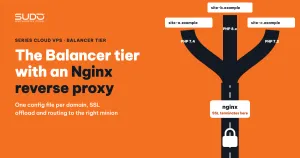
How the per-domain conf.d files on the balancer are organized is covered in The Balancer tier: Nginx reverse proxy, SSL offload and domain routing. The 00-demo-noindex.conf file simply adds one shared layer in front of those files.
Next article
Deploy, domain change and VPS move pipelines with database rollback. Wrapping the riskiest operations into pipelines with a backup first, checks afterwards and automatic rollback on failure, plus a trap in the Jenkins post block that can delete the very backup you need for the rollback.