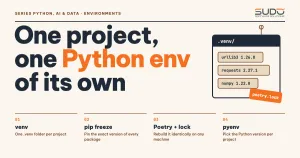
In a data or AI project, the thing that costs the most hours is usually not the algorithm but the question "why does it work on my machine?". One notebook uses one version of numpy, a teammate's machine has another, and the production server runs a Python that is one minor version older. This article shows how to build isolated, reproducible Python environments for each project: use venv and pip from the standard toolchain, add Poetry when you need stricter version locking, and manage several interpreter versions side by side with pyenv.
Every environment command in this article was run for real on Python 3.10 (the series released in October 2021, the latest stable series when this article was published; the machine used the newest 3.10 patch release, so the 3.10.22 line in the output is a patch number, while the application packages are pinned to early-2022 versions), Poetry 1.1.12, on an Apple M4 with 16 GB. The output is pasted as is, with only machine paths shortened or masked and a few pip notice lines omitted. For the venv relocation example only, pip is pinned to 21.3.1 (October 2021) to match the article's timeframe.
Why every project needs its own Python environments
When you run pip install straight into the system interpreter, every project on the machine shares one site-packages directory. The consequences are familiar: project A needs requests==2.27, project B needs an older release because an internal library has not been updated, and upgrading for one breaks the other. With shared Python environments on macOS and Linux the risk is even bigger: the operating system's Python also serves system tools, and removing or upgrading packages carelessly can break those very tools.
The fix is isolation: each Python environment belongs to one project and has its own interpreter and its own site-packages directory. The idea is close to what SOLID principles in Java with practical examples says about dependencies: a component should not be tied to the details of another. At the environment level, the "detail" is the package version. Good Python environments meet three criteria:
- Isolated: Python environments are separate from each other, so installing or removing packages in one project does not affect another project or the system.
- Reproducible: Python environments must be rebuildable: teammates, CI machines and servers can recreate the exact set of package versions that worked on your machine.
- Disposable: if one of your Python environments breaks, you delete it and rebuild it in minutes instead of "repairing" it.
venv: Python environments built into the standard library
The venv module, the standard tool for creating Python environments, has shipped with Python since version 3.3 (PEP 405) and is fully described in the Python venv documentation. The command python -m venv <directory> creates a directory holding a copy or symlink of the interpreter, an empty lib/pythonX.Y/site-packages directory, activation scripts and a pyvenv.cfg file. Pip is installed for you through ensurepip, so new Python environments can install packages right away.
The script below prints information about the running interpreter. Use it throughout the article to compare "before" and "after":
"""Print information about the running interpreter (paths are printed relative to the current directory)."""
import os
import sys
from importlib import metadata

def rel(p: str) -> str:
    return os.path.relpath(p) if p.startswith(os.getcwd()) else p

in_venv = sys.prefix != sys.base_prefix
print("python      :", sys.version.split()[0])
print("in venv     :", in_venv)
print("sys.prefix  :", rel(sys.prefix))
for name in ("requests", "pytest", "numpy"):
    try:
        print(f"{name:<12}:", metadata.version(name))
    except metadata.PackageNotFoundError:
        print(f"{name:<12}: (not installed)")
The condition sys.prefix != sys.base_prefix deserves attention: it is the official way for a Python program to know whether it is running inside a venv, because the VIRTUAL_ENV variable exists only after you activate. Run these in order: the system interpreter, create one of your Python environments with venv, then call the python inside the venv directly.
$ python3.10 --version
Python 3.10.22
$ python3.10 check_env.py   # system interpreter
python      : 3.10.22
in venv     : False
sys.prefix  : <python-3.10>
requests    : (not installed)
pytest      : (not installed)
numpy       : (not installed)

$ python3.10 -m venv .venv-pip
$ cat .venv-pip/pyvenv.cfg | sed "s#^home = .*#home = <base python directory>#"
home = <base python directory>
include-system-site-packages = false
version = 3.10.22

$ ls .venv-pip
bin
include
lib
pyvenv.cfg
$ .venv-pip/bin/python check_env.py   # no activation needed
python      : 3.10.22
in venv     : True
sys.prefix  : .venv-pip
requests    : (not installed)
pytest      : (not installed)
numpy       : (not installed)
The output of this new venv, the simplest of all Python environments, shows three things. First, pyvenv.cfg has only a few lines: the home key points to the base interpreter (I replaced that line with a placeholder so the machine path is not exposed), and include-system-site-packages = false means the venv cannot see the system's packages. Second, the venv has only four entries (bin, include, lib, pyvenv.cfg), so creating it is very fast. Third, I did not need to activate: calling .venv-pip/bin/python is enough, and sys.prefix already points into the venv. The Python documentation states that activation is only a convenience (it prepends bin to PATH); in CI scripts and Dockerfiles, calling the absolute path is even clearer.
Installing and pinning versions in Python environments with pip
The minimum workflow for reproducible Python environments with pip uses two files. The first declares what you want (direct dependencies); the second records what you have (every package, including indirect dependencies, with exact version numbers). The pip documentation page Repeatable Installs describes exactly this model: pin with ==, generate the full list with pip freeze, and, at a stricter level, verify the hash of every downloaded file.
requests==2.27.1
numpy==1.22.0
The requests package pulls in four indirect dependencies (certifi, charset-normalizer, idna, urllib3). If you pin only requests, every fresh install may give you different versions of the other four, and that is the root of the "it worked yesterday" bug. A simple remedy is to add a constraints file (pip's -c option) that caps the versions of indirect packages without forcing you to install them:
# Pin the secondary packages at early-2022 versions so results are reproducible
certifi==2021.10.8
charset-normalizer==2.0.10
idna==3.3
urllib3==1.26.8
Then install, freeze into requirements.txt, and prove reproducibility by deleting the venv and rebuilding it from that file:
$ .venv-pip/bin/pip install -c constraints.txt -r requirements.in

$ .venv-pip/bin/pip freeze
certifi==2021.10.8
charset-normalizer==2.0.10
idna==3.3
numpy==1.22.0
requests==2.27.1
urllib3==1.26.8

$ .venv-pip/bin/python check_env.py
python      : 3.10.22
in venv     : True
sys.prefix  : .venv-pip
requests    : 2.27.1
pytest      : (not installed)
numpy       : 1.22.0

$ optional PATH check: which python after sourcing activate
VIRTUAL_ENV=.venv-pip
<demo>/.venv-pip/bin/python

$ delete the venv and rebuild it from requirements.txt

python      : 3.10.22
in venv     : True
sys.prefix  : .venv-pip
requests    : 2.27.1
pytest      : (not installed)
numpy       : 1.22.0
Rebuilt from requirements.txt, the venv gives exactly the same result: requests 2.27.1, numpy 1.22.0. That is the minimum condition for calling Python environments "reproducible". The cost is that you must keep the two files in sync yourself; the pip-tools package (the pip-compile command) automates compiling requirements.in into the pinned file, and it is the lightest option before moving to Poetry.
Why you must not copy or move Python environments
The venv documentation advises against moving or copying a venv, because Python environments are tied to their path: rebuild it instead. The reason is the shebang. Commands such as pip in bin/ are scripts whose first line holds the absolute path to the interpreter at creation time. Create a venv and rename its directory (script run_move.sh) to see it:
$ head -1 /tmp/venv-a/bin/pip
#!/tmp/venv-a/bin/python
$ mv /tmp/venv-a /tmp/venv-b && /tmp/venv-b/bin/pip --version
run_move.sh: /tmp/venv-b/bin/pip: /tmp/venv-a/bin/python: bad interpreter: No such file or directory
$ /tmp/venv-b/bin/python -m pip --version   # python still runs, but the script does not
pip 21.3.1 from /tmp/venv-b/lib/python3.10/site-packages/pip (python 3.10)
The pip script breaks (bad interpreter) because it still points to the old directory, while python -m pip keeps working. The practical consequences for Python environments: never commit the .venv directory to Git, never package it into a Docker image by copying it from a dev machine, and do not rename a project directory without rebuilding. Add .venv/ to .gitignore and commit requirements.txt instead.
Poetry: managing Python environments, declaring dependencies and locking versions
Poetry folds the scattered steps above into one tool for managing Python environments: it declares dependencies in pyproject.toml, resolves them, writes poetry.lock, creates the venv and installs packages. The pyproject.toml file comes from PEP 518 (created in 2016) so that tools can declare build requirements statically; the [build-system] table is the mandatory part of the standard, while [tool.poetry] is where Poetry keeps its own configuration. Poetry's basic usage guide spells out two behaviors worth remembering: if there is no poetry.lock, poetry install resolves dependencies and creates the lock; if a lock exists, it installs exactly the locked versions. You can verify this in the Poetry Basic usage documentation.
The demo's pyproject.toml is below. The ^3.10 syntax is the "caret": according to the dependency specification documentation, ^1.2.3 means >=1.2.3 <2.0.0, while ~1.2.3 only allows patch changes (>=1.2.3 <1.3.0). For 0.x packages the caret is stricter: ^0.2.3 accepts only >=0.2.3 <0.3.0. In the demo I pin exact versions so results are reproducible, but real projects usually use the caret for direct dependencies and let the lock file hold the exact versions.
[tool.poetry]
name = "order-report"
version = "0.1.0"
description = "Demo of managing an environment with Poetry"
authors = ["Sudo <dev@example.com>"]

[tool.poetry.dependencies]
python = "^3.10"
requests = "2.27.1"
numpy = "1.22.0"
# secondary packages of requests: pinned at early-2022 versions so results are reproducible
certifi = "2021.10.8"
urllib3 = "1.26.8"
idna = "3.3"
charset-normalizer = "2.0.10"

[tool.poetry.dev-dependencies]
pyflakes = "2.4.0"

[build-system]
requires = ["poetry-core>=1.0.0"]
build-backend = "poetry.core.masonry.api"
The variable POETRY_VIRTUALENVS_IN_PROJECT=true tells Poetry to create the venv inside the project directory (.venv) instead of a shared cache directory; many teams prefer this because IDEs detect the interpreter automatically.
The script run_poetry.sh (in the article's source directory) runs poetry env use, poetry install twice, poetry show --tree, poetry export and poetry run in turn.
Actual results:
$ poetry --version
Poetry version 1.1.12
$ poetry env use python3.10
Creating virtualenv order-report in <dir>/.venv
Using virtualenv: <dir>/.venv
$ poetry install
Updating dependencies
Resolving dependencies...
Writing lock file
Package operations: 7 installs, 0 updates, 0 removals
  • Installing certifi (2021.10.8)
  • Installing charset-normalizer (2.0.10)
  • Installing idna (3.3)
  • Installing urllib3 (1.26.8)
  • Installing numpy (1.22.0)
  • Installing pyflakes (2.4.0)
  • Installing requests (2.27.1)

$ ls
check_env.py
poetry.lock
pyproject.toml
run_poetry.sh

$ grep -A1 "^name = .requests" poetry.lock
name = "requests"
version = "2.27.1"

$ poetry show --tree
certifi 2021.10.8 Python package for providing Mozilla's CA Bundle.
charset-normalizer 2.0.10 The Real First Universal Charset Detector. Open, modern and actively maintained alternative to Chardet.
idna 3.3 Internationalized Domain Names in Applications (IDNA)
numpy 1.22.0 NumPy is the fundamental package for array computing with Python.
pyflakes 2.4.0 passive checker of Python programs
requests 2.27.1 Python HTTP for Humans.
|-- certifi >=2017.4.17
|-- charset-normalizer >=2.0.0,<2.1.0
|-- idna >=2.5,<4
`-- urllib3 >=1.21.1,<1.27
urllib3 1.26.8 HTTP library with thread-safe connection pooling, file post, and more.

$ poetry install   # second run, lock already exists
Installing dependencies from lock file
No dependencies to install or update

$ poetry export -f requirements.txt --dev --without-hashes
certifi==2021.10.8
charset-normalizer==2.0.10; python_full_version >= "3.5.0"
idna==3.3; python_version >= "3.5"
numpy==1.22.0; python_version >= "3.8"
pyflakes==2.4.0; (python_version >= "2.7" and python_full_version < "3.0.0") or (python_full_version >= "3.4.0")
requests==2.27.1; (python_version >= "2.7" and python_full_version < "3.0.0") or (python_full_version >= "3.6.0")
urllib3==1.26.8; (python_version >= "2.7" and python_full_version < "3.0.0") or (python_full_version >= "3.5.0" and python_version < "4")

$ poetry run python check_env.py
python      : 3.10.22
in venv     : True
sys.prefix  : .venv
requests    : 2.27.1
pytest      : (not installed)
numpy       : 1.22.0
A few points need explaining. Poetry creates the venv, one of the simplest Python environments, resolves dependencies, installs seven packages and writes poetry.lock in a single command. The second install run reports "Installing dependencies from lock file / No dependencies to install or update": that is reproducible behavior, because everything comes from the lock instead of being resolved again. The poetry show --tree command prints the dependency tree, for example requests requires charset-normalizer >=2.0.0,<2.1.0. The poetry export command writes a requirements.txt so that places without Poetry (such as the final stage of a Docker build) can still rebuild the same Python environments with the exact versions.
Rules for using the lock file across Python environments
For applications (data pipelines, APIs serving models), commit poetry.lock so every machine builds the same Python environments. The Poetry documentation recommends that application developers commit this file; for a library published for others, their applications ignore the library's lock, so you need to decide whether to commit it and update it regularly. When you want a deliberate upgrade, use poetry update (it updates within the limits of pyproject.toml) and review the lock diff in a pull request the same way you review code. If you edit pyproject.toml by hand and forget to update the lock, Poetry warns that the two files are out of sync; treat that warning as a merge-blocking error in CI.
Comparing Python environment management tools
The Python ecosystem has many overlapping tools for building Python environments. The table below summarizes the scope of each, as of early 2022:
| Tool | What it does | Version locking | When to choose it |
|---|---|---|---|
venv + pip | Creates Python environments and installs packages, available everywhere | Manual (pip freeze, constraints) | Scripts, small projects, Dockerfiles, servers where you install nothing extra |
virtualenv | Predecessor of venv, faster and supports more interpreters | Same as pip | You need an environment for an older Python or advanced features |
pip-tools | Compiles requirements.in into a pinned file | Automatic, can include hashes | You want a light workflow that still locks everything |
| Poetry | Dependencies, lock, venv, packaging and publishing | poetry.lock | Applications or libraries developed by several people |
| Pipenv | Pipfile and Pipfile.lock, creates a venv | Pipfile.lock | Your team already knows this tool |
| conda | Manages both system packages (CUDA, BLAS) and Python packages | environment.yml (+ external lock) | Data science that needs complex precompiled libraries |
| pyenv | Installs and switches between several interpreter versions | Does not manage packages | You need to run Python 3.8, 3.9 and 3.10 side by side |
Our rule for choosing tools for Python environments: use venv with pip for anything small; move to Poetry or pip-tools when there are two or more people or a production deployment; use conda when the project depends on heavy binary libraries that PyPI wheels do not serve well on your platform. Do not mix them when you set up Python environments: each of your Python environments should have only one "source of truth" for package versions.
Managing Python environments across multiple Python versions with pyenv
Neither venv nor Poetry installs an interpreter: they use the interpreter already on the machine. The Poetry documentation states clearly that a Python version matching the constraint python = "^3.10" must be installed first. When the dev machine uses 3.10 but the server still runs 3.8, you need a tool to choose the interpreter. With pyenv, according to the pyenv project documentation, every python and pip command goes through "shims" at the front of PATH; the shim asks pyenv which version to use, in this order of priority: the PYENV_VERSION variable (set by pyenv shell), the .python-version file in the current directory (written by pyenv local), a file of the same name in a parent directory, and finally the global version.
pyenv install 3.10.1        # builds from source, needs build tools installed
pyenv local 3.10.1          # writes .python-version, commit this file to Git
python -m venv .venv        # venv uses exactly the 3.10.1 interpreter
poetry env use python3.10   # or point Poetry at that interpreter
Note: I did not run pyenv in this article (the machine used a separately downloaded Python 3.10 to produce the output above), so the snippet is described from the documentation, and the patch number 3.10.1 (December 2021) is only an example. Because pyenv builds the interpreter from source, on macOS you need to install the Xcode Command Line Tools first, and you should also install libraries such as openssl, readline and zlib with Homebrew following pyenv's "Suggested build environment" guide, otherwise the ssl or sqlite3 module may be missing. The key point to remember is that the .python-version file should be committed so the whole team uses the same interpreter version for all Python environments, and the python field in pyproject.toml is a constraint at the publishing level, while .python-version is a choice at the dev machine level.
Recommended workflow for Python environments in data and AI projects
Combining the parts above gives this workflow for Python environments in a small team:
- Fix the project's Python version (for example the 3.10 series) and record it in
.python-versionandpyproject.toml. - Create a dedicated Python environment:
poetry installorpython -m venv .venv. Do not install packages into the system interpreter. - Declare direct dependencies and let the tool generate the lock file. Commit
poetry.lockorrequirements.txt. - Separate development dependencies (
pytest,pyflakes) from runtime dependencies with Poetry's dev group or two requirements files. - In CI and Docker, build the environment from the lock file, never with an unpinned
pip install. - Upgrade on a schedule (for example monthly): run the update, run the tests, read the lock diff, then merge.
For AI projects, a stable Python environment matters even more: training results depend on the version of numpy, scikit-learn or torch, and a model saved with pickle or joblib can usually be reloaded only on the package versions it was saved with. The lock file is part of an experiment's reproducibility.
Common mistakes when building Python environments
- Forgetting to activate and installing into the system anyway: typing
pip installwithout going through the venv. The safe habit ispython -m pipwith the venv's interpreter, or the full path as in the demo. - Committing
.venvto Git: the directory is heavy, cannot be moved and contains your machine's paths. Add it to.gitignore. - Pinning only direct packages: indirect packages still drift. Use
pip freeze, a constraints file or a lock file. - A lock that disagrees with
pyproject.toml: the install differs from what you expect. Make CI fail when the two files are out of sync. - Python changes but the old Python environment stays: after upgrading the system interpreter, an old venv may break; the cleanest fix is to delete and rebuild it (or use venv's
--upgradeoption per the documentation if you only bump a patch version in place). - Running from cron or systemd without naming the interpreter: the service uses the system Python instead of the venv. Always write the absolute path to the venv's
python.
Quick checklist
- One Python environment (venv) per project; do not install packages into the system Python.
- A full version-pinning file (including indirect dependencies) is committed.
- The Python environment can be rebuilt from scratch with one command, tested on a clean machine.
- The interpreter version for your Python environments is recorded in the repo.
.venv/is in.gitignore.
All code in this article lives in the code/s7-01/ directory (demo/run_venv.sh, demo/run_move.sh, poetry-demo/run_poetry.sh); it runs on Python 3.10 and Poetry 1.1.12 (November 2021). Once you have stable Python environments, the next step in the series is to use it to collect data from the web responsibly.
Next article
Read next: Crawling data with Python: requests, BeautifulSoup and robots.txt.