The hand-written tool calling loop from the previous article is enough for a simple agent, but it has one weakness: all state lives in local variables of a running Python function. The more branches the process has ("status question: look it up; refund request: check the limit; large amount: wait for a human"), the messier the function gets, and if the approver replies two hours later, the process is long gone. LangGraph solves exactly that: you describe the process as a graph of state, nodes and edges, and the library handles execution, checkpoints, pausing and resuming. This article builds a customer support workflow with LangGraph 0.5.3, runs it for real against a small model, and tests the pitfalls the documentation warns about.
Environment: Apple M4, 16 GB, Python 3.12, langgraph==0.5.3, langgraph-checkpoint-sqlite==2.0.11, openai==1.78.1, and the qwen2.5:1.5b model served by Ollama through the OpenAI-compatible endpoint http://localhost:11434/v1 (no real API key needed). The message classification step reuses the validated-JSON technique from Structured data extraction from HTML with LLMs and Pydantic.
When you need LangGraph instead of a hand-written loop
In Building effective agents, Anthropic distinguishes workflows (LLMs and tools orchestrated along predefined code paths) from agents (the LLM decides the next step itself). It also warns that frameworks can add abstraction layers that hide the underlying prompts and make debugging harder. The advice is to start with direct API calls and adopt a framework only once you understand what it does. The process in this article is a routing workflow: classify the input, then send it to a specialized branch. Note that "multi-step" here means one workflow with branches inside a single graph, not a system of several cooperating agents; multi-agent design is a separate topic. LangGraph is used here for three concrete needs:
- Explicit state (LangGraph calls it State): all data flowing through the process lives in a
Stateobject you declare, which is easy to print and easy to test. - Pause and resume (LangGraph saves checkpoints): stop for a human approver, then continue hours later, even after the process restarts.
- Replayable history: every step leaves a checkpoint, which helps with debugging and auditing.
The README of the langchain-ai/langgraph repository says LangGraph is inspired by Pregel and Apache Beam, and its public interface is inspired by NetworkX. What matters for this problem is that a LangGraph graph may contain cycles, so a "retry" or "ask again" loop can be expressed directly. The pitfall that comes with that is covered later.
The LangGraph model: state, node, edge and reducer
According to the Graph API documentation, a LangGraph graph has four core concepts:
- State: shared data stored in channels. By default each channel is overwritten by the new value.
- Reducer: a function that merges the current value with a node's update. Declare
Annotated[list[str], operator.add]and updates are appended instead of overwritten. - Node: a Python function that receives the state and returns a partial update (it does not need to return the whole state).
- Edge: a normal edge (always goes from one node to another), a conditional edge (a function picks the next node), and the
STARTentry point.
Multiple edges leaving one node run in parallel in the next super-step; sequential nodes sit in different super-steps. To see the state merging clearly, step1_linear.py builds a minimal graph with no LLM: node a uppercases the text, then fans out in parallel to b and c.
class S(TypedDict):
    text: str                                  # no reducer: overwritten
    steps: Annotated[list[str], operator.add]  # with reducer: appended

def a(s: S): return {"text": s["text"].upper(), "steps": ["a"]}
def b(s: S): return {"steps": ["b"]}
def c(s: S): return {"steps": ["c"], "text": s["text"] + "!"}
Real output of invoke and of stream_mode="updates":
{'text': 'XIN CHAO!', 'steps': ['a', 'b', 'c']}

--- stream_mode='updates' ---
{'a': {'text': 'XIN CHAO', 'steps': ['a']}}
{'b': {'steps': ['b']}}
{'c': {'steps': ['c'], 'text': 'XIN CHAO!'}}
The steps field has a reducer, so it collects all of ['a','b','c']; the text field has no reducer, so the value from the node that writes last wins. The updates mode shows what each node returned, which is useful when debugging LangGraph.
Building the customer support workflow with LangGraph
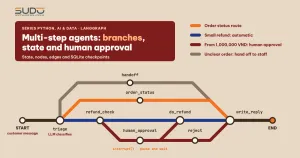
The real-world LangGraph workflow: a customer sends a message, the model classifies the intent, and the flow takes one of several branches: look up order status, refund (small amounts are automatic; 1,000,000 VND and above wait for a human), or hand off to a human agent when the order is unclear. Finally, one node writes the reply from the established facts. The workflow state:
class State(TypedDict, total=False):
    message: str
    intent: str
    order_id: str | None
    amount_vnd: int | None
    facts: str
    approved: bool
    reply: str
    trace: Annotated[list[str], operator.add]
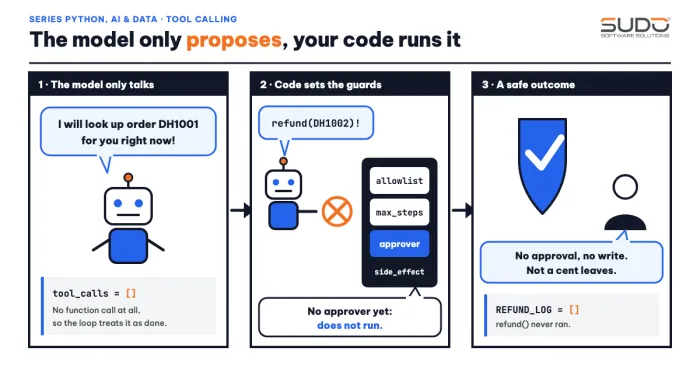
The key design principle: the model does only the two things it is good at, classifying and writing prose; every decision with consequences (does the order exist, does the amount exceed the limit, should we refund) lives in ordinary Python code. The LangGraph triage node calls the model through client.beta.chat.completions.parse with a Pydantic class Triage (intent accepts only refund, order_status or other) at temperature 0. The routing function does not trust the model when the order ID is unknown:
def route(s: State) -> Literal["order_status", "refund_check", "handoff"]:
    if s["intent"] in ("order_status", "refund") and s.get("order_id") not in ORDERS:
        return "handoff"                      # missing or wrong order ID: hand off, do not guess
    return {"order_status": "order_status", "refund": "refund_check"}.get(s["intent"], "handoff")
When a node must both update state and choose the next node, the LangGraph documentation recommends Command instead of a conditional edge. The refund_check node applies the limit and returns both the update and the destination:
def refund_check(s: State) -> Command[Literal["human_approval", "do_refund"]]:
    amount = s.get("amount_vnd") or ORDERS[s["order_id"]]["total_vnd"]
    amount = min(amount, ORDERS[s["order_id"]]["total_vnd"])
    goto = "human_approval" if amount >= APPROVAL_THRESHOLD else "do_refund"
    return Command(update={"amount_vnd": amount, "trace": [f"refund_check amount={amount} -> {goto}"]}, goto=goto)
The LangGraph graph is assembled with StateGraph: add eight nodes, the edge START → triage, a conditional edge from triage, and let the terminal branches all flow into write_reply. Nodes that use Command declare their destinations through the return type, so they need no extra edges. The Mermaid diagram generated by get_graph().draw_mermaid() (file step2_output.txt) shows 13 edges, 7 of them dynamic (dashed).
The documentation warns: for each node, use either static edges or dynamic routing, because mixing both can run both paths. In the LangGraph code above, the last four nodes have only static edges, while triage, refund_check and human_approval use only dynamic routing.
A real run: three LangGraph branches
step2_run.py runs five scenarios with InMemorySaver. The trace field records the nodes visited. The small refund scenario (480,000 VND, below the limit, so automatic):
== 2. Small refund (480,000 VND) -> no approval needed
['triage -> refund', 'refund_check amount=480000 -> do_refund', 'do_refund', 'write_reply']
REFUND_LOG: [{'order_id': 'DH1002', 'amount_vnd': 480000}]
The reply written by the 1.5B model is still clumsy, so it only phrases text from facts that were already settled; the branch taken and the refunded amount are read from trace and REFUND_LOG.
The third scenario is a 3,900,000 VND refund, which exceeds the limit. The human_approval node calls interrupt():
def human_approval(s: State) -> Command[Literal["do_refund", "reject"]]:
    decision = interrupt({"question": "Approve refund?", "order_id": s["order_id"], "amount_vnd": s["amount_vnd"]})
    ok = bool(decision.get("approve"))
    return Command(update={"approved": ok, "trace": [f"human_approval -> {'approved' if ok else 'rejected'}"]},
                   goto="do_refund" if ok else "reject")
== 3. Large refund (3,900,000 VND) -> pause for approval
invoke result: {'intent': 'refund', 'order_id': 'DH1003', 'amount_vnd': 3900000, 'trace': ['triage -> refund', 'refund_check amount=3900000 -> human_approval'], '__interrupt__': [Interrupt(value={'question': 'Approve refund?', 'order_id': 'DH1003', 'amount_vnd': 3900000}, resumable=True, ns=['human_approval:55eeee35-0d5b-5d52-ea66-e261acb83419'])]}
next state: ('human_approval',)
REFUND_LOG before approval: [{'order_id': 'DH1002', 'amount_vnd': 480000}]According to the LangGraph interrupt documentation, interrupt() pauses the graph at the call site, saves the state and returns the payload to the caller under the __interrupt__ key; it requires a checkpointer and a thread_id in config["configurable"] so it knows which state to load. The result above matches: get_state(cfg).next is ('human_approval',) and REFUND_LOG has no row for order DH1003, meaning no money has been refunded yet. Resume by calling again with Command(resume=...); the resume value becomes the return value of interrupt():
-- approver approves --
['triage -> refund', 'refund_check amount=3900000 -> human_approval', 'human_approval -> approved', 'do_refund', 'write_reply']
REFUND_LOG: [{'order_id': 'DH1002', 'amount_vnd': 480000}, {'order_id': 'DH1003', 'amount_vnd': 3900000}]

== 4. Same scenario, approver rejects
['triage -> refund', 'refund_check amount=3900000 -> human_approval', 'human_approval -> rejected', 'reject', 'write_reply']
REFUND_LOG: 2 rows

== 5. Message without a clear order -> hand off to a human
['triage -> other', 'handoff', 'write_reply']
In the same LangGraph graph, two different decisions lead to two different branches, and on rejection REFUND_LOG stays at 2 rows. This is the human-in-the-loop pattern with LangGraph: the real power to act lives in the do_refund node, and the only path to that node for a large amount goes through human_approval.
Durable LangGraph checkpoints: stop in one process, resume in another
In LangGraph, InMemorySaver loses everything when the process exits, so it cannot support long-running approvals. The persistence documentation lists InMemorySaver (RAM), SqliteSaver (local file, good for development) and PostgresSaver (server database, good for real deployments). step4_sqlite.py proves durability with two separate Python processes sharing the file checkpoints.sqlite and the same thread_id:
conn = sqlite3.connect("checkpoints.sqlite", check_same_thread=False)
app = sg.build(SqliteSaver(conn))
cfg = {"configurable": {"thread_id": "don-DH1003"}}
if sys.argv[1] == "start":
    out = app.invoke({"message": "...", "trace": []}, cfg)
else:
    out = app.invoke(Command(resume={"approve": sys.argv[2] == "yes"}), cfg)
paused at: ('human_approval',) | payload: {'question': 'Approve refund?', 'order_id': 'DH1003', 'amount_vnd': 3900000}
--- new process ---
before resume, next = ('human_approval',) | saved trace: ['triage -> refund', 'refund_check amount=3900000 -> human_approval']
final trace: ['triage -> refund', 'refund_check amount=3900000 -> human_approval', 'human_approval -> approved', 'do_refund', 'write_reply']
REFUND_LOG: [{'order_id': 'DH1003', 'amount_vnd': 3900000}]
checkpoints saved: 7The second process has no variables from the first, yet it reloads the exact pause point and the saved trace, continues, and records the refund. The seven checkpoints are seven consecutive states: the unprocessed input (step -1), after the input is written (step 0, next is triage), and after each of the five nodes triage, refund_check, human_approval, do_refund, write_reply (steps 1 to 5). step7_history.py prints get_state_history for this graph, and the next column reads __start__, triage, refund_check, human_approval, do_refund, write_reply and empty. Every step produces a checkpoint, so a long-running system needs a policy to delete old checkpoints so the file does not grow without bound.
Pitfall 1: the node reruns from the start on resume
This is the subtlest bug with LangGraph's interrupt(). The documentation says that on resume the node "restarts from the beginning", so any code placed before interrupt() runs again; therefore a side effect before interrupt() must be idempotent, or moved to a separate node. step3_pitfalls.py reproduces this with a node that sends a "pending approval" email and only then asks for approval:
== 1. A side effect placed BEFORE interrupt runs twice
emails sent: 2 ["send email 'pending approval'", "send email 'pending approval'"]

   Fix: move the side effect to its own node that runs BEFORE the node containing interrupt
emails sent: 1
The customer gets two emails instead of one; if the side effect were a money transfer, the damage would be far worse. The fix in LangGraph is to split notify into its own node before the ask node, so a resume reruns only ask. In the customer support graph, human_approval calls interrupt() right at the top, and writing to REFUND_LOG happens in the separate do_refund node. The documentation also says not to wrap interrupt() in a bare try/except, because it uses an exception to pause.
Pitfall 2: a loop with no stop condition
LangGraph graphs allow cycles, so an endless "retry" bug is real. LangGraph guards against it with recursion_limit, the maximum number of super-steps in one run; going over it raises GraphRecursionError. In the LangGraph 0.5.3 used here, the library source sets the default to 25 (read from the environment variable LANGGRAPH_DEFAULT_RECURSION_LIMIT, default "25"). Because defaults can change between versions, set recursion_limit explicitly instead of relying on the default. The experiment uses a limit of 8 for a loop that always retries:
== 2. A 'retry' loop with no stop condition
GraphRecursionError: Recursion limit of 8 reached without hitting a stop condition. You can increase the limit by setting the `recursion_limit` config key.

   Fix: count attempts in state and exit on purpose
{'tries': 3}
In the first version, the router always returns attempt, so the graph runs until it hits the limit of 8. The fixed version counts tries in state (with the operator.add reducer) and returns END after 3 attempts. This is the same principle as in the tool calling article, applied to LangGraph: every agent loop needs an exit condition in code, with a maximum count, rather than asking the model to stop on its own.
Pitfall 3: two parallel nodes write the same field
Following the lesson from the state section, step6_conflict.py runs two nodes b and c in parallel, both writing the text field that has no reducer:
InvalidUpdateError: At key 'text': Can receive only one value per step. Use an Annotated key to handle multiple values.LangGraph refuses rather than picking arbitrarily, and the message points straight at the fix: declare the channel with Annotated and a reducer, or have each node write its own field. This error shows up on the very first run, unlike the side-effect rerun bug, which only appears on resume.
Measuring the triage node in the LangGraph graph: which branch fails
A LangGraph graph is only as solid as its weakest node. With a 1.5B model, the triage node is the risk point, so step5_triage_eval.py measures it on 12 labeled messages (3 order status questions, 3 refund requests, 4 unrelated, 2 messages missing an order ID). The original messages were in Vietnamese; they are translated here:
other         DH1003  | label: order_status  DH1003  | DH1003 why haven't I seen any update, shop   <-- mismatch
other         DH####  | label: order_status  None    | Where is my order???   <-- mismatch
refund        DH####  | label: refund        None    | I was charged twice, refund me   <-- mismatch

intent correct: 10/12 | order_id correct: 10/12
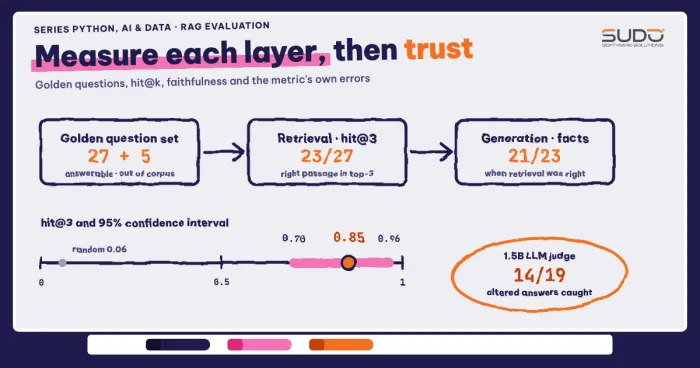
(Only the three mismatched rows are excerpted; step5_output.txt has all 12.) Two kinds of error stand out. First, the message "DH1003 why haven't I seen any update, shop" is classified as other, so a customer asking about an order is handed to a human: a safe failure (slow, not wrong money). Second, for the two messages with no order ID, the model invented the ID DH#### (copied verbatim from the prompt template). Because route checks order_id in ORDERS, the invented ID is blocked and the case goes to a human. The lesson when using LangGraph: validate the model's output at the boundary between nodes, and 10/12 is a tiny sample that only illustrates the kinds of errors, not overall accuracy; to trust it you need a larger test set, as done in RAG evaluation.
When not to use LangGraph
- Short linear flows, where LangGraph is not needed: three calls in sequence are clearer as three lines of Python than as a graph. Anthropic's advice to avoid extra abstraction before it is needed still applies.
- No need to pause or persist: an agent that runs for a few seconds inside one request is fine with the loop from the tool calling article.
- Version dependence: the LangGraph API changes fast. Pin the LangGraph version in
requirements.txtand read the release notes when upgrading.
Common mistakes when writing LangGraph
- Forgetting to pass a checkpointer when you
compilethe LangGraph graph, or forgettingthread_id:interrupt()cannot be used. - Using
InMemorySaverin production and losing state when the pod restarts. - Placing a side effect (sending email, writing to a DB, calling a payment API) before
interrupt()in the same node. - Having both a static edge and dynamic routing from one node, so both paths run.
- Not setting
recursion_limitexplicitly and having no counter in state for a retry loop. - Trusting an
order_idorintentproduced by the model without checking it against real data.
Checklist for a LangGraph agent in production
- Declare the LangGraph
Stateexplicitly; any field written by several nodes needs a reducer. - The model only classifies and writes text; consequential actions live in ordinary code nodes with condition checks.
- With LangGraph, money actions over the limit go through
interrupt(); the node containinginterrupt()has no non-idempotent side effect. - A durable checkpointer (SQLite in development, PostgreSQL in production), with a policy to delete old checkpoints.
- Every LangGraph loop has a counter and an explicit
recursion_limit. - Record
traceat each node for auditing; measure the classification node with a labeled question set before going to production. - Pin the LangGraph version and rerun the test suite when upgrading.
The source code is in code/s7-42: support_graph.py, llm.py, the scripts step1 through step7, and the *_output.txt files that hold the output pasted above. Replies written by the 1.5B model can differ between runs (the interrupt ns ID is also random); the stable parts to check are the branch taken, trace and REFUND_LOG.
Next article
Model Context Protocol: writing an MCP server in Python for agents. The graph here calls prebuilt Python functions in the same process; when tools live in another service and several agents need to share them, the next article introduces the MCP protocol for publishing tools through a common standard.